Short answer
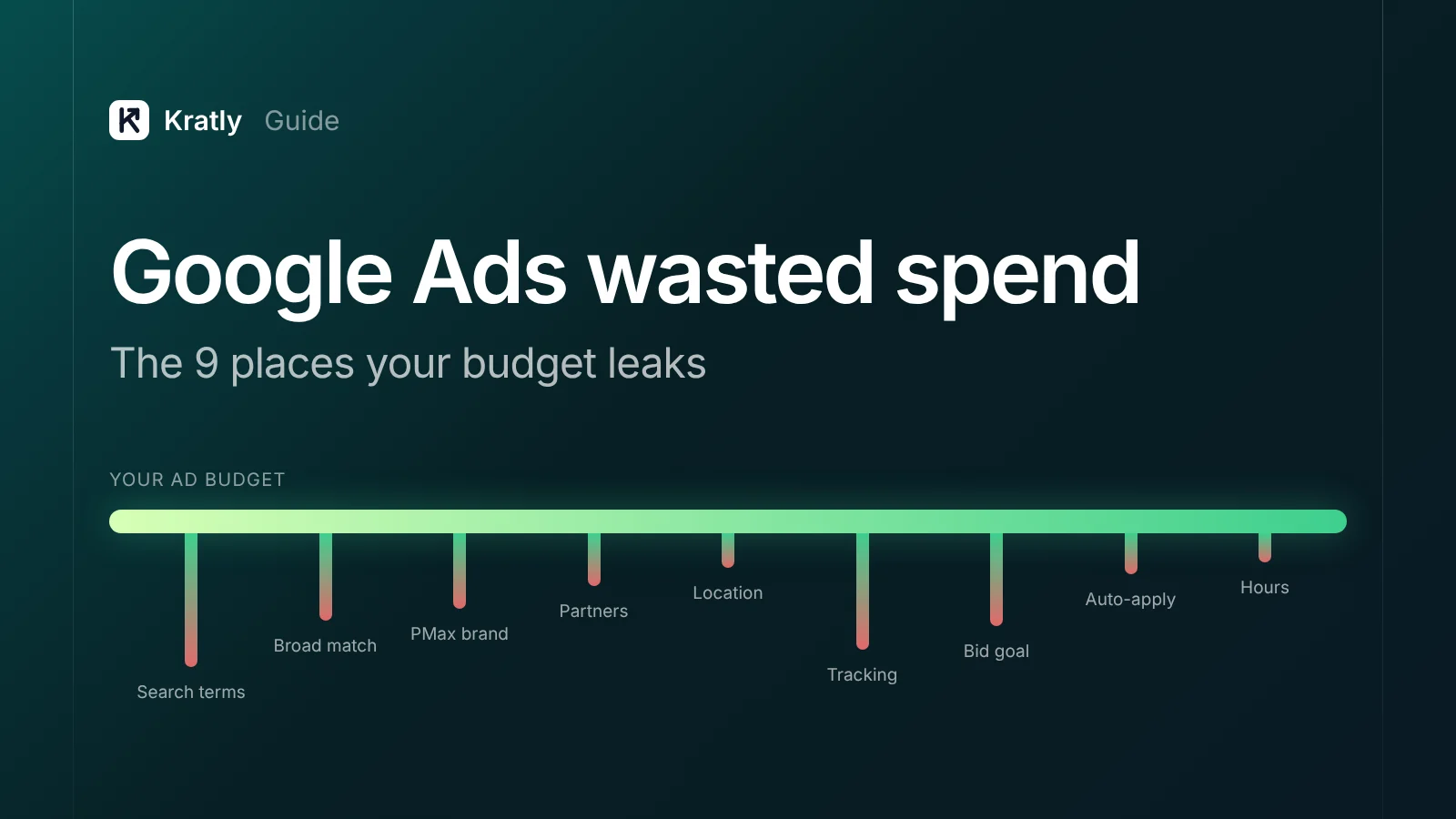
Google Ads wasted spend is money spent on clicks that never lead to a sale. It usually leaks from nine places: irrelevant search terms, loose broad match, Performance Max eating brand traffic, Search Partners and Display, loose location settings, broken conversion tracking, bidding to the wrong goal, auto-applied recommendations, and bad hours or devices.
You raised the budget and sales stayed flat. One store owner on the Shopify Community put it plainly: "I did spend hundreds and hundreds of dollars - again, with ZERO SALES!" (Shopify Community). The account isn't cursed. The money is leaking somewhere you can find and fix.
How much Google Ads wasted spend is normal?#
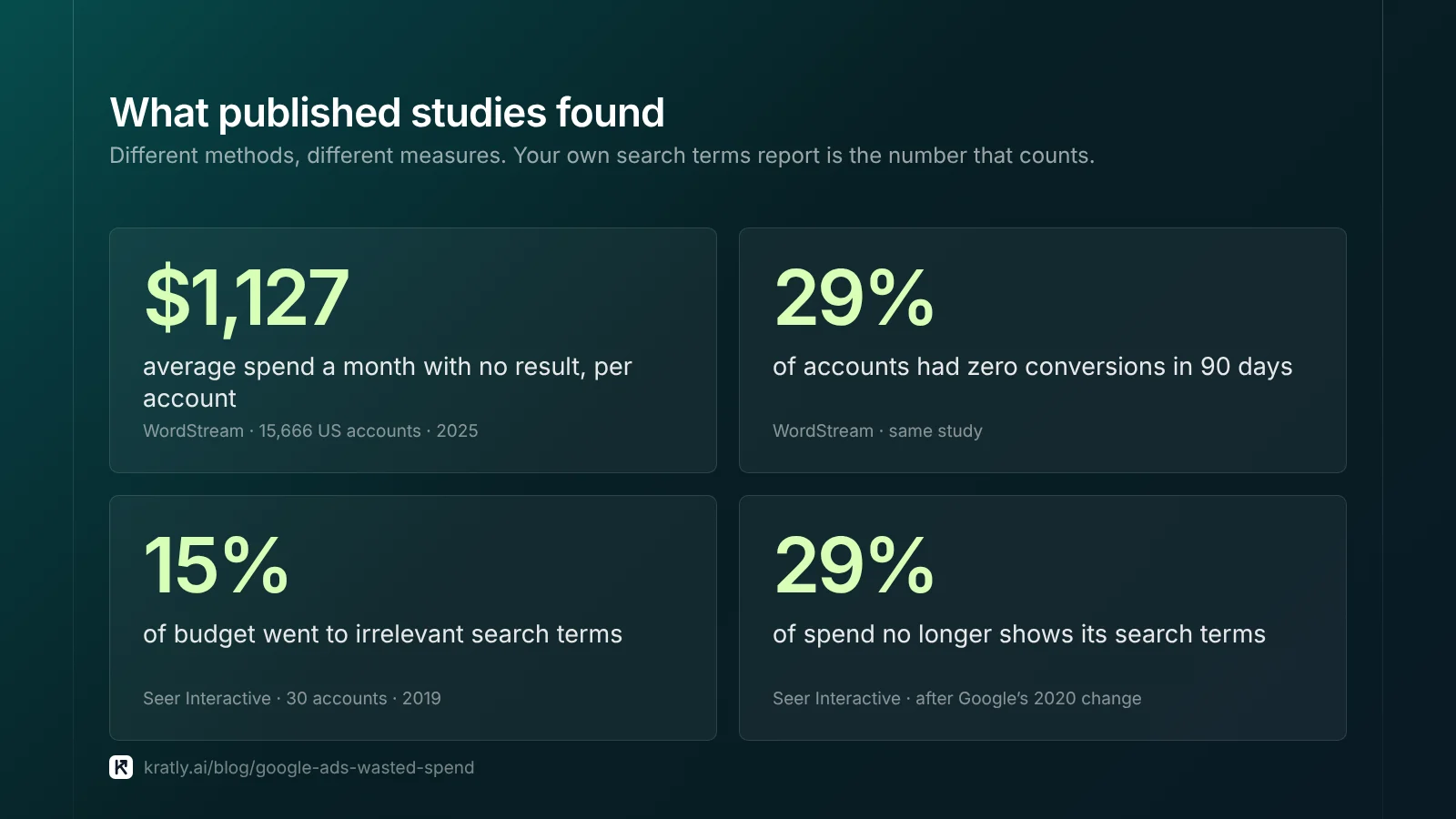
There is no single honest number, because "waste" depends on what you count. But the published data points the same way: a large share of spend buys clicks that never pay.
| Source | What it measured | Finding |
|---|---|---|
| WordStream, 15,666 US accounts, Jan–Nov 2025 | Spend with no result | Average waste of $1,127.54 a month; 29% of accounts had zero conversions in 90 days (PPC Land) |
| Same WordStream data | Negative keywords | 25% of accounts had none. Accounts with negatives converted at 13% vs 4.6% without |
| Seer Interactive, 30 accounts, 2019 | Irrelevant keywords | 15% of budget went to irrelevant search terms (Seer) |
| Seer Interactive, 2020 | Hidden search terms | After Google limited the report, spend with visible search terms fell from 98.7% to 71.0% (Seer) |
Two cautions. WordStream's sample is accounts that chose to run its free grader, so it skews toward accounts with problems. And many blog posts quote "20–40% wasted" with no study behind it. Measure your own number instead.
A working definition you can use in your team: wasted spend is ad spend on clicks, keywords, placements or audiences that produced no paid customer within your normal sales cycle.
Note the word paid. A sign-up is not a sale. For SaaS and apps, most "converting" spend can still be waste. We come back to that in leak 7.
The 9 places your Google Ads budget leaks#
Work through these in order. The first three usually hold most of the money, and each one has a check you can run today.
1Search terms that spend and never buy#
Your keywords are not what you pay for. You pay for the search terms Google matches to them. That gap is where most waste starts.
One SaaS founder on Indie Hackers spent €100 and got zero sign-ups. The report showed "Google had clustered my keywords into the website builder auction," and paid visitors stayed about 10 seconds (Indie Hackers).
The check:
- Open Insights and reports › Search terms for the last 90 days.
- Filter to conversions = 0 and sort by cost, highest first.
- Read the top 50. Mark terms that show the wrong intent: "free", "jobs", "login", competitor brands, how-to questions, other product categories.
- Add them as negatives to a shared negative keyword list, then apply the list to every relevant campaign.
Concentration matters. One agency's 2026 data across 84 advertisers found the costliest 10% of zero-conversion terms held 48.8% of that waste (Doctor Ads, agency data, not independently verified). So the top of the sorted list is where you start.
Our step-by-step guide on how to find negative keywords covers patterns, match types for negatives and list structure.
2Broad match and AI Max with no guardrails#
Broad match is the default. Google's own help page says it is "the default match type that all your keywords are assigned" (Google Ads Help). Broad match can also use the searcher's recent activity, your landing page and other keywords in the ad group to decide what to match.
That reach works when Smart Bidding has good conversion data. It burns money when the data is thin or wrong. AI Max for Search pushes reach further, and it needs conversion-based Smart Bidding to work (Google Ads Help).
The check:
- In the search terms report, add the Match type column and segment by it.
- Compare cost per paid customer for broad versus phrase and exact.
- Check each Search campaign's settings for AI Max and confirm someone chose to turn it on.
- If broad match terms convert worse and your account has fewer than about 30 real conversions a month, move the costliest keywords to phrase or exact first.
The 30-conversion line is a common rule of thumb among practitioners, not a Google rule. Use it as a starting point.
3Performance Max eating your brand traffic#
Performance Max (PMax) can show ads on searches for your own brand name. Those people were already looking for you. Paying PMax prices for them inflates its results and hides how little new demand it finds.
A Shopify store owner described PMax sales that "were ridiculous compared to the amount of money we spent" before the shop nearly closed (Shopify Community). Another reported about $100 per purchase on a $36 average order (Shopify Community).
The check:
- Open the PMax search terms report (Campaigns › Search terms). It now splits Shopping ads from text ads (Google Ads Help).
- Add up the cost on terms that contain your brand name.
- Add a brand exclusion list to PMax. It covers Search, Shopping and YouTube search inventory (Google Ads Help).
- Add account-level negative keywords. They also apply to PMax (Google Ads Help).
- Open the channel performance report and see how much went to Display, YouTube and Gmail versus Search.
PMax negatives apply to Search and Shopping inventory only. They don't stop Display or YouTube spend.
4Search Partners and Display Expansion#
Two settings send Search budget off Google Search. Search Partners are "included by default" (Google Ads Help). Display Expansion turns on when the "Include Google Display Network" box is ticked (Google Ads Help).
Since August 2025 you can see Search Partner sites, with impressions only, and parked domains were opted out by default by the end of 2025 (Search Engine Journal).
The check:
- Segment campaign results by Network (with search partners).
- Compare cost per paid customer for Google Search versus Search Partners.
- Untick Display Network on Search campaigns unless you can show it pays.
- If partners convert worse, turn them off, or use the new priority and budget-cap controls once your account has them (see What changed).
5Location set to "Presence or interest"#
The default location option is "Presence or interest", which Google calls the "default and recommended option" (Google Ads Help). It shows ads to people who are interested in your target area, not only people in it.
For a US-only product, that can mean paying for clicks from countries you can't sell to.
The check:
- Open Campaign settings › Locations › Location options.
- Switch to Presence: people in or regularly in your included locations.
- Open the locations report with "User location" and look for spend outside your target.
6Conversion tracking that counts the wrong things#
If tracking is wrong, every other number is wrong, and Smart Bidding learns from the error.
The classic case: one audited account showed 186,146 conversions against 3,238 real transactions, because micro-conversions were counted as sales (Search Engine Journal).
Google uses primary conversion actions for bidding. Secondary actions only show in the "All conversions" column (Google Ads Help).
The check:
- Open Goals › Conversions › Summary. List every primary action.
- Demote page views, scrolls, video plays and "visited pricing" to secondary.
- Compare last month's Google Ads conversions to orders or paid customers in your backend (Stripe, Shopify, CRM).
- If Google reports more than your backend, look for duplicate tags or a tag on a page that reloads.
- If campaigns show conversions but $0 value, fix the value first. Our guide on why Google Ads shows $0 revenue per campaign walks through it.
7Bidding to sign-ups instead of paying customers#
This leak is quiet because the dashboard looks healthy. Cost per sign-up drops. Revenue doesn't move.
Smart Bidding finds more of whatever you tell it to count. If you count free trials, it finds people who start free trials. Many of them never pay, and some lead forms fill up with spam that still counts as a conversion.
The check:
- Export last quarter's sign-ups with their campaign and match each one to Stripe or your billing system.
- Calculate cost per paying customer by campaign, not cost per sign-up.
- Send the paid event back to Google Ads with its value, and make it the primary action.
Sending payments back is a setup job, not a setting. See how to send Stripe revenue to Google Ads, and the full method in our SaaS marketing attribution guide.
8Auto-applied recommendations#
Google can apply its own recommendations to your account: new keywords, broad match upgrades, budget changes. Auto-apply is opt-in, but it's easy to accept during setup and forget (Google Ads Help).
The check:
- Go to Recommendations › Auto-apply.
- Turn off anything that adds keywords, changes match types or raises budgets.
- Open the History tab and change history to see what was applied and when.
- Line the dates up against any jump in cost.
9Hours and devices that spend but don't convert#
The default ad schedule is "All day" (Google Ads Help). Google can also spend up to twice your average daily budget on a single day, and paces toward about 30.4 times the daily budget each month.
For B2B, 2 a.m. clicks often look different from 10 a.m. clicks.
The check:
- Segment 90 days of cost and paid conversions by hour of day, day of week and device.
- Find windows with real spend and no paid customers.
- Lower bids or exclude those windows. Leave enough data before you judge: one quiet Tuesday is not a pattern.
Why Google Ads isn't profitable even when ROAS looks fine#
If your Google Ads ROAS looks fine but the bank balance doesn't, check three gaps.
Revenue is not profit. ROAS on a 30% margin product needs to be far higher than on an 80% margin product to break even. Break-even ROAS is 1 ÷ gross margin. At 30% margin, that's about 3.3. At 80%, it's 1.25.
Attributed is not incremental. Brand searches, returning customers and people who would have bought anyway inflate reported results. A holdout test tells you what the ads actually added. See did my marketing change work?.
First payment is not lifetime value. For subscriptions, refunds and churn in the first 90 days change the picture. Report revenue net of refunds.
Work out your own wasted-spend number#
Published averages won't tell you what your account wastes. This takes about 20 minutes with a spreadsheet:
- Export 90 days of search terms with cost and campaign.
- Join them to paying customers from your billing system, by campaign or search term (see leak 7).
- Add up the cost on terms, placements and campaigns with no paying customer.
- Divide by total spend.
That percentage is your baseline. Re-run it monthly. If it isn't falling, the fixes aren't sticking.
When you've fixed the leaks and a campaign still loses money on paid revenue, pause it. Our guide on when to pause a Google Ads campaign sets out the rule.
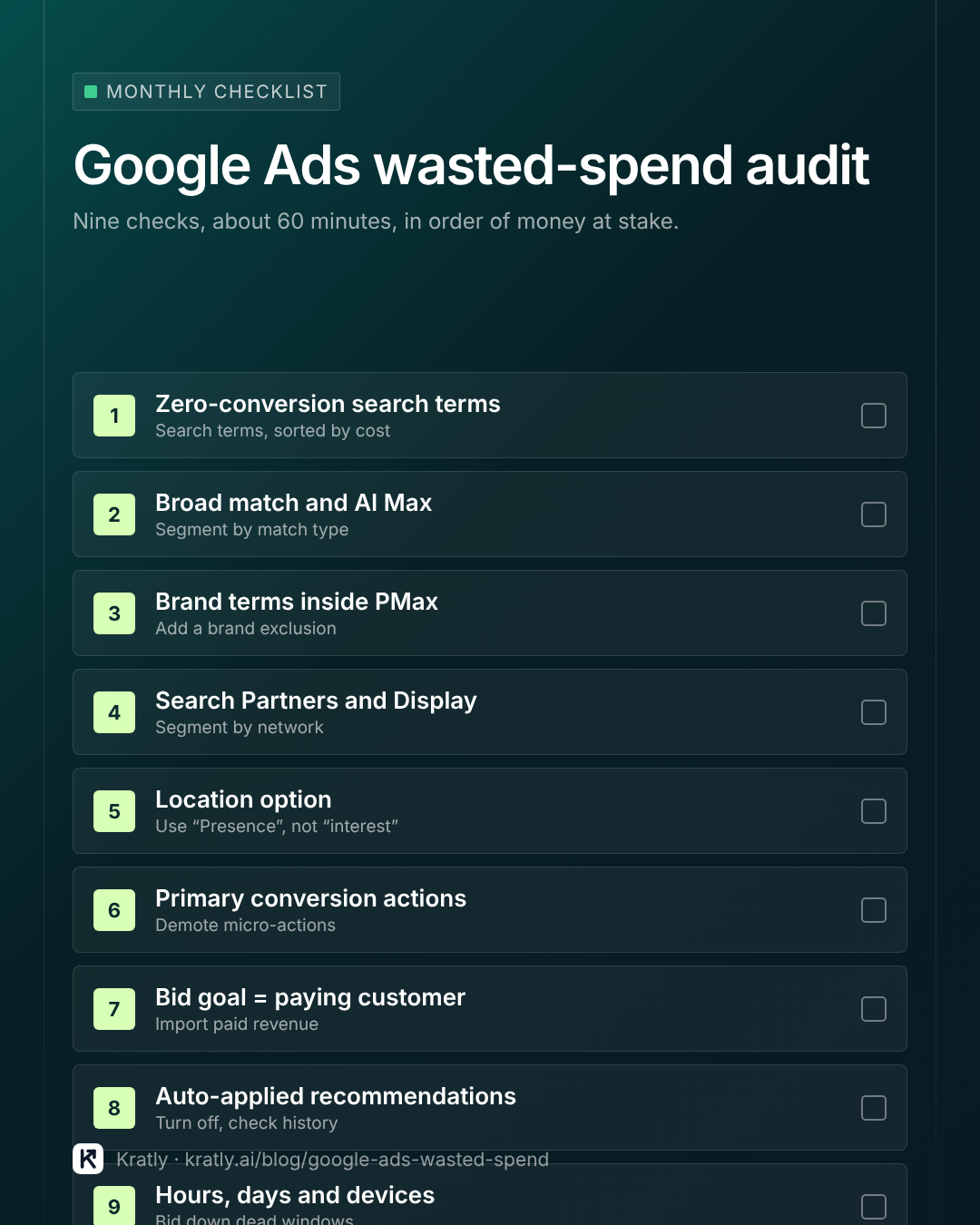
A 60-minute Google Ads audit checklist#
Save this and run it every month. It covers the nine leaks in order of money at stake.
How to cut Google Ads cost without losing customers: fix leaks 6 and 7 first. When bidding learns from real payments, every other cut gets safer. Cutting budget before fixing tracking often cuts the good spend along with the bad.
What changed in 2025 and 2026#
Most ranking guides were written before these changes. They matter for leaks 2, 3 and 4.
| Date | Change | Why it matters |
|---|---|---|
| March 2025 | PMax negative keyword limit raised from 100 to 10,000 per campaign (Search Engine Land) | You can now block bad terms in PMax at scale |
| May 2025 | Brand settings for Search moved into the AI Max panel (Google Ads Help) | Check AI Max settings when auditing brand spend |
| 2025 | PMax gained negative keyword lists, channel reporting and the search terms report (Google Ads Help) | PMax is far less of a black box than it was |
| August 2025 | Search Partner placement reporting; parked domains opted out by default (Search Engine Journal) | You can see where partner spend goes |
| October 14, 2026 | Channel prioritization (High/Low) and budget caps for Search Partners and Display, rolling out over the coming months (Google) | You can cap leak 4 instead of choosing all or nothing |
Google says the current Display spend setup on Search campaigns goes away from February 2027, per the same announcement. Check your account for the new controls before your next audit.
Negative keyword limits outside PMax still apply: 5,000 keywords per shared list, 20 lists per account, and 1,000 account-level negatives (Google Ads Help).
How to do this in Kratly#
You can run every check above by hand. Kratly does the same audit continuously, and judges each campaign by paid revenue instead of clicks.
- Connect Google Ads and your revenue source. Link Google Ads and Stripe (or your store). Kratly matches each paying customer to the campaign and search term that brought them.
- Open the wasted-spend list. Kratly sorts search terms and campaigns by spend with no paying customer, the same order as the checklist.
- Review the suggested negatives and setting changes. Each one shows the spend at stake and the evidence.
- Approve, and Kratly applies them. Changes go into Google Ads with a log, so you can undo any of them.
- Check back weekly. Kratly re-runs the audit as new search terms appear.
Go deeper: Offline conversion import in Google Ads with real Stripe revenue · What is a good ROAS? Break-even ROAS for SaaS and ecommerce · Google Ads conversion tracking: when sign-ups count as sales · How much to spend on Google Ads: break-even CPC, budget by stage
Questions, answered
What counts as wasted spend in Google Ads?
Wasted spend is money spent on clicks, search terms, placements or audiences that never produce a paying customer within your normal sales cycle. Clicks that create sign-ups who never pay count as waste too. Measure it against paid revenue in your billing system, not against conversions Google reports.
How do I find wasted spend in Google Ads?
Open the search terms report for the last 90 days, filter to zero conversions and sort by cost. Then check PMax brand spend, Search Partners, location options, primary conversion actions and auto-applied recommendations. The checklist above covers all nine places in about an hour.
Should I turn off Search Partners?
Not automatically. Segment your results by network and compare cost per paying customer. If partners cost more per customer than Google Search, turn them off. When the 2026 channel controls reach your account, you can set them to low priority or cap their share of budget instead.
Is Performance Max wasting my budget?
It can be, mostly through brand searches and Display or YouTube spend. Check the PMax search terms report for brand terms, add a brand exclusion list and account-level negatives, then read the channel performance report. Judge PMax on new paying customers, not on total conversions.
How often should I run a Google Ads audit?
Run the search terms check weekly while you're cleaning an account, then monthly. Run the full nine-point checklist monthly and after any big change: a new campaign type, a bidding switch or a budget increase. Smart Bidding drifts as search behaviour changes, so one audit isn't enough.
How much should I cut when Google Ads isn't profitable?
Fix tracking and bidding goals first, then cut. Once Google Ads learns from paid revenue, look at cost per paying customer by campaign. Pause or reduce campaigns where it stays above what a customer is worth after gross margin. Cutting before fixing tracking often removes your best spend.
Written by
Priyansh Kumar
Priyansh Kumar has spent more than a decade in growth, scaling brands from 1 to 10 and from 10 to 100. He now builds Kratly, an autonomous growth team that ties every campaign, page and email to the revenue it brings.
Sources
- Google Ads Help: About keyword matching options · Location options · Search Partners · Display Expansion · Negative keyword limits · PMax negative keywords · PMax search terms report · Brand exclusions · AI Max · Auto-apply recommendations · Primary and secondary conversions · Ad schedule
- Google: Channel prioritization and budget allocation (October 14, 2026)
- PPC Land: WordStream study of 15,666 accounts
- Seer Interactive: Find wasted PPC spend · Search terms removed for 28% of budgets
- Search Engine Land: PMax negative keyword limit expanded
- Search Engine Journal: Search Partner placement visibility · Lessons from 2,000 AdWords audits
Was this article useful?