Short answer
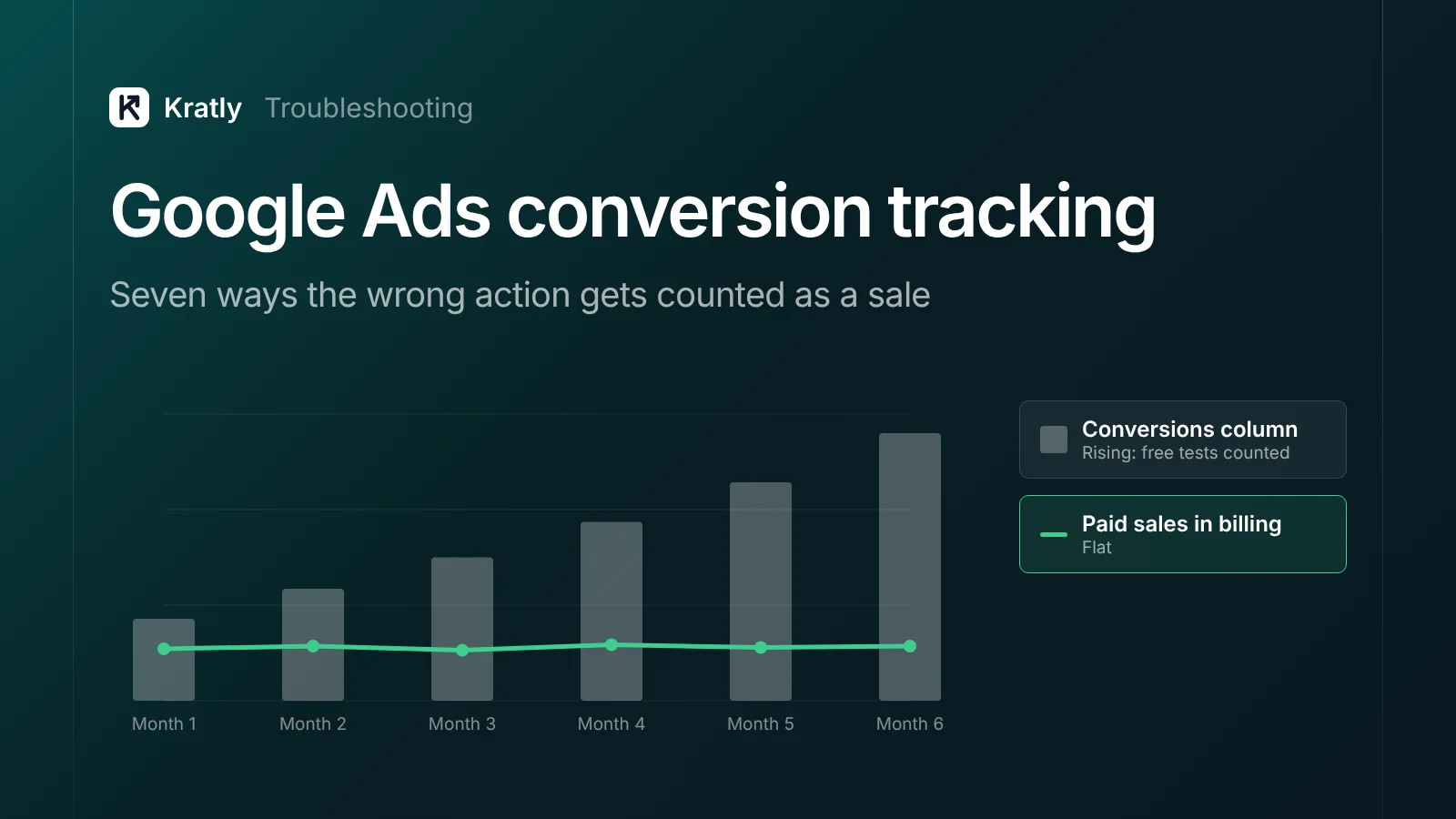
Google Ads conversion tracking goes wrong when a free action, like a sign-up or a quiz, is counted as a sale. Smart Bidding then buys more of that action. Check which actions are primary, which goals each campaign bids on, how each action counts, and whether one sale is tracked twice.
At an edtech business, Google Ads conversion tracking counted completions of a free readiness test as conversions. So Smart Bidding did its job. It found more people who take free tests, not people who buy.
The problem wasn't missing data. The setup told Google the wrong thing was a sale. For $0 revenue, see why Google Ads shows conversion value 0. For a full account audit, see Google Ads wasted spend. A note on bias: Kratly sells tools in this space.
How does Google Ads conversion tracking decide what Smart Bidding learns?#
Smart Bidding doesn't know what a sale is. It only knows the Conversions column.
A primary conversion action is an action that is reported in the Conversions column and used for bidding. A secondary action is "for observation only" and shows in All conv. (Google Ads Help).
But that's only half the rule. The action must be primary, and "the campaign must use the goal that contains the conversion action for bidding" (Google Ads Help).
So there are three layers:
| Layer | What it controls | Where it hides mistakes |
|---|---|---|
| Conversion action | What fires, how it counts, its value | Wrong category, "every" on a lead |
| Primary or secondary | Whether the action can feed bidding | Free actions left as primary |
| Goal (account-default or campaign-specific) | Which goals a campaign bids on | A campaign override nobody remembers |
Seven ways the wrong action gets counted as a sale#
1. A free action is primary#
A free test, a sign-up or a "start trial" is set to primary. Bidding now has two kinds of "win," and the free one is far easier to find. Usually someone added it to watch a funnel step and never made it secondary.
The fix: in Goals › Conversions › Summary, open each primary action. Ask: "Would I pay my target cost per conversion for this, every time?" If not, make it secondary. It still shows in All conv.
Our wasted-spend guide covers page views. The harder cases feel like intent, such as a quiz or demo request. Judge them on how often they become paid customers.
2. The goal layer overrides what you set#
Google groups actions by category into standard goals, such as Purchases or Submit lead forms (Google Ads Help). Account-default goals apply to every campaign unless you say otherwise (Google Ads Help). Campaign-specific goals let one campaign "override your account-default goals" (Google Ads Help).
Three traps follow:
- One campaign keeps the old goal. You fix the account default, but a campaign set to bid on sign-ups keeps buying sign-ups.
- An emptied campaign goal reverts. Remove all actions from a campaign-specific goal and it falls back to account defaults (same page).
- Custom goals break the secondary rule. A secondary action inside a custom goal is used for bidding (Google Ads Help).
Google advises account-default goals for most campaigns. I'd only override when a campaign sells something different.
3. The wrong category puts an action in the wrong goal#
Google's sale categories are Purchase, Add to cart, Begin checkout and Subscribe. Lead categories include Sign up, Submit lead form and Qualified leads (Google Ads Help). The full list is in the Google Ads API reference.
Because goals are built from categories, a wrong label moves the action. Picture a free test tagged "Subscribe." It now sits in a sale goal, and a quick check of your sale goals won't flag it.
The fix: sort the conversion list by category. A free action never belongs in a sale category.
4. "Every" vs "one" counting#
Every counts every conversion after an ad click; Google suggests it for sales. One counts one conversion per click; Google suggests it for leads (Google Ads Help).
Use "every" on a free test, and one person who retakes it three times becomes three conversions.
The fix: purchases and paid subscriptions on "every." Leads, sign-ups, tests and demo requests on "one."
5. One sale counted twice#
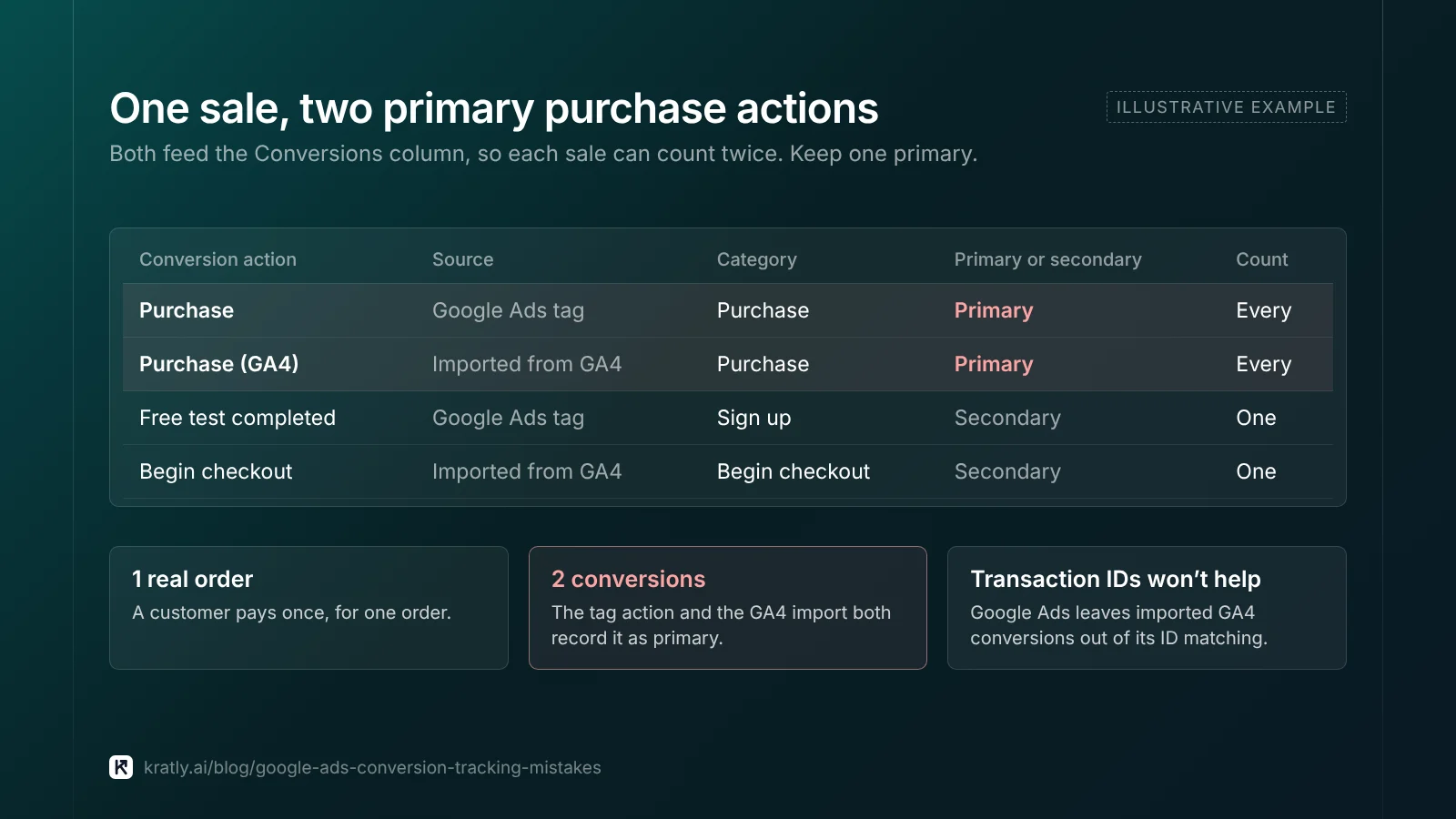
A common setup has a purchase action from the Google Ads tag and a purchase key event imported from GA4. If both are primary, each sale can count twice. Google's own GA4 guide says to keep imported key events secondary "to avoid double counting" while you compare them (Google Ads Help).
Transaction IDs won't save you here. Google Ads can match IDs across sources, but imported Analytics conversions are left out. For those, deduplication must happen "within Google Analytics itself" (Google Ads Help).
GA4 imports arrive as secondary by default, as covered in why Google Ads shows conversion value 0. Doubles start when someone promotes the import too.
The fix: one primary purchase action per sale, with a unique transaction ID. Keep the other as secondary. If you upload paid revenue from your billing system, make that upload the only primary purchase. See offline conversion import with real Stripe revenue.
6. Expecting enhanced conversions to fix the definition#
Enhanced conversions add hashed first-party data, such as an email, to your tags. Google hashes it with SHA256 and says it "supplements your existing conversion" (Google Ads Help).
That improves matching, not what counts. If a free test is primary, Google just matches more test-takers. Fix primary actions first, then turn on enhanced conversions for real sales.
7. Paying the same for old and new customers#
Here the action is right, but the buyer isn't new. A returning customer counts the same as a stranger.
Google's customer acquisition setting has three modes: New Customer Value, High Value New Customer and New Customer Only (Google Ads Help). The first two bid higher for new buyers. The last bids only for them. You define existing customers with a customer list and your website tag. I'd start with "bid higher," not "only." It's easier to undo.
A 20-minute audit of your conversion setup#
You need admin access and last month's paid orders or customers from your billing system.
| Minutes | Check | Where | Red flag |
|---|---|---|---|
| 0–4 | List every primary action | Goals › Conversions › Summary | Any free action is primary |
| 4–7 | Check each action's category | Same list, category column | Free action in a sale category |
| 7–10 | Check count settings | Action settings | "Every" on leads or tests |
| 10–13 | Find duplicate sales | Same list, by source | Two primary purchase actions |
| 13–16 | Check campaign goals | Campaign settings › Goals | Campaign-specific or custom goal you didn't plan |
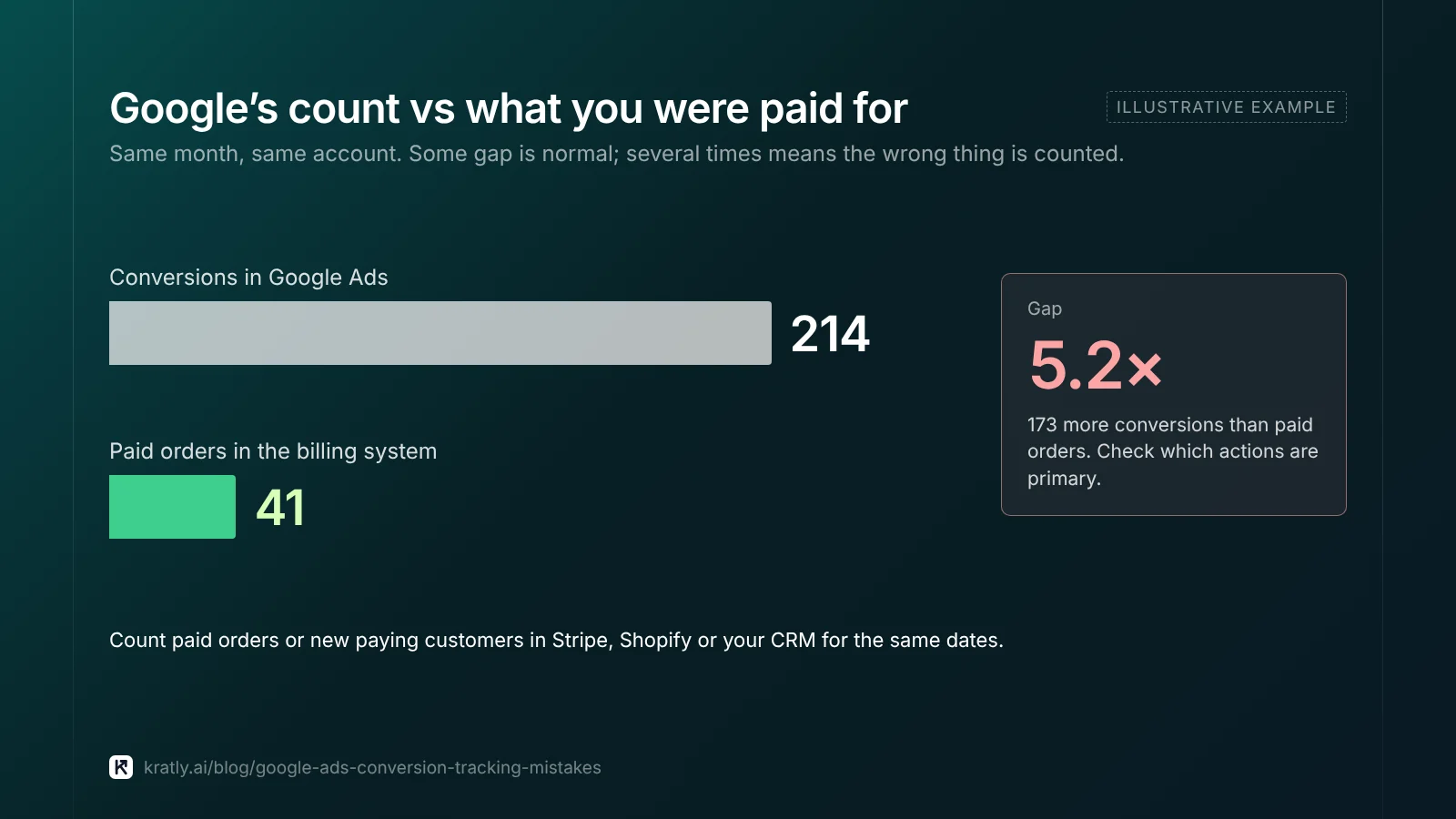
| 16–20 | Compare totals | Conversions column vs billing system | Google reports far more "sales" than you were paid for |
The last check settles it. Count last month's paid orders or new paying customers in Stripe, Shopify or your CRM. Some gap is normal. A gap of several times means the wrong thing is being counted.
Can you switch goals without wrecking bidding?#
A big goal change puts a bid strategy in "Learning" for up to 7 days. Performance usually settles "within 1 to 2 conversion cycles." Google suggests judging over 2 cycles or 2 weeks, whichever is longer (Google Ads Help).
Here's how I'd make the switch:
- Fix duplicates and counting first. These are plain errors. Don't test them.
- Raise targets for the new action. A sale costs more than a free test. Keep a target CPA built for test completions and bidding will choke. Google advises changing targets gradually (Google Ads Help).
- Check volume. With only a handful of paid sales a month, use a mid-funnel action that predicts payment, valued below a sale. Our SaaS activation metric guide shows how to find one.
- Test the big change. Run the new goal as a campaign experiment against the old one. Judge it on paid revenue, not Google's count.
- Leave it alone. Don't change budgets and goals in the same week.
How to do this in Kratly#
- Run the free wasted-spend checker. Upload your Google Ads search terms report. It runs in your browser and flags searches that spend without converting.
- Connect Google Ads and Stripe or Shopify. Kratly shows Google's conversions next to paying customers and revenue, by campaign.
- Review the gaps. Many conversions and little revenue? Check that campaign's primary actions first.
- Approve suggested changes. You approve each suggested budget move, and every change is logged and reversible.
For where tools like this fit, see AI marketing agent: what it can do, what it can't, how to choose.
Questions, answered
What is the difference between primary and secondary conversions?
Primary conversion actions appear in the Conversions column and are used for bidding, as long as the campaign bids on the goal that contains them. Secondary actions are for observation and appear in All conv. One exception: a secondary action inside a custom goal is used for bidding. Make only real sales or proven predictors of sales primary.
Why are my Google Ads conversions not accurate?
Usually because the wrong actions count. A free action may be primary, or a GA4 import and a Google tag may both track the same sale. Count settings and campaign goal overrides also inflate numbers. Compare last month's Conversions column with paid orders in your billing system. A gap of several times points to setup, not attribution.
Should sign-ups be a primary conversion in Google Ads?
Only if you have too few paid sales for bidding to learn from, and sign-ups reliably turn into payments. Even then, set them to count "one" and give them a lower value than a sale. If you can send paid revenue back to Google Ads, make that the primary action and keep sign-ups secondary.
Will changing my conversion goals reset Smart Bidding?
It triggers a learning period, not a full reset. Google says a significant goal change can show a "Learning" status for up to 7 days. Results usually settle within one to two conversion cycles. Adjust targets gradually, avoid other big changes that week, and judge over at least two weeks.
Written by
Priyansh Kumar
Priyansh Kumar has spent more than a decade in growth, scaling brands from 1 to 10 and from 10 to 100. He now builds Kratly, an autonomous growth team that ties every campaign, page and email to the revenue it brings.
Sources
- Google Ads Help: Primary and secondary actions · About conversion goals · Account-default goals · Campaign-specific goals · Conversion categories · Counting options · Transaction IDs · Multi-source conversions FAQ · Enhanced conversions · Customer lifecycle goals · Learning period · Campaign experiments
- Google Ads Help: GA4 migration: increase confidence in GA4 conversion data
- Google Analytics Help: Import GA4 key events into Google Ads
- Google Ads API: ConversionActionCategory reference
Was this article useful?