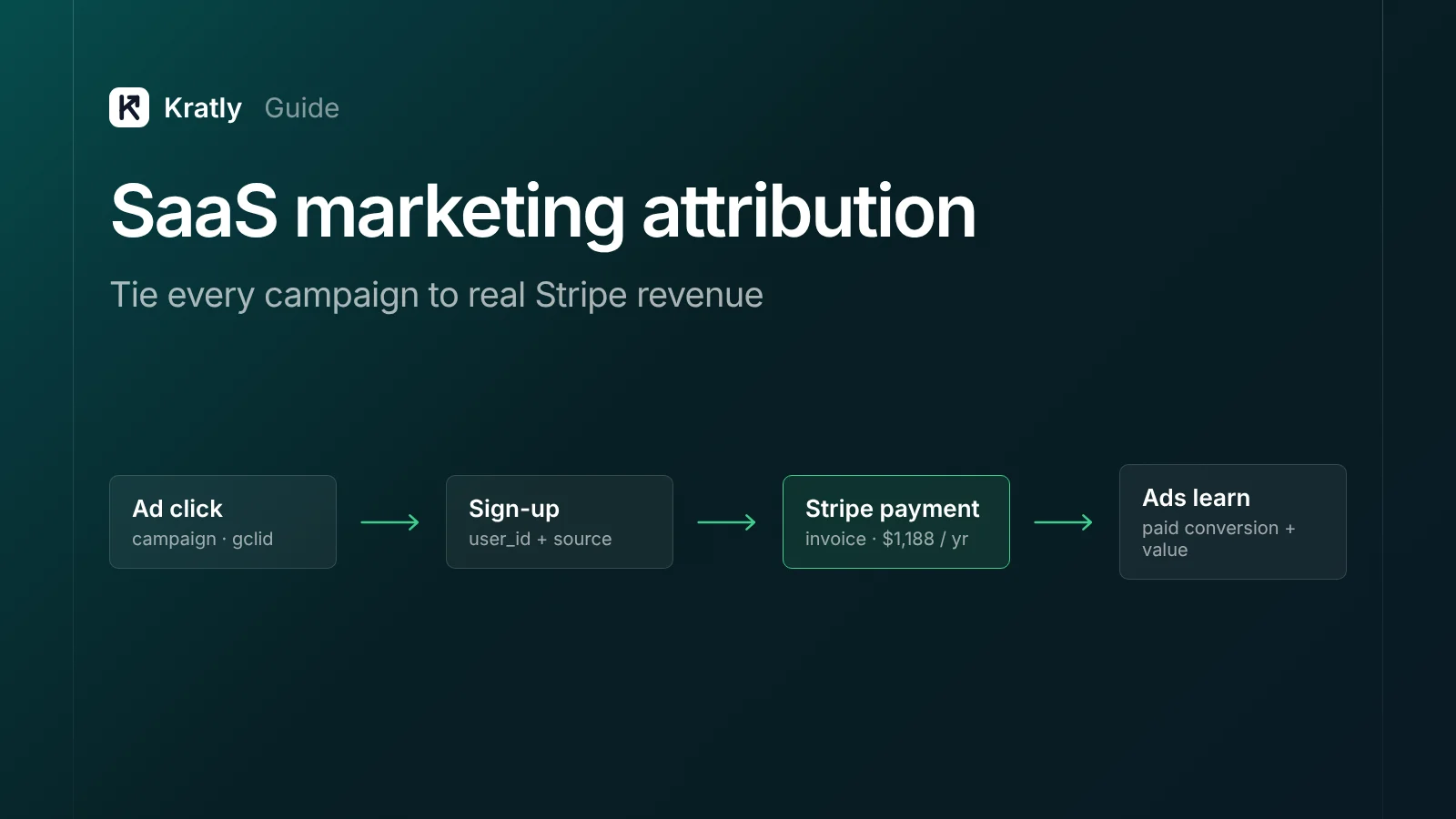
Short answer
SaaS marketing attribution means linking every paying customer back to the campaign that brought them. Capture the click ID and UTMs on the first visit, store them on the user at sign-up, pass them into Stripe as metadata, and send each paid invoice back to Google Ads and Meta. Then report revenue by campaign from Stripe.
You can see which pages get traffic. You can see which campaigns get sign-ups. But ask which campaign paid this month's invoices and nobody can answer. One founder on Indie Hackers summed it up: "Neither told me which traffic actually paid me" (Indie Hackers).
This guide shows you how to close that gap with the tools you already pay for.
What is SaaS marketing attribution?#
SaaS marketing attribution is the practice of crediting revenue, not clicks or sign-ups, to the marketing source that produced it.
Revenue attribution goes one step further than standard analytics. It answers: "This campaign cost $4,000 and brought customers who paid $9,200 in their first 90 days, net of refunds."
SaaS makes this harder than ecommerce for three reasons:
- The sale happens later. A visitor clicks today, starts a trial next week and pays in a month. Many tools stop looking by then.
- The sale happens somewhere else. The click lands on your website. The payment happens in Stripe, often inside your app. Those two systems don't share an ID unless you give them one.
- The revenue repeats. A subscription pays every month, can upgrade, and can be refunded. Credit for the first payment is only part of the story.
Marketers don't trust their numbers as it is. In one 2024 survey, only 21.5% of US marketers said last-click attribution reflects long-term impact accurately (eMarketer). In a 2025 TransUnion and eMarketer study, 60% said stakeholders question their metrics at least sometimes (MarTech).
Why GA4, Google Ads and Stripe never agree#
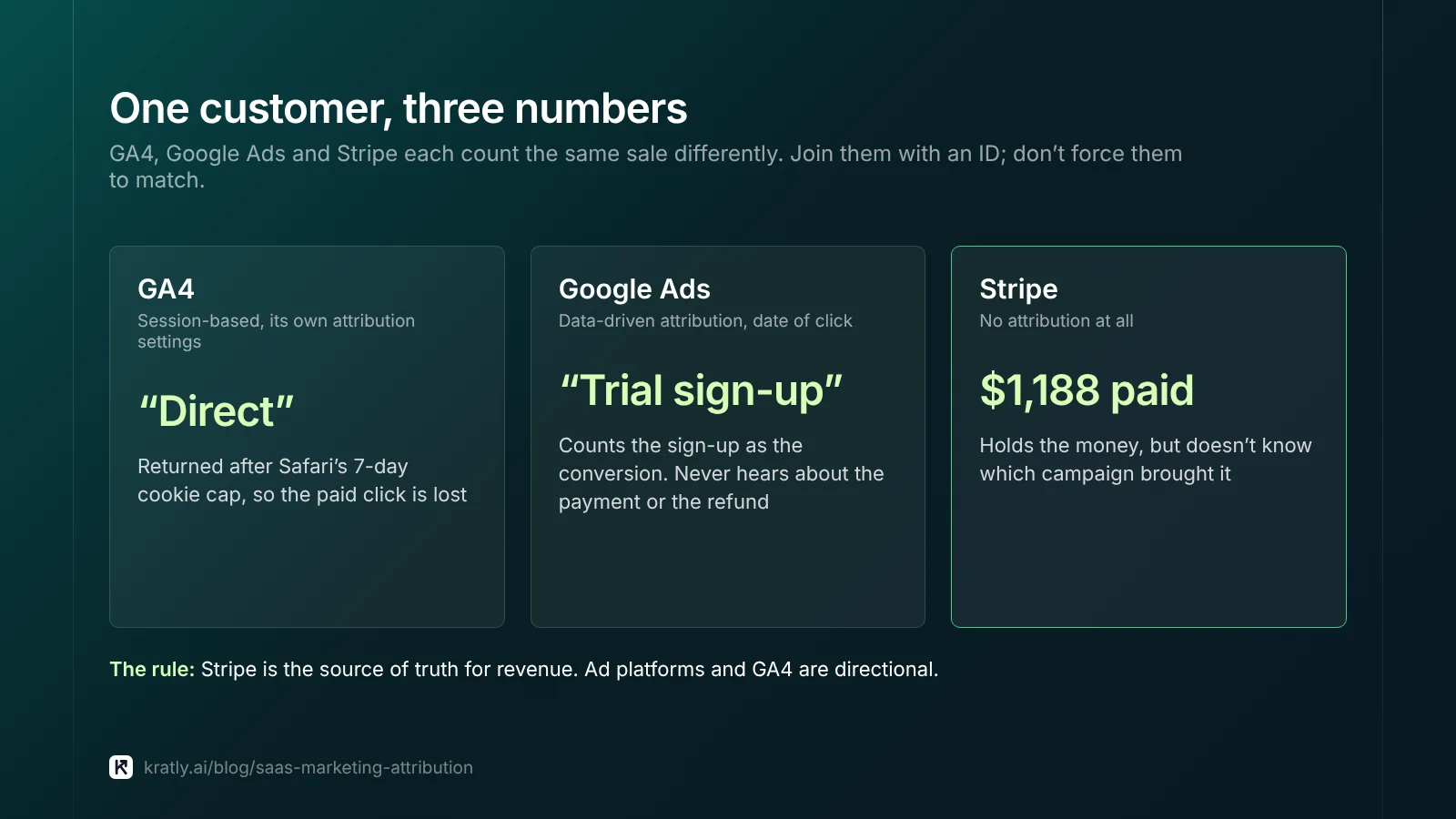
If GA4 says one number, Google Ads another, and Stripe a third, nothing is broken in the usual sense. Each tool counts differently.
| Cause | What happens | Effect |
|---|---|---|
| Different models | Google Ads uses data-driven attribution by default; GA4 uses its own settings; Stripe has no attribution at all | Same sale, different credit |
| Different windows | GA4's default lookback is 30 days for acquisition key events and 90 days for others (Google Analytics Help) | Late payers fall out of the window |
| Safari and browser limits | Safari caps script-set cookies at 7 days, and 24 hours after some link-decorated visits (WebKit) | The visitor looks "new" or "direct" when they come back to pay |
| Ad blockers | Tags never fire for some visitors | Sales missing from analytics |
| In-app payment | Payment happens in your app or Stripe, not on a page with your tag | Analytics never sees the sale |
| Refunds and churn | Ad platforms rarely hear about refunds | Reported revenue stays too high |
The practical rule: Stripe is the source of truth for revenue. Ad platforms and GA4 are directional. Your job is to join them with an ID, not to make them match.
Which attribution model should a SaaS company use?#
Your choices are smaller than most guides suggest.
- Google Ads now offers only data-driven and last click. Data-driven is the default for most conversion actions (Google Ads Help). First click, linear, time decay and position-based were removed in 2023 (Google Ads Help).
- GA4 removed the same four rule-based models in November 2023 (Google Analytics Help).
So inside the ad tools, you mostly choose between "Google's model" and "last click". The real decision is what you store in your own data:
| Touch you store | Answers | Use it for |
|---|---|---|
| First touch | What brought them to us at all? | Judging top-of-funnel channels like SEO and content |
| Last non-direct touch | What brought them back to sign up? | Day-to-day budget calls on paid campaigns |
| Self-reported ("How did you hear about us?") | What do they remember? | Podcasts, word of mouth, communities, LinkedIn posts no tracker sees |
Store all three. They take one extra column each. Our comparison of first touch, last touch and last non-direct explains when each one misleads.
None of these models proves a campaign caused a sale. For that, you need a holdout. See our guide to marketing incrementality tests for small teams.
The revenue attribution setup, step by step#
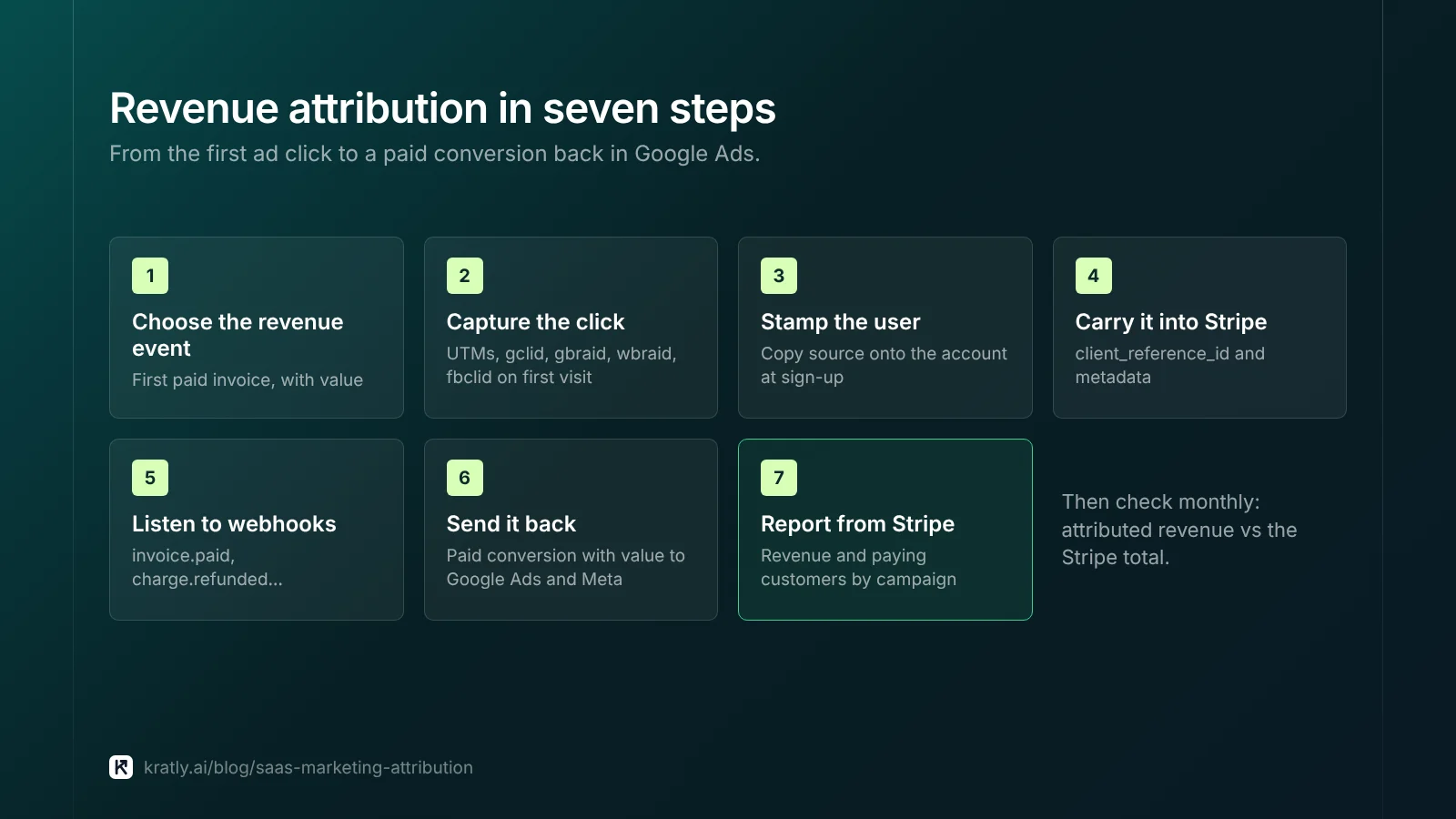
This is the full chain from ad click to paid invoice. A small team can build it in a week or two.
Step 1: Decide which event counts as revenue#
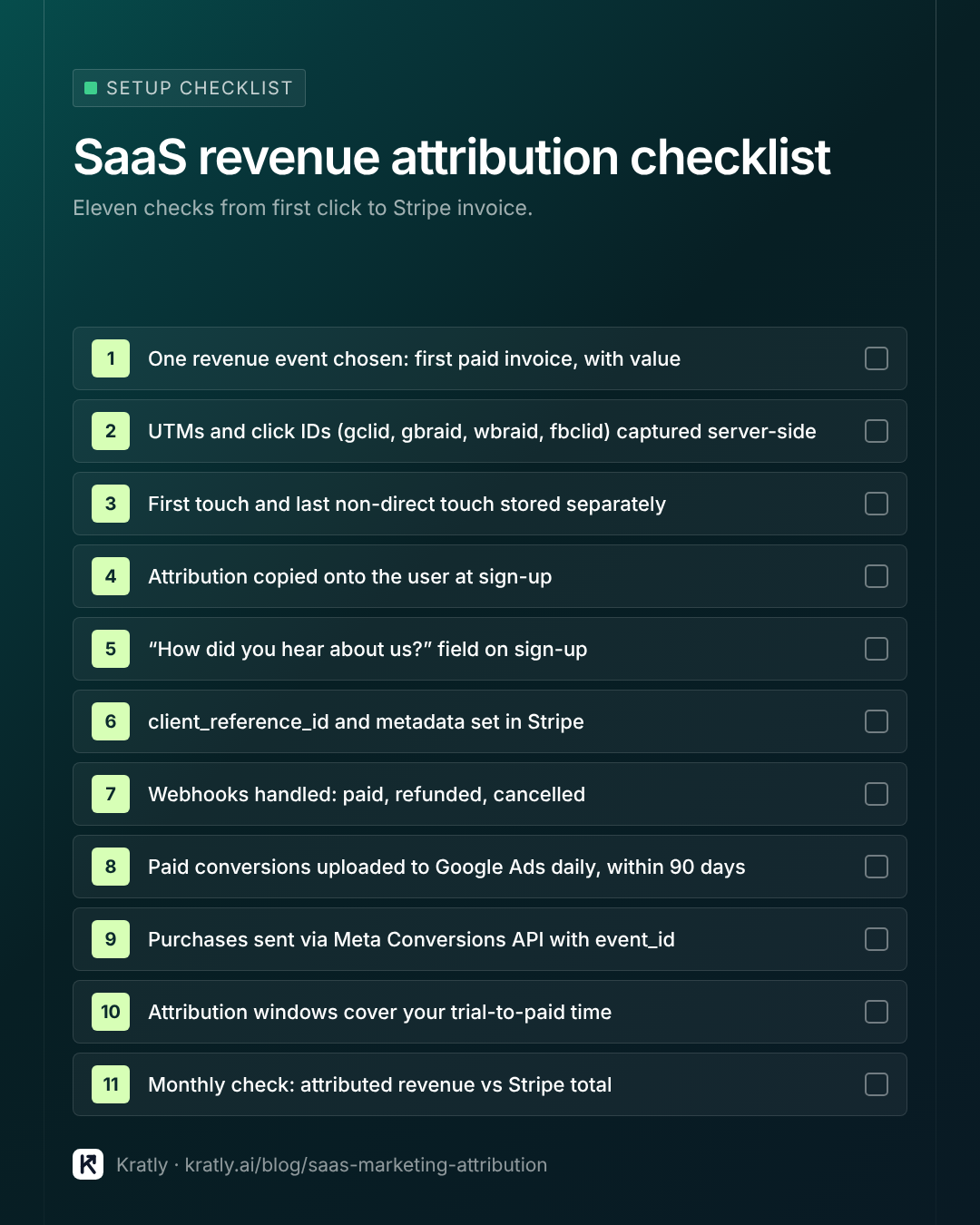
Pick the event your ads should optimise for. For most SaaS, that's the first paid invoice, with its value. Not the trial start. Not the sign-up.
If your trial is long, also track an earlier signal that predicts payment, such as "activated" or "added a teammate". Use it as a secondary action until you have enough paid data.
Step 2: Capture the click on the first visit#
On the landing page, read and save:
- UTM parameters (
utm_source,utm_medium,utm_campaign,utm_term,utm_content) - Google click IDs:
gclid,gbraid,wbraid - Meta:
fbclid, plus the_fbcand_fbpcookies - Referrer and landing page URL
- Timestamp
Save them server-side in a first-party cookie set by your server, or in your database against an anonymous ID. Script-set cookies can disappear in 7 days on Safari, which is shorter than many trials.
Keep both the first and the latest non-direct touch. Don't overwrite first touch.
Step 3: Stamp the source on the user at sign-up#
When the visitor creates an account, copy the stored attribution record onto your users table, next to user_id and email. This is the step most teams skip. Without it, the trail ends at the sign-up form.
Step 4: Carry it into Stripe#
Pass the user ID and source into Stripe when you create the Checkout Session or subscription. Details are in the Stripe section below.
Step 5: Listen to Stripe webhooks#
Handle these events:
checkout.session.completed: the purchase, with your metadatainvoice.paid: every renewal and upgradecharge.refunded: subtract itcustomer.subscription.deleted: churn
Events can arrive out of order. One founder building this found payment_intent.succeeded sometimes arrived before checkout.session.completed, so attribution data was missing at first (Indie Hackers). Make handlers idempotent and look up the source by customer, not by event order.
Step 6: Send the paid event back to the ad platforms#
Upload each first payment to Google Ads and Meta with its value. That's how bidding learns what a paying customer looks like. See Send paid revenue back.
Step 7: Report from Stripe, by campaign#
Join Stripe revenue to your attribution table. Report, by campaign and channel:
- New paying customers
- First-90-day revenue, net of refunds
- Cost per paying customer
- Payback period in months
Check once a month that attributed revenue adds up to Stripe's total. The gap is your "unknown" bucket. Keep it visible.
Stripe attribution: how to carry the source into payments#
Stripe doesn't know where a customer came from unless you tell it. As one builder put it, Stripe "does not know the session id unless we put it there" (Indie Hackers).
Three Stripe fields do the work:
client_reference_id: a string up to 200 characters on the Checkout Session, meant to "reconcile the session with your internal systems" (Stripe API). Put youruser_idhere.metadataon the Checkout Session: source, campaign and click ID.subscription_data.metadata: the same values, so they live on the Subscription too.
That third one matters. Stripe metadata "doesn't automatically copy to related objects" (Stripe Docs). If you only set it on the session, renewals won't carry the source. Subscription metadata does copy onto each invoice as a snapshot.
// Server-side, when the user clicks "Upgrade"
const attribution = await db.attribution.findByUser(user.id);

const session = await stripe.checkout.sessions.create({
  mode: 'subscription',
  customer_email: user.email,
  client_reference_id: user.id,
  line_items: [{ price: priceId, quantity: 1 }],
  metadata: {
    first_source: attribution.first.utm_source,
    first_campaign: attribution.first.utm_campaign,
    last_source: attribution.last.utm_source,
    last_campaign: attribution.last.utm_campaign,
    gclid: attribution.last.gclid ?? '',
  },
  subscription_data: {
    metadata: {
      first_campaign: attribution.first.utm_campaign,
      last_campaign: attribution.last.utm_campaign,
    },
  },
  success_url: 'https://app.example.com/welcome',
  cancel_url: 'https://app.example.com/billing',
});
Stay within Stripe's limits: 50 keys per object, keys up to 40 characters, values up to 500 characters (Stripe Docs). Metadata only comes back on requests made with your secret key, so it isn't exposed to the browser.
If customers pay through invoices or in-app upgrades instead of Checkout, set the same metadata on the Customer when you create it, and copy it onto subscriptions in your own code.
Send paid revenue back to Google Ads and Meta#
Attribution in a spreadsheet tells you what works. Sending revenue back tells the ad platforms, so their bidding chases payers instead of sign-ups.
Google Ads: offline conversion import and enhanced conversions for leads#
Google's method needs auto-tagging on, and you must "store each GCLID with the corresponding prospect's information" (Google Ads Help). Then you upload conversions with their value.
Key limits from Google's documentation (Google Ads Help):
- Upload click-based conversions within 90 days of the click. Google keeps the GCLID for only 90 days.
- Enhanced conversion uploads with hashed customer data: within 63 days.
- Adjustments, such as refunds: within 55 days of the original conversion.
- Upload at least daily.
Enhanced conversions for leads matches on hashed email as well as GCLID, which helps when the click ID was lost. Google recommends including GCLIDs "whenever possible" (Google Ads Help).
2026 change to watch: from June 15, 2026, offline conversion and enhanced-conversions-for-leads uploads move to Google's Data Manager API and are blocked in the Google Ads API for new adopters (Google Ads Help; PPC Land). If you're building this now, build on the Data Manager API.
Our step-by-step guide on how to send Stripe revenue to Google Ads covers the upload format. If campaigns already show conversions but $0 value, start with why Google Ads shows $0 revenue per campaign.
Meta: the Conversions API#
Send a server-side Purchase event through the Conversions API with value and currency. Meta recommends running Pixel and Conversions API together, and removes duplicates when event_id and event_name match within 48 hours (Meta for Developers).
Include the _fbc and _fbp values you captured in step 2. They improve match rates.
Fix the windows#
Set your Google Ads click-through window and your GA4 key-event lookback (up to 90 days) to cover your normal trial-to-paid time. If most customers pay within 21 days, a 7-day window throws away most of the signal.
Multi-touch attribution for SaaS: when it's worth it#
Multi-touch attribution splits credit for a sale across several touches. It sounds like the grown-up answer. For most teams spending $5k to $100k a month, it isn't the first problem to solve.
Before multi-touch helps, you need the basics above working. Spreading credit across touches you never captured just spreads the error.
A rough guide by spend (our judgement, not an industry standard):
| Monthly ad spend | What to build |
|---|---|
| Under $10k | Steps 1–7 above, with a spreadsheet or simple database view. Add the "How did you hear about us?" field |
| $10k–$30k | Automate the Stripe join and the daily upload back to Google Ads and Meta. Report payback by campaign weekly |
| $30k–$100k | Add multi-touch views for long cycles and several channels. Run a holdout test on your biggest channel each quarter |
The fastest way to lose trust in attribution is to change budgets on a model nobody can explain. Start with first touch, last non-direct and self-reported. Add complexity when a real decision needs it.
A worked example: sign-ups vs paying customers#
Here's why revenue attribution changes decisions. The numbers below are illustrative, not from a real account.
A SaaS team runs two Google Ads campaigns for a month. Google Ads is set to optimise for trial sign-ups.
| Campaign A: broad "project tool" terms | Campaign B: "[competitor] alternative" terms | |
|---|---|---|
| Spend | $6,000 | $3,000 |
| Trial sign-ups | 300 | 60 |
| Cost per sign-up | $20 | $50 |
| Paying customers (from Stripe, 60 days) | 6 | 12 |
| Cost per paying customer | $1,000 | $250 |
| First-90-day revenue, net of refunds | $1,800 | $4,300 |
Judged by sign-ups, Campaign A wins easily and gets more budget. Judged by Stripe, Campaign B brings customers at a quarter of the cost and more than twice the revenue.
Worse, Google's bidding is learning the wrong lesson. It sees A's cheap sign-ups as success and looks for more people like them.
Once the team uploads first payments with value and makes that the primary conversion, the bidding starts chasing B-type buyers. That's the whole point of the setup above.
Six attribution mistakes that cost SaaS teams money#
- Optimising ads for trial sign-ups. Bidding finds people who sign up, not people who pay. Upload the paid event and use it for bidding.
- Overwriting first touch. If every visit overwrites the source, SEO and content never get credit. Store first touch once and never change it.
- Setting metadata only on the Checkout Session. Renewals lose the source. Use
subscription_data.metadatatoo. - Ignoring refunds. A campaign that brings refund-heavy customers looks great until you net them out. Send refunds as adjustments and report net revenue.
- Windows shorter than the trial. A 7-day window on a 14-day trial throws away most paying customers. Match windows to your real trial-to-paid time.
- Trusting one tool's number. GA4, Google Ads and Stripe will never match. Pick Stripe as the truth and keep the "unknown" bucket visible instead of hiding it.
Most of these are one-line fixes once you know to look. Together they decide whether your budget follows sign-ups or revenue.
How to do this in Kratly#
You can build everything above yourself. Kratly does it out of the box, so your team works from paid revenue on day one.
- Connect your ad accounts and Stripe. Kratly captures the click and source on each visit and links it to the Stripe customer.
- See revenue by campaign. Each campaign shows paying customers, revenue net of refunds and cost per paying customer.
- Send paid conversions back. Kratly sends each first payment, with value, back to Google Ads so bidding learns from payers.
- Act on it. When a campaign spends without paying customers, Kratly flags it and suggests the change.
Go deeper: Stripe UTM tracking: see which campaign every payment came from · Server-side tracking explained: first-party data after cookies · Identify anonymous website visitors: what works and what's legal · GA4 vs Stripe revenue: why they don't match and how to fix it
Questions, answered
What is the best attribution model for SaaS?
There's no single best model. Store first touch, last non-direct touch and a self-reported source for every customer. Use last non-direct for weekly paid-ad decisions, first touch for judging SEO and content, and self-reported for channels trackers miss. Use holdout tests to prove what actually caused sales.
Why doesn't GA4 revenue match Stripe?
GA4 misses sales when tags don't fire or when payment happens in your app or on Stripe's page. Ad blockers and Safari cookie limits break the trail. Late payments fall outside the lookback window, and GA4 doesn't hear about refunds. Treat Stripe as the revenue truth and GA4 as directional.
How do I track lead source in Stripe?
Capture the source on the first website visit, store it on the user at sign-up, then pass it into Stripe when you create the Checkout Session. Use client_reference_id for your user ID, and metadata plus subscription_data.metadata for the source and campaign, so renewals keep it too.
How long should attribution windows be for SaaS?
Long enough to cover your normal time from first click to first payment. Check your own data: if most customers pay within 30 days, use at least 30. Google Ads click-based uploads must happen within 90 days of the click. GA4 lookback for most key events can be set to 90 days.
Can small SaaS companies afford attribution?
Yes. The core setup needs a few database columns, Stripe metadata and a daily upload to Google Ads. A small team can build it in a week or two. Paid tools save engineering time and add reporting, which starts to matter as ad spend and channel count grow.
Is multi-touch attribution worth it for SaaS?
Only once the basics work. If you don't yet capture click IDs and join them to Stripe, multi-touch spreads credit across incomplete data. Most teams under about $30k a month in ad spend get more from accurate first-touch, last-touch and paid-revenue uploads than from a multi-touch model.
Written by
Priyansh Kumar
Priyansh Kumar has spent more than a decade in growth, scaling brands from 1 to 10 and from 10 to 100. He now builds Kratly, an autonomous growth team that ties every campaign, page and email to the revenue it brings.
Sources
- Google Ads Help: About attribution models · Rule-based models removed · Offline conversion import · Upload windows and frequency · Enhanced conversions for leads
- Google Analytics Help: Attribution settings and lookback windows
- Stripe: Create a Checkout Session · Metadata
- Meta for Developers: Deduplicate Pixel and server events
- WebKit: Intelligent Tracking Prevention 2.1
- eMarketer: Just 1 in 5 marketers confident in last-click attribution (2024)
- MarTech: Marketers' trust in measurement is stalled (2025)
- PPC Land: Google blocks new offline conversion imports via Ads API
Was this article useful?