Short answer
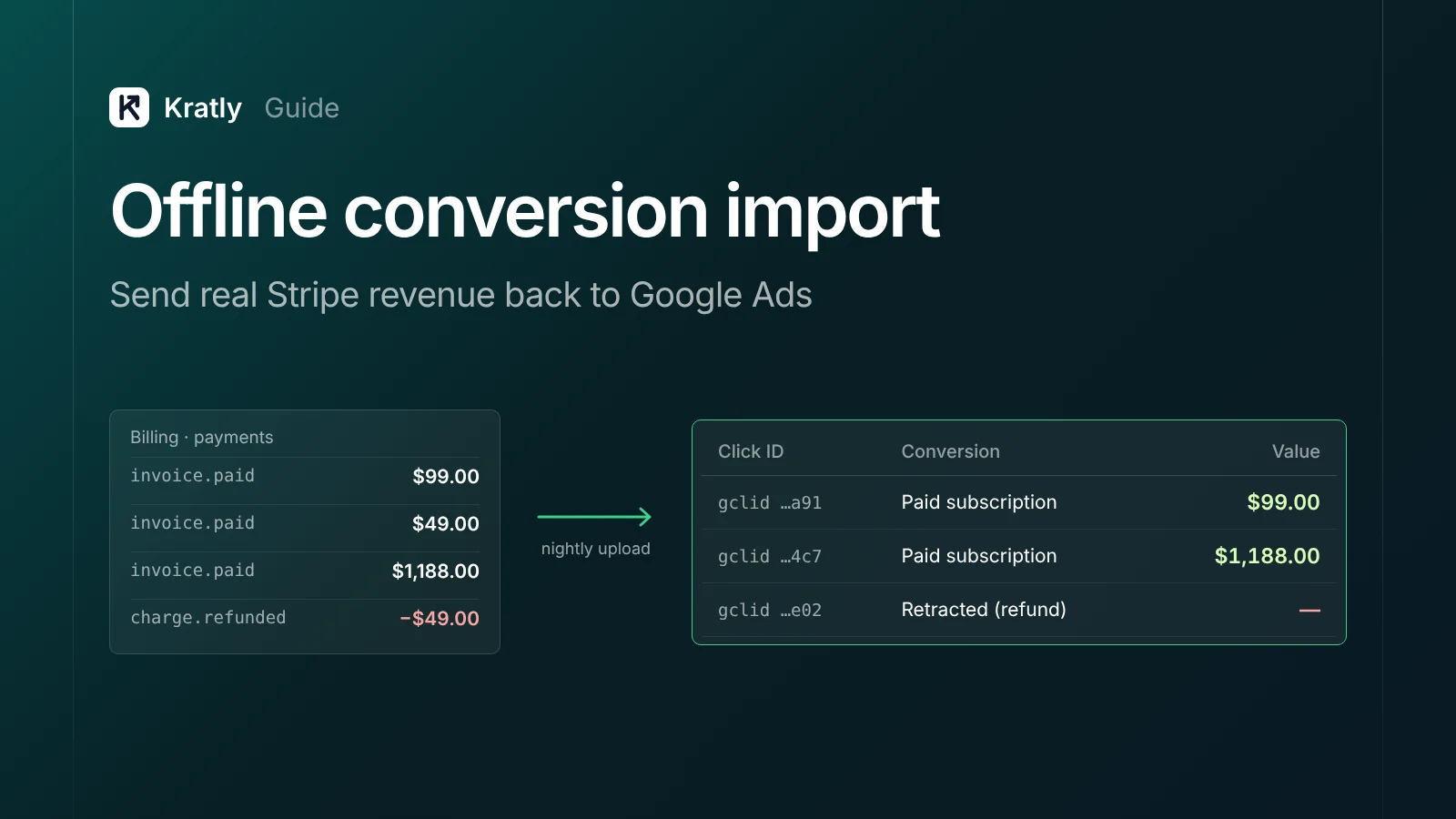
Offline conversion import in Google Ads lets you upload sales that happen after the click, such as a Stripe payment or a closed deal. You send a click ID or hashed email, the time and the value. Upload daily, keep delays under 7 days, restate refunds, and only then switch bidding to target ROAS.
Composite example: A SaaS team uploads Stripe payments to Google Ads once a week. The same week, they switch a campaign to target ROAS. Uploads land days late, and refunds never go back. Bidding learns from a stale, inflated picture.
Every upload "succeeded." The problem was settings and timing. This guide covers those, for any revenue source. For the Stripe wiring itself, see Track Stripe conversions in Google Ads: see which campaign paid. A note on bias: Kratly sells tools in this space.
What is offline conversion import in Google Ads?#
Offline conversion import is the Google Ads feature for uploading sales or leads that happen after an ad click, out of sight of your website tag (Google Ads Help).
"Offline" just means the tag can't see it: a trial that pays on day 14, or a deal closed in a CRM. If a purchase happens on your own checkout, a tag is enough.
Which import method should you use?#
| Method | Match key | Best for | Main limit |
|---|---|---|---|
| Website tag | Cookie on your site | Purchases on your own checkout | Misses later payments and renewals |
| Click ID import (classic offline import) | GCLID, GBRAID or WBRAID | Payments days or weeks after the click | Click ID kept for 90 days (Google Ads Help) |
| Enhanced conversions for leads | Hashed email or phone, plus click ID | Leads and SaaS sign-ups that pay later | Upload within 63 days (Google Ads Help) |
| GA4 key event import | GA4 client ID | Reporting, light setups | Arrives as secondary by default (Analytics Help) |
Google now calls classic click ID import "a legacy feature" and recommends enhanced conversions for leads (Google Ads Help). Advertisers who added first-party data to GCLIDs saw "a median 10% increase in conversions," by Google's own figure (Google Ads Help). My take: send both the click ID and the hashed email. How to get the rows in (Sheets, a Data Manager connector or the API) is compared in the Stripe guide's upload options.
How should you set up the conversion action?#
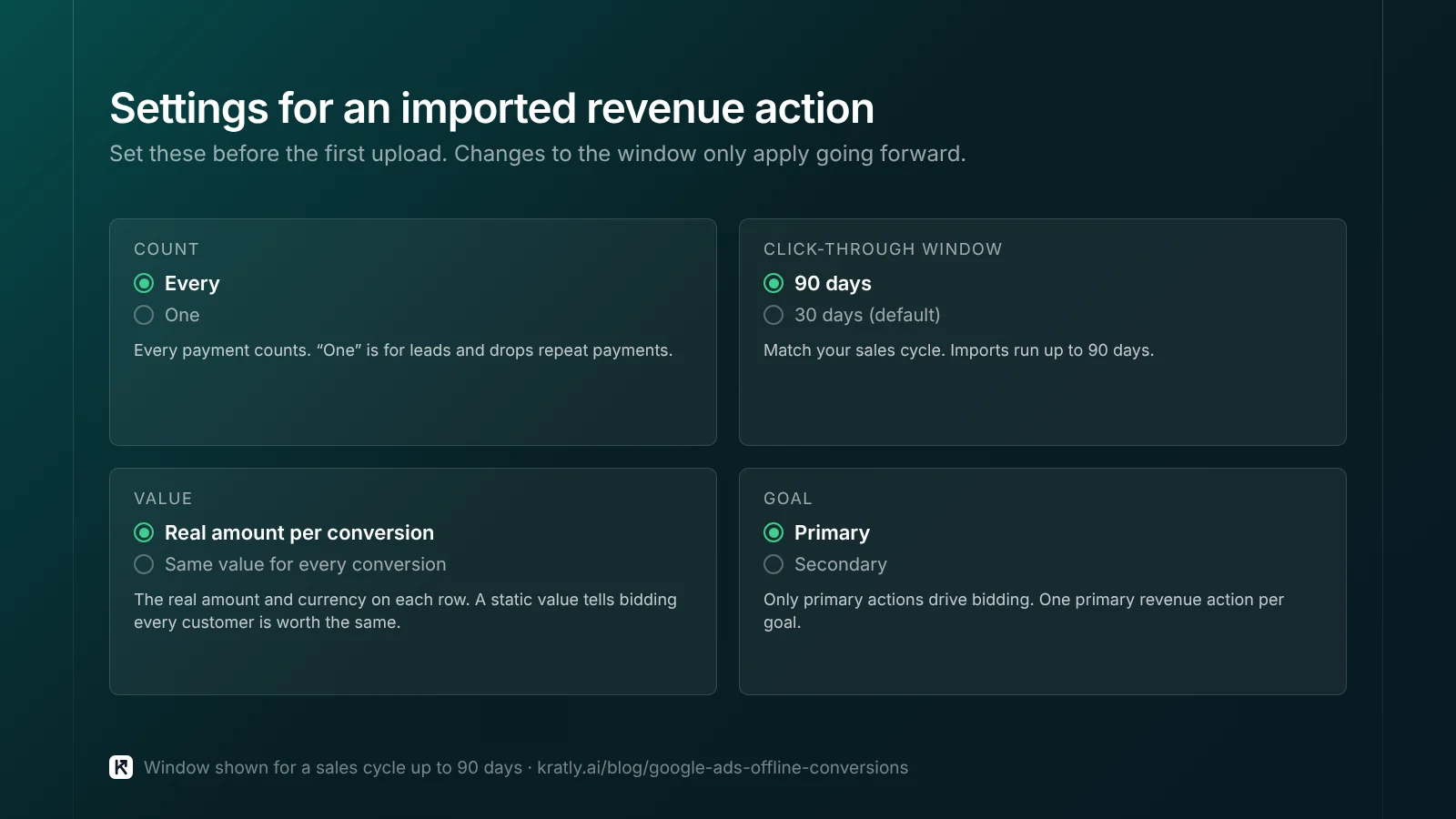
Set these before the first upload.
- Count: "Every" for revenue, "One" for leads. Google calls "Every" "a good choice if you'd like to track and improve your sales" (Google Ads Help).
- Window: match your sales cycle. It runs up to 90 days, defaults to 30, and changes only apply going forward (Google Ads Help).
- Value: the real amount per conversion. A static value tells bidding every customer is worth the same.
- One primary revenue action per goal. Only primary actions drive bidding (Google Ads Help). Give first payments and upgrades separate actions.
If a sign-up action is still primary, bidding chases sign-ups. See Google Ads conversion tracking: when sign-ups count as sales.
How does upload lag affect Smart Bidding?#
Google reports conversions on the click date, not the payment date (Google Ads Help). Today's upload can change last week's numbers.
Late uploads make recent days look weak, so Smart Bidding may pull back on traffic that works. Google's guidance:
- "Upload conversions at least daily" (Google Ads Help).
- "Shorter conversion delays (less than 7 days) are recommended" for value-based bidding (Google Ads Help).
- If nothing arrives within 7 days of the click, "the initial ramp up period for value-based bidding may take several months" (same source).
Processing usually takes under 12 hours, and up to 72 for GBRAID and WBRAID (Google Ads Help). I'd run the upload nightly and check results in "All conv. (by conv. time)."
If most customers pay after 30 days, consider a faster primary event, such as a trial that adds a card.
How to send revenue to Google Ads for value bidding#
To send revenue to Google Ads, upload each payment with its amount and currency. That Google Ads conversion value is what target ROAS bids on. Before switching, check four things.
- Volume. Target ROAS "should have at least 15 conversions in the last 30 days at the conversion tracking level" (Google Ads Help).
- Varied values. You "must report two or more different values" (same source).
- History. Upload values "for 3 weeks or 1-2 conversion cycles, whichever is longer" first (same source).
- No backfill. Google says to "avoid backfilling historical value data."
Once live, avoid "multiple ROAS target changes within a single conversion cycle" (same source).
Below 15 paid conversions a month, I'd keep simpler bidding and use revenue data to cut waste. Google Ads wasted spend: the 9 places your budget leaks shows where to look.
Restating values: refunds, upgrades and lifetime value#
"Restate" changes a value after upload; "Retract" removes the conversion (Google Ads Help). Refund timing is in the Stripe guide. Rules that catch people out, from the same page:
- A retraction can't be undone. Restating to $0 also removes the conversion.
- The earliest adjustment time runs first.
- Adjustments go in a separate file from new conversions.
- GBRAID conversions can only be adjusted by Order ID.
| Goal | What to upload first | What to restate later |
|---|---|---|
| Refunds | Actual payment | Retract full refunds; restate partial ones to the net amount |
| Annual upgrades | First monthly payment | Restate to the annual amount, or log a separate "upgrade" action |
| Predicted lifetime value | First payment × a modest multiple | Restate down if the customer churns early |
An optimistic lifetime multiple makes bidding overpay for every customer. I'd start with first-payment value and add prediction after a few months of churn data.
Why did my upload fail? Error codes and fixes#
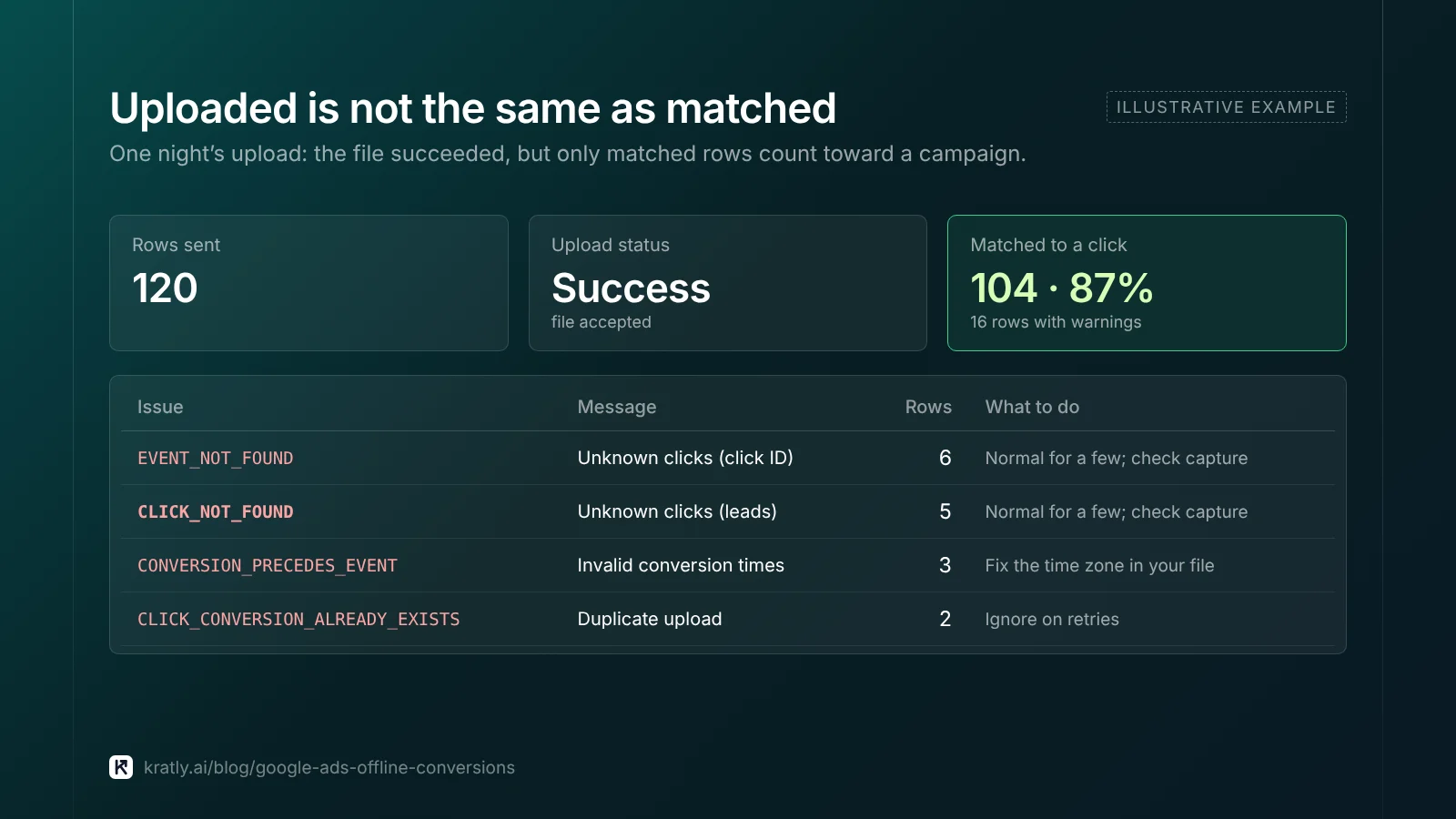
A successful upload doesn't mean every row counted (Google Ads API).
| Error (API name / UI message) | What it means | Fix |
|---|---|---|
| TOO_RECENT_CONVERSION_ACTION | Action was just created | Wait about six hours |
| "Click too recent" | Click not processed yet | Retry 6 hours after the click |
| EXPIRED_EVENT / "Identifiers… too old" | Click is older than the action's window | Upload more often; use an action with a longer window |
| CONVERSION_PRECEDES_EVENT / "Invalid conversion times" | Conversion time is before the click | Fix the time zone in your file |
| EVENT_NOT_FOUND (click ID) or CLICK_NOT_FOUND (enhanced conversions for leads) / "Unknown clicks" | No Google Ads click matches | Normal for some rows; check capture if it's most rows |
| CLICK_CONVERSION_ALREADY_EXISTS | Duplicate upload | Ignore on retries |
Sources: Google Ads API troubleshooting and Google Ads Help.
One quiet problem shows no error: a count of "One" drops repeat payments. Check the "Repeat Rate" column.
Test first with validateOnly and diagnostics#
New API builds go through the Data Manager API (see the Stripe guide). Its validateOnly flag lets you "check your request for fast-fail errors without ingesting any data" (Data Manager API). My test plan:
- Send ten rows with
validateOnlyon. Fix every error and warning. - Send them for real and wait a day.
- In diagnostics, compare rows sent with rows matched.
- Then turn on the nightly job, with a
transactionIdon every event for dedupe.
Consent and privacy rules for uploads#
This is for US-focused teams; get legal advice for your case. Google asks you to "get consent where required by law" (Google Ads Help). It "highly" recommends filling the consent field, or some conversions may not attribute (Google Ads API).
For EEA, UK or Swiss customers, send consent status per row and leave out IP addresses (same source). For US traffic, follow your privacy policy and state rules.
How to do this in Kratly#
- Connect Google Ads, website tracking and Stripe or Shopify. Kratly ties each payment to the click and campaign that brought it.
- Find upload gaps. Kratly shows Google's reported conversions next to Stripe revenue for each campaign. A big gap is a sign of missing uploads or unrestated refunds.
- Send verified revenue back. From the Paid search page, Kratly can send Stripe-verified revenue back to Google Ads. Budget suggestions wait for your approval, and every change is logged and reversible.
More on agents acting on this data: AI marketing agent: what it can do, what it can't, how to choose. The wider picture: SaaS marketing attribution.
Questions, answered
How often should I upload offline conversions?
Daily. Google says to upload at least daily, and for value-based bidding it recommends conversion delays under seven days. A nightly job is the simplest way to meet both. Weekly uploads still count, but bidding sees recent days as weaker than they are and can cut spend on campaigns that work.
Can I use target ROAS with imported Stripe revenue?
Yes, once you have enough data. Google wants at least 15 conversions in the last 30 days at the conversion tracking level. It also asks for varied values and three weeks or one to two conversion cycles of uploads first. Smaller accounts are usually better off keeping simpler bidding for now.
Why are my uploaded conversions not showing?
Check four things. Processing can take up to 12 hours, or 72 for iOS click IDs. Google reports by click date, so look at the "by conv. time" column. A count setting of "One" drops repeat payments. And rows with no matching click upload fine but never attribute to a campaign.
Should I upload predicted lifetime value instead of the first payment?
Only once you trust your churn data. Uploading a predicted value makes bidding favor customers likely to stay. But an optimistic multiple makes Google pay too much for every click. Start with the real first payment, restate refunds, and add a modest predicted value after a few months of real retention numbers.
Written by
Priyansh Kumar
Priyansh Kumar has spent more than a decade in growth, scaling brands from 1 to 10 and from 10 to 100. He now builds Kratly, an autonomous growth team that ties every campaign, page and email to the revenue it brings.
Sources
- Google Ads Help: About offline conversion imports · Offline conversion imports FAQs · Upgrade to enhanced conversions for leads · Fix discrepancies and errors · Conversion counting options · Conversion windows · Primary and secondary actions · Value-based bidding · Conversion adjustments
- Google Analytics Help: Import key events into Google Ads
- Google for Developers: Data Manager API: send offline events · Google Ads API: conversion troubleshooting · Google Ads API: manage offline conversions
Was this article useful?