Short answer
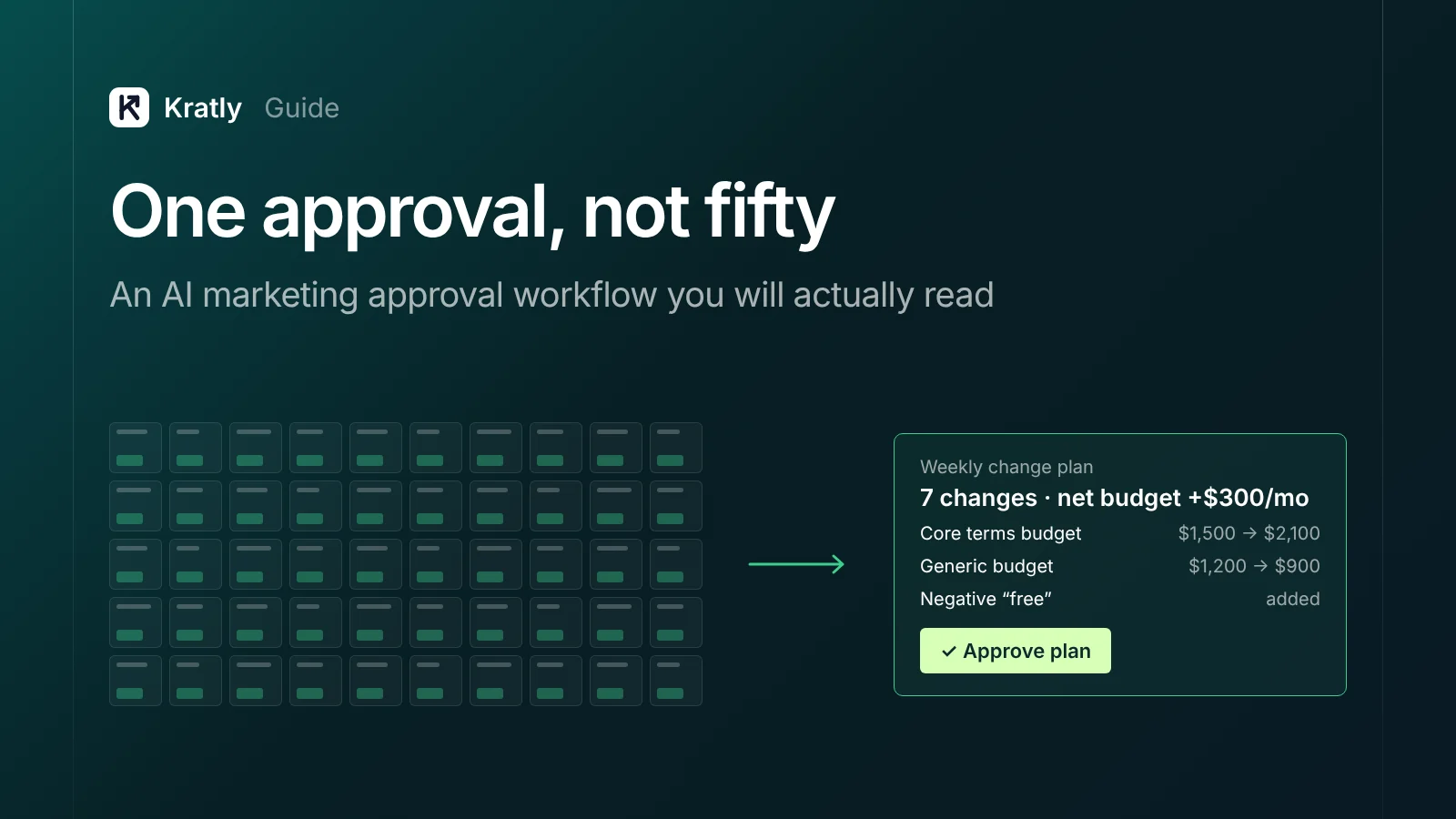
A good AI marketing approval workflow sorts agent actions by risk. Safe actions run inside hard caps. Everything else goes into one plan you review once. Spend caps live in the ad platform, not the prompt. Every change is logged with a way back. A few actions are never automated.
Composite example: a founder connects an AI agent to her ad accounts on Monday. By Wednesday she has 50 approval requests, each small, so she taps "approve" between meetings. One of those taps raised a campaign budget. She didn't notice, because it looked like the other 49.
That isn't a bad agent. It's a bad approval design. Approving everything feels safe, but it trains people to approve without reading.
To choose a tool, see our AI marketing agent buyer's guide. For buying the work rather than software, see our pillar on AI that does the work. This guide covers approvals once you have an agent.
What is an AI marketing approval workflow?#
An AI marketing approval workflow is the set of rules that decides which agent actions run alone and which wait for a person.
Without one, you get what the OWASP Gen AI Security Project calls "excessive agency." It lists three usual causes: "excessive functionality," "excessive permissions" and "excessive autonomy" (OWASP, LLM06:2025).
OWASP's fixes include: "Utilise human-in-the-loop control to require a human to approve high-impact actions before they are taken" (OWASP). Note "high-impact," not every action. Anthropic's engineering guide says agents "can then pause for human feedback at checkpoints or when encountering blockers" (Anthropic, December 2024).
Sort every action into four risk tiers#
List every action the agent can take and put each in a tier. The tier sets the approval rule, not the agent's confidence.
| Tier | What it does | Marketing examples | Approval rule (our view) | Way back |
|---|---|---|---|---|
| 1. Read only | Looks, never touches | Pull reports, flag wasted search terms, spot broken tracking | None. Runs on a schedule | Nothing to undo |
| 2. Reversible, no new spend | Changes settings you can put back | Add negative keywords, pause an ad, lower a bid, fix a UTM | Can run alone inside caps, listed in the weekly log | Undo from change history |
| 3. Changes spend | Moves or adds money | Raise a budget, shift money between campaigns, new bid strategy | Batched into one plan; a person approves before it runs | Undo the setting, but money already spent is gone |
| 4. Can't be undone | Leaves a mark you can't take back | Delete a campaign, publish a post or ad customers see, send email, edit billing or user access | Approved item by item, or never automated | None, or only partial |
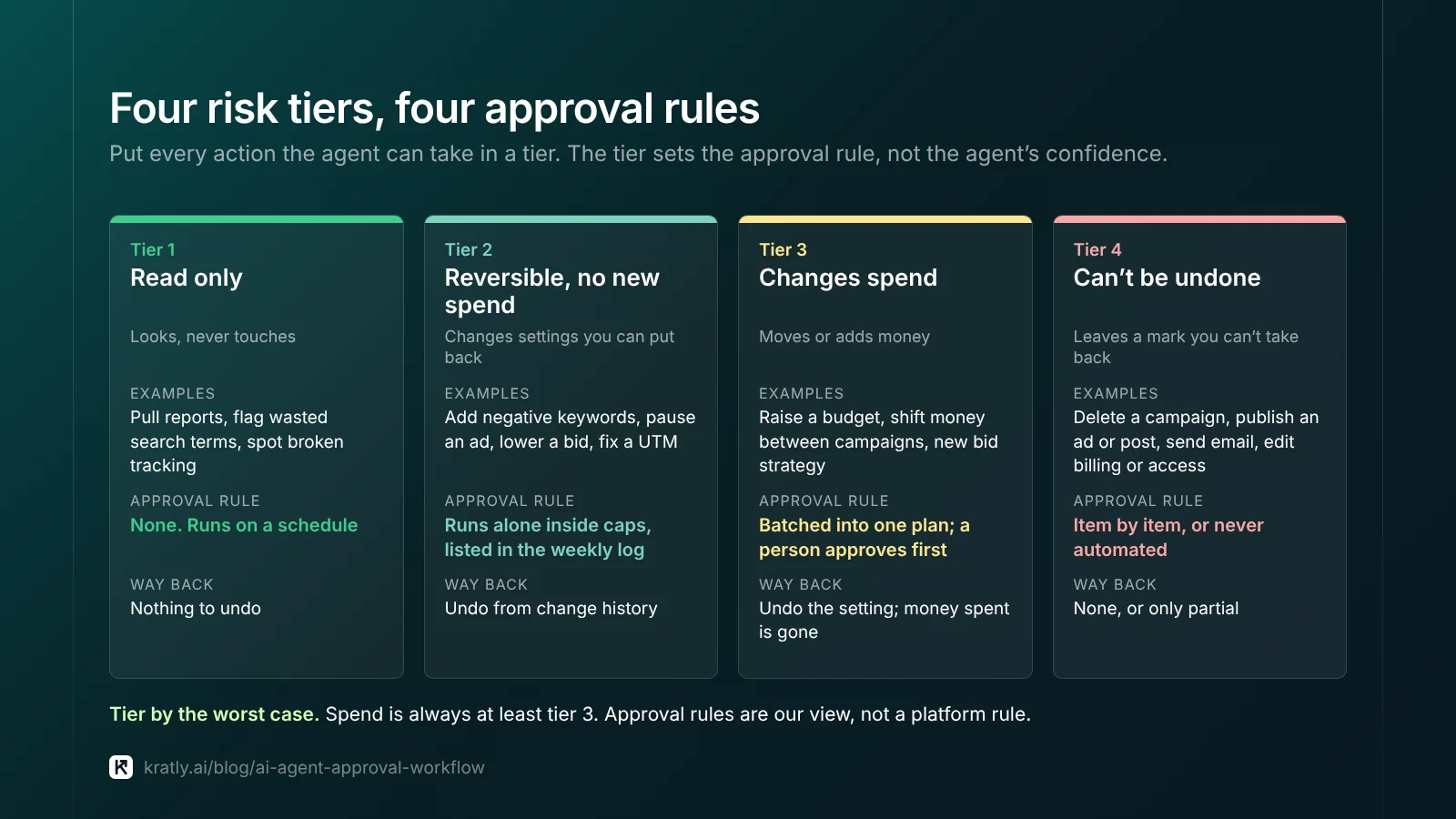
Tier by the worst case. "Pause an ad" is tier 2. "Pause the only campaign bringing paying customers" behaves like tier 3. Spend is always at least tier 3. You can undo a budget change, but not the money spent while it was live.
Our autonomous growth guide covers a different axis: how much freedom an agent earns over weeks. Trust decides when an action moves to "log only." The tier sets the ceiling it never passes.
How do spend caps keep an agent inside budget?#
A cap written in a prompt is a request. A cap set in the ad platform is a wall. OWASP makes the same point: "Implement authorization in downstream systems rather than relying on an LLM to decide if an action is allowed or not" (OWASP).
Layer 1: account-level limits in each ad platform#
Google Ads. An account budget caps combined spend across all campaigns. As of November 2026, Google says: "Your account will stop serving ads if your budget is spent or a specific end date is reached" (Google Ads Help). It's required for monthly invoicing, so check whether your billing setup offers one.
Meta. Meta ad accounts can carry an account spending limit. Meta's help center has pages to update, reset and remove one. Independent trainer Jon Loomer calls it "a lifetime limit" on what the account can spend across all campaigns (Jon Loomer). Set these limits yourself. The agent should never be able to change them.
Layer 2: campaign budgets, read correctly#
Daily budgets are averages. As of November 2026, Google says a campaign "might spend up to twice your average daily budget" on a given day. Over a month, it spends "no more than 30.4 times your average daily budget" (Google Ads Help). So raising a daily budget raises the monthly ceiling too. See how much to spend on Google Ads for the math.
Layer 3: per-change and per-week limits in the agent#
Set a largest single change, a total moved per week, and a stop rule such as "pause if cost per paying customer passes X."
Worked example. Assumption: $6,000 a month on Google Ads, a $6,500 account budget and a $600 weekly limit on budget moved. The agent shifts $600 a week at most, and the account budget catches anything that slips past. Pick the monthly figure first with our startup marketing budget guide.
Batch changes into one reviewable plan#
This is how fifty approvals become one. The agent collects tier 3 changes, plus any tier 2 changes you keep on approval, into one weekly plan with these parts:
| Part of the plan | What it shows | Why it matters |
|---|---|---|
| Summary line | "7 changes, net budget +$300/month, 2 campaigns affected" | You see the size before the detail |
| Before and after | Old value, new value, for every setting | Like a code diff: no hidden edits |
| Reason and data | The numbers behind each change, from revenue, not clicks | You judge the logic, not just the action |
| Tier label | Which tier each change sits in | Tier 4 items stand out |
| Undo path | How each change would be reversed | No surprises if it goes wrong |
| Approve all, approve some, reject | Per-line control | You don't lose good changes to one bad one |
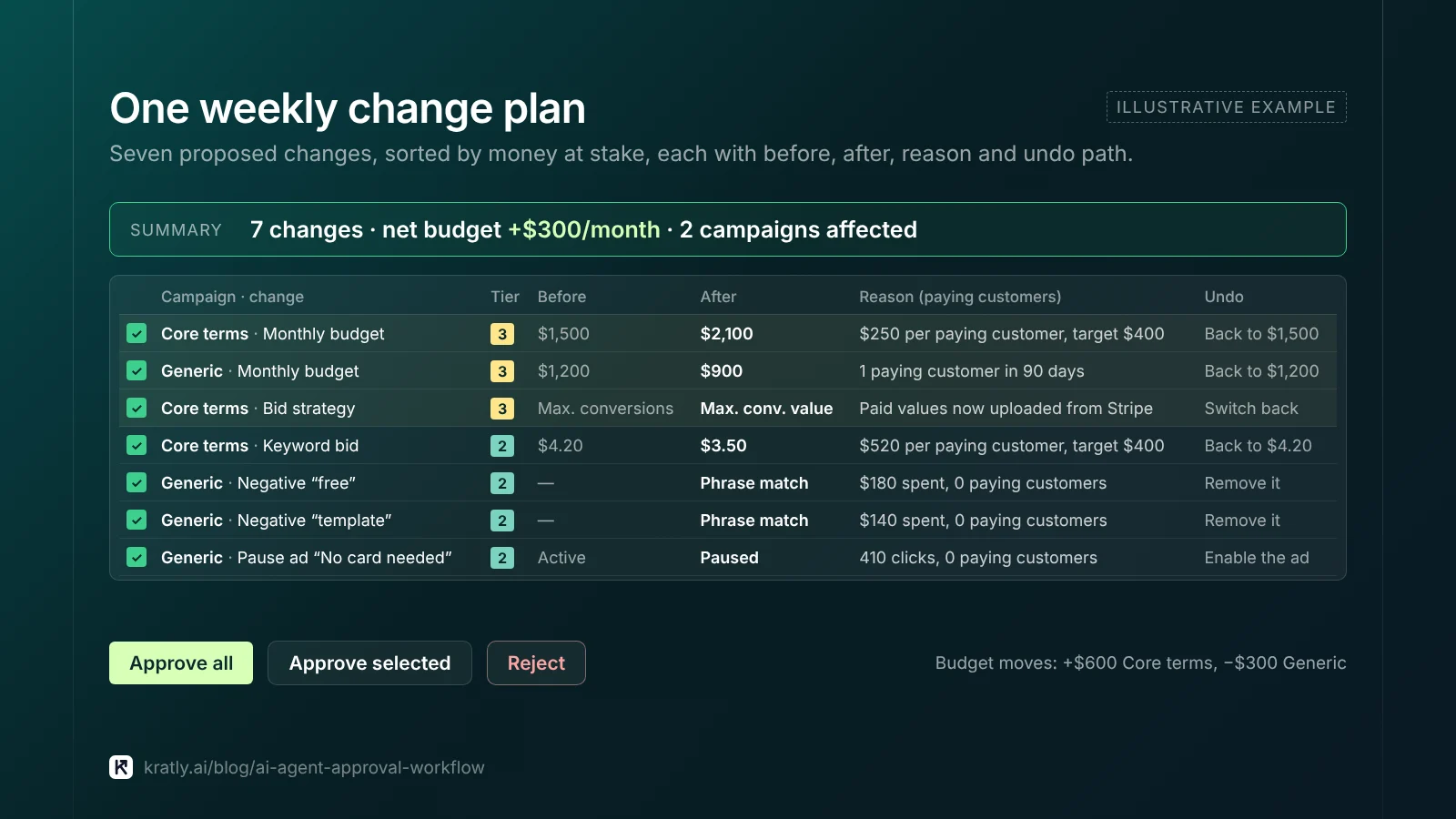
Fix the review slot: same day, same time. Define "urgent" in advance; broken tracking may skip the queue, a new idea doesn't. Sort by money at stake, so the biggest change gets your sharpest reading. And check the "reason" column uses paying customers, not platform conversions.
Change logs and rollback: what "reversible" really means#
As of November 2026, Google Ads change history covers the last 2 years. But you can undo most types of changes only from the last 30 days. Bulk Undo warns: "If something can't be reverted (deleted items for example), you'll receive an error" (Google Ads Help). That's why deletion is tier 4. Pausing keeps the way back.
Keep two logs. The platform's history shows what changed. The agent's own log must show why, the data used and who approved it.
Watch for a third actor. If you opted in, Google applies its own recommendations, and change history shows who enrolled you (Google Ads Help). With two actors editing, you can't tell whose change helped. Turn auto-apply off first, as covered in the nine places Google Ads budget leaks.
Who should approve AI agent changes?#
One named person, not "the team." Pick someone who knows which campaigns bring paying customers, has a weekly slot, and doesn't earn more when spend rises. In a fractional CMO plus AI agent setup, the CMO sets the limits and someone in-house approves.
Then give the agent the least access it needs. As of November 2026, Google's access levels let Read only view campaigns, Standard edit campaigns and billing information, and only Admin manage user access. So an agent that edits campaigns can also reach billing. Ask the vendor how its software blocks that.
What should never be automated?#
Our list of actions that stay with people:
- Spending limits or billing. The agent can't move its own fence.
- Users and access. One bad change becomes a security problem.
- Deleting campaigns, audiences or conversion actions. Pause instead.
- Changing what counts as a conversion. It changes what every bidding system aims at. See the conversion tracking mistakes that turn sign-ups into sales.
- Anything customers read, before you've seen it. Ads, posts, emails.
- Pricing, discounts and refunds. OpenAI's agent guide singles out "high-risk actions" for human review, per Maginative.
- Regulated claims in health, finance or law.
Where Kratly fits#
We build Kratly, so weigh this with that in mind. It works the way this article describes: every change it proposes shows the reason and data, waits on an approval card or runs within limits you set per area (off, approve or auto), is logged, and can be undone. One pause stops everything. Changes inside Meta, Google and Microsoft ad accounts are built but switched off until each platform approves access and the change passes a live test on our own accounts.
Questions, answered
How many approvals should an AI marketing agent need?
As few as keep you safe. Read-only work needs none. Small, reversible changes inside caps can run alone and show up in a weekly log. Spend changes go into one batched weekly plan. Deletions and anything customers see get approved one by one, or are never automated.
Can I just tell the AI agent not to overspend?
Don't rely on it. A prompt instruction is a request the model can misread. Set an account budget in Google Ads and an account spending limit in Meta yourself, so the platform stops spend even if the agent gets it wrong. Keep the agent's access below the level that can edit those limits.
What is human-in-the-loop for AI agents?
Human-in-the-loop means a person must approve certain actions before the agent can take them. OWASP recommends it for "high-impact actions," not every action. In marketing, that usually means spend changes, deletions and anything customers will see. Low-risk, reversible work can run alone, as long as it is logged and checked each week.
Can AI agent changes in Google Ads be undone?
Most can, for a while. As of November 2026, Google says you can undo most types of changes made in the last 30 days from change history. Deleted items can't be reverted through bulk Undo. Money spent while a change was live is also gone. That's why spend changes and deletions need approval first.
Who should approve an AI agent's marketing changes?
One named person with a fixed weekly review slot. They should know which campaigns bring paying customers. Ideally they don't earn more when ad spend rises, so an agency paid by share of spend is a poor fit. A shared team queue tends to go unread.
Written by
Priyansh Kumar
Priyansh Kumar has spent more than a decade in growth, scaling brands from 1 to 10 and from 10 to 100. He now builds Kratly, an autonomous growth team that ties every campaign, page and email to the revenue it brings.
Sources
- OWASP Gen AI Security Project: LLM06:2025 Excessive Agency
- Anthropic: Building effective agents (December 19, 2024)
- Google Ads Help: Create an account budget · Average daily budget · Review your account history · Revert bulk actions with Undo · Manage auto-applied recommendations · About access levels
- Meta Business Help Center: Update an account spending limit · Reset the amount spent · Remove an account spending limit
- Jon Loomer Digital: Campaign, account and daily spending limits
- Maginative: Summary of OpenAI's practical guide to building agents
Was this article useful?