Short answer
Set up Shopify Google Ads conversion tracking through the Google & YouTube app with enhanced conversions on. Connect Meta through the Facebook & Instagram app with the Conversions API. Remove old duplicate tags. Then judge spend on Shopify orders, not platform claims: compare each channel's ROAS with your break-even ROAS, which is 1 ÷ gross margin.
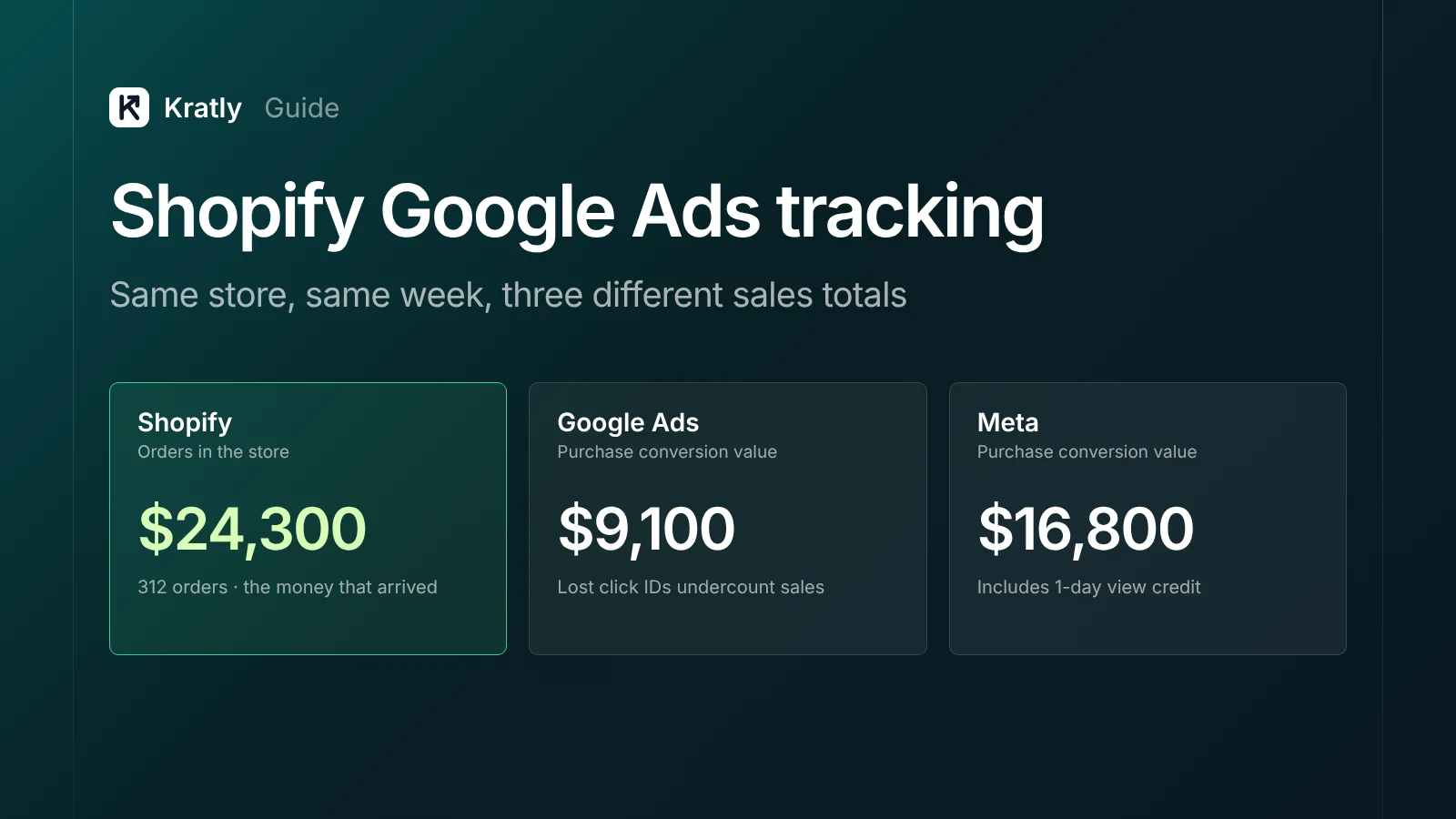
Two Shopify owners, two opposite problems. One wrote: "Facebook is reporting more than double the sales that Shopify reports" (Shopify Community). Another, in March 2026: "Google Ads has only been picking up about 10% of my sales" (Shopify Community).
Both stores are spending on ads they can't judge. This guide covers Shopify Google Ads conversion tracking, Meta's Conversions API and how to decide spend on real orders.
Why Shopify, Google Ads and Meta never agree#
Shopify credits the last click. Google Ads and Meta each count any sale their ad touched, so their totals overlap.
Shopify says it plainly. A customer who clicks an email and then a Google Shopping ad may be counted as a conversion by both tools. Shopify credits only one (Shopify Help Center).
| Tool | Default way of giving credit | Window |
|---|---|---|
| Shopify marketing reports | Last non-direct click; also offers last click, first click, any click and linear (Shopify) | Most recent ad click in the past 30 days, for activities created in Shopify |
| Google Ads | Credits the ad click before the sale | 30 days by default; 1 to 90 days allowed (Google Ads Help) |
| Meta Ads | Counts link clicks, other engagement and views | 7-day click, 1-day engage-through, 1-day view by default (Jon Loomer, 2026) |
| GA4 | Data-driven by default | 30 days for acquisition events, 90 for others (Google Analytics Help) |
Meta's view and engagement credit is the usual reason it claims more sales than Shopify. Someone sees an ad, then searches your brand and buys. Meta counts it. Shopify doesn't.
Google's undercount usually has a different cause: lost click IDs. In the March 2026 thread above, a Google tech found the click ID (GCLID) was dropped on the homepage but kept on collection pages. A reply pointed at redirects from currency or geolocation apps, or www to non-www rules.
What I'd check first: open your store with ?gclid=test1234 on the URL. Click through to checkout. If the parameter or the _gcl_aw cookie vanishes, fix that before touching any bids.
Set up Shopify Google Ads conversion tracking#
Use the Google & YouTube app unless you have a strong reason not to. Google's own guide covers it (Google Ads Help).
- Install the Google & YouTube app and connect your Google Ads account.
- Check the conversion actions. Purchase, add to cart and checkout started are the suggested defaults. You can edit how they map to Shopify events under "Measure conversions."
- Turn on enhanced conversions. Do it during setup, or later under Settings › Google Ads settings. It sends hashed first-party data, such as email, so Google can match more sales to clicks.
- Make Purchase the only primary goal. Google advises setting the app's new conversions as primary. Set add to cart and checkout started to secondary, so Smart Bidding optimizes for orders, not carts (Google Ads Help).
- Remove the old tags. Google warns about duplicate measurement. Old gtag snippets in the theme, a GTM purchase tag and a third-party app can all fire on one order.
The trade-off: the app is free but gives you less control. A server-side tracking app costs a monthly fee and setup hours. It helps when consent banners or ad blockers cut data. It won't fix a redirect that strips the click ID.
Google also asks you to get consent "where legally required." In the EU or UK, a consent banner will reduce what any tag sees.
Shopify Meta Conversions API: pick a data sharing level#
Meta's pixel runs in the browser, so ad blockers can stop it. The Conversions API sends events server to server, which "can't be blocked by browser-based ad blockers" (Shopify Help Center).
In the Facebook & Instagram app you choose one of three levels:
| Level | What it uses | What it shares |
|---|---|---|
| Standard | Meta pixel only | Browsing behavior from the browser |
| Enhanced | Pixel + Conversions API | Adds customer name, location, email and phone for matching |
| Maximum | Pixel + Conversions API + Meta's latest ad tech | Same, with the purchase event sent server to server |
I'd pick Maximum for most US stores. More matched purchases give Meta's bidding better signal. The case for Standard: you've promised customers in your privacy policy not to share personal data with ad networks. Shopify reminds merchants that "data sharing is a choice" and to tell customers how data is shared.
Watch for doubles. When the pixel and the server both send a Purchase, Meta removes duplicates only if both carry the same event_id and event name. Both must also arrive within 48 hours (Meta for Developers). The Shopify app handles that. A second Conversions API app added on top often doesn't.
For non-Shopify stores or subscription products, the same logic applies. See measuring Facebook ad sign-ups that actually pay.
Checkout extensibility: what broke and what replaced it#
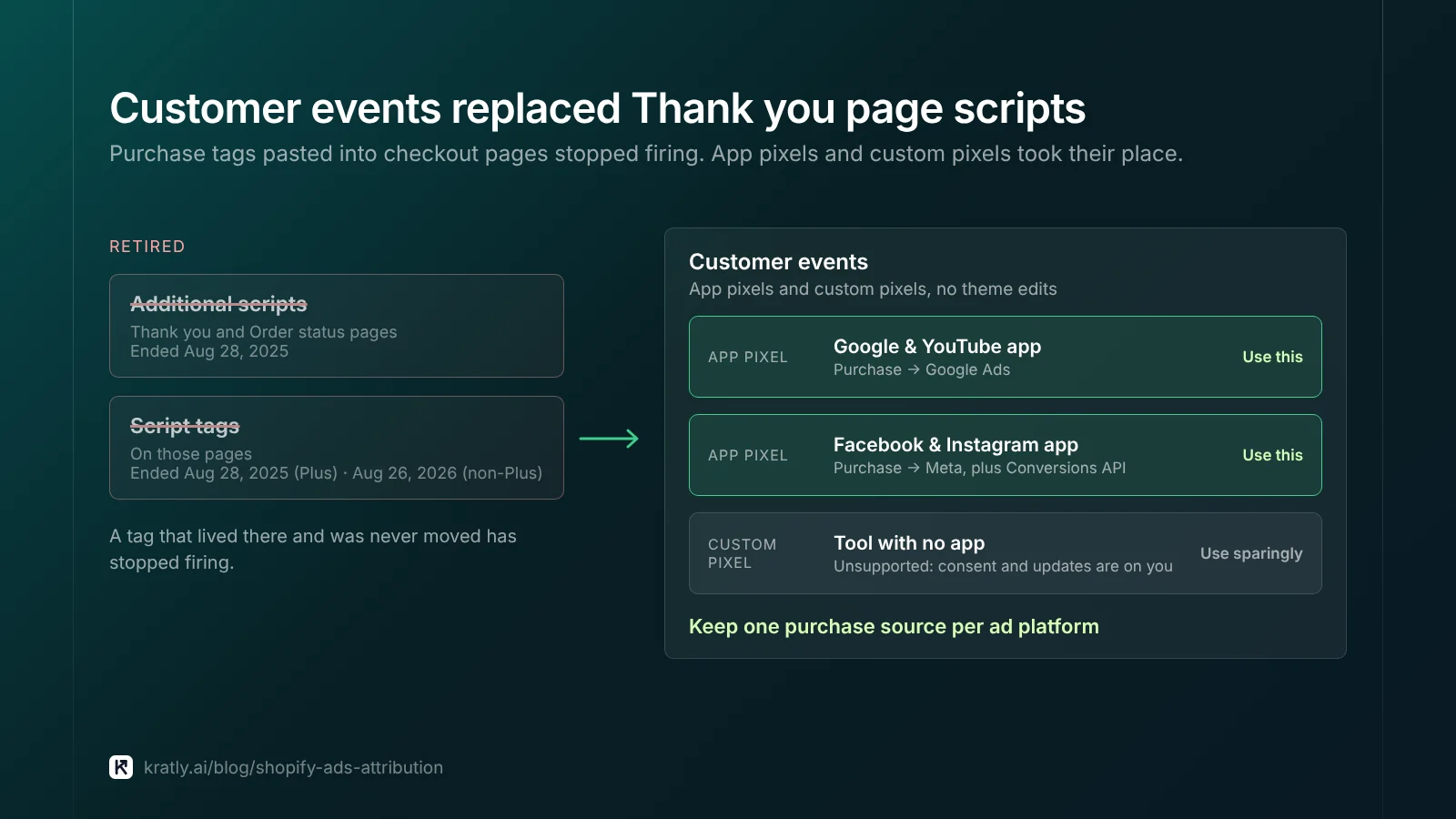
Many older stores tracked purchases with code pasted into "Additional scripts" on the Thank you page. That's gone.
- checkout.liquid and additional scripts were sunset for the Thank you and Order status pages on August 28, 2025 (Shopify.dev).
- Script tags on those pages ended the same day for Plus stores, and on August 26, 2026 for non-Plus stores.
If a purchase tag lived there and you never moved it, it stopped firing.
The replacement is customer events: app pixels from the Google, Meta and other apps, plus custom pixels you write. Custom pixels run in a sandbox and can track checkout pages without theme edits. Shopify notes that custom pixels are unsupported and that "compliance with applicable laws, consents, code security, troubleshooting, and updates are your responsibility" (Shopify Help Center).
What I'd do: use the official app pixels for Google and Meta. Add a custom pixel only for a tool with no app. Every extra pixel is one more thing that can double-count.
Shopify ROAS: judge spend on real orders#
Even with clean tracking, the platforms will disagree. Pick one number for budget decisions.
I'd use Shopify orders, tied to channel by UTM, as the decision number. Use each platform's own conversions only to let its bidding learn. Platform numbers are built to give their ads credit. Shopify's count is the money that arrived.
The opposite case: if a large share of your buyers see Meta video and later search your brand, last-click Shopify data will undervalue Meta. Then test it instead of trusting either report. Run a holdout or a lift test (did your change really work?).
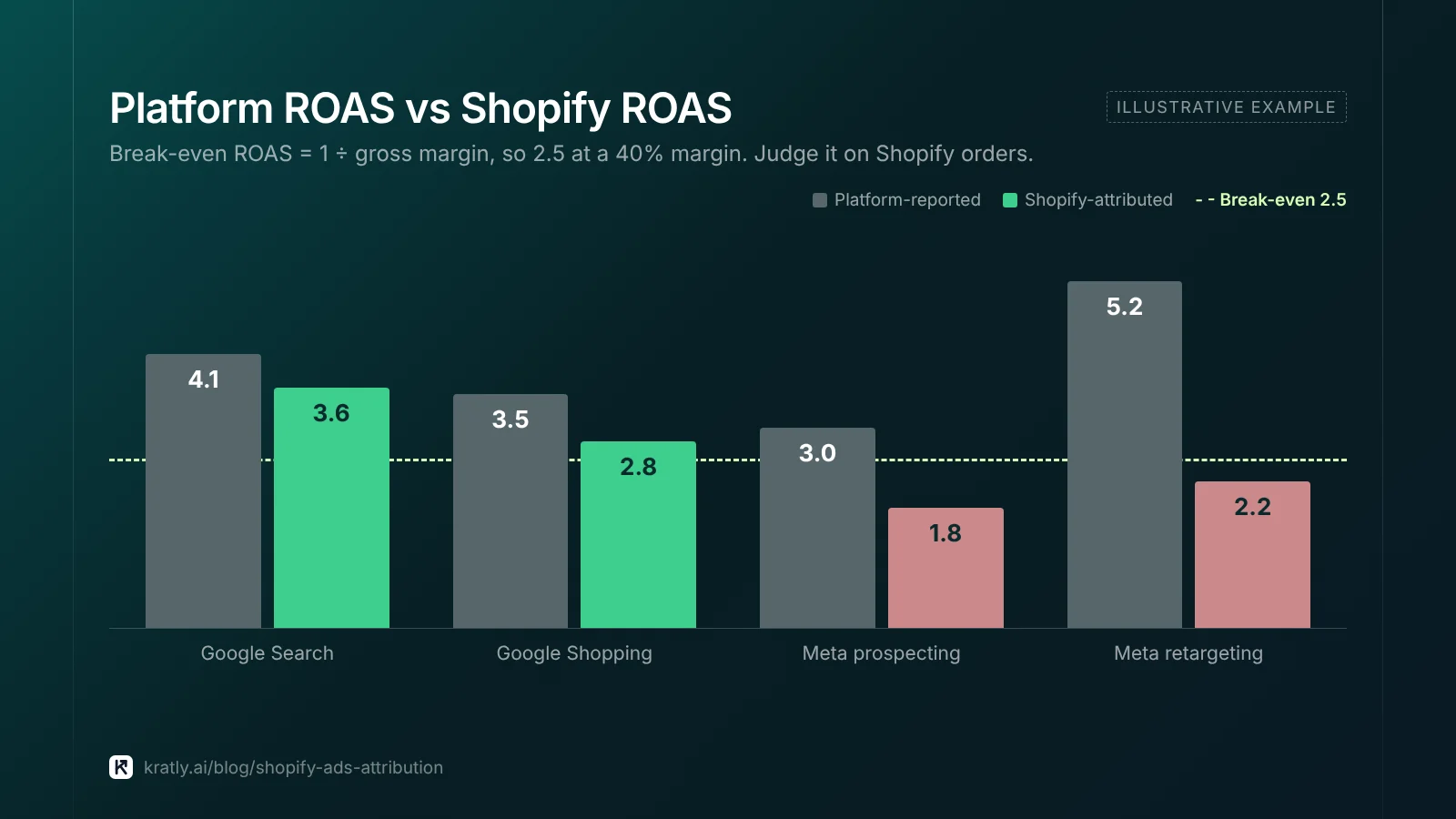
Then compare ROAS with what you need to break even. Break-even ROAS = 1 ÷ gross margin (Amazon Ads).
| Gross margin (after shipping, fees, discounts, returns) | Break-even ROAS |
|---|---|
| 25% | 4.0 |
| 40% | 2.5 |
| 50% | 2.0 |
| 65% | 1.54 |
Worked example: a store at 40% margin spends $10,000 on Meta. Meta reports $30,000 in sales, a ROAS of 3.0. Shopify credits $18,000, a ROAS of 1.8. On Meta's number, you scale. On Shopify's, you lose about $2,800 for every $10,000 you spend ($18,000 × 40% = $7,200 of margin).
Use margin, not markup. When a campaign stays below break-even after fixes, the steps in when to pause a campaign apply to Shopify stores too.
A 20-minute weekly reconciliation#
You need the same check every week, not a data team.
- Count orders. Shopify total orders vs Purchase conversions in Google Ads and Meta for the same dates. Google plus Meta above 100% of Shopify orders is normal overlap. Google far below the share of paid traffic means lost click IDs.
- Check for doubles. If a platform's purchase count exceeds Shopify's total orders, you have duplicate tags.
- Check UTMs. Every Meta and Google ad should carry
utm_sourceandutm_campaign. Shopify's marketing reports rely onutm_campaign. - Compute Shopify ROAS per channel and compare with break-even.
- Log one decision per channel: scale, hold, cut or test.
The full method for tying spend to revenue, beyond Shopify, is in SaaS marketing attribution: tie every campaign to real revenue.
How to do this in Kratly#
- Connect Google Ads, Meta and your store. Kratly reads spend from each ad account and orders from the store.
- See revenue by campaign. Kratly shows store revenue and cost per order for each campaign, next to what each platform reports.
- Check break-even. Kratly marks each campaign's revenue per dollar against break-even; apply your margin to get break-even ROAS.
- Approve changes. Kratly suggests budget moves. You approve them, and each change is logged and reversible.
Go deeper: Meta Conversions API: set it up and check it sends real purchases · Triple Whale vs Northbeam vs Hyros: attribution tools compared
Questions, answered
Why does Facebook show more sales than Shopify?
Meta counts sales after link clicks within 7 days and after views or engagement within 1 day by default. Shopify credits only the last non-direct click. When a buyer sees a Meta ad and later clicks a Google ad, both platforms claim the sale. Shopify credits Google.
Why is Google Ads missing Shopify sales?
Usually a lost click ID or a tagging mistake. Common causes are a redirect or app that strips the GCLID, or a consent banner blocking tags. Purchase code left in retired Thank you page scripts, or the wrong primary goal, can also cause it. Test with ?gclid=test1234 and check the _gcl_aw cookie survives to checkout.
Do I need a server-side tracking app on Shopify?
Not to start. The Google & YouTube app with enhanced conversions and Meta's Maximum level cover most stores. A paid server-side app costs a monthly fee and setup hours. It helps when consent rules or ad blockers cut much of your data. It won't fix a redirect that strips the click ID.
What is a good ROAS for Shopify ads?
Anything above your break-even ROAS, which is 1 ÷ gross margin. At 40% margin, that's 2.5; at 50%, it's 2.0. Use margin after shipping, fees, discounts and returns, not markup. Measure it on Shopify-attributed orders, not platform-reported sales, because each platform counts sales its ads only touched.
Written by
Priyansh Kumar
Priyansh Kumar has spent more than a decade in growth, scaling brands from 1 to 10 and from 10 to 100. He now builds Kratly, an autonomous growth team that ties every campaign, page and email to the revenue it brings.
Sources
- Google Ads Help: Conversion tracking with the Google & YouTube app on Shopify · Conversion windows · Primary and secondary conversions
- Google Analytics Help: Attribution lookback windows
- Shopify Help Center: Marketing performance and attribution models · Facebook data sharing · Custom pixels
- Shopify.dev: checkout.liquid sunset dates
- Meta for Developers: Deduplicate pixel and server events
- Jon Loomer: How Meta ads attribution works in 2026
- Amazon Ads: Ads math and break-even ROAS
- Shopify Community: Facebook reporting double the sales · Google Ads not picking up conversion data
Was this article useful?