Short answer
The Meta Conversions API sends events from your server to Meta, next to the browser Pixel. Set it up through the Conversions API Gateway, a partner app such as Shopify, or a direct API build. Then verify it: test events, deduplication, Event Match Quality, freshness, and a weekly count against real orders in Stripe or Shopify.
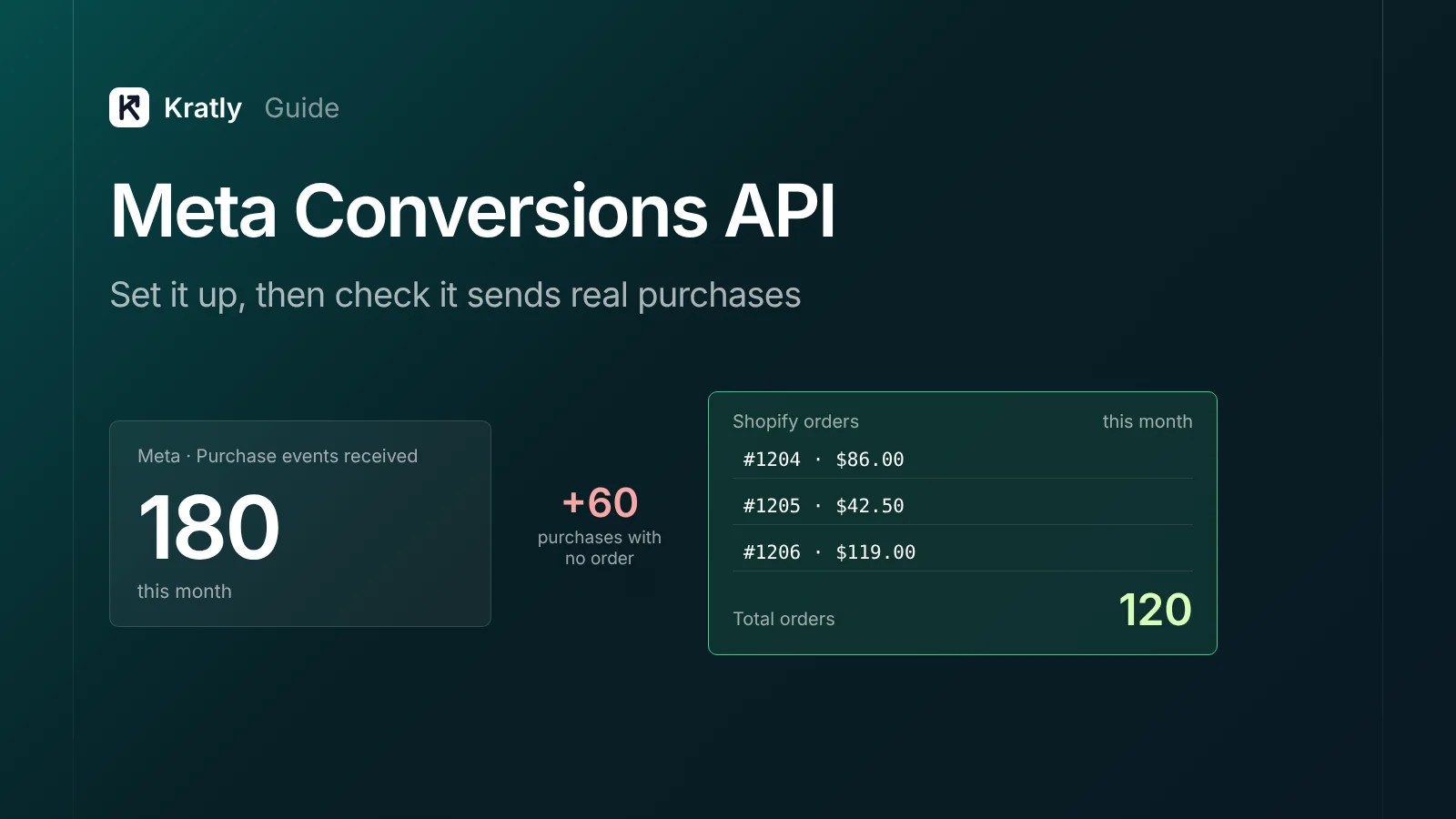
Composite example: a store owner turns on the Meta Conversions API through a plugin. Events Manager shows a green "active" status. A month later, Meta reports 180 purchases; Shopify shows 120 orders in total. The Pixel and plugin sent Purchase with different event IDs. (Made-up example, not a real company or Kratly customer.)
"Connected" is not "correct." This guide covers the Meta Conversions API setup for any business, then the checks. For the SaaS trial-to-payment flow, see Facebook ads for SaaS.
What is the Meta Conversions API?#
The Meta Conversions API is a server-to-server connection that sends your website, app or offline events to Meta. It runs next to the Meta Pixel, which sends the same events from the visitor's browser.
Browsers block or drop some Pixel events. Your server sees every order. Meta recommends running both, with deduplication. For other server-side options, see server-side tracking explained.
It won't fix an event that fires at the wrong moment. A Purchase fired on a checkout page view stays wrong, just more reliably.
Which setup option should you pick?#
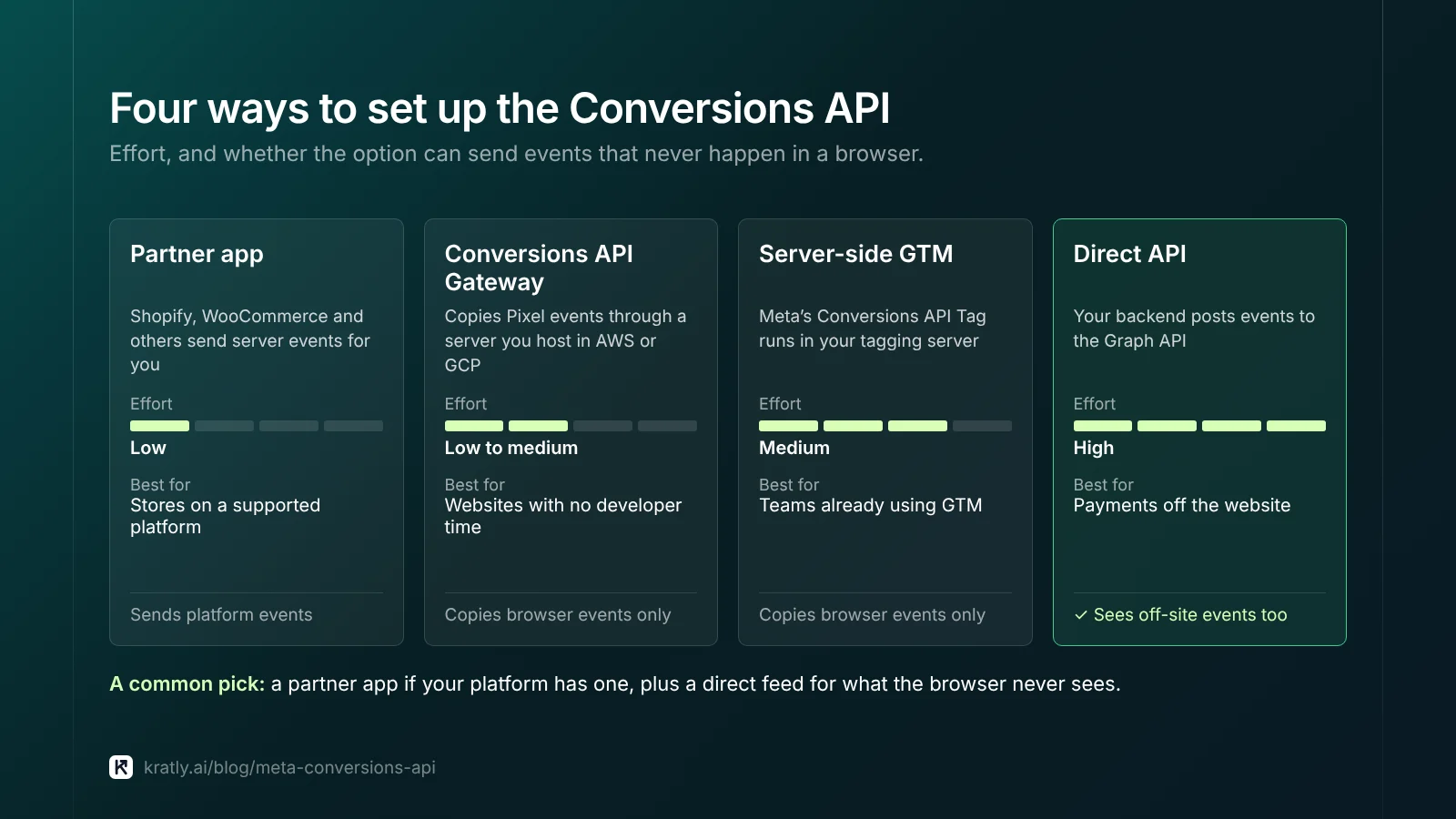
Methods "vary by level of effort, cost, and the features they enable," says Meta (Meta for Developers).
| Option | How it works | Effort | Best for |
|---|---|---|---|
| Partner integration (Shopify, WooCommerce and others) | The platform sends server events for you | Low | Stores on a supported platform |
| Conversions API Gateway | Copies Pixel events through a server you host in AWS or GCP | Low to medium | Websites with no developer time |
| Server-side Google Tag Manager | Meta's Conversions API Tag runs in your tagging server | Medium | Teams already using GTM |
| Direct API from your backend | Your code posts events to the Graph API | High | Payments that happen off the website |
Partner apps. Shopify's app sets the Conversions API through a data sharing level; our Shopify guide covers which to pick. Use one server source per Pixel. A second plugin usually means double purchases.
Gateway. Your Pixel sends each event to Meta and to the Gateway, which resends it server-side with an event_id for deduplication. You host it in AWS or GCP and pay the cloud bill (Meta for Developers). It only mirrors what the Pixel sees, so refunds, renewals and phone orders never reach it.
Server-side GTM. Meta maintains a "Conversions API Tag" for server containers. It forwards GA4 events carrying user_data and event_id (Meta for Developers). Hosts such as Stape document the same setup.
Direct API. Only this option sees events with no browser, like a Stripe renewal or a phone sale. You need a Pixel ID and an access token from Events Manager.
My pick: a partner app if your platform has one, plus a direct feed for what the browser never sees.
Which parameters does every event need?#
event_name: such asPurchase.event_time: no more than 7 days old, or the whole request fails (Meta for Developers).action_source: where it happened. Website events also needclient_user_agentandevent_source_url(Meta for Developers).user_data: at least one customer field, correctly formatted.event_id: the key that lets Meta drop the Pixel copy.custom_data: for Purchase,valueandcurrency.
Formatting customer data#
Hash personal fields with SHA-256; which fields to hash and how to store fbc are in Facebook ads for SaaS. Lowercase and trim emails. Give phones a country code, so (650) 555-1212 becomes 16505551212 (Meta for Developers).
A bad format throws no error. The field just fails to match.
How do you test and verify the setup?#
Run these checks in order. They take about an hour.
1. Send a test event#
In Events Manager, open Test events, copy the code, and send it as test_event_code. Remove it before going live. Test events "are not dropped," so don't test with fake $10,000 orders (Meta for Developers).
2. Check events received#
On the Overview, events should show within about 20 minutes. Connection Method shows browser, server or both. Events dropped for consent appear here too (Meta for Developers).
3. Check deduplication#
Open Event Details, then Event Deduplication. Meta keeps one event when the Pixel's eventID and the server's event_id match, with the same name, within 48 hours (Meta for Developers). Low Overlap means keys aren't unique, or only one side sends them. Meta's API flags event coverage under 75% (Meta for Developers).
4. Check Event Match Quality#
Event Match Quality is Meta's 1-to-10 score for how well your customer data matches events to people. Aim for 6.0 or higher, Meta suggests. To raise it:
- Send hashed email and phone on every purchase.
- Store
fbcandfbpat checkout and pass them on later server events. - Send the visitor's IP and user agent, not your server's.
- Add
external_idon both Pixel and server events.
5. Check freshness#
Event Freshness runs from "Real Time" to "Weekly." Meta wants events sent "ideally within an hour." Nightly batch jobs are the usual culprit.
Meta ads not converting? Five causes to check#
When Meta ads show spend but few purchases, check tracking before blaming the ads.
| Symptom | Likely cause | Where to check | Fix |
|---|---|---|---|
| Few or no server events | Wrong Pixel ID, expired token, or 4xx errors | Overview, Connection Method | Use the same Pixel ID for browser and server; log API responses |
| Campaign has "no conversions" but orders exist | Campaign optimizes for a different event | Ad set conversion event | Point the ad set at Purchase |
| Purchases roughly double real orders | Missing or mismatched event_id | Event Deduplication tab | One ID per order, sent by both sides |
| Purchases show, but delivery stays weak | Low Event Match Quality | Overview score | Add email, phone, fbc, fbp |
| Purchases arrive days late or fail | Batch jobs or old event_time | Event Freshness tab | Send within an hour; never send events older than 7 days |
Bad requests return a 4xx code with "minimal error details" (Meta for Developers), so log every response yourself.
If tracking checks out, the problem is the offer, audience or price. Judge it against your break-even ROAS.
Do Meta's purchases match your real orders?#
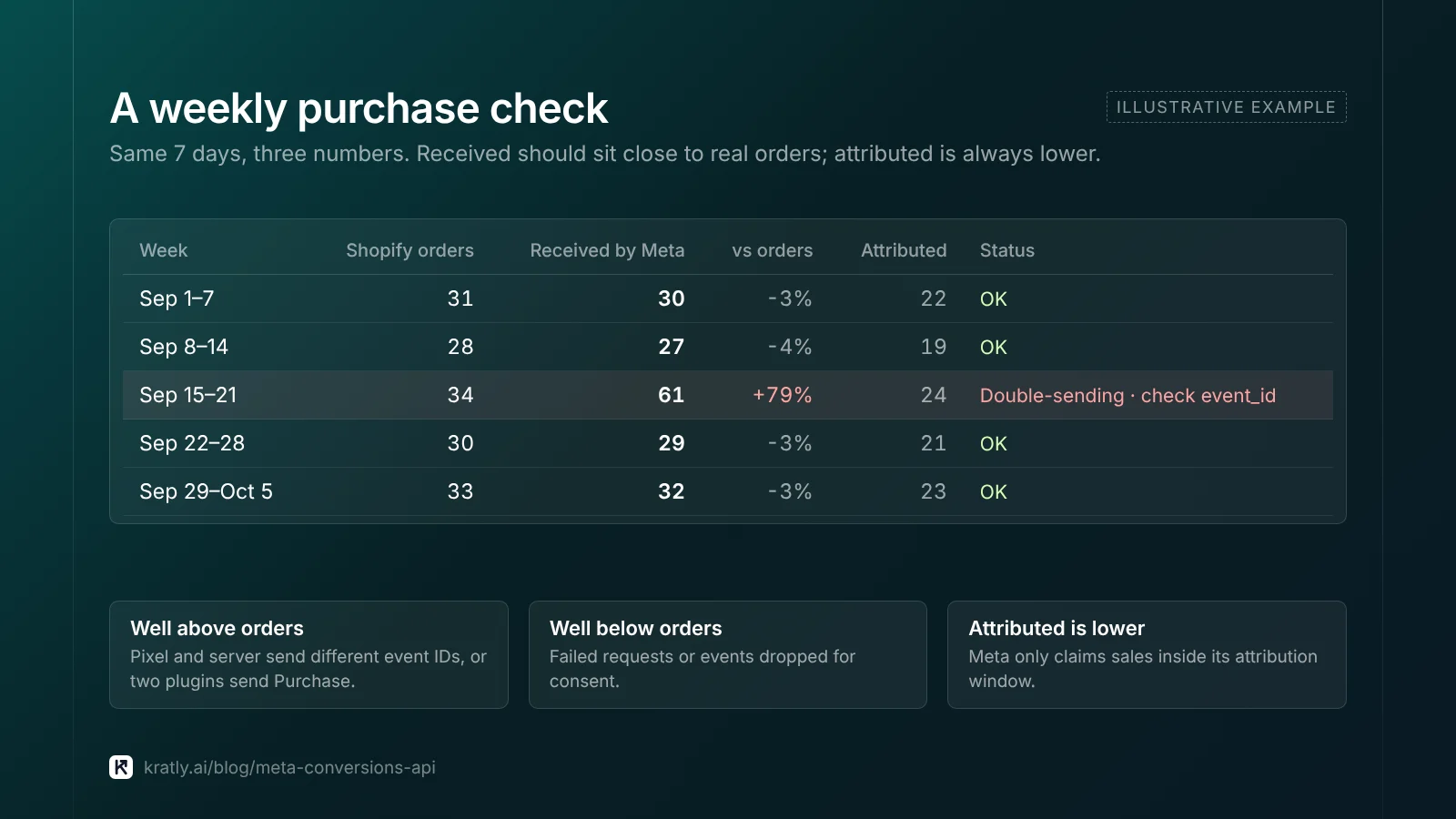
Events Manager shows events arrived, not that they're right. Weekly, compare three numbers for the same 7 days:
- Real orders from Stripe or Shopify, net of test orders.
- Purchase events received on the Events Manager Overview, after deduplication.
- Purchases attributed in Ads Manager.
Number 2 should sit close to number 1. Well above means double-sending. Well below means failed or consent-dropped events. Number 3 is always lower, since Meta only claims sales inside its attribution window.
Then compare value. Watch for cents sent as dollars (Stripe stores $49.00 as 4900), tax and shipping counted on one side only, and missing currency on non-USD orders.
I'd use the order ID or Stripe payment ID as the event_id. Then every Meta purchase traces to one real order.
What about privacy and consent?#
This isn't legal advice; ask your lawyer. A server doesn't remove consent rules. If a visitor declines ad tracking, don't send their events.
For some US state laws, Meta offers Limited Data Use, set with the data_processing_options fields. It covers California, Colorado and Connecticut. Meta warns of "an impact to campaign performance" (Meta for Developers). Consent banners are covered in our server-side tracking guide.
How to do this in Kratly#
Kratly sells in this category. Everything above works without it.
- Connect Meta Ads with Stripe or Shopify. Kratly reads Meta spend and your real orders.
- Compare purchases with revenue. See Meta's reported results next to the payments Kratly ties to each campaign.
- Spot drift. When Meta's count moves away from real orders, fix tracking before changing budgets.
- Approve suggestions. Kratly suggests budget moves; you approve each, and every change is logged and reversible.
How to judge tools like this: AI marketing agent buyer's guide. Where ad budget leaks: Google Ads wasted spend.
Questions, answered
Do I still need the Meta Pixel if I use the Conversions API?
Yes, in most cases. Meta recommends running both together and deduplicating them with a shared event ID. The Pixel captures browser signals like the fbp cookie and page context. The server catches events the browser misses. Running only one of them usually leaves you with weaker matching or missed events.
How long does Meta Conversions API setup take?
A partner app such as Shopify's can be live within an hour. The Conversions API Gateway takes longer, because you set up cloud hosting first. A direct API build usually takes a developer a few days, plus testing. In every case, plan an extra hour for the checks in this guide: test events, dedup, match quality and order counts.
What is a good Event Match Quality score?
Meta suggests aiming for 6.0 or higher out of 10. Purchase events usually score best, since you have the buyer's email and phone at checkout. If you're below that, send hashed email and phone on every event. Then pass stored fbc and fbp values, and fix formatting errors such as missing phone country codes.
Why does Meta show more purchases than I have orders?
The most common cause is double-sending. The Pixel and a server source both send Purchase with different or missing event IDs, so Meta counts each sale twice. Stacked plugins cause the same thing. Check the Event Deduplication tab and use the order ID as the event_id on both sides. Then compare the weekly count with Shopify or Stripe.
Can I send offline or phone sales through the Conversions API?
Yes. The Conversions API accepts events that don't come from a website, such as store or phone sales. Set the right action_source and send hashed customer details so Meta can match the buyer. These events must still be sent within 7 days, so set up a daily feed rather than a monthly upload.
Written by
Priyansh Kumar
Priyansh Kumar has spent more than a decade in growth, scaling brands from 1 to 10 and from 10 to 100. He now builds Kratly, an autonomous growth team that ties every campaign, page and email to the revenue it brings.
Sources
- Meta for Developers: Get started · Parameters · Server event parameters · Customer information parameters · Deduplication · Using the API · Verifying your setup · Dataset Quality API · Troubleshooting · Conversions API Gateway · Server-side GTM · Limited Data Use
- Stape: How to set up Meta Conversions API
Was this article useful?