Short answer
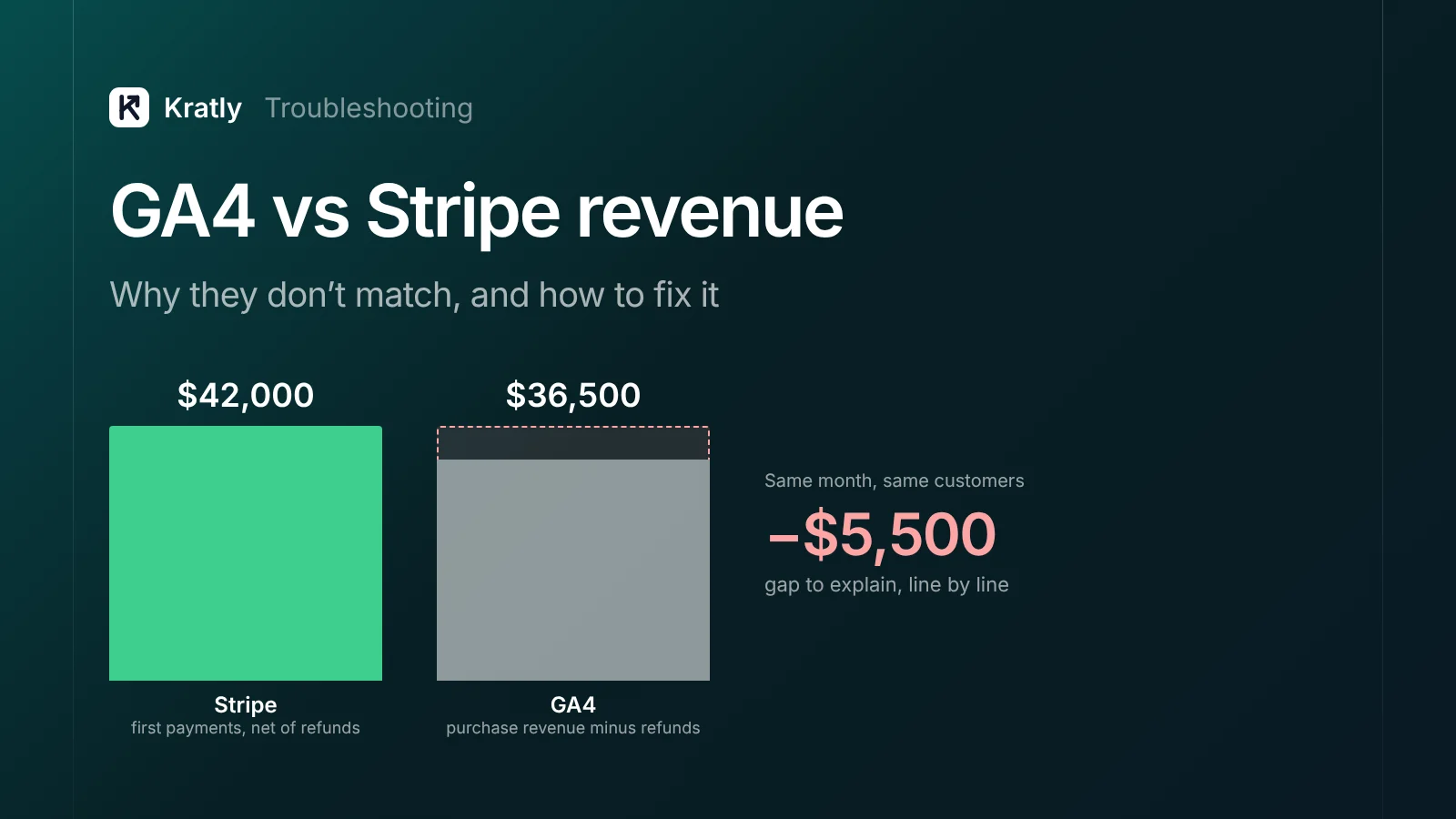
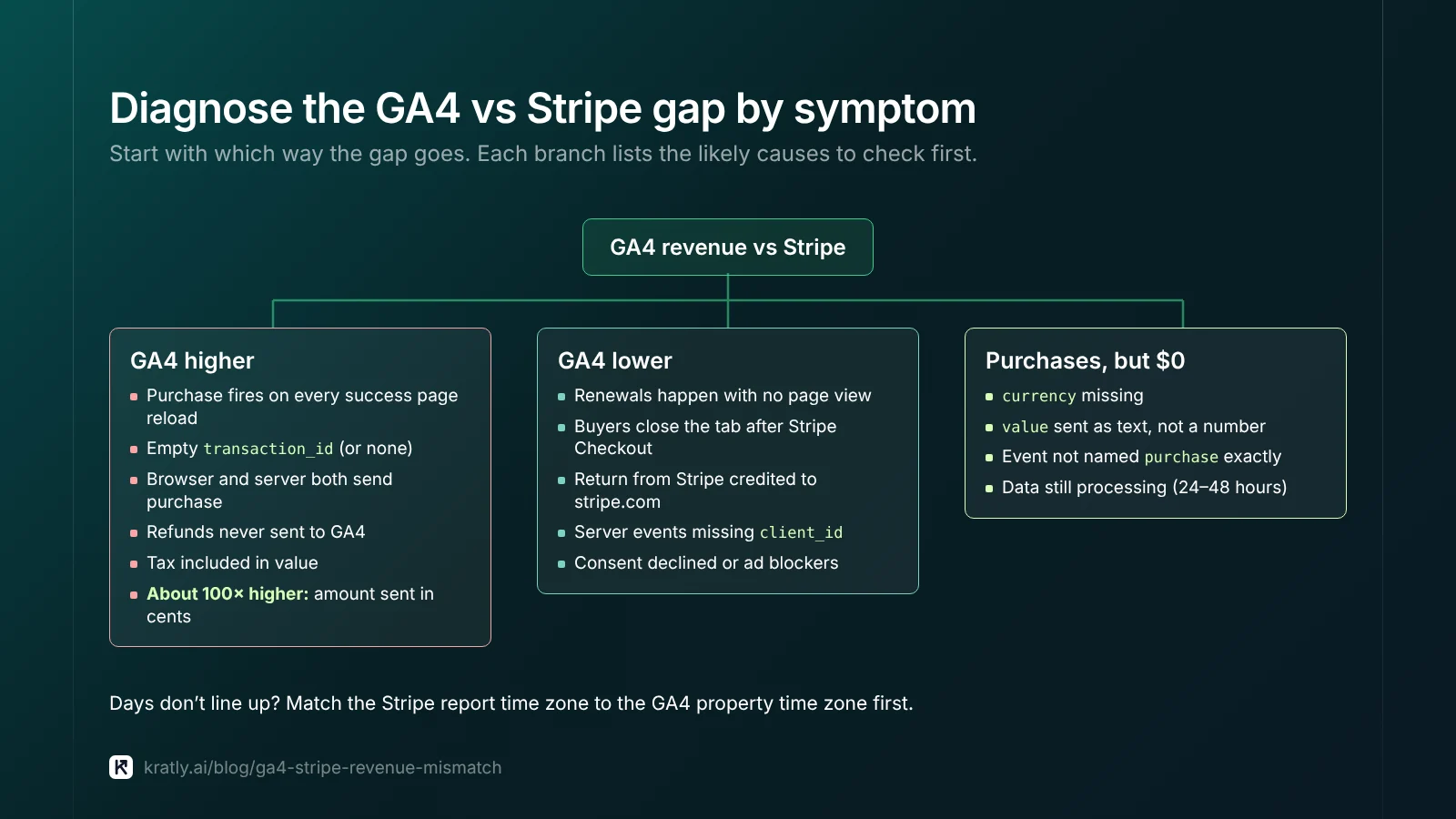
When GA4 vs Stripe revenue doesn't match, sort the gap by symptom first. GA4 higher usually means duplicate purchase events, values sent in cents, or refunds never sent. GA4 lower usually means renewals, closed tabs, consent or ad blockers. Then reconcile one closed month, net of refunds, in the same time zone.
When our team linked a Stripe checkout built on the server, GA4 revenue and Stripe revenue didn't line up.
Gaps like that usually have causes you can fix. Find your symptom below, fix the cause, then reconcile.
Why doesn't GA4 revenue match Stripe?#
A GA4 to Stripe revenue gap is the difference between purchase revenue GA4 received and the payments Stripe processed. Stripe records money that moved. GA4 records events your code sent.
Some of the gap is by design, covered in why GA4, Google Ads and Stripe never agree. This guide covers the part caused by how your purchase event is built and sent. Treat Stripe as the truth.
Diagnose the gap by symptom#
| Symptom | Most likely causes | First thing to check |
|---|---|---|
| GA4 higher than Stripe | Success page reloads, empty transaction_id, refunds not sent, tax included | Purchases per transaction_id in an exploration |
| GA4 much higher (about 100x) | Stripe amount sent without dividing by 100 | One purchase in DebugView: is value 4900 or 49? |
| GA4 lower than Stripe | Renewals, closed tabs, consent, ad blockers | Stripe split into first payments and renewals |
| GA4 shows purchases but $0 revenue | currency missing, value sent as text, wrong parameter name | The raw event in DebugView |
| Wrong currency | Code missing or wrong, multi-currency prices | currency on each event vs the Stripe charge |
| Duplicate transactions | Browser and server both send purchase | Where the event fires from |
| Days or weeks don't match | Stripe report time zone vs GA4 property time zone | Both settings, side by side |
| Small segments look wrong | Data thresholds or a narrow date range | The data quality icon on the report |
When GA4 shows more revenue than Stripe#
The purchase event fires on every success page reload#
If purchase fires when the thank-you page loads, every reload and back-button visit can fire it again. GA4 has a guard for this. "Google Analytics deduplicates purchase events with the same transaction ID" (Google Analytics Help). But two caveats from the same page:
- It "only works for data collected through web streams, not app streams."
- Don't send an empty string. GA4 "will deduplicate all purchase events that have transaction_id=''", so real sales vanish too.
Fix: use the Stripe session or invoice ID as transaction_id, and send from one place only. Our GA4 key events guide shows the server setup.
The value is in cents#
Stripe's API "expects amount values in the currency's minor unit." Stripe's own example: 1000 charges 10 USD (Stripe Docs). If your code passes amount_total straight into GA4, a $49 plan shows as $4,900.
Fix: divide by 100 for two-decimal currencies, but not for zero-decimal ones like JPY.
Refunds never reach GA4#
Stripe nets refunds out of your balance. GA4 keeps the original sale unless you tell it. GA4 has a refund event for this. It requires transaction_id, and currency is required whenever you set value (Google for Developers).
Fix: on Stripe's refund webhook, send refund with the original transaction ID.
When GA4 shows less revenue than Stripe#
Renewals never happen in a browser#
A renewal is a charge with no page view, and so is a trial that bills while the customer is away. Your site's tag never sees them.
Fix: if GA4 is for acquisition, compare it with Stripe first payments only. If you want renewals in GA4, send them from the server as a separate, unmarked event.
Stripe-hosted checkout leaves your domain#
Stripe Checkout runs on checkout.stripe.com unless you set up a custom domain (Stripe Docs). Two things go wrong:
- Some buyers never return. They pay, then close the tab, or use a method that confirms later. A browser-only
purchasemisses them. - The return looks like a new visit. The buyer arrives back from Stripe, and GA4 may credit the sale to stripe.com.
Fix for the second: add the payment domain to GA4's unwanted referrals list. Google's own example is "An ecommerce site that uses a third-party payment processor" (Google Analytics Help). Fix for the first: send purchase from Stripe's webhook, not the success page.
Server events that can't join a visitor#
Server-sent purchase events go through the Measurement Protocol. Each needs the visitor's client_id, which "should match the ID generated by the Google Analytics tag" (Google for Developers).
Add session_id as well. Google's reference says events without session_id and engagement_time_msec "may still appear in some reports," but won't count correctly in session metrics (Google for Developers).
Fix: save both IDs at checkout start, store them with the Stripe customer, and read them in the webhook.
Consent mode and ad blockers#
If a visitor declines analytics cookies, "events are not associated with a persistent user identifier" (Tag Manager Help). Modeling can fill some gaps, but only with at least 1,000 denied-consent events a day for seven days, plus enough consented users. Ad blockers stop the tag entirely.
Fix: server-side purchase events restore the revenue total, though source data stays thin.
Why is GA4 revenue tracking not working at all?#
Purchases show $0 revenue, or nothing shows at all. Check in order:
- Is the event arriving? Open DebugView and buy in Stripe test mode. No event means the tag or webhook never sent it.
- Is
currencythere? Google says "If you setvaluethencurrencyis required" (Google for Developers). Use a three-letter ISO code. Stripe returns lowercase, likeusd; I'd uppercase it to be safe. - Is
valuea number? Google lists it as type number. Send49, not"$49". - Is the name exact?
purchase, lowercase.Purchasewon't fill ecommerce reports. - Did you wait? Google says "Data processing can take 24-48 hours" and reports may change during that time (Google Analytics Help).
If Google Ads shows the same $0 problem, see why Google Ads shows conversion value 0.
Time zones, dates and thresholds#
- Stripe financial reports use your account's time zone or UTC, your choice. They also use your settlement currency (Stripe Docs).
- The Stripe Dashboard time zone changes display only, "not your reporting." API times stay in UTC (Stripe Support).
- GA4 uses the reporting time zone in Property details (Google Analytics Help).
A late-night US sale can land on different days in each tool.
Thresholds are the other trap. GA4 may withhold rows "to prevent anyone viewing a report or exploration from inferring the identity" of users (Google Analytics Help). Check the data quality icon, and widen the date range before trusting a small segment.
How to reconcile GA4 vs Stripe revenue each month#
- Pick a closed month, a few days after month end.
- Match time zones. Run the Stripe report in the same zone as your GA4 property.
- Pull Stripe net revenue. Charges minus refunds, before fees. Google says GA4
valueshould exclude tax and shipping (Google for Developers), so remove tax. - Split new from renewal. Compare GA4 to first payments only, unless GA4 receives renewals.
- Pull GA4 purchase revenue minus refunds for the same dates.
- Explain the gap line by line, with a number on each.
- Log what's left monthly. A sudden jump means something broke.
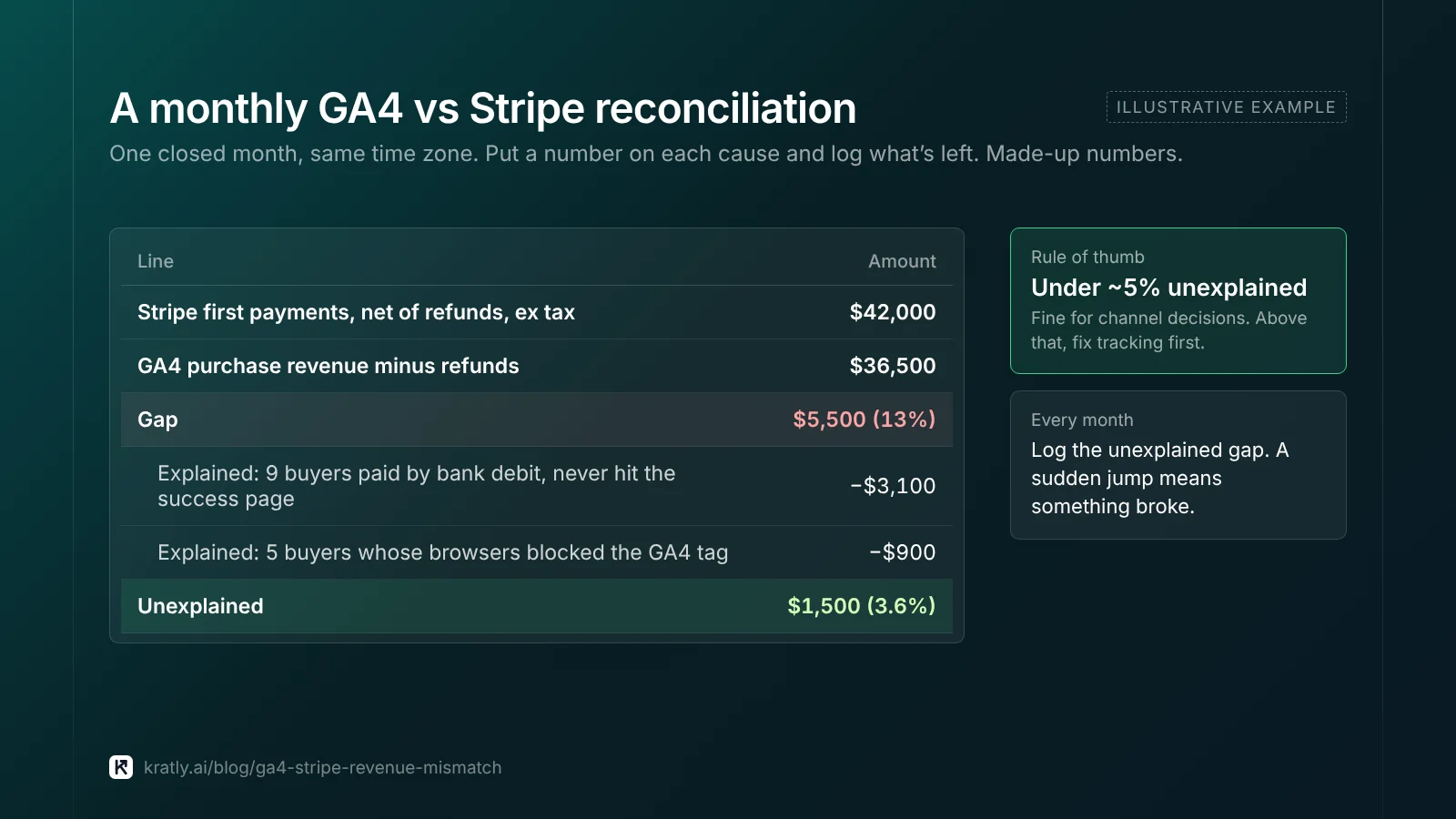
An illustrative example (made-up numbers):
| Line | Amount |
|---|---|
| Stripe first payments, net of refunds, ex tax | $42,000 |
| GA4 purchase revenue minus refunds | $36,500 |
| Gap | $5,500 (13%) |
| Explained: 9 buyers paid by bank debit, never hit the success page | −$3,100 |
| Explained: 5 buyers whose browsers blocked the GA4 tag | −$900 |
| Unexplained | $1,500 (3.6%) |
What gap is acceptable? There's no official benchmark. My rule of thumb: an unexplained gap under about 5% of Stripe revenue is fine for channel decisions. Above that, fix tracking first.
How to do this in Kratly#
Kratly sells software in this category; the method above works without it.
- Connect Stripe and add Kratly's website tracking. Kratly reads payments, renewals and refunds from Stripe, rather than from browser events.
- Connect Google Ads and Meta Ads, so spend sits next to revenue.
- Review revenue by campaign, page and email. Payments with no known source show as their own group.
- Approve suggestions. Budget changes Kratly suggests wait for your approval, and each one is logged and reversible.
Weighing GA4 against other tools? See Google Analytics alternatives for SaaS that track revenue and AI marketing agent: what it can do, what it can't, how to choose.
Questions, answered
Should GA4 revenue ever match Stripe exactly?
No. GA4 counts events your code sends, and Stripe counts money that moved. Ad blockers, declined consent and buyers who never return from checkout all leave gaps. Aim to explain the gap, not erase it. Once known causes are accounted for, a small and steady unexplained gap is fine for channel decisions.
Why is GA4 revenue 100 times higher than Stripe?
Your code is almost certainly sending Stripe's raw amount. Stripe stores amounts in the currency's smallest unit, so a $49 charge is 4900. Divide by 100 before you set GA4's value for two-decimal currencies like USD. Don't divide for zero-decimal currencies like JPY. Check one purchase in DebugView to confirm the fix.
Why is GA4 revenue tracking not working when purchases show up?
Check the raw event in DebugView. The usual cause is a missing currency parameter, which GA4 requires whenever you send value. Other causes are value sent as text instead of a number, or a misspelled event name. New data can also take 24 to 48 hours to settle in reports.
Does Stripe report in UTC?
It depends where you look. Stripe's API returns times in UTC. Financial reports let you choose your account's time zone or UTC. The Dashboard time zone setting changes only what the Dashboard displays, not reports. Match the report's time zone to your GA4 property before comparing any day, week or month.
Written by
Priyansh Kumar
Priyansh Kumar has spent more than a decade in growth, scaling brands from 1 to 10 and from 10 to 100. He now builds Kratly, an autonomous growth team that ties every campaign, page and email to the revenue it brings.
Sources
- Google Analytics Help: Measure ecommerce · Identify unwanted referrals · About data thresholds · Data freshness · Compare Analytics reports and BigQuery data
- Google for Developers: Recommended events (purchase, refund) · Measurement Protocol · Send Measurement Protocol events · Measurement Protocol reference
- Tag Manager Help: Behavioral modeling for consent mode
- Stripe Docs: Supported currencies (minor units) · Report configuration (time zone, currency) · Checkout Session object
- Stripe Support: Customize the time zone on the Dashboard
Was this article useful?