Short answer
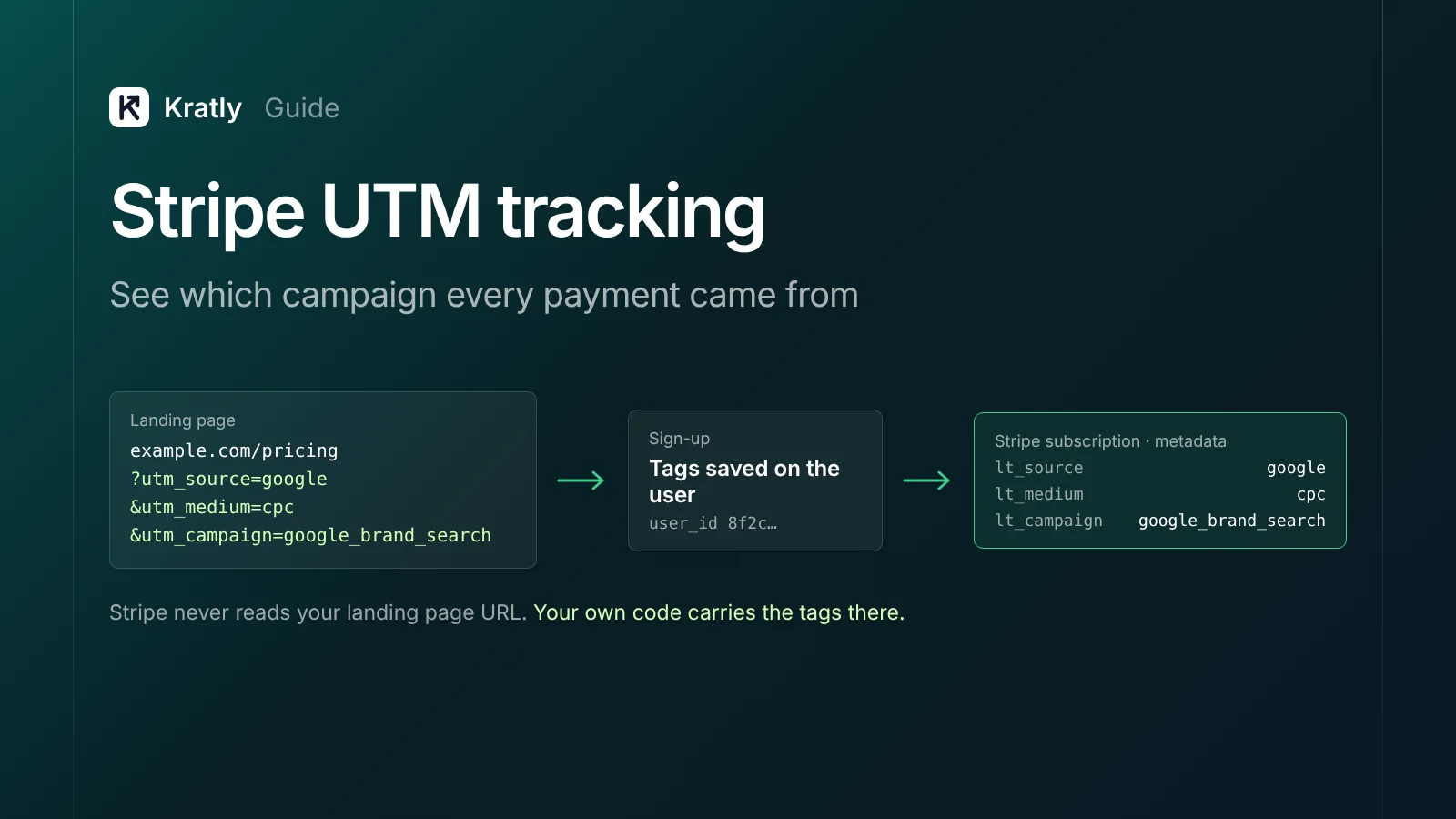
Stripe UTM tracking means saving the UTM tags from a visitor's first and latest visit, then writing them onto the Stripe objects you report from. Stripe won't read your landing page URL. Capture the tags in your own database, then copy them into Customer and Subscription metadata when you create the Checkout Session on your server.
We once linked a Stripe Checkout session built on our server, and the UTMs from the visitor's landing page were lost on the way to Stripe.
The reason: the server request that built the session never saw the landing URL.
This guide covers the UTM side only. For the full attribution chain, start with SaaS marketing attribution. For sending payments to Google Ads, see tracking Stripe conversions in Google Ads.
Why doesn't Stripe see my UTM parameters?#
Stripe UTM tracking is carrying a buyer's campaign tags from the landing page into Stripe, so payments group by campaign.
The tags live in one URL, on one page view. The payment can happen days later, on another domain. Here's where they drop off.
| Where | What happens | Fix |
|---|---|---|
| Redirects | A redirect (http to https, bare domain to www, old path to new) drops the query string | Test every ad URL end to end; keep the query string on redirects |
| The second page | Tags sit only on the first URL; the visitor clicks to pricing and they're gone | Save tags on the first page view, not at checkout |
| Sign-up now, pay later | The trial converts weeks later, from an email or the app | Store tags on the user record at sign-up |
| Server-built Checkout | Your server creates the session; that request never saw the landing URL | Look tags up by user ID and pass them in |
| Cross-domain checkout | Checkout runs on checkout.stripe.com unless you set a custom domain (Stripe Docs) | Pass tags as data, not as a URL your scripts read |
| Payment Links | UTMs only pass through to your redirect URL (Stripe Docs) | Catch them on the redirect page; see below |
| Renewals | Monthly invoices happen with no visit at all | Put tags on the Subscription so invoices inherit them |
Good news: Safari's Private Browsing strips "a subset of query parameters" used for cross-site tracking. But WebKit says parameters "only used for campaign attribution" are allowed through (WebKit, July 2024). In my reading, plain UTMs usually survive. Click IDs are less safe.
What I'd check first: click your own ad, browse two pages, sign up, and pay in test mode. If the campaign isn't on the Stripe payment, one row above is your leak.
How to capture UTMs and keep first and last touch#
The capture basics (save server-side on the first visit, copy to the user at sign-up) are in step 2 of our attribution setup. For Stripe, what matters is the exact rule for each of the two records you'll hand over:
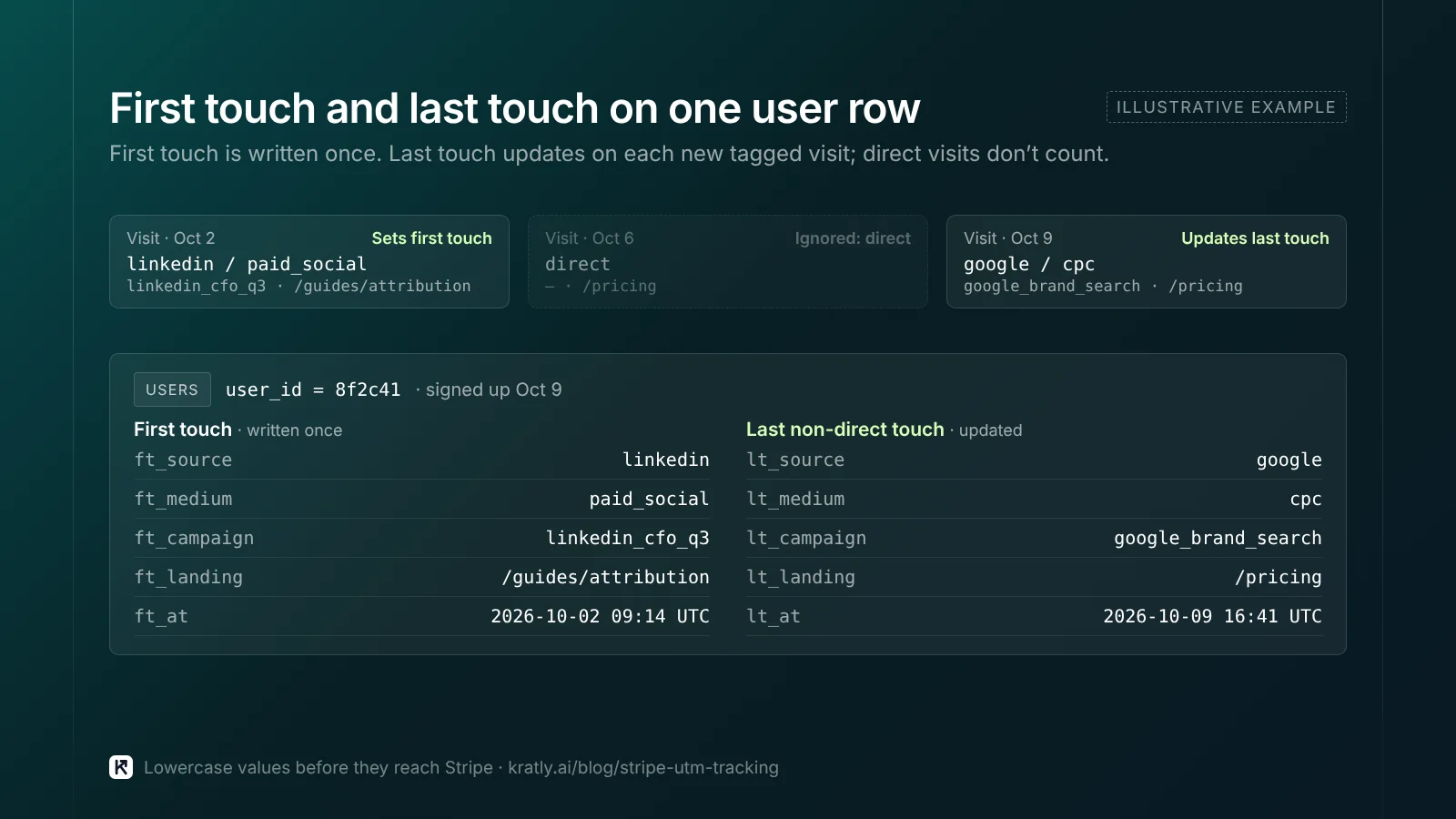
- First touch. The tags from the first tagged visit. Written once. This answers "what brought them in?"
- Last non-direct touch. The most recent tagged visit before sign-up or payment. Overwrite it each time a new tagged visit arrives. A plain direct visit doesn't count.
Keep a timestamp and landing page too. Lowercase values before they go into Stripe, or "Google" and "google" become two sources. See our UTM naming convention guide.
Why not leave this to analytics? GA4 looks back 30 days by default for acquisition key events (Google Analytics Help). Your own table has no window.
Which Stripe field should hold the UTMs?#
Two rules from Stripe's docs shape every choice. Metadata allows 50 keys, with keys up to 40 characters and values up to 500. And an object's metadata "doesn't automatically copy to related objects" (Stripe Docs).
| Field | What it's for | Copies to | Good for UTMs? |
|---|---|---|---|
client_reference_id | One string up to 200 characters to match the session to your system (Stripe API) | Stays on the session; sent in checkout.session.completed | Put your user ID here, not the tags |
Checkout Session metadata | Data about this one checkout | Nothing | Fine for one-off reports; lost for renewals |
subscription_data.metadata | Saves to the Subscription the session creates | Each invoice, as a one-time snapshot (Stripe Docs) | Yes, for subscription revenue |
payment_intent_data.metadata | Saves to the PaymentIntent in payment mode | The Charge, as a snapshot | Yes, for one-time payments |
Customer metadata | Data about the buyer | Nothing | Yes, for first touch |
My pick for a SaaS company:
client_reference_id= your user ID. It's the join key back to your database.- Customer metadata = first touch. It belongs to the person, not the purchase.
subscription_data.metadata= last touch at purchase. Each renewal invoice gets a snapshot, so revenue groups by campaign without extra lookups.payment_intent_data.metadatafor one-time payments.
Use short, fixed keys like ft_campaign and lt_campaign. Ten UTM keys plus a few IDs stays well under 50.
How to pass UTMs to a server-built Checkout Session#
This is the step that broke in our case. Don't expect the session request to know anything. Look the tags up by user and hand them over.
// Server: user clicks "Upgrade". Tags come from your DB, not the request.
const { first, last } = await db.attribution.forUser(user.id);

await stripe.customers.update(user.stripeCustomerId, {
  metadata: { ft_source: first.source, ft_medium: first.medium, ft_campaign: first.campaign },
});

const session = await stripe.checkout.sessions.create({
  mode: 'subscription',
  customer: user.stripeCustomerId,
  client_reference_id: user.id,
  line_items: [{ price: priceId, quantity: 1 }],
  subscription_data: {
    metadata: { lt_source: last.source, lt_medium: last.medium, lt_campaign: last.campaign },
  },
  success_url: 'https://app.example.com/welcome?session_id={CHECKOUT_SESSION_ID}',
});
subscription_data.metadata and payment_intent_data.metadata can only be set in a server-side call that creates the session (Stripe Support). So the server is the right place.
Stripe UTM tracking with Payment Links#
Per Stripe's docs, you can add utm_source, utm_medium, utm_campaign, utm_term and utm_content to a link URL. Values must be letters, numbers, dashes or underscores, up to 150 characters. Invalid values are "discreetly discarded" (Stripe Docs).
The catch: you must set the link to redirect after payment. Stripe then adds the UTMs to your redirect URL. The docs we checked don't say Stripe stores them on the payment itself. So if you show Stripe's confirmation page instead, the tags go nowhere you can see.
Here's how I'd make them stick:
- Set the redirect URL to your own page with
?session_id={CHECKOUT_SESSION_ID}. Stripe fills in the ID (Stripe Docs). - On that page, read the UTMs and the session ID. Send both to your server.
- On the server, save the tags against the session ID. Then copy them onto the PaymentIntent or Subscription metadata.
- Add
client_reference_idto the link URL if you know the user. It's sent in thecheckout.session.completedwebhook.
Two limits. One-time link payments use a guest customer, so there may be no Customer to tag (Stripe Docs). And if the buyer closes the tab before the redirect, the tags are gone. I'd treat link UTMs as a backup to the tags you stored at landing.
How do you read UTMs back out of Stripe?#
Four routes, from simplest to most flexible:
- Dashboard search. Stripe lets you search objects by a metadata value (Stripe Docs). Good for spot checks.
- Report exports. In financial reports, choose All columns and metadata appears in its own section. Stripe warns metadata can go missing past 100 keys, and columns aren't built at export time (Stripe Docs).
- Sigma. SQL inside the Dashboard. Sigma templates don't include metadata by default; Stripe points you to its "Metadata to column" template (Stripe Docs). Sigma is a paid add-on outside sandboxes.
- Webhooks into your own table.
checkout.session.completedcarries the session's metadata. Renewal invoices carry the Subscription's snapshot underparent.subscription_details.metadata(Stripe Docs). This is the route I'd use past a few hundred customers.
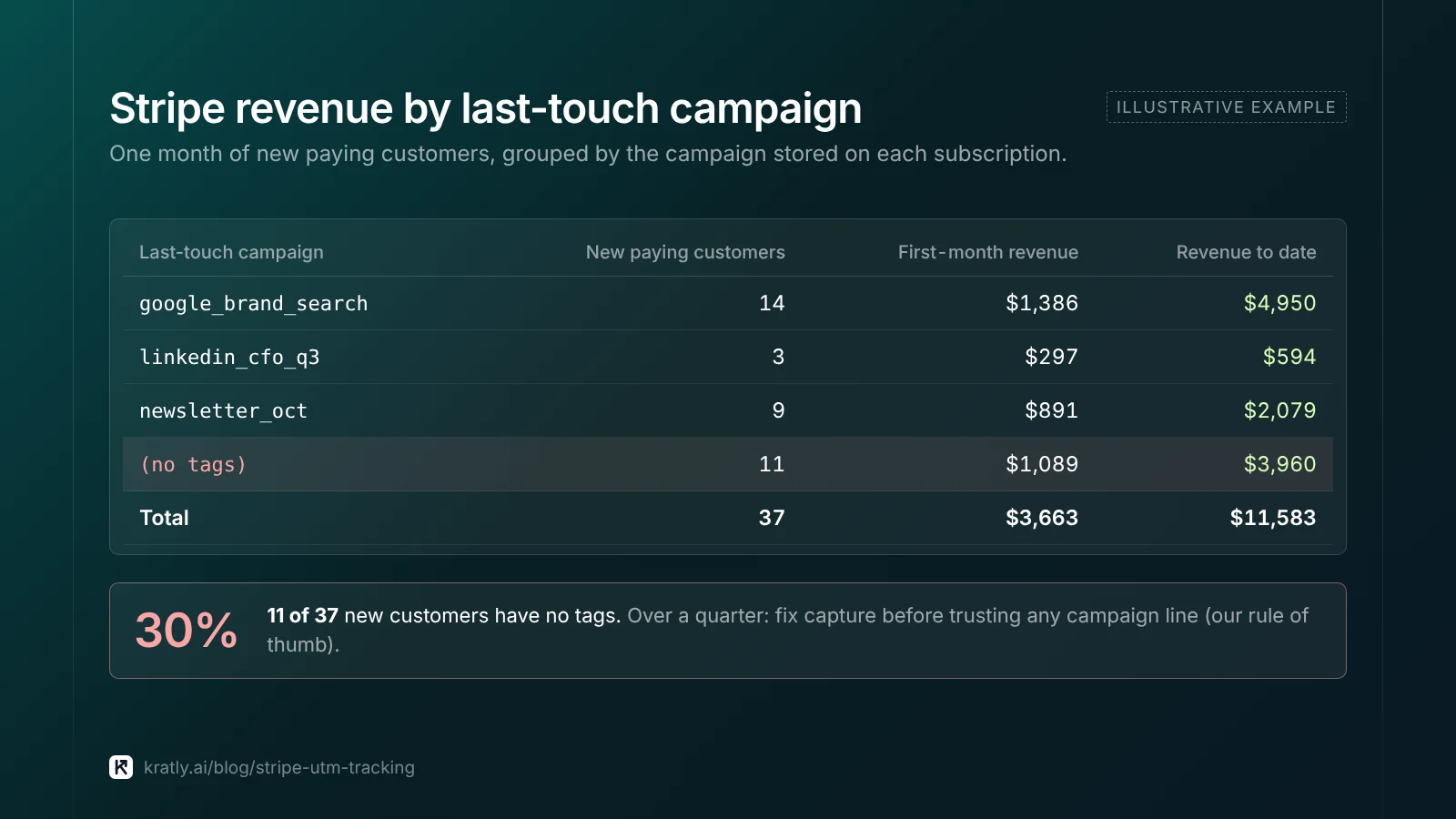
A simple monthly view looks like this. The numbers are illustrative, not from a real company.
| Last-touch campaign | New paying customers | First-month revenue | Revenue to date |
|---|---|---|---|
| google_brand_search | 14 | $1,386 | $4,950 |
| linkedin_cfo_q3 | 3 | $297 | $594 |
| newsletter_oct | 9 | $891 | $2,079 |
| (no tags) | 11 | $1,089 | $3,960 |
Keep the "(no tags)" row. If it's over a quarter of new customers, fix capture before trusting any campaign line. That threshold is my judgment.
How to do this in Kratly#
Kratly sells software in this category. Everything above works without it.
- Add Kratly's website tracking. It records UTMs and click IDs on the first visit and keeps first and last touch.
- Connect Stripe. Kratly matches each payment and renewal to the visitor who became that customer.
- Review revenue by campaign, page and email. Payments with no known source show as their own group.
- Approve suggestions. Kratly may suggest budget moves based on that revenue. You approve each one, and changes are logged and reversible.
More on tools like this in what an AI marketing agent can and can't do.
Questions, answered
Does Stripe track UTM parameters automatically?
Mostly no. Stripe Checkout Sessions you create through the API don't read the visitor's landing URL. Payment Links accept five UTM parameters, but Stripe passes them only to your redirect URL after payment. To report revenue by campaign, capture UTMs on your own site and write them into Stripe metadata yourself when you create the session.
Should I put UTMs in client_reference_id or metadata?
Use metadata for UTMs and client_reference_id for your user ID. The reference ID is one string up to 200 characters. It matches the session to your records. Metadata holds up to 50 named keys. Put first touch on the Customer and last touch on the Subscription or PaymentIntent.
Why are my Stripe renewals missing campaign data?
Because Checkout Session metadata doesn't copy to the Subscription or its invoices. Set the tags with subscription_data.metadata when you create the session. Stripe then copies the Subscription's metadata onto each new invoice as a snapshot. Renewals carry the campaign without any extra lookups.
How do I track conversions with Stripe Checkout?
Listen for the checkout.session.completed webhook. It includes the session's metadata and client_reference_id. Use the ID to find the user and their stored UTMs. For subscriptions, also handle invoice.paid so renewals count. To send those conversions into ad platforms, you need a separate upload step.
Can I see UTM data in the Stripe Dashboard?
Yes, in a limited way. You can search objects by metadata value and include metadata columns in financial report exports by choosing All columns. Sigma can turn metadata into columns with a template, but it's a paid add-on. For regular revenue-by-campaign reports, a webhook-fed table is easier to work with.
Written by
Priyansh Kumar
Priyansh Kumar has spent more than a decade in growth, scaling brands from 1 to 10 and from 10 to 100. He now builds Kratly, an autonomous growth team that ties every campaign, page and email to the revenue it brings.
Sources
- Stripe Docs: Track a payment link (UTM codes, client_reference_id) · After a payment link payment · Metadata · Create a Checkout Session · Checkout Session object · Search · Metadata in reports · How Sigma works
- Stripe Support: Using metadata with Checkout Sessions
- WebKit: Private Browsing 2.0 (July 2024)
- Google Analytics Help: Attribution lookback windows
Was this article useful?