Short answer
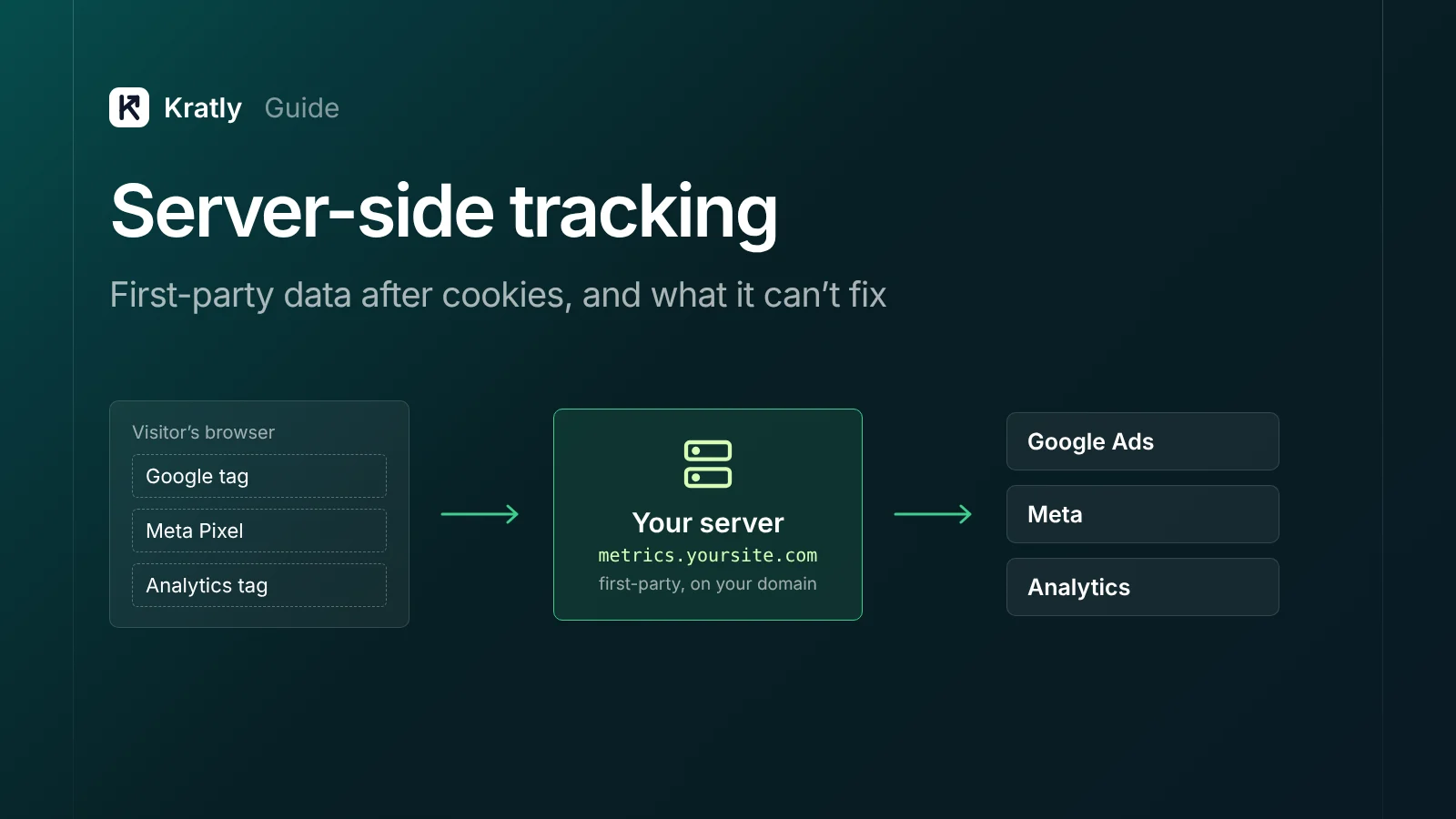
Server side tracking means your own server, not the visitor's browser, sends events to Google, Meta and analytics. The main options are server-side Google Tag Manager, Meta's Conversions API, Google's enhanced conversions, and events sent from your backend or Stripe. It recovers some data lost to Safari limits and ad blockers. It does not remove the need for consent.
Composite example: a SaaS team spends $20k a month on ads. Stripe shows 80 new customers; the ad platforms claim about 50. Many missing buyers are iPhone users who pay after a week, when the browser has forgotten their source.
Will server-side tracking fix that? Partly.
What is server-side tracking?#
Server-side tracking is a setup where events are sent to analytics and ad platforms from a server you control, instead of from tags in the visitor's browser.
With client-side tags, each tool loads its own script in the browser and sends data straight to its owner. With server-side tracking, the browser sends one stream to your server, which decides what to forward. Google describes it as moving "measurement tag instrumentation from your website or app to a server-side processing container" (Google Tag Platform).
| Client-side tags | Server-side tracking | |
|---|---|---|
| Who sends the data | The visitor's browser, one call per tool | Your server, after one call from the browser (or none) |
| Cookies | Often set by JavaScript, which Safari caps | Can be set by your server on your own domain |
| Ad blockers | Block well-known tag domains | Harder to block on your own domain, not impossible |
| Cost | Free tags | Hosting, setup and upkeep |
| Events the browser never sees | Missed (renewals, refunds, in-app payments) | Can be sent from your backend |
That last row matters most for SaaS, where payments happen in Stripe.
What are your server-side tracking options?#
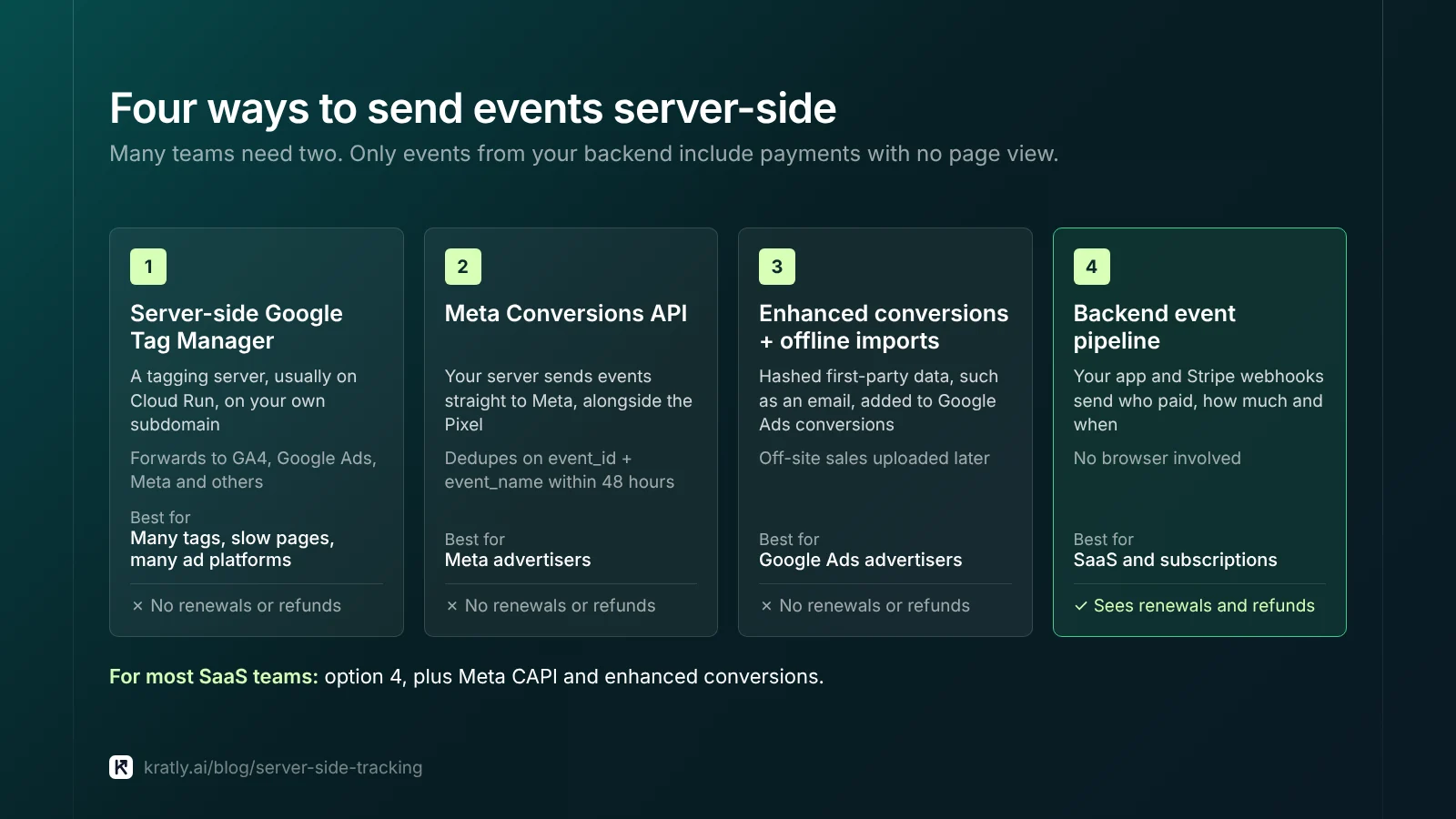
"Server-side" covers four different things. Many teams need two of them.
1. Server-side Google Tag Manager#
You run a tagging server, usually on Google Cloud Run, and point a subdomain such as metrics.yoursite.com at it. Google says custom domain support "allows you to run your tagging setup in a first-party context" (Google Tag Platform).
Server-side tags then forward events to GA4, Google Ads, Meta and others. Managed hosts such as Stape run the server for you. Best for: many tags, slow pages, or many ad platforms to feed.
2. Meta Conversions API (CAPI)#
CAPI sends events from your server straight to Meta. Meta recommends running it alongside the Pixel. It removes duplicates when event_id and event_name match within 48 hours (Meta for Developers). Setup and testing are in Meta Conversions API: set it up and check it sends real purchases.
3. Google Ads enhanced conversions and offline imports#
Enhanced conversions add hashed first-party data, such as an email, to your conversions. Google hashes it with "a secure one-way hashing algorithm called SHA256" (Google Ads Help). For sales that happen off the site, you upload them later. The upload method is in Offline conversion import in Google Ads with real Stripe revenue.
4. Your own event pipeline from backend events#
Your app and Stripe webhooks already know who paid, how much, and when. You send those events to Google, Meta and your database. No browser is involved, so this is the only option that sees renewals, refunds and in-app payments. The full chain is in SaaS marketing attribution: tie every campaign to real revenue. For apps, see web to app attribution.
What I'd pick for most SaaS teams: option 4 plus CAPI and enhanced conversions. Server-side GTM improves click data; backend events improve the revenue data you bid on.
What does server-side tracking fix?#
Safari cookie limits (ITP)#
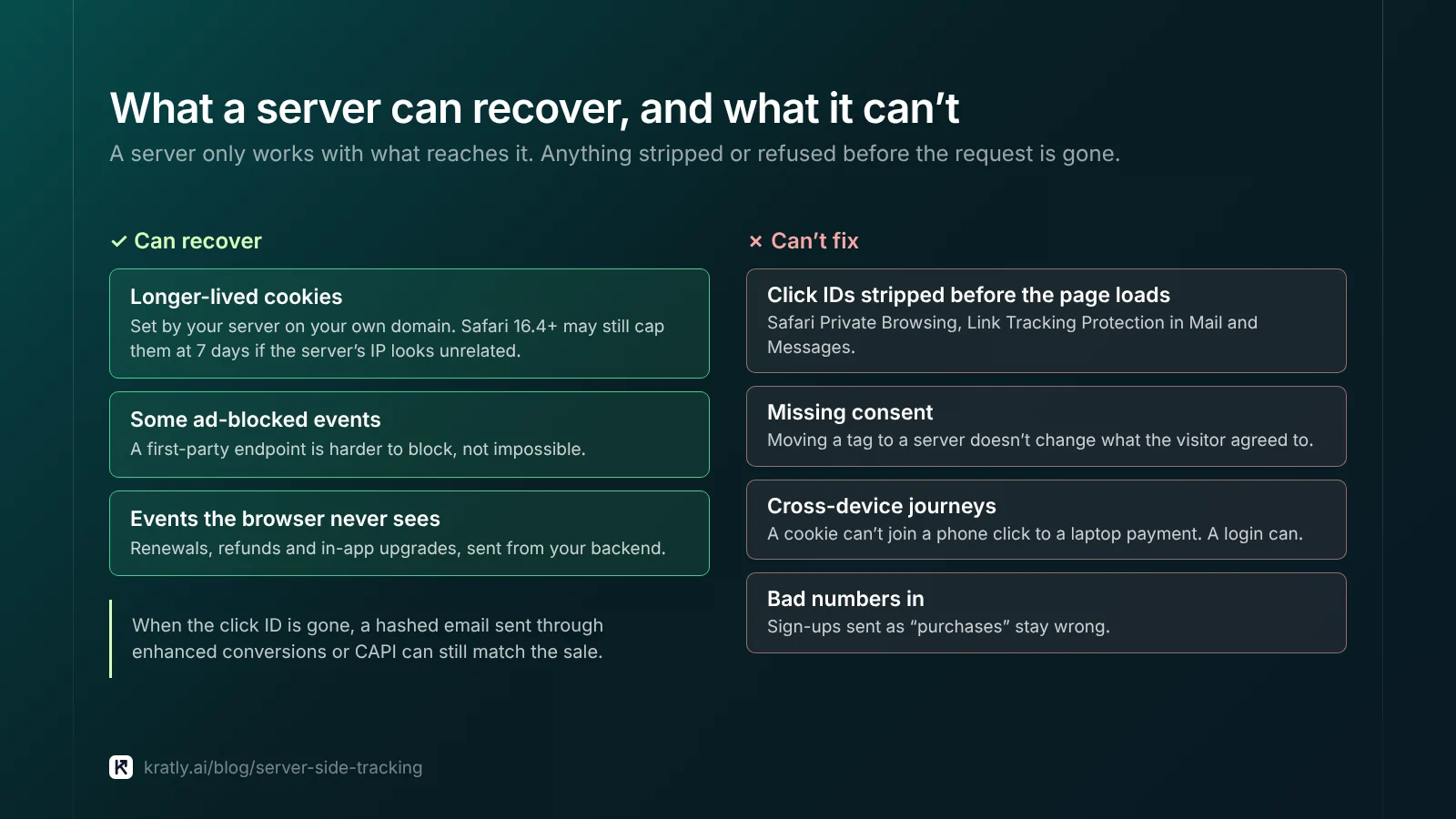
Safari caps JavaScript-set cookies at 7 days, or 24 hours after some link-decorated visits (WebKit). A 14-day trial outlasts both, and the buyer shows up as "direct."
A cookie set by your own server, on your own domain, can last longer. That's the main Safari ITP tracking benefit people buy server-side GTM for.
The catch: tracking specialists report that since Safari 16.4, server-set cookies are also capped at 7 days when the tracking server's IP looks unrelated to your site's (Simo Ahava; PPC Land). Apple hasn't documented it, so treat it as observed behavior. A subdomain pointed at Cloud Run can trip it. The fix is a reverse proxy on your main host, which is more engineering work.
Ad blockers#
About 29.5% of internet users worldwide use one at least sometimes. The figure for Americans is 32.5% (GWI data for Q2 2025, via Backlinko). A first-party endpoint is harder to catch, but common paths like /analytics can still be filtered.
Events the browser never sees#
Renewals, refunds and in-app upgrades have no page view. For subscriptions this is often a bigger gap than cookies.
What server-side tracking can't fix#
Click IDs that never arrive. If a parameter is stripped before the page loads, your server never sees it. Safari's Private Browsing removes known tracking parameters before the request is sent (WebKit). Apple's Link Tracking Protection also strips them from links opened in Mail and Messages (9to5Mac). In iOS 26 beta tests, gclid survived regular browsing; final-release behavior is unconfirmed (PPC Land). Hashed email matching through enhanced conversions or CAPI doesn't depend on the click ID, which is why I'd send it too.
Consent. Moving a tag to a server doesn't change what the visitor agreed to. More below.
Cross-device journeys. A cookie can't join a phone click to a laptop payment. A login or email can.
Third-party cookies in Chrome. There's no Chrome cookie cutoff to prepare for. In April 2025, Google said it "will not be rolling out a new standalone prompt for third-party cookies" (Privacy Sandbox blog). Your 2026 problem is Safari, blockers and consent.
Bad numbers in, bad numbers out. Sign-ups sent as "purchases" stay wrong. GA4 vs Stripe revenue: why they don't match and how to fix it walks through the common gaps.
Do you still need consent with server-side tracking?#
Yes. This is not legal advice; ask your lawyer. A server isn't a loophole. If a visitor declines ad tracking, sending their data from your server is still sending it.
Google's consent mode is the plumbing most teams use. It has four signals: ad_storage, ad_user_data, ad_personalization and analytics_storage (Google Tag Platform).
- Basic mode blocks Google tags until the visitor answers the banner. If they decline, nothing is sent.
- Advanced mode loads tags with consent denied and sends cookieless pings until consent is granted.
Your server should read the consent state, pass it on, and drop ad events for people who said no.
How much does server-side tracking cost?#
Google estimates "$30-$50 per server per month" on Cloud Run, times your minimum instance count (Google Tag Platform). A load balancer adds more.
Time is usually the bigger cost. These are my estimates, not benchmarks:
| Option | First setup | Ongoing upkeep | Hosting |
|---|---|---|---|
| Server-side GTM | 2–5 days | 2–4 hours a month | Cloud Run instances |
| Meta CAPI | 1–3 days | 1–2 hours a month | None extra |
| Enhanced conversions / uploads | 1–3 days | 1–2 hours a month | None extra |
| Own Stripe webhook pipeline | 1–2 engineer weeks | A few hours a month | Your backend |
Budget for an owner too. A tagging server nobody watches breaks quietly.
When is it not worth the effort?#
I'd skip server-side GTM, for now, if:
- You spend under about $5k a month on ads. A few missed conversions won't change a decision.
- You run a Shopify store. Its apps already send server events (Shopify Google Ads conversion tracking).
- Every sale is already a Stripe webhook you forward.
- Nobody will maintain it.
- Ads optimize for sign-ups. Fix that first.
It's worth it when Safari is a big share of traffic, you feed four or more platforms, or long trials outlast Safari's cookie cap.
How to do this in Kratly#
Kratly is one option if you'd rather not run the pipeline. We sell in this category, so weigh that.
- Connect your website tracking, Stripe, Google Ads and Meta Ads. Kratly links each payment to the campaign, page or email that brought it.
- Check the gap. Compare revenue tied to campaigns with Stripe's total.
- Review revenue by campaign, not platform-claimed conversions.
- Approve suggested changes. Kratly suggests budget moves. You approve them, and each change is logged and reversible.
Questions, answered
Is server-side tracking the same as first-party tracking?
Not exactly. First-party tracking means data is collected on your own domain. Server-side tracking means a server you control sends events onward. They usually go together, since a tagging server on your subdomain sets first-party cookies. But you can run a first-party script without a server, or a server on a third-party domain.
Does server-side tracking get around Safari ITP?
Partly. Cookies set by your server on your domain can outlast the 7-day cap on JavaScript cookies. But specialists report that since Safari 16.4, server-set cookies are also capped at 7 days when the tracking server's IP looks unrelated to your site. Serving the endpoint from your main host through a reverse proxy avoids that, at extra cost.
Does server-side tracking stop ad blockers?
It reduces their effect but doesn't stop them. Blockers mostly match known vendor domains. A first-party endpoint is harder to spot, but common paths can still be filtered. Events sent from your backend, such as Stripe payments, never touch the browser, so blockers can't affect them.
Is server-side tracking cookieless tracking?
No. Most server-side setups still use cookies, just ones your server sets on your domain. Truly cookieless measurement relies on hashed emails from logged-in users, backend payment events and modeling. Consent mode's advanced setting sends cookieless pings when consent is denied, but that's a consent feature.
Do I need server-side tracking for a small SaaS?
Usually not the full tagging server. At small budgets, send Stripe payments as server events to Google and Meta, turn on enhanced conversions and CAPI, and capture the source on sign-up. That covers what your bidding needs. Add server-side Google Tag Manager later, when Safari losses or tag count justify the upkeep.
Written by
Priyansh Kumar
Priyansh Kumar has spent more than a decade in growth, scaling brands from 1 to 10 and from 10 to 100. He now builds Kratly, an autonomous growth team that ties every campaign, page and email to the revenue it brings.
Sources
- Google Tag Platform: Server-side tagging overview · Planning infrastructure requirements and costs · Consent mode overview
- Google Ads Help: About enhanced conversions
- Meta for Developers: Deduplicate Pixel and server events
- WebKit: Intelligent Tracking Prevention 2.1 (Feb 2019) · Private Browsing 2.0 (Jul 2024)
- Privacy Sandbox blog: Next steps for Privacy Sandbox and tracking protections in Chrome (Apr 2025)
- Simo Ahava: First-party cookies and WebKit, revisited
- PPC Land: Safari cuts server-set cookies to 7 days on cloaked tracking subdomains (Oct 2026) · iOS 26 testing reveals mixed impact on Google Ads tracking parameters (Sep 2025)
- 9to5Mac: iOS 17 Link Tracking Protection (Jun 2023)
- Backlinko: Ad blocker usage and demographic statistics (updated Mar 2026, GWI data)
Was this article useful?