Short answer
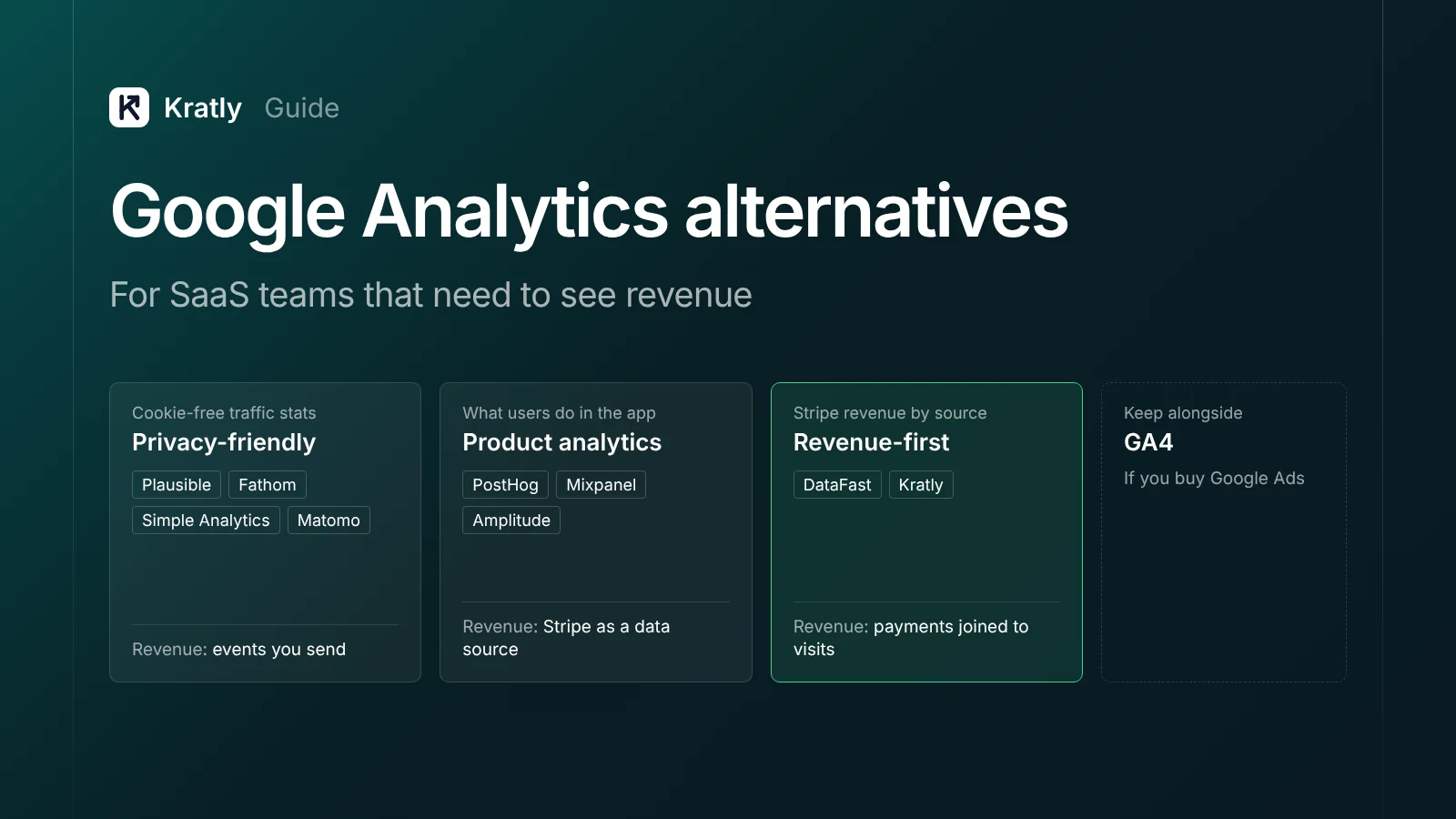
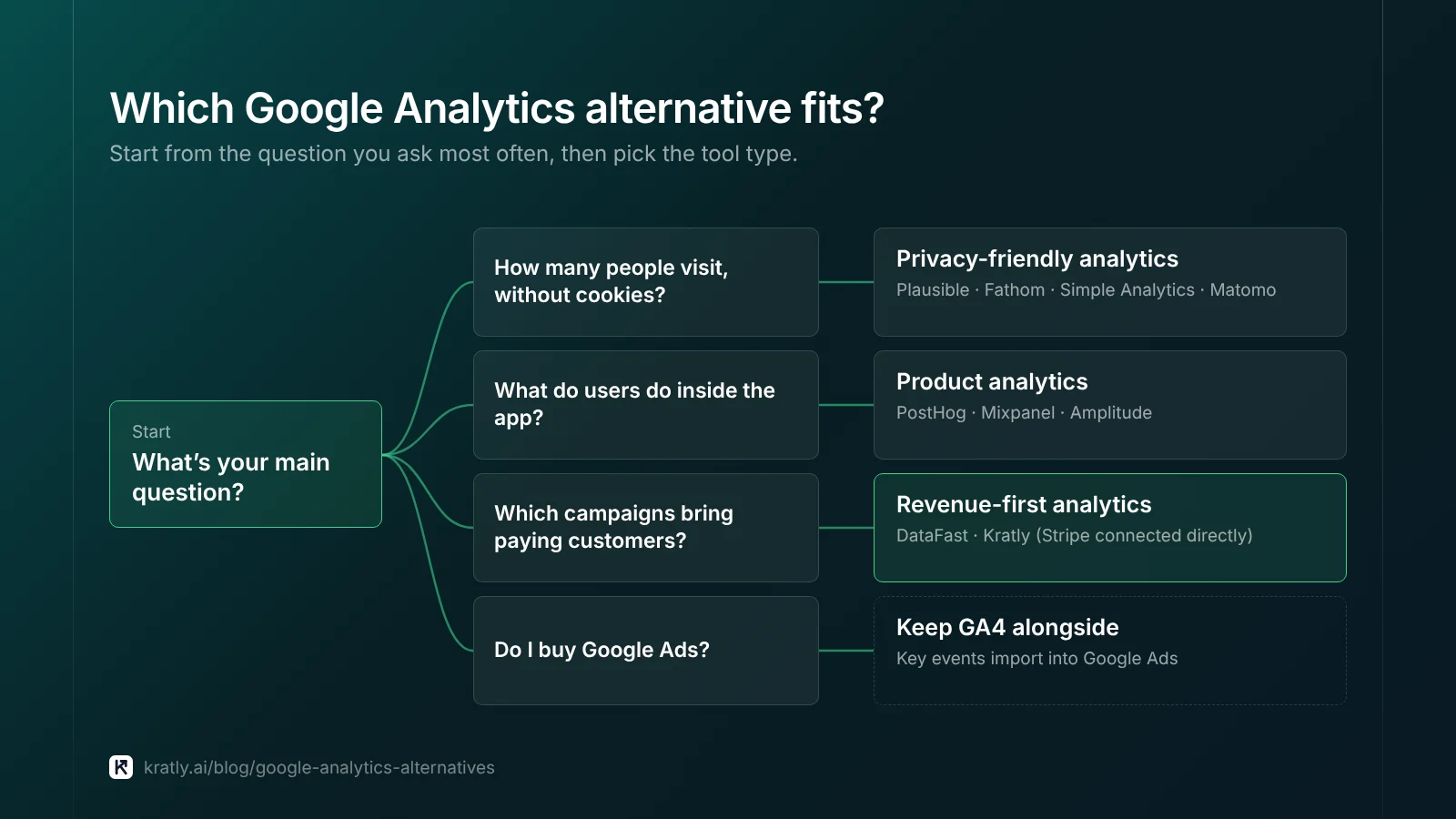
The best Google Analytics alternative depends on the job. For cookie-free traffic stats, look at Plausible, Fathom, Simple Analytics or Matomo. For product behavior with Stripe revenue, look at PostHog, Mixpanel or Amplitude. For revenue by traffic source, pick a tool that connects Stripe directly. Keep GA4 alongside if you buy Google Ads.
On February 10, 2022, France's data protection authority, the CNIL, ruled against a website using Google Analytics. It found the transfer of visitor data to the US broke the GDPR. The site got one month to comply. The CNIL suggested tools that produce anonymous statistics instead (Hunton Andrews Kurth, a law firm's summary).
That was an EU decision, and the picture has changed since. On July 10, 2023, the European Commission adopted the EU-US Data Privacy Framework. Data can now flow to US companies in the Framework without extra safeguards (European Commission). US sites face different rules again. Ask your lawyer about your markets.
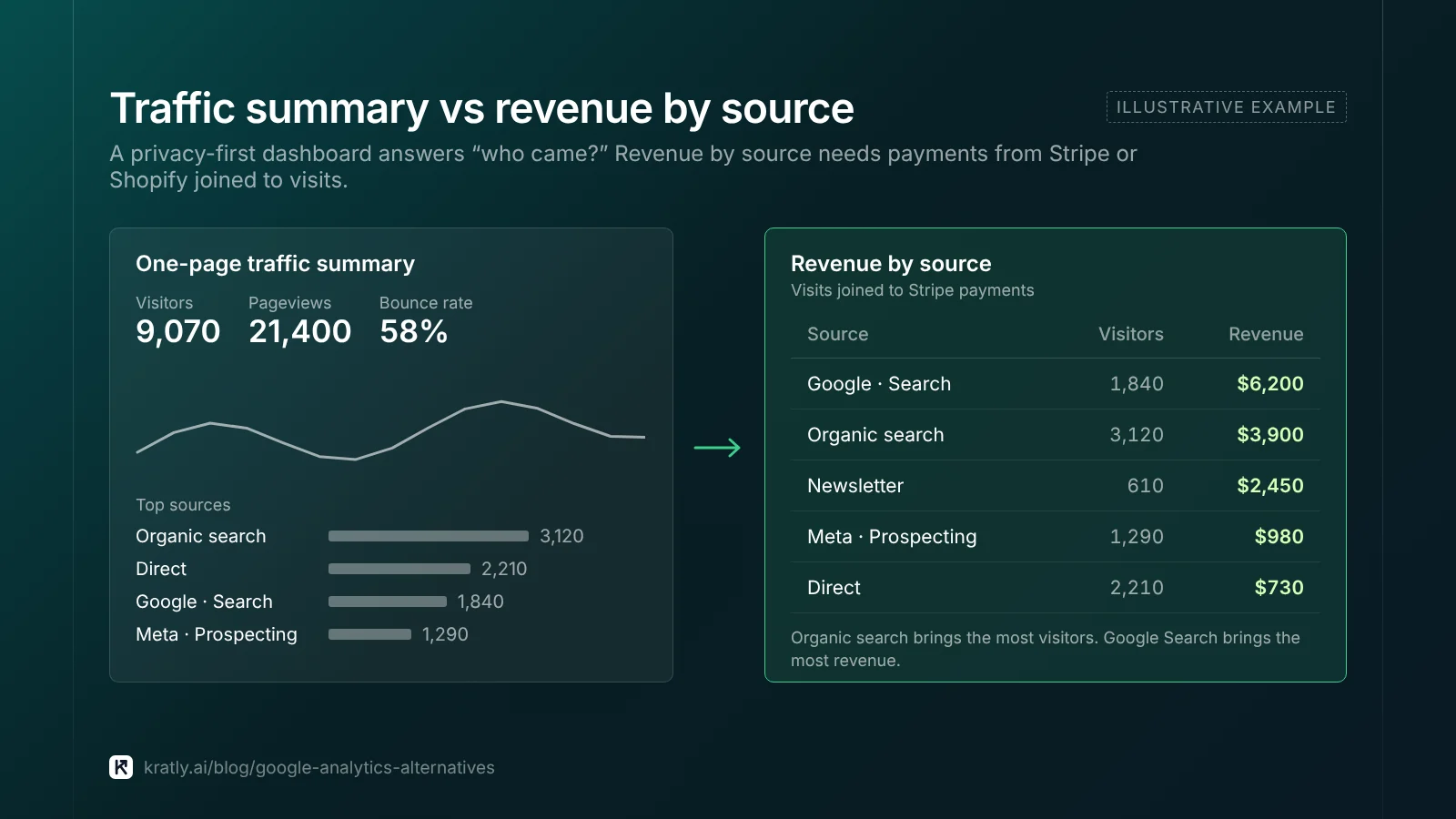
Privacy is one reason to look for a Google Analytics alternative. For SaaS founders, the bigger reason is money. GA4 often can't see the payment in Stripe. For that problem, read GA4 vs Stripe revenue: why they don't match and how to fix it first.
A note on bias: Kratly sells in this space. I've linked every vendor claim so you can check it.
What should a GA4 alternative for SaaS do?#
A Google Analytics alternative is a tool that replaces GA4 for counting visits, sources and conversions, with a different trade-off on privacy, depth or revenue.
For SaaS, I'd rank tools on three questions:
- Can it see revenue? The actual payment in Stripe or Shopify, including renewals and refunds. Not a browser "purchase" event.
- What does it need for consent? Read the vendor's wording, then ask your lawyer. A cookie banner loses visitors who decline.
- Who will use it? Marketers want sources. Product teams want funnels. Few tools do both well.
Tools that split credit across many ad touches are a different purchase; see Marketing attribution software: buyer's guide for SaaS and stores. The method behind revenue by source is in SaaS marketing attribution: tie every campaign to real revenue.
Privacy-friendly analytics: Plausible, Fathom, Simple Analytics, Matomo#
Privacy friendly analytics tools collect fewer visitor details, mostly without cookies. They fit marketing sites, blogs and docs.
Plausible#
Who it's for: content-led SaaS and small teams that want one simple dashboard.
Revenue: Plausible lets you "send monetary values alongside custom events to track revenue." You can filter revenue by source, campaign, entry page, country or device (Plausible). Its page names Shopify setup, but not a direct Stripe connection.
Consent: Plausible says "No cookie banner required" and that it doesn't use cookies.
Pricing model: subscription, with a 30-day free trial.
Fathom#
Who it's for: agencies and founders with several small sites.
Revenue: "Event and revenue tracking" is listed on every plan (Fathom). The pricing page doesn't mention Stripe.
Consent: Fathom says "No cookie banners required."
Pricing model: from $15 a month for up to 100,000 monthly pageviews and 50 sites, with a 7-day trial.
Simple Analytics#
A Dutch, EU-hosted option (European Alternatives). I couldn't confirm its revenue features or prices for this guide; check its pricing page.
Matomo#
Who it's for: teams that want to own their data on their own servers.
Revenue: Matomo has ecommerce tracking. There's a catch for consent-free use in France. Its CNIL compliance mode strips campaign parameters, rejects user IDs and recommends turning ecommerce off (Matomo CNIL self-assessment). In that mode, you can't fully tie revenue to campaigns.
Pricing model: On-Premise is "Free forever." Cloud is paid and priced by monthly hits (Matomo).
What I'd check first: does a tool keep campaign data in its strictest privacy mode? Ask every vendor.
Product analytics with Stripe revenue: PostHog, Mixpanel, Amplitude#
These track what users do inside your app. They're the better GA4 alternative for SaaS when your questions are about activation and retention.
PostHog#
Who it's for: product-led SaaS with engineers who will set it up.
Revenue: Stripe connects as a data warehouse source. PostHog then "will automatically use the data from Stripe to compute your revenue metrics." You can link Stripe customers to PostHog persons and groups (PostHog Docs). The docs recommend webhook syncing, since append-only syncs miss changed rows.
Pricing model: usage-based. The free monthly allowance includes 1M product analytics events and 1M synced warehouse rows (PostHog pricing).
Mixpanel#
Who it's for: product and growth teams that want funnels and cohorts.
Revenue: Mixpanel's Stripe guide streams Stripe webhooks through a Google Cloud Function that you deploy. Each Stripe event becomes a Mixpanel event, keyed to the Stripe customer (Mixpanel Docs). Historical data needs its warehouse connectors.
Amplitude#
Who it's for: larger product teams already using Amplitude for behavior data.
Revenue: Amplitude's Stripe source imports charges, refunds, invoices and payment intents. It matches users by metadata.user_id and email, among other fields. It can't backfill: only events after you set up the webhook arrive (Amplitude Docs). Set it up early.
I didn't verify Mixpanel or Amplitude pricing or cookie posture; check each vendor.
Revenue-first web analytics tools#
A newer group starts from the payment and works back to the visit, showing revenue by source, page and campaign.
DataFast is one example. It connects Stripe, LemonSqueezy, Polar and Shopify (DataFast Docs). Its Starter plan is $9 a month and Growth is $19, each with a 14-day trial.
DataFast says its default script "uses cookies to recognise returning visitors," so you may need a banner. Its cookieless script avoids that, but is less accurate for revenue over weeks (DataFast).
That's the core trade-off here. Tying a payment to a visit three weeks earlier means recognizing the visitor. Cookie-free tools rotate or drop that identifier.
Which Google Analytics alternative fits? A comparison table#
| Tool | Best for | Revenue from Stripe or Shopify | Consent posture (vendor's words) | Pricing model |
|---|---|---|---|---|
| GA4 | Anyone on Google Ads | Events you send; no direct Stripe link | Uses cookies | Standard version free |
| Plausible | Content-led sites | Revenue via custom events; Shopify setup | "No cookie banner required" | Subscription, 30-day trial |
| Fathom | Many small sites | Event and revenue tracking | "No cookie banners required" | From $15/mo |
| Matomo | Self-hosting | Ecommerce; limited in CNIL mode | CNIL consent-exempt mode | Free on-premise; Cloud by hits |
| PostHog | Product-led SaaS | Stripe warehouse source | Check vendor | Usage-based, free allowance |
| Mixpanel | Product teams | Stripe webhooks via your own function | Check vendor | Check vendor |
| Amplitude | Larger product teams | Stripe source, no backfill | Check vendor | Check vendor |
| DataFast | Indie SaaS | Stripe, Shopify and others | Cookies by default; cookieless option | From $9/mo |
| Kratly | SaaS and stores on Google and Meta Ads | Stripe and Shopify, by campaign, page and email | Ask us | Free trial |
My picks: a privacy-first tool for EU-heavy marketing sites, PostHog or Mixpanel for activation questions, and a revenue-first tool when ad budget is the question.
When should you keep GA4?#
Often. Dropping a free tool still has costs. Keep it if:
- You run Google Ads. You can import GA4 key events into Google Ads. They arrive as secondary conversions by default (Google Analytics Help). Many accounts depend on that link.
- You need long lookback windows. GA4 keeps a 30-day default for acquisition key events and 90 days for others (Google Analytics Help).
Limit it if EU consent rules shrink your GA4 data until it stops helping.
For most SaaS teams I'd run GA4 for Google Ads plus one alternative for the question GA4 answers badly. Either way, set up GA4 key events for SaaS so the GA4 side stays clean.
How to switch without losing data#
Run both tools in parallel for 30 days.
- Install the new tool next to GA4, with the same UTM naming convention on both.
- Export the GA4 reports you use most, by month.
- Compare visitors weekly. Expect gaps; cookie-free tools count people differently.
- Compare revenue with Stripe. The new tool's total should sit at or below Stripe's. More means double counting.
- Decide on day 30. Keep both, keep one, or keep GA4 just for Google Ads.
My estimate: two to six hours for steps 1 to 4.
How to do this in Kratly#
Kratly isn't a product analytics tool and won't replace PostHog for in-app funnels. It fits teams asking which campaigns, pages and emails bring revenue.
- Add Kratly's website tracking and connect Stripe or Shopify. Kratly ties each payment to the campaign, page or email that brought it.
- Connect Google Ads, Meta Ads and Search Console. Spend and search data sit next to revenue.
- Compare against Stripe for 30 days. Run it beside GA4 and check totals weekly, as above.
- Review suggestions. Kratly suggests budget changes. You approve them, and each change is logged and reversible.
LinkedIn, TikTok and Reddit Ads are coming soon. Until then, tag that traffic with UTMs and upload its spend as a CSV. Compare us fairly in Kratly alternatives and comparisons: which growth tool fits. For AI tools, see AI marketing agent: what it can do, what it can't, how to choose.
Questions, answered
What is the best Google Analytics alternative for SaaS?
It depends on your main question. For simple, cookie-free traffic stats, Plausible or Fathom are common picks. For product behavior, PostHog, Mixpanel or Amplitude go deeper and can pull in Stripe data. For revenue by campaign, choose a tool that connects Stripe directly. Many SaaS teams keep GA4 too, mainly for Google Ads.
Is there a free GA4 alternative?
Yes. Matomo On-Premise is free if you host it yourself, though servers and upkeep cost time. PostHog has a free monthly allowance, including 1M product analytics events. Free tiers change often, so check each pricing page before you plan around one. Also count the setup hours, which are rarely free.
Do privacy friendly analytics tools need a cookie banner?
Plausible and Fathom both say no cookie banner is required. Matomo offers a CNIL mode meant for consent exemption in France, with limits. DataFast says its default script uses cookies, so you may need a banner. These are vendor statements, not legal advice. Check them with your lawyer for your markets.
Can I track Stripe revenue without Google Analytics?
Yes. PostHog connects Stripe as a data source, and Amplitude has a Stripe source. Mixpanel documents a webhook setup. Revenue-first tools such as DataFast, and Kratly, connect Stripe and show revenue by source. Whichever you use, compare its revenue total with Stripe. It should never claim more than you earned.
Written by
Priyansh Kumar
Priyansh Kumar has spent more than a decade in growth, scaling brands from 1 to 10 and from 10 to 100. He now builds Kratly, an autonomous growth team that ties every campaign, page and email to the revenue it brings.
Sources
- European Commission: Adequacy decision for the EU-US Data Privacy Framework (Jul 10, 2023)
- Hunton Andrews Kurth: French CNIL rules EU-US data transfers through analytics cookie unlawful (Feb 10, 2022)
- Google Analytics Help: Import key events into Google Ads · Attribution lookback windows
- PostHog Docs: Stripe payment platform · Pricing
- Mixpanel Docs: Stripe integration
- Amplitude Docs: Stripe source
- Matomo: CNIL consent exemption self-assessment (Apr 2026) · Pricing
- Vendor pages: Plausible for ecommerce · Fathom pricing · DataFast payment providers · DataFast GDPR · Simple Analytics pricing
- European Alternatives: Simple Analytics profile
Was this article useful?