Short answer
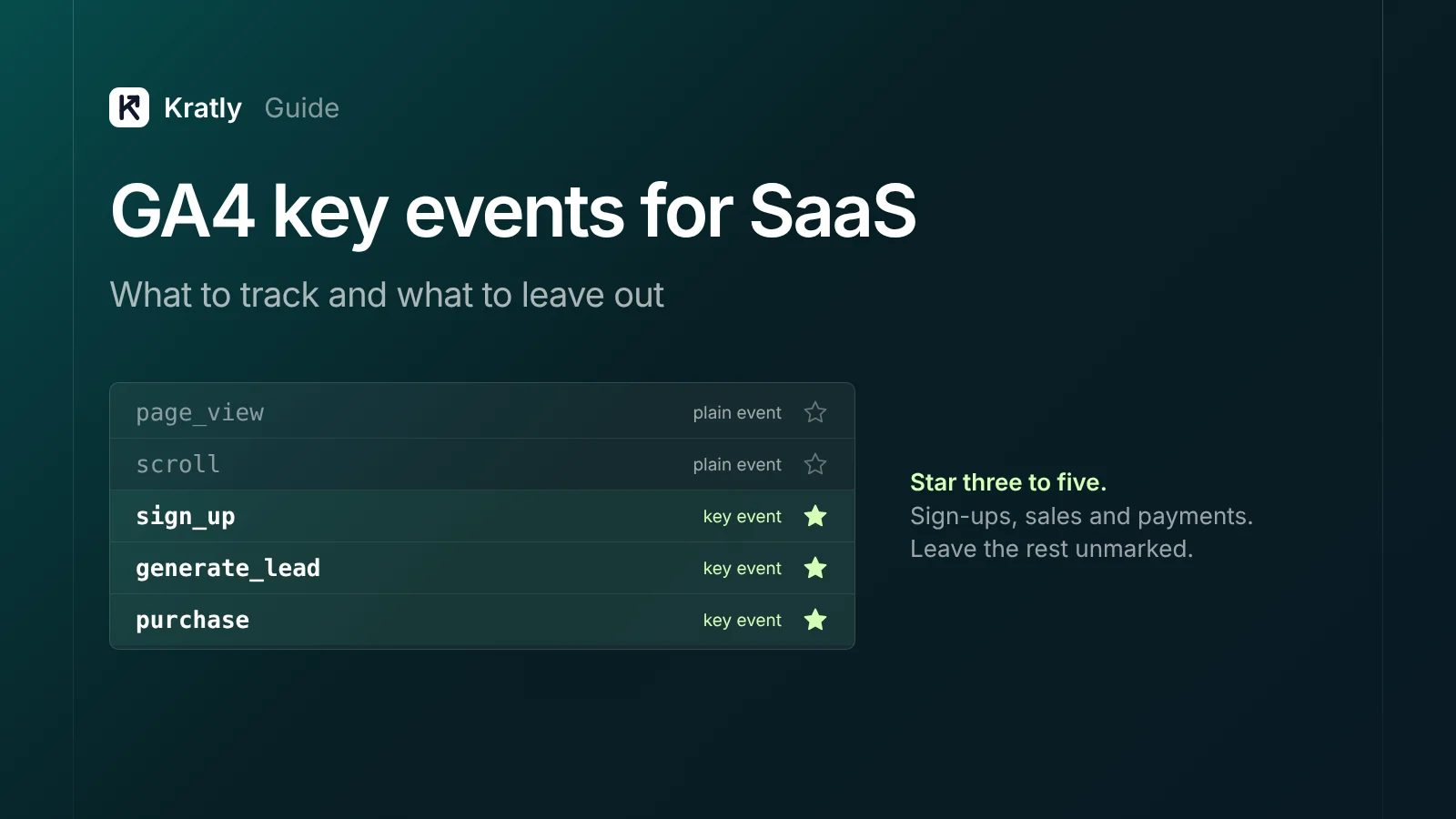
The GA4 key events for SaaS should be three to five actions. Use sign_up, generate_lead for demo requests, purchase for the first paid invoice, and maybe one activation event. Send purchase from Stripe on your server with a unique transaction_id. Leave page views, scrolls, logins and session starts unmarked.
In March 2024, Google's Ads Liaison Ginny Marvin explained a change that confused many teams: "Conversions in the report and explore modules will become key events and retain the exact same measurement capabilities" (Search Engine Journal).
The name changed. The job didn't. The key events you pick still decide what your reports call success. If you star page_view, every visit looks like a win. If you never star a payment, GA4 can't tell you which channel brings customers.
Below: what to mark, what to skip, and how to send Stripe payments without double counting.
Key events vs conversions in GA4: what changed#
A GA4 key event is an event you star because it marks an action that matters to your business, like a sign-up or a payment.
Google's definition is short: a key event "measures an action that's particularly important to the success of your business" (Google Analytics Help).
Before March 2024, GA4 called these "conversions." Google Ads also used "conversions," and the two numbers rarely matched. So Google renamed the GA4 version. Its help page now says important events "are now called 'key events'" (Google Analytics Help).
In GA4 today, the two words mean different things:
- Key event: an event you starred in GA4. It's for analyzing traffic, behavior and journeys.
- Conversion: a Google Ads conversion. You create it from a key event, and it's shared between Google Ads and GA4 (Google Analytics Help).
The flow is: event → key event → conversion. So a key event never touches your ad bidding unless you make it a conversion. Your GA4 list can be a little wider than what Google Ads optimizes for.
The GA4 key events SaaS teams should mark#
Use Google's recommended event names where one fits. Google says you "should send recommended events with their prescribed parameters to get the most details in your reports" (Google Analytics Help).
| Action in your funnel | Event name | Key event? | Notes |
|---|---|---|---|
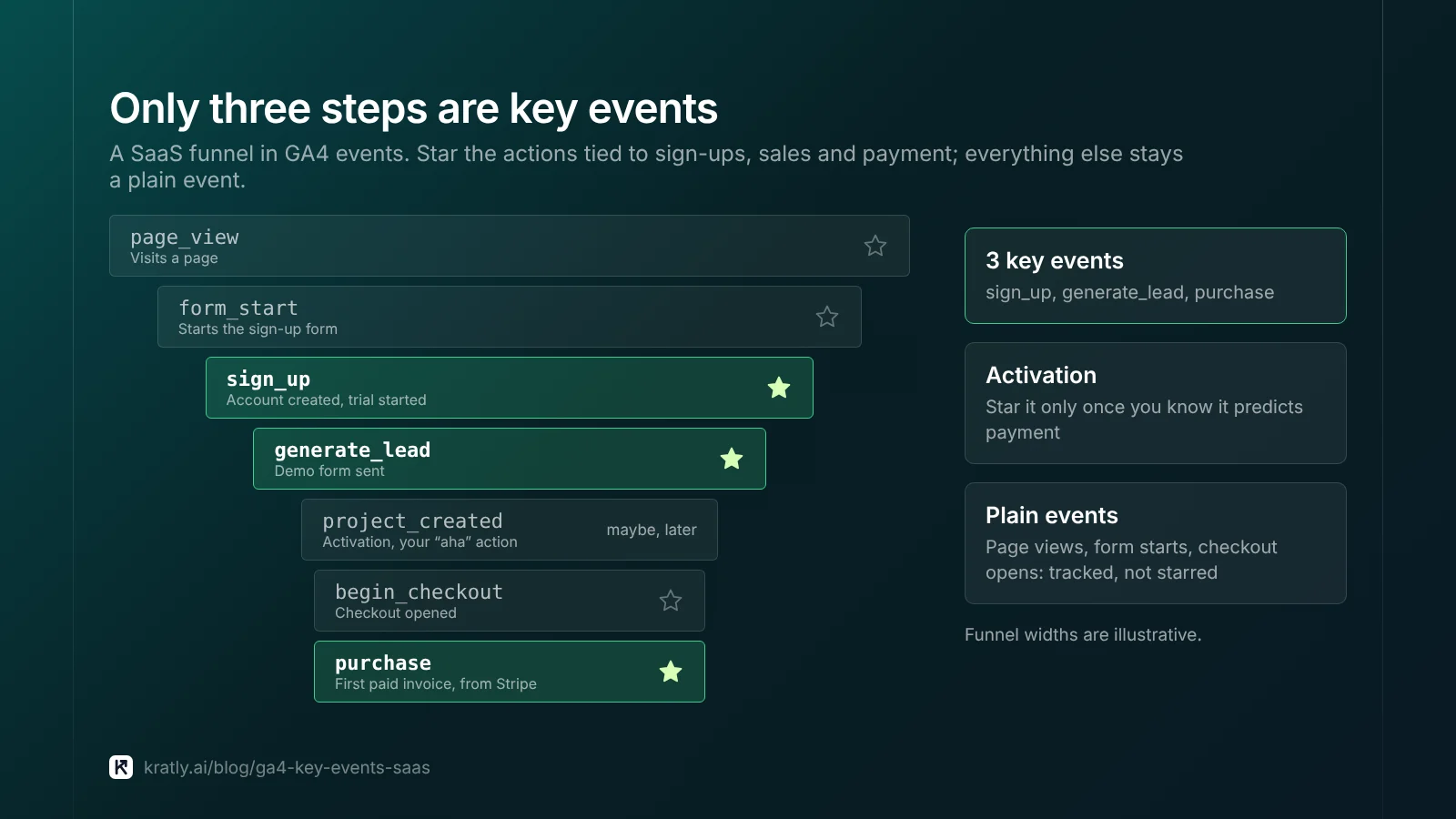
| Account created / trial started | sign_up | Yes | Add a method parameter (email, google) |
| Demo or sales form sent | generate_lead | Yes, if you sell through sales | Use qualify_lead and close_convert_lead later in the funnel |
| First paid invoice | purchase | Yes | Server-side from Stripe, with transaction_id, value, currency |
| Activation (your "aha" action) | Custom, e.g. project_created | Maybe | Only if it predicts payment in your data |
| Checkout opened | begin_checkout | Usually no | Track it; star it only if checkout drop-off is your main problem |
| Lead becomes customer (sales-led) | close_convert_lead | Yes | Send from your CRM, server-side |
What I'd start with: sign_up, purchase, and generate_lead if you have a demo form. Add activation once you know which action predicts paying.
When I'd do the opposite: if you're sales-led with a 90-day cycle, purchase will be rare and late. Then qualify_lead deserves to be a key event too, because it's the earliest signal you can act on within a month.
There's a ceiling, too. A standard property can mark up to 30 key events, and Analytics 360 up to 50 (Google Analytics Help). If you're near it, the list has lost meaning.
Events to leave unmarked#
GA4 collects many events for you. Most should never be key events. Any event "can become a key event," but that doesn't mean it should (Google Analytics Help). Google's own example: pick generate_lead for a finished sign-up form rather than scroll for someone reading it (Google Analytics Help).
Leave these unmarked:
page_view,session_start,first_visit,user_engagement: they happen on almost every visit, so every channel looks like it converts.scroll,click,file_download,video_progress: interest, not intent to pay.login: it measures existing users. It inflates "key events" for channels your customers already use, like direct and email.form_start: half-finished forms are noise.
Each extra key event dilutes "session key event rate" in acquisition reports. Your team then argues over a number that doesn't track revenue.
How to mark a key event#
You need Editor access or above. In GA4 (Google Analytics Help):
- Go to Admin › Data display › Events.
- Find the event on the Recent events tab.
- Click the star next to it.
For an event GA4 hasn't received yet, click + Create event, name it, and turn on Mark as key event. You'll pick a default value and a counting method. Use "once per session" for forms people may submit twice.
Marking only affects data from that moment on, never history. It can take up to 24 hours to show in standard reports. Log the date of every change.
Send Stripe payments as a GA4 purchase event#
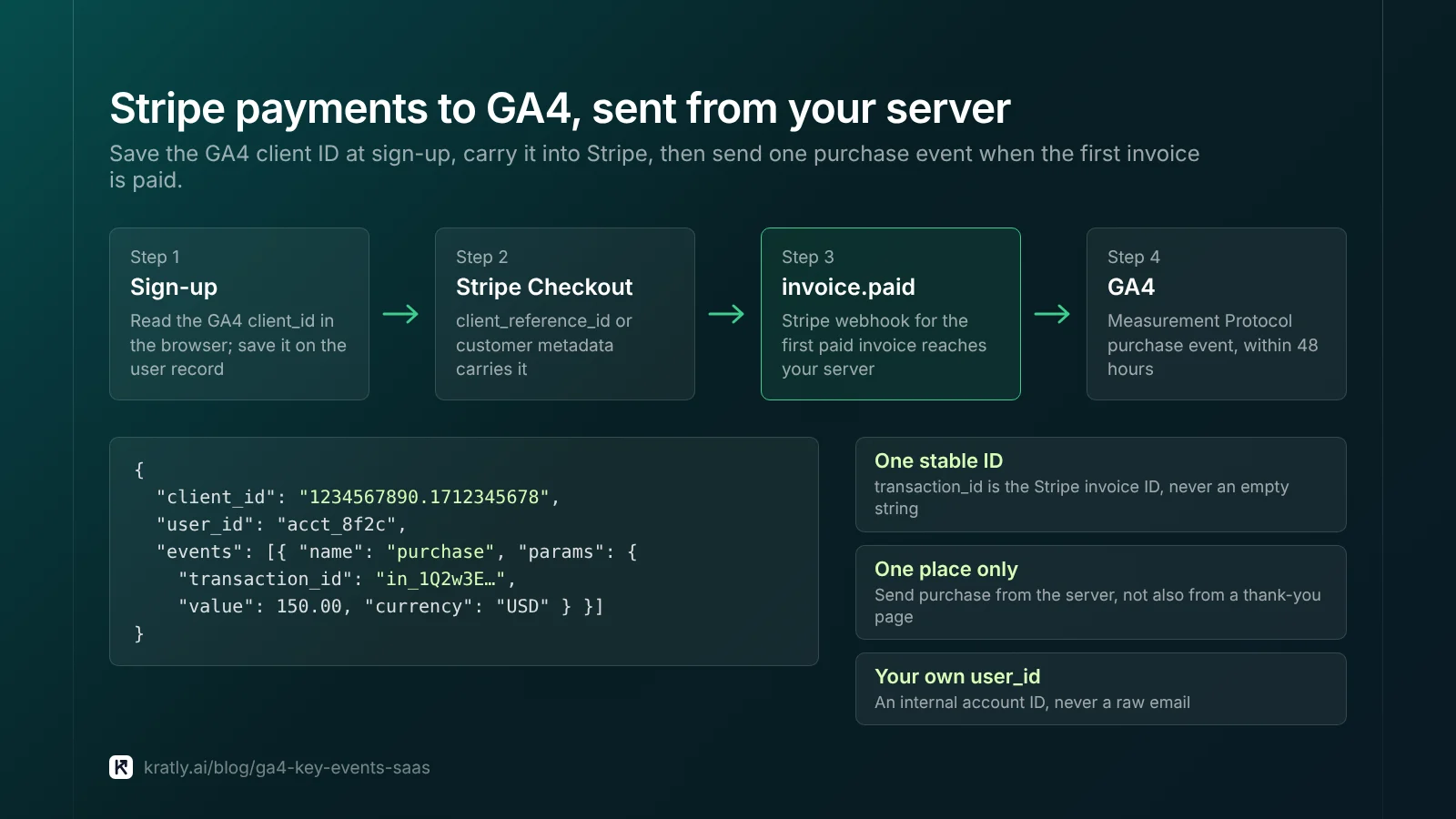
The browser can't see a Stripe renewal or a payment that happens after a trial. Your server can. So send the GA4 purchase event from Stripe, using the Measurement Protocol.
Google says the Measurement Protocol is "intended to supplement, not replace" your normal tagging (Google Developers). So keep gtag or Tag Manager on the site, and add server events on top.
How to wire it:
- Save the GA4 client ID at sign-up. The
client_id"should match the ID generated by the Google Analytics tag" (Google Developers). Read it in the browser and store it on the user record. - Copy it into Stripe. Put it in customer metadata or the Checkout
client_reference_id(up to 200 characters) (Stripe Docs). Metadata doesn't copy across related objects, so set it where your webhook will read it (Stripe Docs). - Send
purchaseon the first paid invoice. Includetransaction_id(the Stripe invoice ID),value,currency, and youruser_id. - Send it right away. Google says events should arrive "within 48 hours" of the original timestamp, or attribution may not work as expected. Backdating is capped at 72 hours (Google Developers).
Avoid double counting. "Google Analytics deduplicates purchase events with the same transaction ID," but only for web streams. Never send an empty string as the ID (Google Analytics Help). My advice: send purchase from one place only, the server. Don't also fire it on a thank-you page.
Use User-ID. User-ID links a person's activity across devices with your own ID. It must not contain anything a third party could use to identify them, like a raw email. The limit is 256 characters (Google Analytics Help). Use your internal account ID.
Renewals: track or skip? I'd send renewals as a separate, unmarked event, or not at all. Renewal revenue belongs to the customer, not to last month's ad click. Keep lifetime value in Stripe, where it's exact. The trade-off: GA4 revenue totals will look smaller than Stripe's, and your team should know why.
New build? Google now points new server-to-server integrations to the Data Manager API. The plan is the same.
Key events and Google Ads bidding#
If you import GA4 key events into Google Ads, they arrive as secondary actions by default. Google does this "to prevent counting the same event twice for bidding" (Google Analytics Help). Secondary actions are reported but don't drive bids unless you change them (Google Ads Help).
What I'd do: let Google Ads bid on paid customers, not sign-ups. The cleanest route is sending Stripe payments to Google Ads directly. See how to track Stripe conversions in Google Ads. Keep sign_up as a secondary action for reporting.
When I'd do the opposite: with fewer than a handful of payments a month, Smart Bidding has too little to learn from. Bid on sign_up for now, and judge campaigns on Stripe revenue by hand.
If campaigns show conversions but no money, read why Google Ads shows $0 conversion value. It's often a missing value or currency on the purchase event.
Key events also need clean traffic labels; see our UTM naming convention guide. For the bigger picture, start with SaaS marketing attribution: tie every campaign to real revenue.
How to do this in Kratly#
Kratly helps with the part GA4 sees poorly: which payments came from which campaign.
- Connect your ad accounts, your site and Stripe. Kratly matches paying customers to the campaigns, pages and emails that brought them.
- Compare sign-ups with payments. Kratly shows revenue and cost per paying customer by campaign, next to sign-ups.
- Review the flags. Kratly flags campaigns that bring sign-ups but no paying customers.
- Approve changes. Every change Kratly suggests waits for your approval and is logged, so you can undo it.
Questions, answered
Are GA4 key events the same as conversions?
Not anymore. Since March 2024, important events you star in GA4 are called key events. "Conversions" now means Google Ads conversions. You create them from key events, and they're shared between Google Ads and GA4. So a key event never affects your ad bidding until you turn it into a conversion.
How many key events can I have in GA4?
Up to 30 in a standard property and 50 in Analytics 360. For a SaaS company, three to five is plenty: sign-up, demo request, first payment and possibly one activation event. Each extra key event dilutes "session key event rate," so every channel starts to look like it converts.
Should sign_up be a key event?
Yes. It's your earliest strong signal and fires often enough to compare channels. But don't let ad platforms bid on it if you have enough payments. Sign-ups that never pay can look great in reports. Keep sign_up as a secondary action in Google Ads, and bid on paid customers instead.
How do I send Stripe purchases to GA4?
Save the GA4 client ID at sign-up and store it with the Stripe customer. Then send a purchase event from your webhook through the Measurement Protocol, with the invoice ID as transaction_id, plus value and currency. Send it within 48 hours, or attribution may not work as expected.
Why is my GA4 purchase event counted twice?
Usually because it fires from both the browser and the server, or with different IDs. GA4 removes duplicates with the same transaction ID on web streams only. Send purchase from one place, the server, with one stable ID. Never send an empty string as the ID.
Written by
Priyansh Kumar
Priyansh Kumar has spent more than a decade in growth, scaling brands from 1 to 10 and from 10 to 100. He now builds Kratly, an autonomous growth team that ties every campaign, page and email to the revenue it brings.
Sources
- Google Analytics Help: About key events · Events and key events · Conversion · Mark events as key events · Recommended events · Measure ecommerce · User-ID · Advertising and attribution
- Google Developers: Measurement Protocol · Send Measurement Protocol events
- Google Ads Help: Primary and secondary conversion actions
- Search Engine Journal: Google unifies conversion reporting across Ads and Analytics (March 21, 2024)
- Stripe Docs: Create a Checkout Session · Metadata
Was this article useful?