Short answer
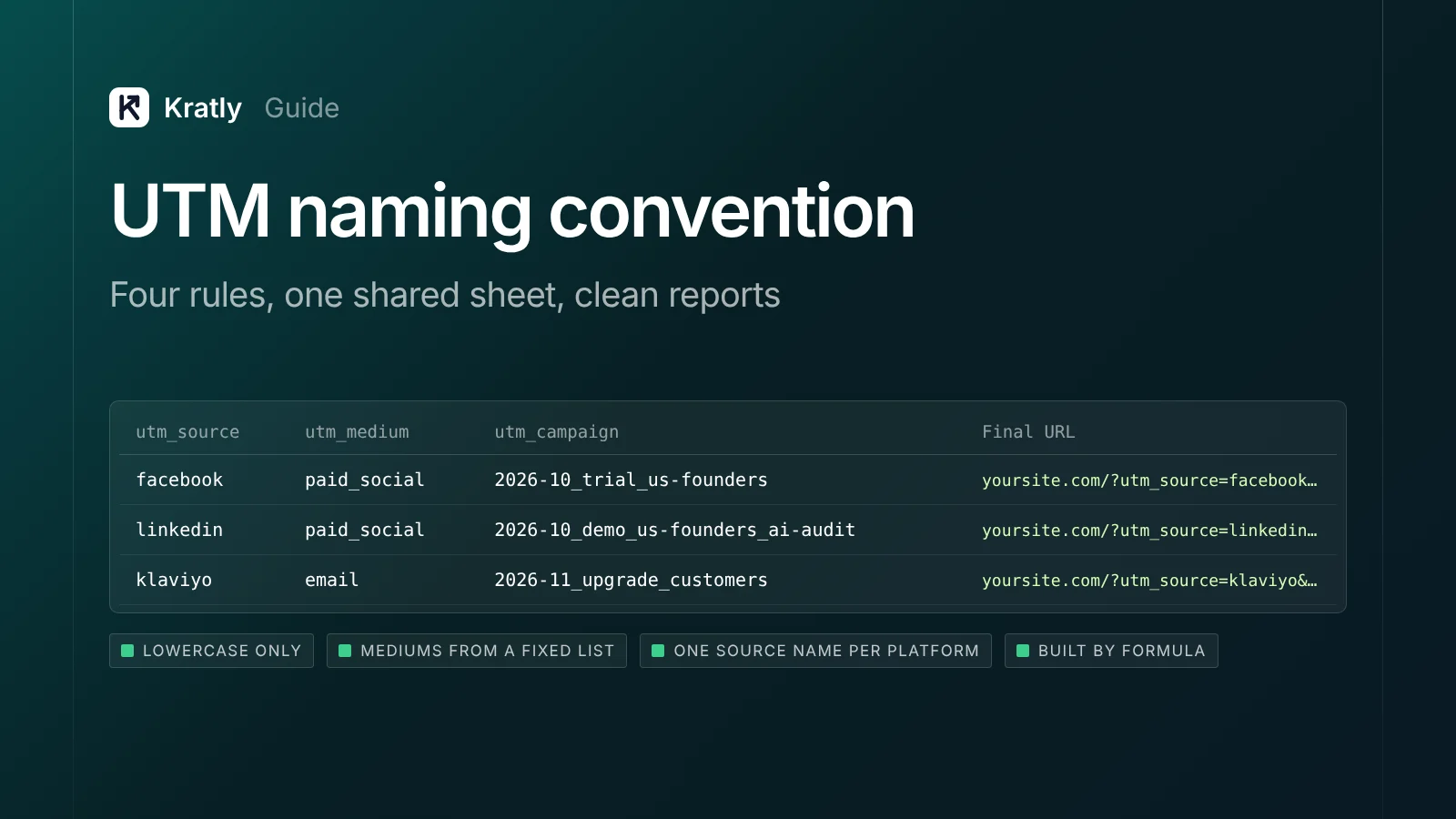
A good UTM naming convention has four rules. Use lowercase only. Pick utm_medium values that match GA4's channel rules, such as cpc, paid_social, email and social. Name campaigns with one fixed pattern, like 2026-10_trial_us-founders. Never tag links between your own pages. Keep every link in one shared sheet.
An email marketer posted this on the Klaviyo community: "it shows source/medium as Klaviyo / campaing. It needs to be klaviyo / flow." Their flow orders also showed up as "Unassigned" (Klaviyo Community).
The answer they got was simple. "Google doesn't know what the medium of 'campaign' or 'flow' is which is why it's being included in the unassigned channel."
That's the whole problem with UTMs. Each tag looks harmless. Then a capital letter, a typo or a made-up medium splits your revenue across rows nobody trusts. This guide gives you a UTM naming convention short enough that people actually use it.
Why UTM tags break your reports#
Three things go wrong, and all three are about naming.
Case. Google says "parameter values are case sensitive." So utm_source=google and utm_source=Google are two different sources (Google Analytics Help). Your Meta revenue ends up in rows for facebook, Facebook and fb.
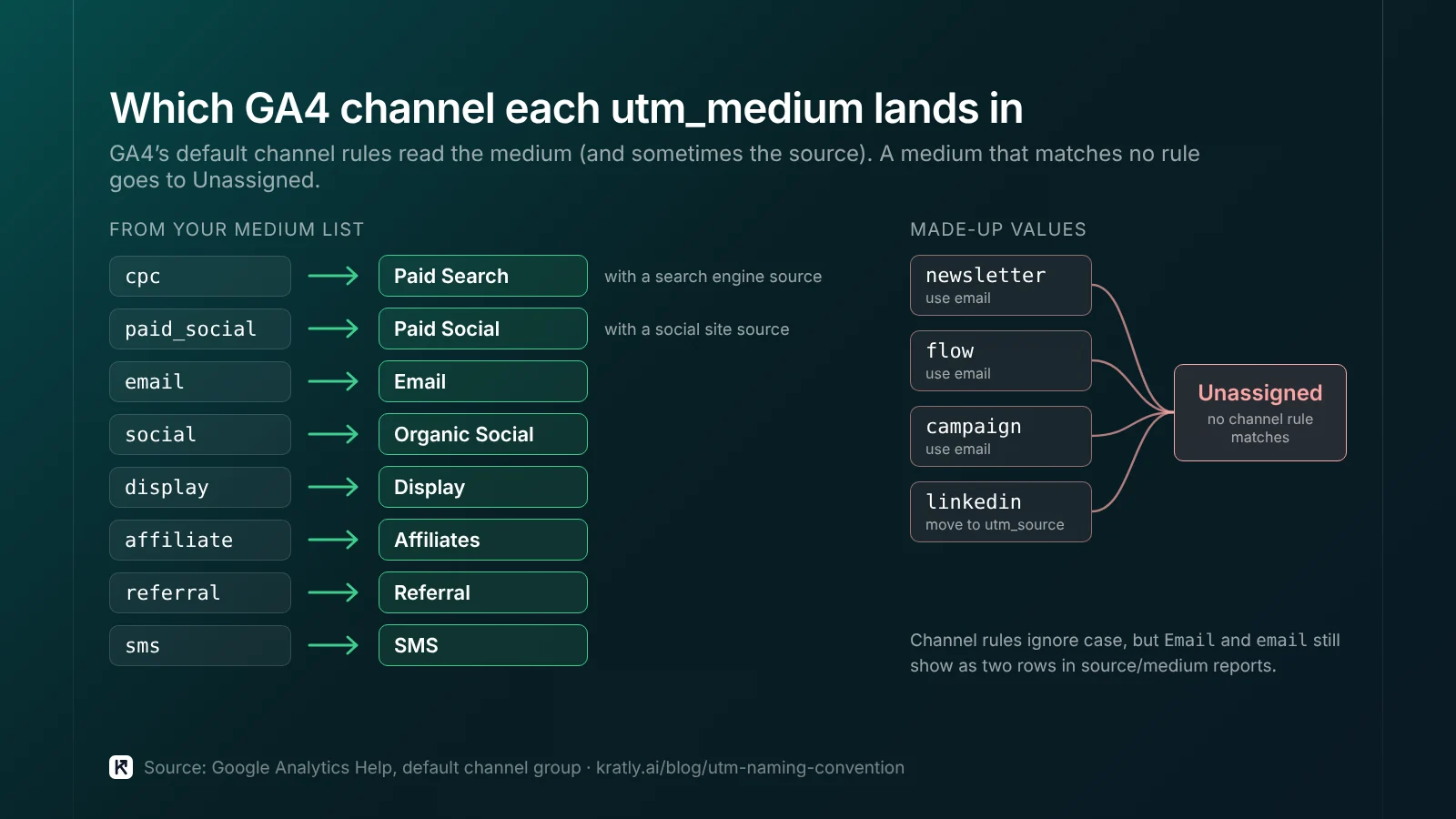
Unknown mediums. GA4 sorts traffic into channels using fixed rules on source and medium. "Unassigned is the value Analytics uses when there are no other channel rules that match" (Google Analytics Help). A medium like newsletter, flow or linkedin matches nothing.
Missing tags. "Missing UTM parameters will result in (not set) values being present in reporting" (Google Analytics Help).
If a fifth of your sign-ups sit in Unassigned, you can't tell which channel to fund. And someone loses half a day each month cleaning rows.
What each UTM parameter is for#
Google lists these parameters (Google Analytics Help):
| Parameter | What it means | Example value |
|---|---|---|
utm_source | Who sent the visit | facebook, linkedin, klaviyo |
utm_medium | The type of channel | cpc, paid_social, email |
utm_campaign | The campaign or promotion | 2026-10_trial_us-founders |
utm_id | The campaign ID | The ad platform's campaign ID |
utm_content | Which creative or link | video-a, footer-cta |
utm_term | The paid keyword | crm-for-startups |
utm_source_platform | The buying platform | Mostly set by Google's own tools |
utm_creative_format | Type of creative | Not currently reported in GA4 |
utm_marketing_tactic | Targeting, like remarketing | Not currently reported in GA4 |
Google says you "should always use utm_source, utm_medium, and utm_campaign." It also strongly recommends utm_id (Google Analytics Help).
What I'd use: the three required fields, plus utm_id and utm_content on paid ads. I'd skip utm_creative_format and utm_marketing_tactic until GA4 reports them. Fewer fields means fewer mistakes.
The UTM naming convention: four rules#
These four rules cover most UTM parameters best practices. Print them at the top of your sheet.
- Lowercase only. Google says to keep "a strict, case-sensitive naming convention." Use lowercase, since "Meta and meta" differ (Google Analytics Help).
- No spaces. Underscores separate parts, hyphens join words. So
2026-10_trial_us-foundershas three parts: date, goal, audience. - One source name per platform, forever. Google says to use "only one unique utm_source for each distinct platform" (Google Analytics Help). Pick
facebookormeta, write it down, and never use the other. - Mediums come from a fixed list. Nobody invents a new medium. If you need one, add it to the list first and check which GA4 channel it lands in.
Medium values that land in the right GA4 channel#
This rule matters most. GA4's default channel group reads your medium (and sometimes source) to pick a channel. Here's how the common values map (Google Analytics Help):
Use this utm_medium | For | GA4 channel |
|---|---|---|
cpc | Paid search ads that aren't auto-tagged, e.g. Microsoft Ads | Paid Search (when the source is a search engine) |
paid_social | Meta, LinkedIn, Reddit and other social ads | Paid Social (when the source is a social site) |
email | Newsletters, lifecycle and trial emails | |
social | Your own organic posts | Organic Social |
display | Banner and programmatic ads | Display |
affiliate | Affiliate and partner payouts | Affiliates |
referral | Partner directories and integration listings | Referral |
sms | Text messages | SMS |
Why these work: GA4 treats any medium matching ^(.*cp.*|ppc|retargeting|paid.*)$ as paid. Combined with a social source, that's Paid Social. Combined with a search source, it's Paid Search. Email needs the source or medium to be exactly email (or a spelling like e-mail).
Common values that go wrong:
newsletter,flow,campaign: Unassigned. Useemail.linkedinas a medium: Unassigned. Putlinkedinin source,paid_socialorsocialin medium.ai-assistant: GA4 added an AI Assistant channel in May 2026 that uses this medium for AI referrals (Google Analytics Help). Don't use it for your own links.
One detail: Google says channel definitions "aren't case sensitive." So Email still lands in the Email channel. But it shows as a separate row in source/medium reports. Lowercase avoids both problems.
A campaign name pattern you can sort#
Google's rule for campaigns: "Use only one unique name that matches the exact campaign name" in the ad platform (Google Analytics Help). So name the campaign in Meta or LinkedIn first, then copy it into utm_campaign.
The pattern I'd use: {yyyy-mm}_{goal}_{audience}_{offer}
| Part | Allowed values (examples) |
|---|---|
yyyy-mm | Launch month: 2026-10 |
goal | trial, demo, webinar, upgrade |
audience | us-founders, retarget-visitors, customers |
offer (optional) | ai-audit, annual-20off |
Example: 2026-10_demo_us-founders_ai-audit. The date first sorts the list by time. The goal second lets you filter every demo campaign at once.
When I'd do the opposite: if you run fewer than five campaigns a quarter, drop the pattern. Use plain names like q4-webinar. A long pattern nobody follows is worse than a short one everybody does.
Where not to use UTMs#
Never on internal links. Don't tag a banner on your blog that links to your pricing page. Loves Data warns that tagging internal links "will impact session-level traffic acquisition data" and can create sessions with several sources (Loves Data). PMG gives the same advice for GA4 (PMG). In practice, the visitor who came from a paid ad gets credited to your own blog banner. Track internal clicks with an event instead.
Not on Google Ads, usually. Keep auto-tagging on. Google recommends "Google Ads auto-tagging whenever possible." When both are present, GA4 uses "the auto-tagged values" for source, medium and the other traffic fields. Your manual utm_content and utm_term go to separate "Manual" dimensions (Google Analytics Help).
When I'd add manual UTMs to Google Ads anyway: when your CRM or sign-up form reads UTMs and can't read the GCLID. Then add them with the same convention. GA4 will still use auto-tagging.
Let ad platforms fill the tags. Google advises dynamic UTMs to "eliminate manual entry errors" (Google Analytics Help). In Meta, macros like {{campaign.id}} and {{site_source_name}} go in the ad's Tracking › URL parameters field (per a third-party setup guide from Lunio). Set utm_id={{campaign.id}} once and it never has a typo.
UTM template: the tracking sheet#
Every link goes in one sheet. If it isn't in the sheet, it doesn't go live.
Columns for your UTM tracking sheet:
| Column | What goes in it |
|---|---|
| Created | Date |
| Owner | Who made it |
| Channel | Picked from a dropdown |
| Landing page | Full URL, no existing ? |
| utm_source | Dropdown from your source list |
| utm_medium | Dropdown from your medium list |
| utm_campaign | Follows the pattern |
| utm_id | Ad platform campaign ID |
| utm_content | Creative or link name |
| utm_term | Paid keyword, if any |
| Final URL | Built by formula |
| Status | Live, paused, ended |
For the Final URL, in Google Sheets: =D2&"?utm_source="&E2&"&utm_medium="&F2&"&utm_campaign="&G2&"&utm_id="&H2&"&utm_content="&I2. Wrap it in LOWER() to force lowercase. Use data validation dropdowns for source and medium, so nobody can type a new one.
What I'd check first each month: filter GA4's traffic acquisition report to Unassigned and to (not set). Each row there points to a link that skipped the sheet.
Your GA4 key events for SaaS only credit the right channel if the tags are right. And no model can fix bad labels; see last non-direct click vs first touch attribution. For how this fits together, read SaaS marketing attribution: tie every campaign to real revenue.
How to do this in Kratly#
- Connect your ad accounts, your site and Stripe. Kratly ties each campaign, page and email to the revenue it brings.
- Check the tags. Kratly flags traffic with UTM values that don't match your list, so you can fix the link.
- See revenue by campaign. Kratly shows revenue and cost per paying customer for each tagged campaign.
- Approve fixes. Suggested changes wait for your approval and are logged, so you can undo them.
Go deeper: Identify anonymous website visitors: what works and what's legal
Questions, answered
What is a UTM naming convention?
It's a written set of rules for your UTM values. It says which sources, mediums and campaign name patterns your team may use. A simple one has four rules: lowercase only, no spaces, one source name per platform, and mediums from a fixed list. One channel then always shows as one row in GA4.
Should UTM parameters be lowercase?
Yes. Parameter values are case sensitive, so GA4 treats Facebook and facebook as different sources. Google's own guidance says to keep a strict naming convention and use lowercase so values don't split. In Google Sheets, wrap your link formula in LOWER() to force lowercase on every link you build.
Why is my traffic showing as Unassigned in GA4?
Usually because the utm_medium doesn't match any GA4 channel rule. Values like newsletter, flow or linkedin fall through. Use email, paid_social, social or cpc instead. GA4 uses Unassigned when no channel rule matches. Check the Unassigned and (not set) rows each month. Each one points to a link that skipped your tracking sheet.
Should I use UTMs with Google Ads?
Not usually. Keep auto-tagging on; GA4 uses auto-tagged values for source and medium even if UTMs are also present. Add manual UTMs only when another tool, like your CRM, needs them. When both are present, your manual utm_content and utm_term go to separate "Manual" dimensions in GA4.
Can I use UTM parameters on internal links?
No. Tagging links between your own pages overwrites the real source. A visitor who came from a paid ad gets credited to your own blog banner. You can also end up with sessions that have several sources. Track internal clicks with GA4 events instead, and keep UTMs for links on other sites.
Written by
Priyansh Kumar
Priyansh Kumar has spent more than a decade in growth, scaling brands from 1 to 10 and from 10 to 100. He now builds Kratly, an autonomous growth team that ties every campaign, page and email to the revenue it brings.
Sources
- Google Analytics Help: URL builders: collect campaign data with custom URLs · Default channel group · Benefits of Google Ads auto-tagging · What's new in Google Analytics (AI Assistant channel, May 2026)
- Loves Data (Benjamin Mangold): Campaign tracking in GA4 using UTMs
- PMG: How UTM tracking works in Google Analytics 4
- Klaviyo Community: GA4 source/medium discrepancy and UTM set-up confusion
- Lunio Help (third-party): Configuring URL parameters for Meta
Was this article useful?