Short answer
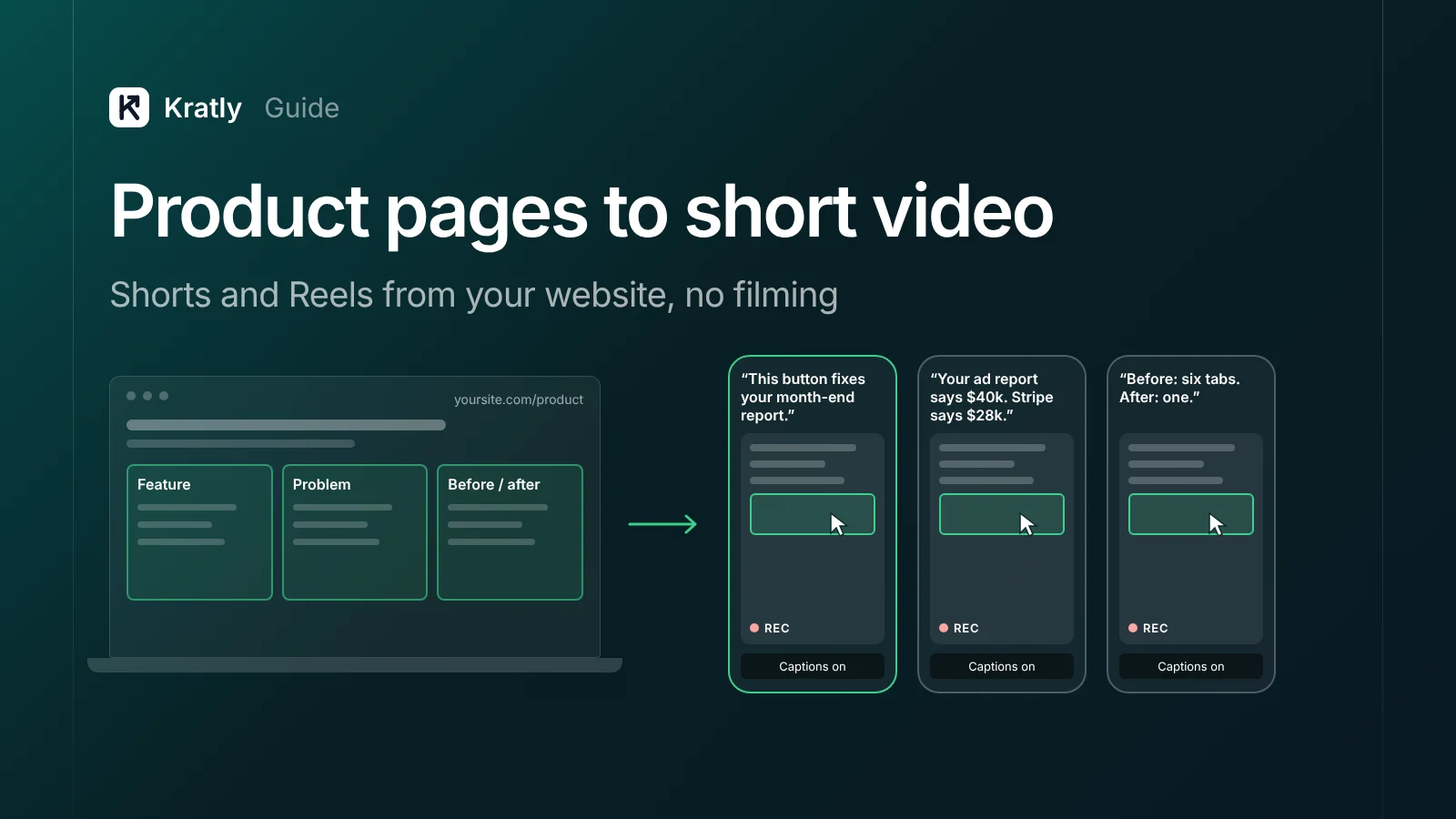
To repurpose your website into short video, take one feature, one problem or one before/after from a product page. Screen-record it, add captions and a voiceover, and open with a hook in the first seconds. Post it as a YouTube Short and an Instagram Reel. Then track views to visits, sign-ups and Stripe revenue.
Here is a line from YouTube's own help page: "URLs placed in YouTube Shorts comments and Shorts descriptions are non-clickable" (YouTube Help).
So a tagged link under a Short goes nowhere. This guide starts with your product pages and ends with revenue.
Repurpose your website into short video: which sections work?#
A product-page short is a vertical video that shows one thing from one page of your site, with no camera.
One idea per video. Most page sections fail because they try to say three things.
| Page section | Short format | Why it works | Example hook |
|---|---|---|---|
| One feature block | Feature in 30 seconds | One action, one result, easy to show | "This button fixes your month-end report." |
| One problem from the hero copy | Problem, then fix | Viewers stop for a pain they feel | "Your ad report says $40k. Stripe says $28k." |
| A before/after screenshot | Split screen or swipe | The change is visible in a second | "Before: six tabs. After: one." |
| A comparison table row | One difference, shown | Buyers who compare are close to paying | "Tool A does this. Here's what we do instead." |
Skip the "about us" page, the pricing table read aloud, and five features in one take.
For comparison shorts, follow the fairness rules in how to write an alternatives page that ranks and stays fair. The best source pages are usually your bottom-of-funnel pages, listed in the SaaS SEO pages that bring revenue.
A script template for a product demo short video#
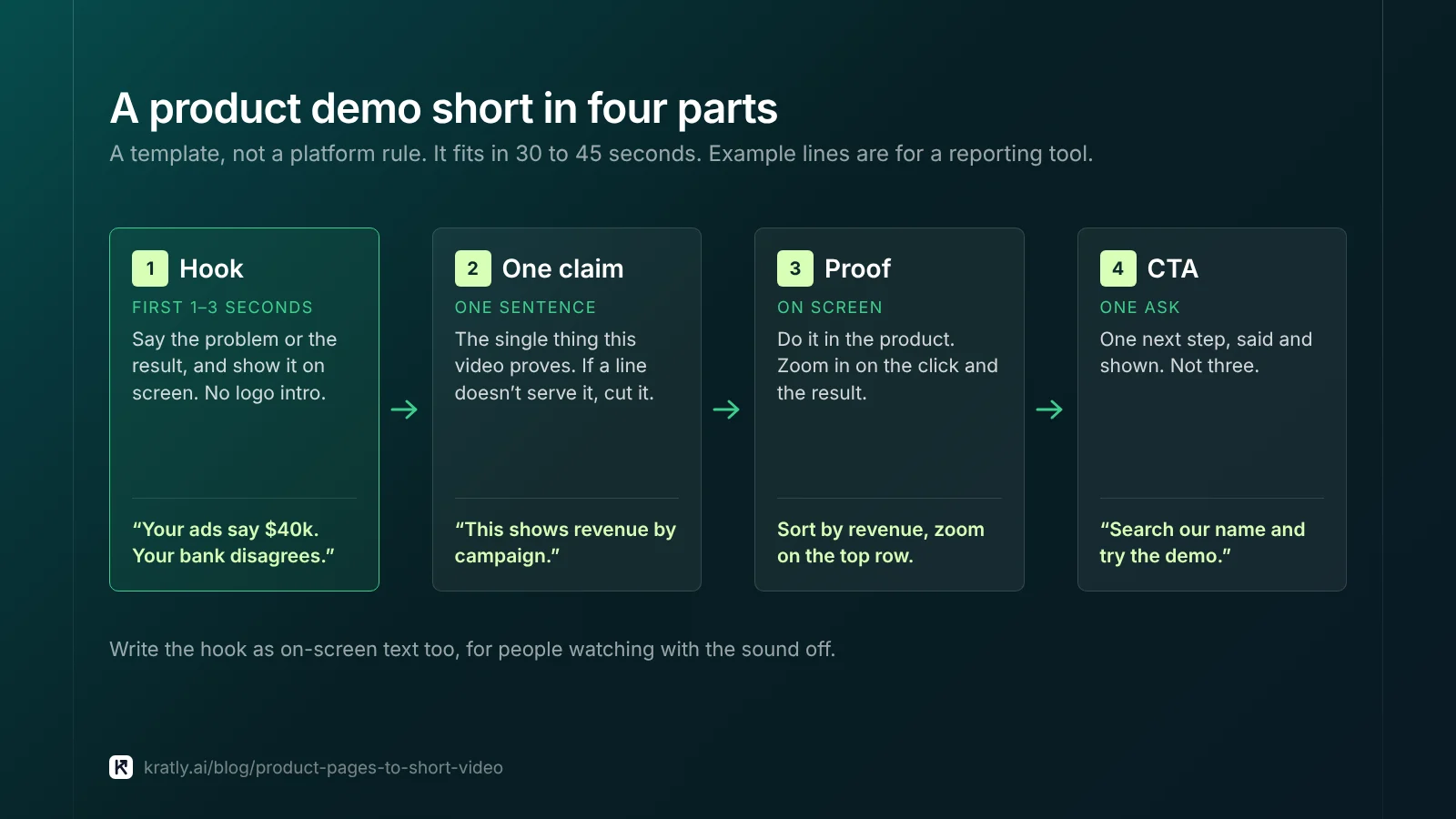
My template, not a platform rule. It fits in 30 to 45 seconds.
- Hook, first 1–3 seconds. Say the problem or the result. Show it on screen at the same time. No logo intro.
- One claim. "You can see which campaign paid, in one click." One sentence.
- Proof. Do it on screen. Zoom in on the click and the result.
- CTA. One ask. "Search our name and try the demo," or "Full walkthrough in the related video."
Write the hook as on-screen text too, for people watching with sound off.
Example for a reporting tool. Hook: "Your ads say $40k. Your bank disagrees." Claim: "This shows revenue by campaign." Proof: sort by revenue, zoom on the top row.
Screen recording, captions and voiceover: no filming#
1. Screen recording. Record your product doing the thing from the page, in a demo account with believable data, never real customer data. Zoom the browser so text reads on a phone. I'd record a narrow, tall window rather than crop later.
2. Captions. Burn in short captions and check product names by hand. YouTube's own policy page lists "Caption creation" with AI as production help that needs no disclosure (YouTube Help).
3. Voiceover. You have three choices:
- Your own voice. Most trust, and free. A phone mic in a quiet room is enough.
- Your own cloned voice. Saves re-recording when the script changes. YouTube lists "Cloning one's own voice to create voice overs or dubs" as not needing disclosure (YouTube Help).
- A stock AI voice. Fastest. Read the labeling section below first.
YouTube Shorts and Instagram Reels specs#
From each platform's pages, as of November 2026.
| Spec | YouTube Shorts | Instagram Reels |
|---|---|---|
| Maximum length | Up to 3 minutes (YouTube Help) | Instagram's Reels page says both 3 and 20 minutes; it adds "Reels over 3 minutes won't be recommended to new audiences" (Instagram) |
| Shape | "Square or vertical" (YouTube Help) | Check Instagram's reel size page before you export |
| Clickable link on the video | No: description and comment URLs are non-clickable (YouTube Help) | Use your profile link, or a Story with a link sticker |
One more YouTube rule matters. Since October 15, 2024, square or vertical uploads count as Shorts on standard channels. To keep a video out of Shorts, YouTube suggests "a wider aspect ratio such as 16:9" (YouTube Help).
My advice: one vertical file under 60 seconds. It fits both platforms and avoids YouTube's copyright rule below.
Do you have to label AI voiceovers?#
YouTube Shorts for SaaS: the "AI use" setting#
YouTube says: "We require creators to disclose AI-generated or altered content that seems realistic" (YouTube Help). Its examples include making "a real person appear to say or do something they didn't do."
No disclosure is needed for AI help with scripts, titles, captions, or cloning your own voice. A real screen recording with your own voice needs none.
Set it at upload, under "AI use" in the Attributes section. YouTube says disclosure alone doesn't limit reach. Creators who "consistently choose not to disclose" can face labels, removal or loss of Partner Program status.
A stock AI narrator isn't named either way. If it sounds human, I'd answer Yes.
Instagram Reels: Meta's "AI info" label#
Meta renamed its "Made with AI" label to "AI info" on July 1, 2024 (Meta). Meta said it would "require people to use this disclosure and label tool" for "realistic-sounding audio that was digitally created or altered." And: "we may apply penalties if they fail to do so" (Meta).
My reading: label Reels that use a realistic AI voice. Instagram's page on AI content labeling shows where the setting sits.
Music without copyright trouble#
Music is where shorts get blocked. "Any Short that is over one minute in duration with an active copyright claim of any type" is blocked worldwide (YouTube Help). Shorts under a minute keep the older, looser limits.
Safer choices:
- YouTube's Audio Library. YouTube says only its tracks "are known to YouTube to be copyright-safe." Creative Commons tracks need the artist credited in your description (YouTube Help).
- Instagram's audio library, inside the Reels editor (Instagram).
- No music. For a demo, a clear voice is enough.
Don't assume a "royalty-free" site is safe on YouTube.
How do you track Shorts and Reels to revenue?#
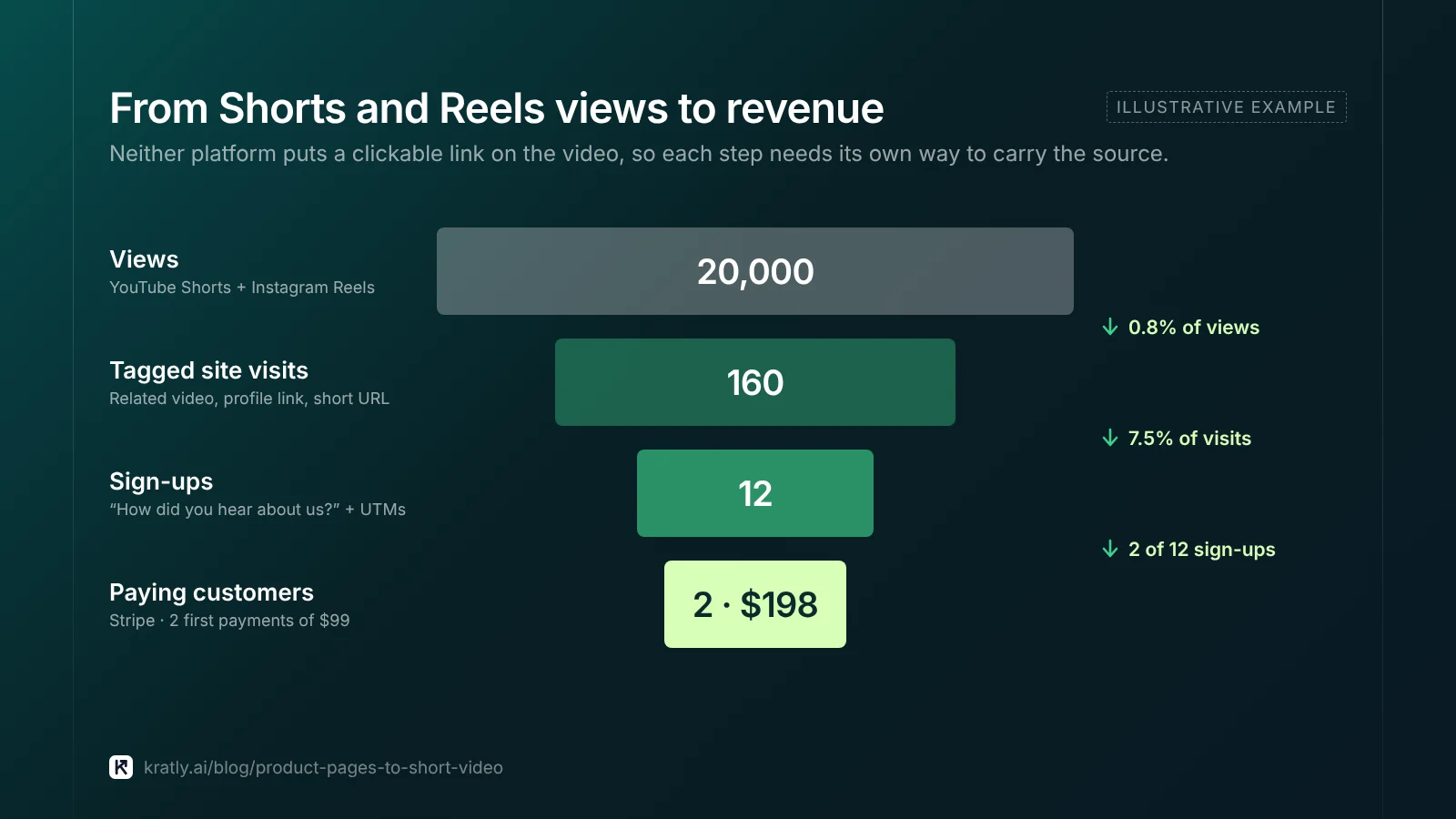
The chain is views, site visits, sign-ups, then revenue. Neither platform puts a clickable link on the video.
Step 1: get a tagged visit.
- YouTube: use the clickable related video link in the Short (YouTube Help). Point it at a longer demo. Put the UTM-tagged link in that video's description, as in our guide to YouTube marketing for B2B SaaS.
- Instagram: put a tagged link in your profile. Share the Reel to a Story with a tagged link sticker.
- Both: say and show a short URL, like
yoursite.com/demo-short. Redirect it to the page with UTMs added.
Use one campaign per video, such as utm_medium=shorts&utm_campaign=revenue-hook. Our UTM naming convention keeps names consistent.
Step 2: keep the source through sign-up. Add a free-text "How did you hear about us?" field. Viewers who search your name later carry no UTM.
Step 3: tie sign-ups to payments. Carry the UTMs into Stripe customer metadata. Stripe UTM tracking shows how.
Step 4: judge on revenue. A short that brings two paying customers beats a viral one that brings none. I'd judge a batch of 10 shorts after eight weeks.
Posting by API instead? Read Instagram API publishing limit: what you can automate in 2026.
Time and cost per video#
This section is opinion, not data.
My estimate for one 30-second product short, once the template exists:
| Task | Time |
|---|---|
| Pick the page section, write the hook and script | 30 minutes |
| Screen-record two or three takes | 20 minutes |
| Voiceover, captions, crop to vertical | 45 minutes |
| Title, labels, tagged links, post to both platforms | 15 minutes |
| Total | About 2 hours |
The first few take longer. Cash cost can be near zero with your own voice and free editing tools. Paid AI voices add a monthly fee; check current prices.
A batch of 10 is about 20 hours. Weigh that against the revenue in Step 4.
Where Kratly fits#
Kratly's video agent writes short scripts from your own pages and can record those pages into vertical videos, then upload them to YouTube after a person approves each one. Both steps are built and in testing on our own channel. Live today: a visit tagged utm_medium=shorts shows up next to the payments it led to, in revenue by campaign, page and email.
Questions, answered
How long can a YouTube Short be in 2026?
Up to three minutes, as of November 2026, per YouTube Help. Square or vertical uploads count as Shorts. Shorts over one minute with any active copyright claim are blocked worldwide, so keep music-heavy shorts under 60 seconds. For product demos, 30 to 45 seconds is usually enough.
Can I put a link in a YouTube Short?
Not in the description or comments. YouTube says URLs there are non-clickable, to reduce spam. You can add a clickable related video link to a longer video, and put your UTM-tagged link in that video's description. Also show a short, easy URL on screen.
Do I need to disclose an AI voiceover on YouTube?
Not if you cloned your own voice. YouTube requires disclosure for realistic altered or synthetic content, like making a real person say something they didn't. A generic AI narrator isn't named either way. If it sounds human, I'd choose Yes under "AI use," since YouTube says disclosure alone doesn't limit reach.
What is the best product demo short video length?
There is no official best length. My rule: 30 to 45 seconds, one idea, hook in the first seconds. That fits both platforms and stays under the one-minute YouTube copyright line. Instagram Reels over three minutes won't be recommended to new audiences, so long demos belong in a full video instead.
Written by
Priyansh Kumar
Priyansh Kumar has spent more than a decade in growth, scaling brands from 1 to 10 and from 10 to 100. He now builds Kratly, an autonomous growth team that ties every campaign, page and email to the revenue it brings.
Sources
- YouTube Help: Upload YouTube Shorts · Understand three-minute YouTube Shorts · Sharing links with your audiences · Disclosing use of GenAI content · Audio Library
- Instagram: Reels features · Reel size and aspect ratios · AI content labeling on Instagram
- Meta: Labeling AI-generated images (Feb 6, 2024, updated Apr 1, 2025) · Our approach to labeling AI-generated content (Apr 2024, updated Sept 12, 2024) · About the link sticker for Instagram Stories
Was this article useful?