Short answer
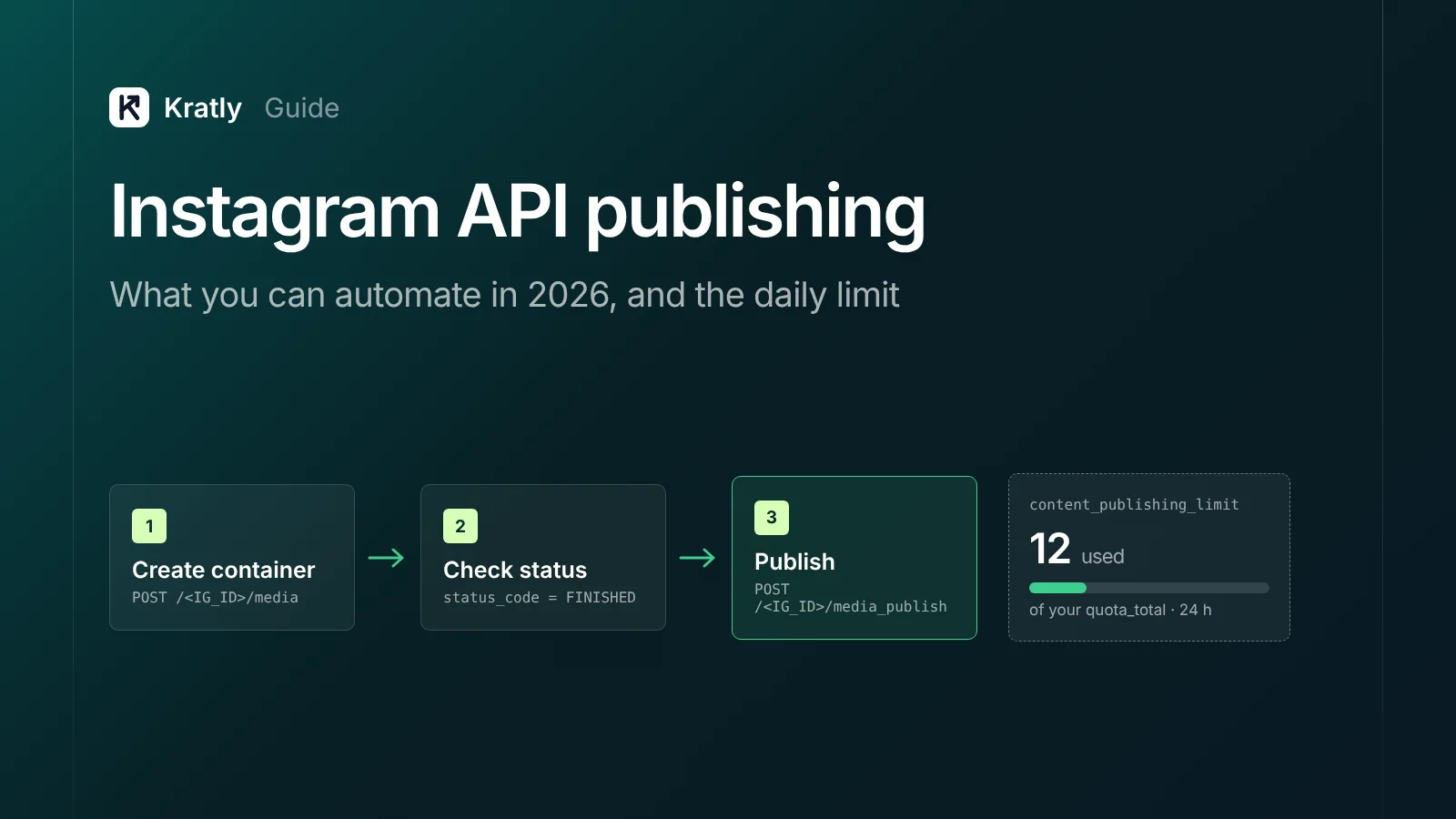
The Instagram API publishing limit is a cap on posts an account can publish by API in 24 hours. Meta's pages give two numbers, 100 and 50. Don't hard-code either. Call the content_publishing_limit endpoint to read your account's real cap and usage. Carousels count as one post.
Composite example: a store's developer builds a queue that posts 60 product Reels on launch day. The docs she read said 100 a day. Partway through, publish calls start failing. Nobody checked the account's own limit first.
All facts below are as of November 2026, checked on Meta's Instagram Platform docs.
What is the Instagram API publishing limit?#
The Instagram API publishing limit is the most posts one Instagram professional account can publish through the API in a moving 24-hour window.
Meta's own pages disagree on the number, as of November 2026:
| Meta page | What it says |
|---|---|
| Content Publishing guide, limits section | "100 API-published posts within a 24-hour moving period" |
| Same guide, carousel section | "50 published posts within a 24-hour period" |
| content_publishing_limit reference | Example response shows quota_total of 50 and quota_duration of 86,400 seconds |
I wouldn't bet a launch on either. The endpoint answers for your account, today.
How to check your account's limit#
Send a GET request to /<IG_ID>/content_publishing_limit with fields=quota_usage,config. quota_usage is posts published in the window. config holds quota_total (the cap) and quota_duration (seconds). Field names are from the content_publishing_limit reference.
Three rules from the Content Publishing guide shape how you count:
- The limit is enforced on the
media_publishcall, not on container creation. - A carousel counts as a single post.
- Meta says to enforce the limit in your own app, especially if it schedules posts.
Who can publish through the API?#
Per Meta's Instagram Platform overview, as of November 2026:
- Account type. "Your app users must have an Instagram professional account." That means a business or creator account. Personal accounts aren't listed.
- Login setup. There are three. Instagram Login serves accounts with no linked Facebook Page. Facebook Login serves accounts linked to a Page. Unified Login "is recommended for new integrations."
- Access level. Standard Access is the default. It works if you only serve accounts you own or manage. Serving other people's accounts needs Advanced Access.
- App Review. "Your app must complete Meta App Review to be granted Advanced Access." Business Verification is also required.
Permissions. The publishing guide lists instagram_business_basic and instagram_business_content_publish for Instagram Login. For Facebook Login it lists instagram_basic, instagram_content_publish and pages_read_engagement. Users with a Business Manager role on the Page may also need ads_management or ads_read (Content Publishing guide).
One trap. If the linked Page requires Page Publishing Authorization, publishing waits until it's done.
What you can publish, and what you can't#
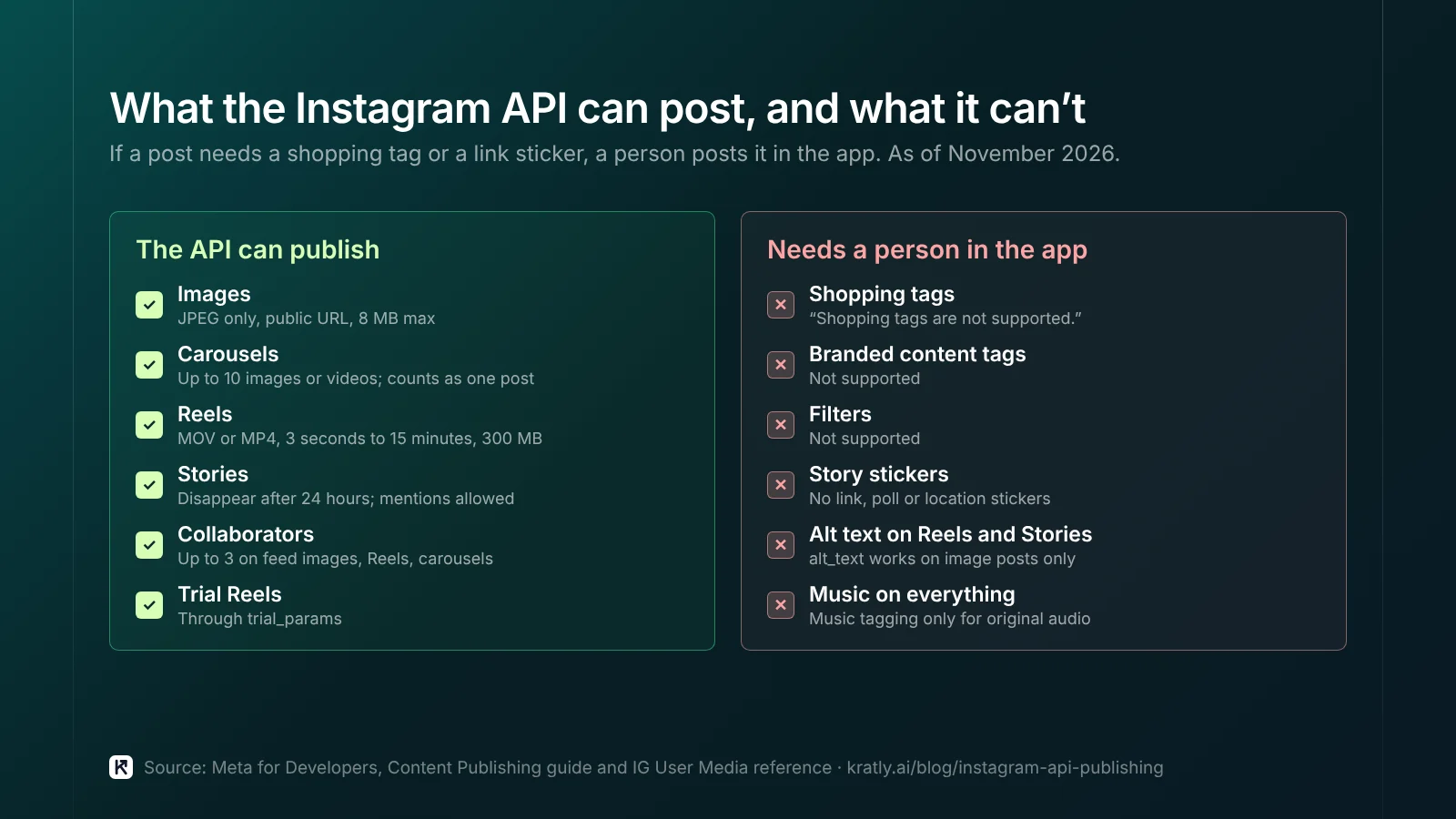
Specs from the IG User Media reference, as of November 2026:
| Type | What the docs allow | Main limits |
|---|---|---|
| Image | JPEG only, public URL | 8 MB max; aspect ratio 4:5 to 1.91:1 |
| Carousel | media_type=CAROUSEL | Up to 10 images, videos or a mix; no Reels inside |
| Reel | media_type=REELS, MOV or MP4 | 3 seconds to 15 minutes; 300 MB max |
| Story | media_type=STORIES | Disappears after 24 hours; no stickers |
Reels get extras: share_to_feed and a cover via cover_url or thumb_offset. Feed images, Reels and carousels allow up to 3 collaborators; Stories don't. Trial Reels are supported through trial_params (Content Publishing guide).
What you can't automate#
These are listed as unsupported on Meta's pages, as of November 2026:
- Shopping tags. "Shopping tags are not supported."
- Branded content tags. Not supported.
- Filters. Not supported.
- Story stickers. Link, poll and location stickers can't be published. You can still mention users.
- Alt text on Reels and Stories. The
alt_textfield works on image posts only. - Music on everything. Music tagging is "only available for original audio."
If a launch post needs a shopping tag or link sticker, a person posts it in the app.
How does the Instagram content publishing API work?#
The Instagram content publishing API uses three steps for every post, per Meta's Content Publishing guide.
- Create a container. POST to
/<IG_ID>/mediawith animage_urlorvideo_url. Meta fetches the file from that URL, so it must sit on a public server. For a carousel, create each item first. Then create a parent container withmedia_type=CAROUSELand achildrenlist. - Check the status. GET
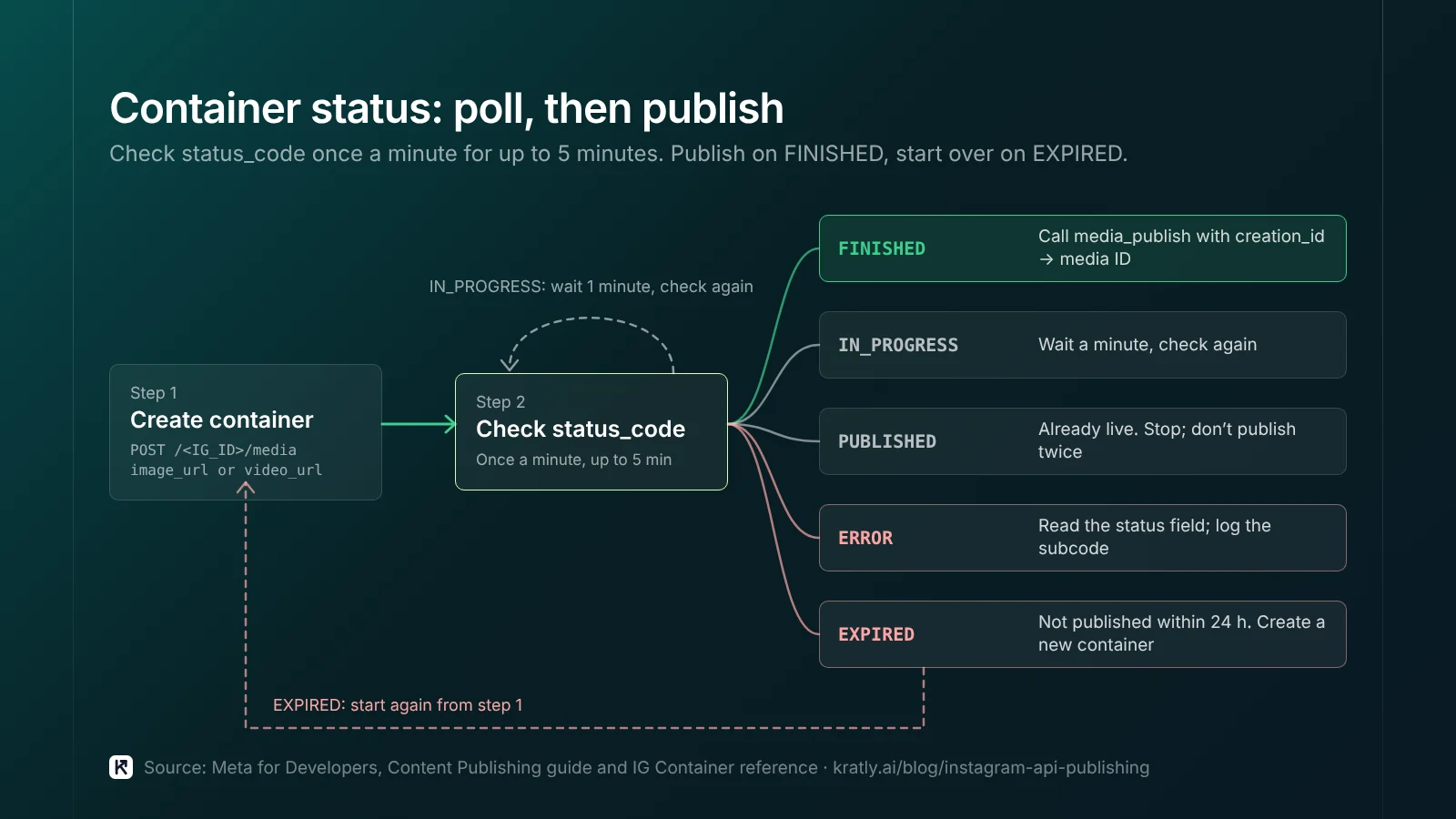
/<IG_CONTAINER_ID>?fields=status_code. Meta suggests checking once a minute for no more than 5 minutes. - Publish. POST to
/<IG_ID>/media_publishwithcreation_idset to the container ID. You get back an Instagram media ID.
With Facebook Login, large videos can use a resumable upload instead of a public URL.
Container status codes#
The IG Container reference lists five values for status_code:
| status_code | Meaning | What I'd do |
|---|---|---|
IN_PROGRESS | Still processing | Wait a minute, check again |
FINISHED | Ready to publish | Call media_publish |
PUBLISHED | Already live | Stop; don't publish twice |
ERROR | Failed | Read the status field for the error subcode |
EXPIRED | Not published within 24 hours | Create a new container |
On ERROR, log the subcode from status with the post ID.
A published Reel returns media_type of VIDEO when you read it back. Use media_product_type to tell Reels apart (Content Publishing guide).
Rate limits are a different thing#
The publishing limit counts posts. Rate limits count API calls.
Meta's Graph API rate limits page sets Instagram calls per app and user pair as of November 2026:
- Formula: "Calls within 24 hours = 4800 * Number of Impressions." Impressions here means how often the account's content appeared on screens in the last 24 hours.
- Window: a rolling 24 hours.
- Signal: throttled responses carry an
X-Business-Use-Case-Usageheader. It includesestimated_time_to_regain_accessin minutes. - Error: the Instagram rate limit error is code 80002.
Small accounts get fewer calls, so poll once a minute.
Insights calls share that limit. For post reporting, see Facebook post insights metrics in 2026: what replaced impressions. For paid Meta, see Facebook ads for SaaS: measure the sign-ups that actually pay and Meta Conversions API: set it up and check it sends real purchases.
How to schedule Instagram Reels with the API#
There's no scheduling endpoint. The Content Publishing guide has no "publish at" field. It only mentions scheduling when it tells apps to enforce the limit for future posts.
So to schedule Instagram Reels with the API, you build the queue yourself:
- Store the post. Save the video URL, caption and target time in your own database.
- Create the container close to post time. Containers expire after 24 hours. Creating one a week early won't work.
- Leave processing time. Create the Reel container 10 to 15 minutes before the slot. That's my rule of thumb, not Meta's. Long videos may need more.
- Check the limit, then publish. Read
content_publishing_limitfirst. If the account is near its cap, hold the post. - Log the result. Save the media ID, or the error subcode.
No code? Use Meta's own tools. Meta has a help page on scheduling posts and stories in the Business Suite mobile app (Meta Business Help). Meta also says you can schedule "reels, photos and carousel posts from the Instagram app" (Meta Help Center). Both are manual. A person picks the time for each post.
For one brand posting a few times a week, manual is fine. I'd build an API queue only past about 20 posts a week, or for several accounts. That's my judgment, not Meta's.
Where do the posts come from? If you're short on footage, see Turn your product pages into Shorts and Reels without filming. For long-form video, see YouTube marketing: B2B SaaS videos for sign-ups and AI answers.
A checklist before you build#
Where Kratly fits#
Kratly's Instagram publishing follows the flow in this article: single images, carousels and Reels, the container status check, and the publishing limit read before each post. It's built and switches on once Meta approves access, and every post waits for a person's approval. Live today: Kratly connects website tracking and Stripe or Shopify revenue, so you can see whether Instagram traffic pays.
Questions, answered
How many posts can I publish per day with the Instagram API?
Meta's docs give two numbers as of November 2026. The Content Publishing guide says 100 posts in a moving 24-hour window in one place and 50 in another. The reference page example shows 50. Call the content_publishing_limit endpoint and read quota_total for your account. Carousels count as one post, and the limit applies when you call media_publish.
Can I schedule Instagram Reels through the API?
Not directly. There is no "publish at" field in Meta's Content Publishing guide. You store the Reel and its time in your own system. Then you create the container shortly before the slot and publish it when the status is FINISHED. Containers expire after 24 hours, so you can't create them days ahead.
Does the Instagram API work with personal accounts?
No. Meta's Instagram Platform overview says app users "must have an Instagram professional account," which can be a business or creator account. Switching a personal account to professional is done in the Instagram app. If your app serves accounts you don't own or manage, you also need Advanced Access, App Review and Business Verification.
What does the EXPIRED container status mean?
It means the container was created but not published within 24 hours. You can't publish it anymore. Create a new container with the same media URL and caption, check that its status is FINISHED, then call media_publish. To avoid this, create containers close to the time you plan to post.
Written by
Priyansh Kumar
Priyansh Kumar has spent more than a decade in growth, scaling brands from 1 to 10 and from 10 to 100. He now builds Kratly, an autonomous growth team that ties every campaign, page and email to the revenue it brings.
Sources
- Meta for Developers, Instagram Platform: Content Publishing guide · IG User content_publishing_limit reference · IG User Media reference · IG Container reference · Instagram Platform overview
- Meta for Developers, Graph API: Rate limits
- Meta Business Help: Schedule posts and stories on Business Suite mobile app
- Meta Help Center: Schedule posts and reels further in advance on Instagram
Was this article useful?