Short answer
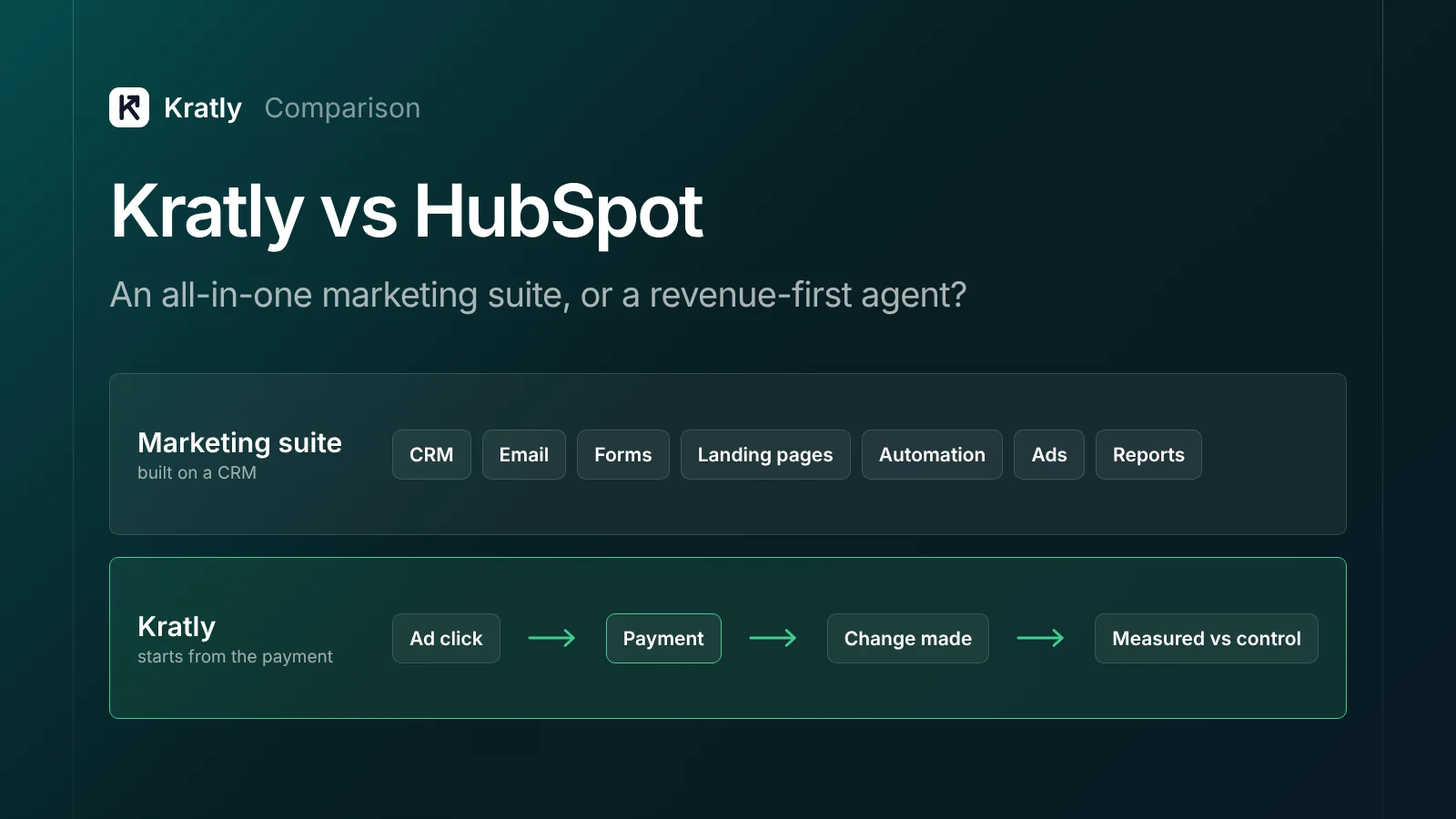
HubSpot Marketing Hub is an all-in-one suite: CRM, email, forms, landing pages, automation and ads, in one place. If you need that system of record, Kratly does not replace it. Kratly is narrower. It ties ad clicks to Stripe, store or app-store payments, then makes and measures changes. HubSpot's deal revenue attribution needs Enterprise, from $3,600 a month. Kratly starts at $49.
These two tools get compared because both promise to show which marketing brings revenue. They come at it from opposite ends. HubSpot starts from contacts and deals. Kratly starts from the payment.
A note on bias: Kratly is our product. Every fact about HubSpot below comes from HubSpot's pricing page, its knowledge base and its own pricing guide, checked in October 2026 and linked inline.
Who each tool is for#
HubSpot Marketing Hub is for teams that want their contacts, emails, forms, landing pages, automation and reporting in one platform, on top of HubSpot's CRM. It suits companies with a sales team that works leads and deals, and a marketing team that nurtures contacts by email. It scales from a free tier to Enterprise.
Kratly is for founders and small growth teams whose revenue lands in Stripe, a store or an app store. It answers which campaigns, pages and emails bring paying customers, then acts: it cuts wasted ad spend, proposes page fixes and sends follow-up emails, each measured against a control. Kratly is not an all-in-one CRM or an email marketing suite. If you need contact management or newsletters, you need a tool like HubSpot.
What each does, side by side#
| HubSpot Marketing Hub | Kratly | |
|---|---|---|
| Core job | Marketing suite on a CRM | Revenue attribution plus a growth agent that acts |
| CRM and contacts | Yes, the core of the platform | No; not a CRM |
| Email marketing | Yes; newsletters, nurture and automation | Follow-up emails only, sent through your SendGrid, with holdouts |
| Forms and landing pages | Yes | Page fixes and content drafts for your existing site |
| Ad accounts | Meta, Google, LinkedIn, Microsoft, TikTok, on all plans | Google Ads, Microsoft Ads, Meta (Conversions API); LinkedIn coming soon |
| Revenue source | CRM deals | Stripe, Shopify and app-store payments |
| Revenue attribution | Deal create and deal revenue attribution on Enterprise | Every plan: first touch, last touch, linear |
| Wasted ad spend | Not a stated feature | Finds it; proposes negatives and budget shifts |
| How changes run | You build workflows | Suggest, Ask first or Autopilot within limits; logged and undoable |
| Proving results | Attribution reports | Changes measured against a control group |
HubSpot facts: Marketing Hub pricing, Connect ad accounts, Create attribution reports. All checked October 2026.
Pricing as of October 2026#
| HubSpot Marketing Hub | Kratly | |
|---|---|---|
| Free | $0, up to 2 users | No free plan; free tools available |
| Entry | Starter: listed at $20 per seat a month; a $7 offer price was shown when we checked. 1,000 marketing contacts | Starter: $49/month |
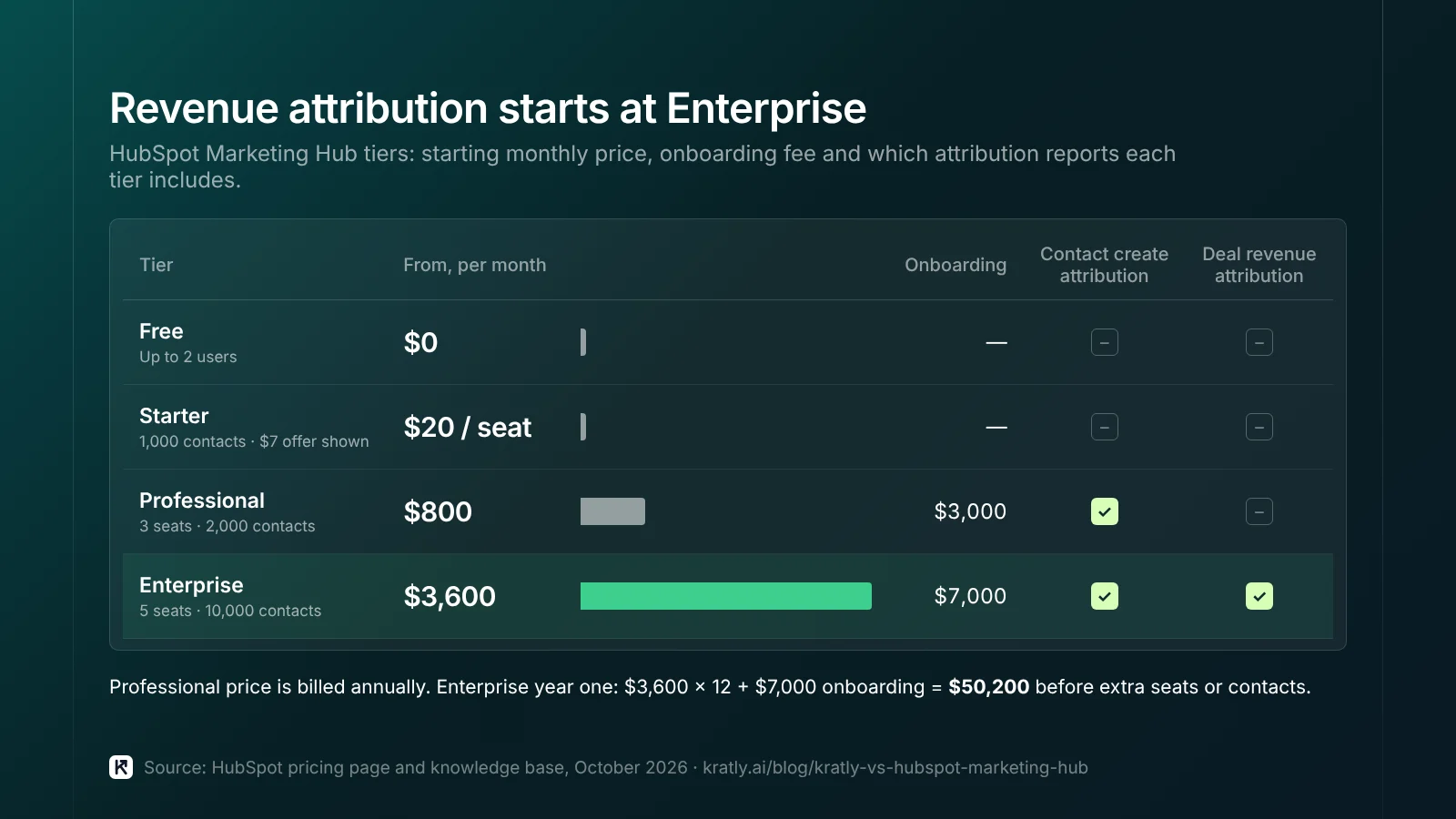
| Mid tier | Professional: from $800/month billed annually ($890 monthly, annual commitment). 3 core seats, extra seats from $45. 2,000 contacts. $3,000 one-time onboarding | Growth: $199/month |
| Top tier | Enterprise: from $3,600/month. 5 core seats, extra seats from $75. 10,000 contacts. $7,000 one-time onboarding | Scale: $599/month; Enterprise: custom |
| Trial | Free tier | 14-day free trial |
HubSpot pricing: hubspot.com/pricing/marketing, checked October 2026. HubSpot's own pricing guide, updated September 2026, gives the same Professional and Enterprise figures. Contact tiers above the included amount cost more. Kratly pricing is on our pricing page.
In year one, HubSpot Enterprise costs at least $43,200 in subscription ($3,600 × 12) plus $7,000 onboarding, so $50,200 before extra seats or contacts. Kratly Scale is $7,188 a year on monthly billing. They are not the same product, so this isn't a like-for-like saving. It is the gap you pay if revenue attribution is the main thing you want.
Which HubSpot tier gives revenue attribution?#
This is the question most people searching "HubSpot vs" are really asking. HubSpot's knowledge base splits attribution into three report types (HubSpot):
- Contact create attribution: Marketing Hub or Content Hub, Professional or Enterprise.
- Deal create attribution: Marketing Hub Enterprise only.
- Deal revenue attribution: Marketing Hub Enterprise only.
HubSpot's pricing page lists "multi-touch revenue attribution" on Enterprise, tracking up to 10,000 logged interactions per contact. Models include first touch, last touch, linear and time decay.
Two practical points follow:
- Revenue means deals. HubSpot attributes the value of CRM deals. If most customers pay by card in Stripe and never become a deal, you need that revenue in HubSpot as deals first.
- Professional tells you who signed up, not who paid. Contact create attribution shows which channels created contacts. For SaaS, that is close to "which ads got sign-ups," which can point budget at the wrong campaigns. See why sign-ups mislead.
Where HubSpot is better#
- A real CRM. Contacts, companies, deals and sales pipelines in one record. Kratly does not do this.
- Email marketing at scale. Newsletters, nurture sequences, lists and segmentation. Kratly sends follow-up emails only.
- Forms and landing pages. Build and host them without a developer.
- Workflow automation. Professional includes omni-channel automation, up to 300 workflows, per HubSpot's pricing page.
- Sales and marketing handoff. Lead scoring, routing and deal stages live next to marketing data.
- More attribution models on Enterprise, including time decay.
- More ad networks. HubSpot connects TikTok as well as Meta, Google, LinkedIn and Microsoft.
- Ecosystem. A large marketplace of apps and partners, and a free tier to start.
Where Kratly is better#
- Revenue attribution on every plan. From $49 a month, with no onboarding fee. HubSpot reserves deal revenue attribution for Enterprise.
- Starts from the payment. Stripe, Shopify and app-store revenue, including self-serve customers who never become a CRM deal.
- It acts on ad accounts. Kratly reviews search terms, finds wasted spend and proposes negatives and budget shifts. You choose Suggest, Ask first or Autopilot.
- It proves lift. Changes are measured against a control group, not just credited by a model. See did my marketing change work?
- Follow-up emails with holdouts. Kratly sends trial and follow-up emails through your SendGrid and holds back a control group, so you see what the emails earned. See trial follow-up emails.
- Less setup. Connect ads and Stripe and start. No contact-tier planning or onboarding project.
Can you use both?#
Yes. This is a common setup for SaaS teams that already run HubSpot.
- HubSpot stays your CRM, email platform and home for forms and landing pages.
- Kratly reads ads and Stripe revenue, shows which campaigns bring paying customers, and does the ad and page work.
Decide who sends which emails. If HubSpot runs nurture and Kratly sends trial follow-ups, make sure the same person doesn't get both. Also pick one tool as the source of truth for revenue by campaign in your weekly review. For more on cutting overlap, read marketing tool sprawl.
How to decide#
| If this sounds like you | Choose |
|---|---|
| Need a CRM, email marketing, forms and landing pages in one place | HubSpot |
| Sales team works deals, and you can afford Enterprise for revenue attribution | HubSpot |
| Self-serve SaaS, revenue in Stripe, wanting revenue by campaign now | Kratly |
| Small team that wants ad waste found and fixed, not just reported | Kratly |
| Already on HubSpot Starter or Professional, missing revenue attribution | Both |
| Ecommerce or app revenue across Shopify or app stores | Kratly, plus an email tool if needed |
This table is our judgement from the facts above.
How to do this in Kratly#
- Connect your ad accounts and Stripe. Link Google Ads, Microsoft Ads or Meta, plus Stripe, Shopify or your app store.
- See revenue by campaign, page and email. Switch between first touch, last touch and linear.
- Approve the work. Kratly proposes negatives, budget shifts, page fixes and follow-up emails. Pick Suggest, Ask first or Autopilot.
- See what each change earned. Results are compared with a control group, and every change is logged and undoable.
Curious where your ad budget leaks first? Upload a search-terms CSV to the free Google Ads wasted-spend checker. It runs in your browser.
Questions, answered
Is Kratly a HubSpot Marketing Hub alternative?
Only partly. Kratly replaces HubSpot's revenue attribution and adds ad, page and email work measured against a control. It does not replace HubSpot's CRM, email marketing, forms or landing pages. Many teams use both.
How much does HubSpot Marketing Hub cost?
As of October 2026, HubSpot's pricing page lists Free at $0, Starter at $20 per seat a month (with a $7 offer shown), Professional from $800 a month billed annually with $3,000 onboarding, and Enterprise from $3,600 a month with $7,000 onboarding.
Which HubSpot plan has revenue attribution?
Deal create and deal revenue attribution need Marketing Hub Enterprise, according to HubSpot's knowledge base. Professional includes contact create attribution, which shows which channels created contacts, not which brought revenue.
Does HubSpot attribute Stripe revenue?
HubSpot attributes the value of CRM deals. To credit Stripe payments, that revenue has to be in HubSpot as deals. Kratly reads Stripe payments directly and ties them to the ad click and visit.
Can Kratly replace HubSpot's email marketing?
No. Kratly sends follow-up emails, such as trial follow-ups, through your SendGrid account with a holdout group. It is not a newsletter or contact management tool. Keep HubSpot or another email platform for that.
Written by
Priyansh Kumar
Priyansh Kumar has spent more than a decade in growth, scaling brands from 1 to 10 and from 10 to 100. He now builds Kratly, an autonomous growth team that ties every campaign, page and email to the revenue it brings.
Sources
- HubSpot: Marketing Hub pricing · Marketing Hub pricing guide (updated September 2026)
- HubSpot Knowledge Base: Create attribution reports · Connect and set up your ad accounts
- Kratly: Pricing
Was this article useful?