Short answer
To estimate AI agent cost per customer, multiply input and output tokens per run by runs per day, days per month and the model's price. Cost hides in long system prompts, tool definitions, re-sent context and retries. Prompt caching bills the repeated part at a fraction of the input price, which can cut the bill by half or more.
When Anthropic launched prompt caching, it showed one test case where a 100,000-token prompt cost 90% less when cached. Time to the first word fell from 11.5 seconds to 2.4 seconds (Anthropic). Notion's co-founder Simon Last said caching would make Notion AI "faster and cheaper" (Anthropic).
That is a lab number for one long, fixed prompt. This guide shows how to work out your own AI agent cost per customer, and when caching helps or hurts.
What drives AI agent cost per customer?#
AI agent cost per customer is the model bill for all the runs an agent makes for one customer in a month. Here is the formula:
Prices are per million tokens (MTok). As of November 2026, Claude Sonnet 5.5 costs $2 per million input tokens and $10 per million output tokens. Agents read far more than they write, so input is often the bigger line.
| Input | Where to get it | Watch out for |
|---|---|---|
| Input tokens per run | The usage field on each API response | Averages hide rare, huge runs |
| Output tokens per run | Same usage field | Long reasoning or reports |
| Runs per customer per day | Your job logs | Retries and loops count as runs |
| Price per MTok | The provider's pricing page | Prices and tiers change |
Don't guess tokens from word counts. Anthropic notes that its newer tokenizer, used from Claude 4.7 on, produces about 30% more tokens for the same text. Measure real calls instead.
For how vendors price agents, see our AI marketing agent pricing models. This guide covers the cost underneath.
Where does the cost hide?#
A one-line task can still send 30,000 tokens. Four things add up fast.
Long system prompts#
The system prompt holds rules, brand voice and examples. It ships with every call. A 6,000-token prompt on 40 runs a day is 240,000 tokens before any real work.
Tool definitions#
Every tool the agent can call has a name, a description and a schema. Anthropic bills these as input: cost includes the tokens "in the tools parameter" (Anthropic). Using tools also adds a hidden system prompt. For Sonnet 5.5 that is 286 tokens per request. An agent with 30 tools can carry thousands of tokens of tool text it never uses.
Re-sent context#
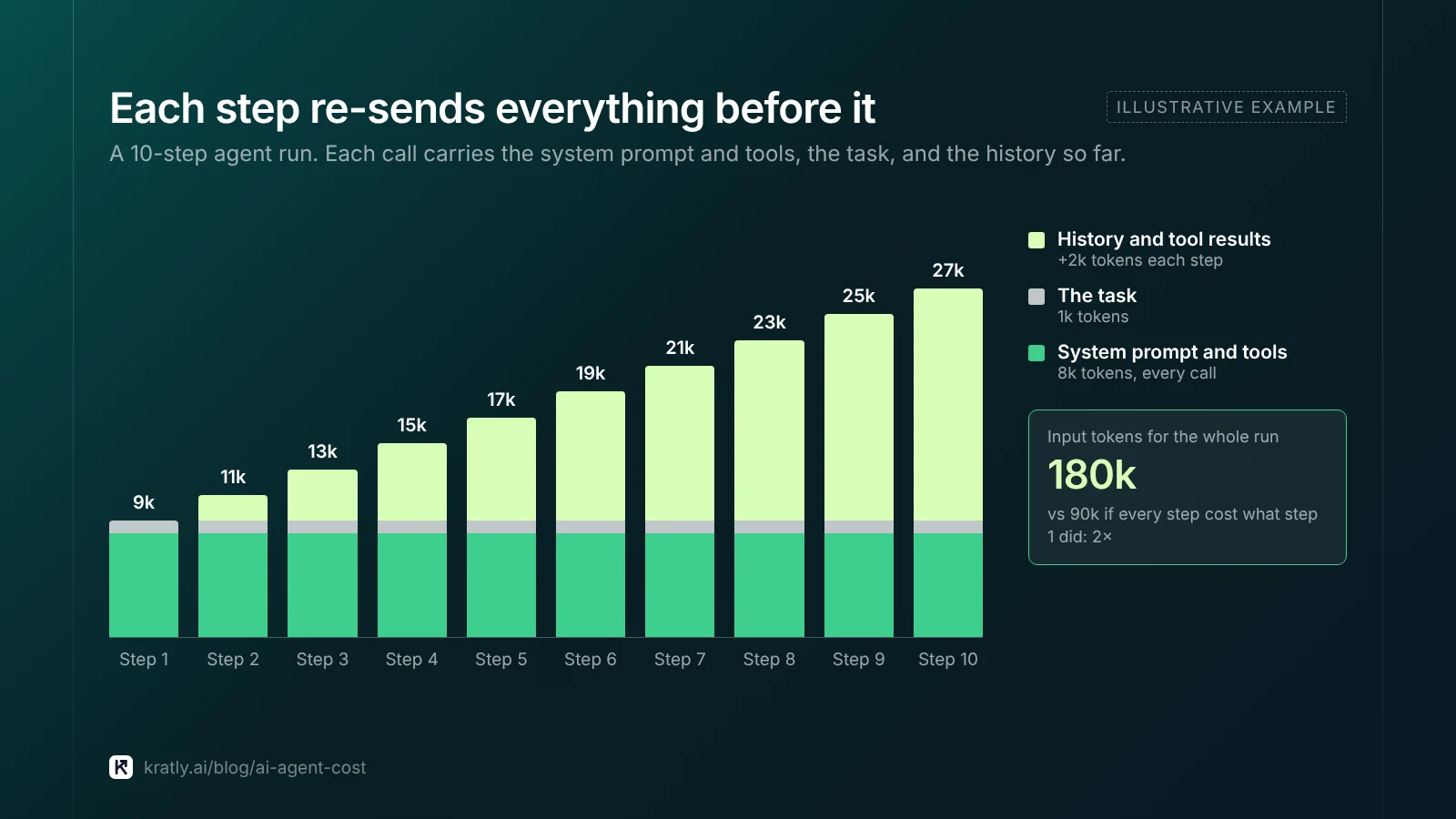
Models don't remember past calls. An agent loop re-sends the whole history on each step. So a 10-step run costs more than 10 times one step.
Retries and failed runs#
A timeout, a rate limit or a bad tool result means the run starts again. You pay for the failed attempt and the retry. Count retries in your job logs and add them to runs per day.
How prompt caching works#
Prompt caching is a feature that stores the start of a prompt so later calls can reuse it at a lower price. The cached part must match exactly, from the first token up to a marker you set.
Here is how Anthropic's version works, as of November 2026, per its prompt caching docs and pricing page:
| Setting | As of November 2026 |
|---|---|
| Cache write, 5-minute life | 1.25× the base input price |
| Cache write, 1-hour life | 2× the base input price |
| Cache read (hit) | 0.1× base input on most models; 0.05× on Opus 5.5 and Sonnet 5.5 |
| Default life | 5 minutes; 1 hour costs extra |
| Cache breakpoints | Up to 4 per request |
| Minimum cacheable length | 512 to 4,096 tokens, by model (512 for Sonnet 5.5) |
| Order cached | Tools, then system, then messages |
Three rules from the docs matter most for cost:
- Short prompts aren't cached. Below the minimum, requests run "without caching, and no error is returned." You won't get a warning.
- Changing tools breaks everything. "Modifying tool definitions (names, descriptions, parameters) invalidates the entire cache."
- Check the usage fields.
cache_read_input_tokensshows hits. If both cache fields read 0, you missed.
Put stable text first: tools, system prompt, fixed account context, then today's task. A timestamp at the top of the system prompt will break every cache hit.
Other providers work the same way#
OpenAI caches automatically. Cached input is "discounted up to 95%," and the minimum is 1,024 tokens for GPT-5.6 and later (OpenAI). Its advice matches: "Put stable developer instructions and shared reference material first." Google's Vertex AI also caches by default. In October 2025, it charged "only 10% of standard input token cost" for cached Gemini 2.5 tokens.
A worked example with caching on and off#
Swap in your own numbers from your logs.
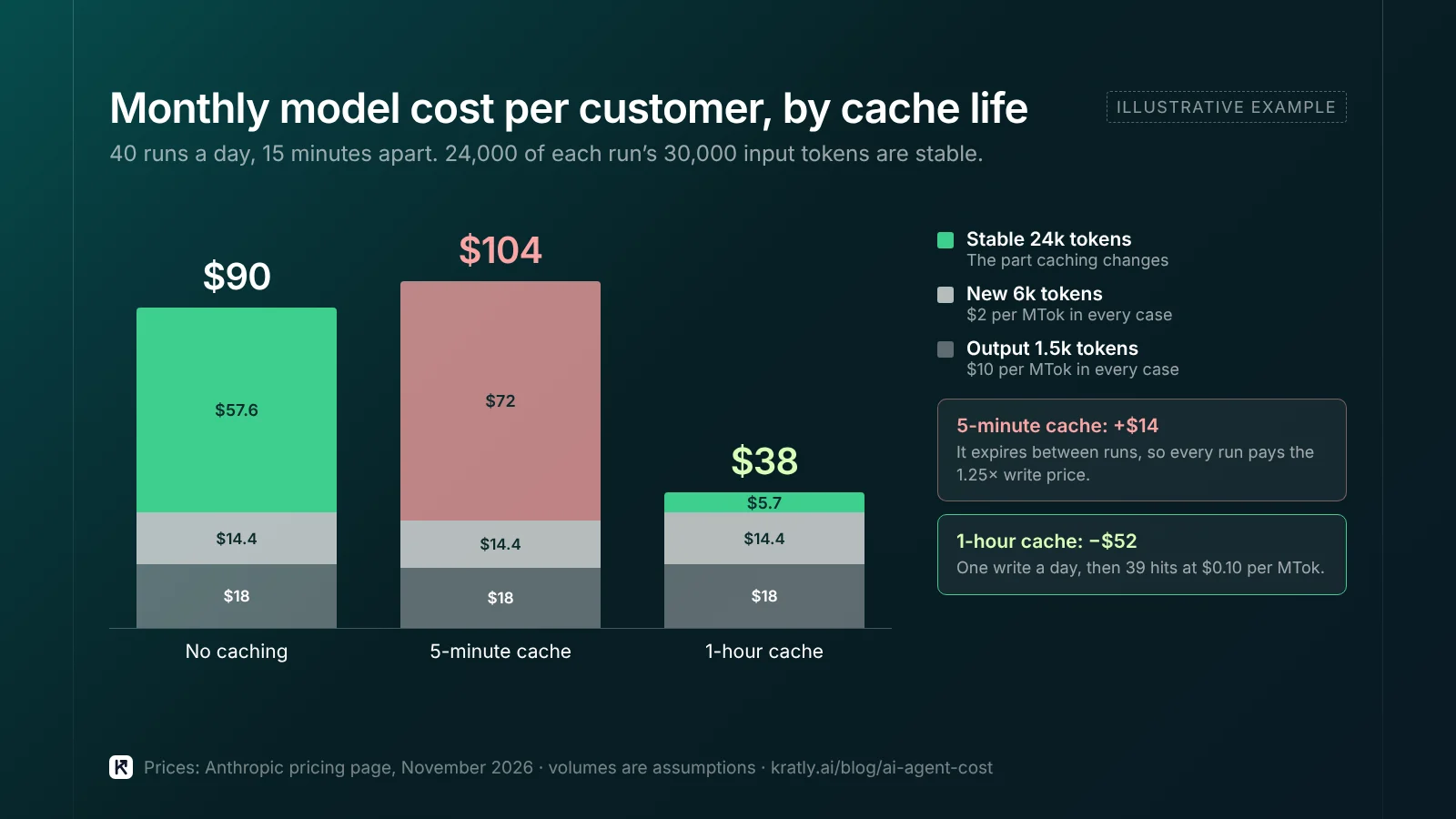
- Assumption: 40 runs per customer per day, over 10 working hours, so about one run every 15 minutes.
- Assumption: 30,000 input tokens per run. 24,000 are stable: system prompt, tool definitions and fixed account context. 6,000 are new each run.
- Assumption: 1,500 output tokens per run, and 30 days a month.
- Prices: Claude Sonnet 5.5, as of November 2026: input $2, 5-minute write $2.50, 1-hour write $4, cache hit $0.10, output $10, all per MTok (Anthropic).
| Line (per customer per day) | No caching | 5-minute cache | 1-hour cache |
|---|---|---|---|
| Stable 24k tokens × 40 runs | 960k at $2 = $1.92 | 40 writes at $2.50 = $2.40 | 1 write at $4 + 39 hits at $0.10 = $0.19 |
| New 6k tokens × 40 runs | 240k at $2 = $0.48 | $0.48 | $0.48 |
| Output 1.5k × 40 runs | 60k at $10 = $0.60 | $0.60 | $0.60 |
| Per day | $3.00 | $3.48 | $1.27 |
| Per month (30 days) | $90 | $104 | $38 |
The wrong cache life costs more than no cache. Runs every 15 minutes outlive a 5-minute cache. Every run pays the 1.25× write price and never gets a hit. Match the cache life to the gap between runs.
The right cache life cuts the bill by more than half. With a 1-hour cache, the stable 24,000 tokens drop from $1.92 to about $0.19 a day. Output and new tokens now make up most of the bill.
Inside one multi-step run, calls come seconds apart, so a 5-minute cache works well there.
Turn the cost into a margin check#
Divide monthly model cost per customer by what that customer pays you. Add hosting, data and support. If the model line is a large share, fix the prompt before raising the price. Our startup marketing budget guide shows how to tie spend to payback.
How do you cut cost without caching?#
- Send fewer tools. Load only the tools a task needs. Fewer tools means fewer tokens, and the cache breaks less often.
- Trim tool results. Return the 20 rows the agent needs, not 2,000.
- Route easy steps to a cheaper model. As of November 2026, Haiku 5.5 costs $0.10 per million input tokens for prompts up to 100,000 tokens. Past that, all input costs $0.50, and cache reads count toward the limit.
- Batch work that can wait. Anthropic's Batch API gives "a 50 percent discount on both input and output tokens" (Anthropic). Overnight reports are a good fit.
- Cap retries. Two retries, then stop and log it. A loop that never ends is the most expensive bug an agent can have.
- Summarize old history once a run gets long.
What to ask an AI agent vendor about cost#
Buying rather than building? You don't pay tokens directly, but the vendor's cost shapes its price and limits. Ask:
| Question | Why it matters |
|---|---|
| How is usage capped each month? | Uncapped usage can surprise you |
| What happens when I add more accounts or data? | More context means more tokens per run |
| How often does the agent run for me? | Runs per day drive cost and freshness |
Compare the total against people, not just software. Our guides on fractional CMO vs AI agent vs agency costs and growth marketer vs AI growth agent costs cover that side. For the bigger picture of buying finished work, see AI that does the work: services-as-software for marketing.
Where Kratly fits#
Kratly is the company behind this blog. It runs an AI growth team on real revenue data, and the methods in this article, stable prompts, prompt caching and cheaper models for easy steps, are how we keep that affordable. We don't publish our own costs. Every change it suggests uses the approval flow in AI marketing approval workflow: one approval, not fifty.
Questions, answered
How do I calculate AI agent cost per customer?
Multiply runs per customer per day by days in the month. Multiply that by input tokens times the input price, plus output tokens times the output price. Take token counts from the usage field on real API responses, not from word counts. Add retries and the extra steps inside agent loops. Then subtract the savings from cached tokens.
How much does prompt caching save?
It depends on how much of each prompt repeats and how often you call. On Anthropic, as of November 2026, a cache hit costs 0.1 times the base input price on most models and 0.05 times on Sonnet 5.5. Anthropic's launch post showed a 90% cost cut on one 100,000-token test. In our worked example, the right cache life cut the monthly bill from $90 to $38.
Can prompt caching cost more than not caching?
Yes. A cache write costs more than normal input: 1.25 times the base price for 5 minutes, or 2 times for 1 hour, on Anthropic. If the cache expires before the next call, you pay the write price every time and never get a cheap read. Match the cache life to how often your agent runs.
Why isn't my prompt being cached?
Check three things. First, the cached part may be below the model's minimum length, and Anthropic gives no error when that happens. Second, something early in the prompt may change between calls, such as a timestamp or tool list. Third, the cache may have expired. Check the usage fields: zero cache reads and writes means a miss.
Written by
Priyansh Kumar
Priyansh Kumar has spent more than a decade in growth, scaling brands from 1 to 10 and from 10 to 100. He now builds Kratly, an autonomous growth team that ties every campaign, page and email to the revenue it brings.
Sources
- Anthropic, Claude Platform Docs: Prompt caching · Pricing (both checked November 1, 2026)
- Anthropic: Prompt caching with Claude (launch post)
- OpenAI: Prompt caching guide (checked November 1, 2026)
- Google Cloud Blog: Vertex AI context caching (October 15, 2025)
Was this article useful?