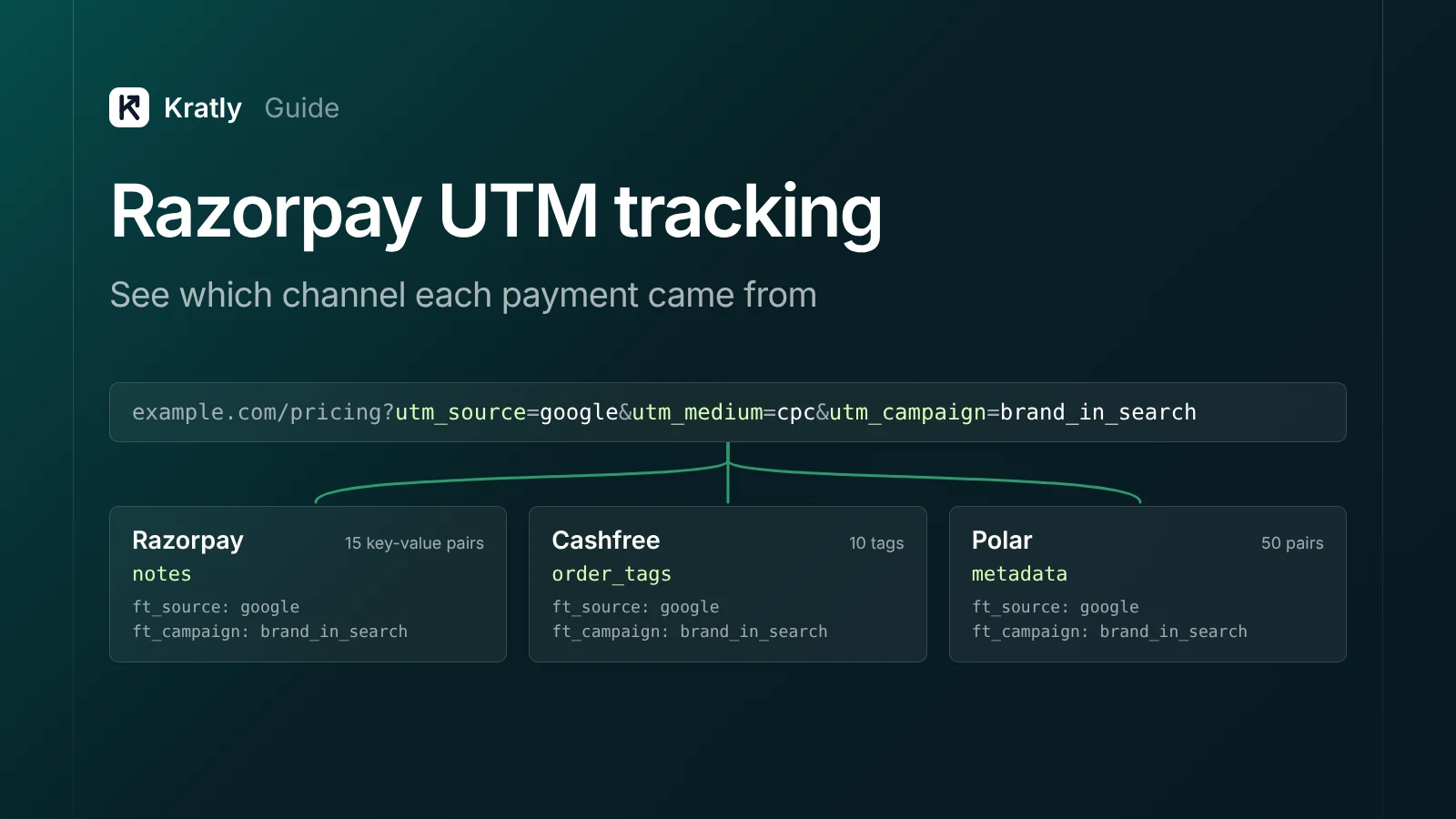
Short answer
Razorpay UTM tracking means saving the visitor's UTMs and click IDs on your server, then writing them into the notes of the order, payment link or subscription you create. Cashfree uses order_tags, and Polar uses checkout metadata. Read the tags back from each processor's webhook and store every payment with its channel.
Stripe allows 50 metadata keys per object (Stripe Docs). Razorpay gives you 15 notes, "256 characters (maximum) each" (Razorpay Docs). Cashfree's own reference says "A maximum of 10 tags can be added" to an order (Cashfree Docs).
So Razorpay UTM tracking is less about capture and more about fitting. Here's which field to use on each processor, what fits, and how to read it back, as of November 2026.
Why don't Razorpay, Cashfree and Polar know your campaign?#
Payment-level attribution is storing the channel that brought a buyer on the payment record itself, so revenue groups by channel without guesswork.
None of these processors reads your landing page URL. The payment happens later, often on a hosted checkout. If your server doesn't hand the tags over, it arrives with no source.
Capture works the same everywhere: save tags server-side, keep first and last non-direct touch, copy them to the user at sign-up. Our Stripe UTM tracking guide covers those rules. For the full chain, see SaaS marketing attribution: tie every campaign to real revenue. What differs is the field, the limit and the webhook.
Selling in India with Razorpay and in the US with Stripe or Polar? Your report must merge processors. Our guide to SaaS go-to-market in the USA from India covers why teams run two.
Which field holds the UTMs on each processor?#
As of November 2026, the official docs say this:
| Processor | Field for your tags | Limits per the docs | Carries to | Source |
|---|---|---|---|---|
| Razorpay | notes on orders and payment links | "Maximum 15 key-value pairs, 256 characters (maximum) each" | The order entity, returned in order.paid | Razorpay Docs |
| Razorpay | notes on subscriptions | "a maximum of 15 key-value pairs" | The subscription | Razorpay Docs |
| Cashfree | order_tags on the order | "A maximum of 10 tags"; each value 1 to 255 characters | data.order.order_tags in the payment webhook | Cashfree Docs |
| Polar | metadata on the checkout | 50 pairs; keys up to 40 characters; string values up to 500 | "copied to the resulting order and/or subscription" | Polar Docs |
| Polar | customer_metadata on the checkout | Same limits | "copied to the created customer" | Polar Docs |
Two traps. Razorpay's payment link page says 256 characters, but its error list includes "length must not be greater than 255" (Razorpay Docs). And Cashfree's schema allows 15 properties while its text says 10. In both cases, I'd design for the lower number.
Plan your keys for the smallest limit#
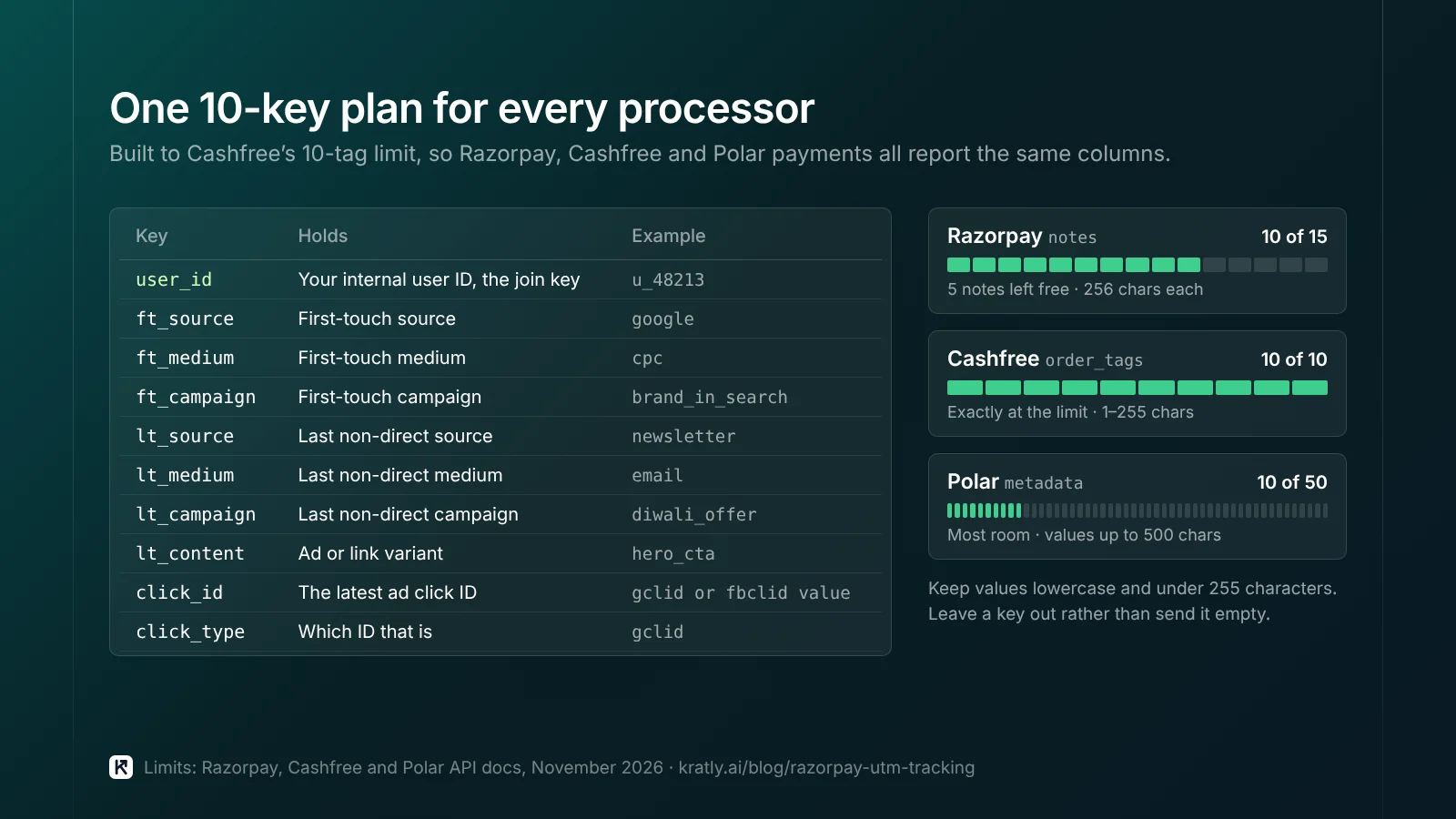
Use one key plan on every processor, built to Cashfree's 10. This is my recommendation, not a processor rule.
| Key | Holds | Example value |
|---|---|---|
user_id | Your internal user ID, the join key | u_48213 |
ft_source | First-touch source | google |
ft_medium | First-touch medium | cpc |
ft_campaign | First-touch campaign | brand_in_search |
lt_source | Last non-direct source | newsletter |
lt_medium | Last non-direct medium | email |
lt_campaign | Last non-direct campaign | diwali_offer |
lt_content | Ad or link variant | hero_cta |
click_id | The latest ad click ID | (the gclid or fbclid value) |
click_type | Which ID that is | gclid |
On Razorpay that leaves 5 notes free. Lowercase values first; see our UTM naming convention. The click ID lets you send the payment back later, as in offline conversion import in Google Ads.
Razorpay UTM tracking: orders, links and subscriptions#
Razorpay's overview says that "The majority of the entities allow the notes object" (Razorpay Docs). Which entity you tag depends on how people pay.
One-time payments through an order#
Your server creates an order before checkout opens. Add the tags there, looked up by user from your database.
// Server: create the order with the user's stored tags.
const { first, last } = await db.attribution.forUser(user.id);

const order = await razorpay.orders.create({
  amount: amountInSubunits,   // see Razorpay's Create an Order docs
  currency: 'INR',
  notes: {
    user_id: user.id,
    ft_source: first.source, ft_medium: first.medium, ft_campaign: first.campaign,
    lt_source: last.source, lt_medium: last.medium, lt_campaign: last.campaign,
    lt_content: last.content, click_id: last.clickId, click_type: last.clickType,
  },
});
When the order is paid, the order.paid webhook carries both entities. Razorpay says "This payload includes both order and payment entities" (Razorpay Docs). Read the tags from the order's notes. The payment entity has its own notes and an order_id (Razorpay Docs). The docs I checked don't say payment notes copy from the order. So read the order.
Payment links#
Payment links take the same notes with the same limit. They also take a reference_id, which must be unique per link and is capped at 40 characters (Razorpay Docs).
I'd put a link ID in reference_id and the tags in notes when you create a link for a known buyer. For public links, make one link per channel.
Subscriptions#
Subscriptions take notes too, up to 15 pairs (Razorpay Docs). Renewals happen with no visit, so put last touch here.
Razorpay sends subscription.charged "on each successful charge" (Razorpay Docs). The docs I checked don't show whether it repeats the notes. So save the subscription ID with the tags, and look them up on each charge.
Cashfree: use order_tags, not order_meta#
order_meta sounds like metadata, but it isn't. Cashfree describes it as "Optional meta details to control how the customer pays and how payment journey completes" (Cashfree Docs). It holds return_url, notify_url and payment_methods, not your tags.
Your tags go in order_tags: "Custom Tags in the form of {"key":"value"} which can be passed for an order." Values are strings of 1 to 255 characters. Don't send empty values; leave the key out instead.
{
  "order_amount": 4999,
  "order_currency": "INR",
  "customer_details": { "customer_id": "u_48213", "customer_phone": "9999999999" },
  "order_meta": { "return_url": "https://app.example.com/paid?order_id={order_id}" },
  "order_tags": {
    "user_id": "u_48213",
    "ft_source": "google", "ft_medium": "cpc", "ft_campaign": "brand_in_search",
    "lt_source": "newsletter", "lt_medium": "email", "lt_campaign": "diwali_offer",
    "click_id": "EAIaIQ...", "click_type": "gclid"
  }
}
Abbreviated request body. Check required fields on Cashfree's Create Order reference.
As of November 2026, the x-api-version header defaults to 2026-01-01, and the version decides whether tags come back. In Cashfree's payment webhook samples, data.order.order_tags is an object in version 2026-01-01 but null in the 2025-01-01 and 2023-08-01 samples (Cashfree Docs). If your tags come back empty, check the version first.
Listen for PAYMENT_SUCCESS_WEBHOOK. Verify it with the x-webhook-signature and x-webhook-timestamp headers before you trust it.
Polar: checkout metadata and checkout link UTMs#
Polar has the most room of the three: 50 pairs, keys up to 40 characters, string values up to 500 (Polar Docs).
Two fields map onto first and last touch:
customer_metadatais "copied to the created customer." Put first touch here. It belongs to the person.metadata"will be copied to the resulting order and/or subscription." Put last touch at purchase here. Renewals stay tied to the subscription.
Using checkout links with no server call? Per Polar's docs, you can add utm_source, utm_medium, utm_campaign, utm_content, utm_term and reference_id to a checkout link URL. They are "automatically attached to the generated Checkout Session" (Polar Docs).
One caution: the docs say link metadata carries to the order, but not the URL UTMs. Until you've tested it, read them from the checkout, keyed by reference_id.
Polar sends order.paid when "the order is fully processed and payment has been received" (Polar Docs). Use that as your paid event.
How do you read the channel back from webhooks?#
You need every payment, with its tags, in one table you control.
| Processor | Event to listen for | Where the tags are | Fallback |
|---|---|---|---|
| Razorpay (order) | order.paid | Order entity notes | Fetch the order by order_id |
| Razorpay (subscription) | subscription.charged | Your table, keyed by subscription ID | Fetch the subscription |
| Cashfree | PAYMENT_SUCCESS_WEBHOOK | data.order.order_tags (version 2026-01-01) | Your table, keyed by order_id |
| Polar | order.paid | Order metadata | Your table, keyed by checkout or reference_id |
Then:
- Verify every webhook with the processor's signature before you write anything.
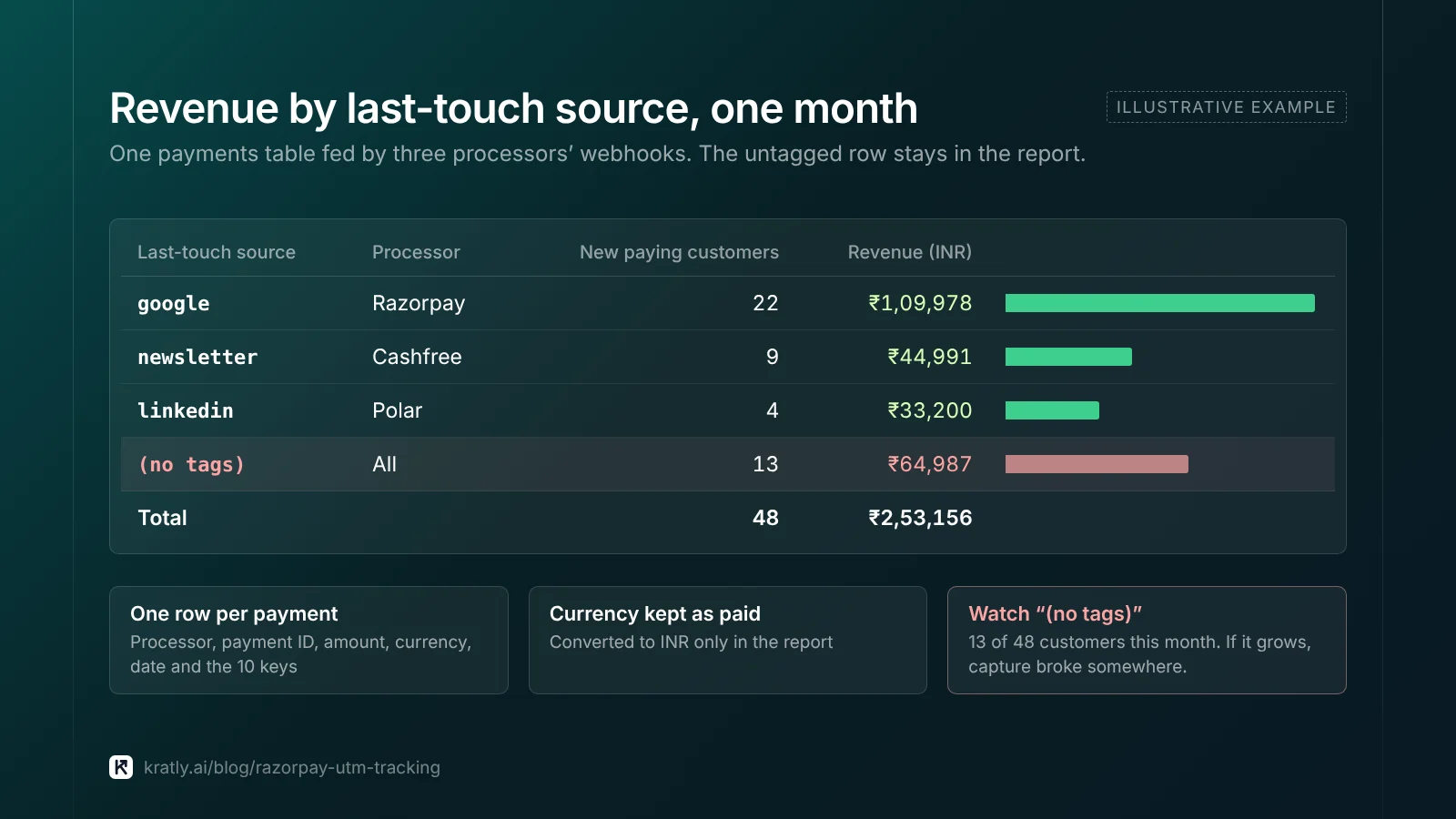
- Write one row per payment: processor, payment ID, amount, currency, date, and your 10 keys.
- Keep currency as paid; convert in the report.
- Flag renewals apart from first payments.
- Keep a "(no tags)" row in every report. If it grows, capture broke somewhere.
An illustrative monthly view (numbers made up):
| Last-touch source | Processor | New paying customers | Revenue (INR) |
|---|---|---|---|
| Razorpay | 22 | ₹1,09,978 | |
| newsletter | Cashfree | 9 | ₹44,991 |
| Polar | 4 | ₹33,200 | |
| (no tags) | All | 13 | ₹64,987 |
Where Kratly fits#
Kratly has Razorpay, Cashfree and Polar connections built alongside Stripe. Each one checks the webhook signature, imports the last 90 days, handles refunds and renewals, and matches payments to visits through a visitor ID passed in notes, order tags or metadata, the same idea as this article. They're new and being tested on our own accounts first; Stripe is the connection we've run longest.
Questions, answered
Does Razorpay track UTM parameters automatically?
No. As far as the docs show, Razorpay does not read UTMs from your landing page. You capture them on your own site, store them by user, and write them into notes when your server creates the order, payment link or subscription. Then you read the notes back from the order.paid webhook or by fetching the entity.
How many notes can a Razorpay order have?
Razorpay's docs say 15 key-value pairs, 256 characters each, as of November 2026. One error message on the payment link page says 255, so keep values under 255. Ten keys covers first touch, last touch, a click ID and your user ID, and leaves room for other notes your team adds.
What is the difference between Cashfree order_tags and order_meta?
order_tags holds your own key-value data, like UTMs. order_meta controls the payment journey: the return URL, the notify URL and which payment methods show. Put attribution in order_tags. In Cashfree's webhook samples, tags come back as an object only in the 2026-01-01 version, so check your API version if they arrive empty.
Does Polar save UTM parameters from checkout links?
Yes, on the checkout session. Polar's docs say UTM parameters and reference_id added to a checkout link URL are attached to the generated checkout session. They don't say those values copy to the order. Checkout metadata does copy to the order and subscription, so it's the safer field when your server creates the checkout.
Written by
Priyansh Kumar
Priyansh Kumar has spent more than a decade in growth, scaling brands from 1 to 10 and from 10 to 100. He now builds Kratly, an autonomous growth team that ties every campaign, page and email to the revenue it brings.
Sources
- Razorpay Docs: Create an Order (notes limits) · Entity metadata (notes) · Create a Standard Payment Link · Create a Subscription · Orders webhook events · Payments webhook events · Subscriptions webhooks
- Cashfree Docs: Create Order (order_tags, order_meta, x-api-version) · Payment webhooks
- Stripe Docs: Metadata (50 keys)
- Polar Docs: Create Checkout Session (metadata, customer_metadata) · Checkout Links (query parameters) · order.paid
Was this article useful?