Short answer
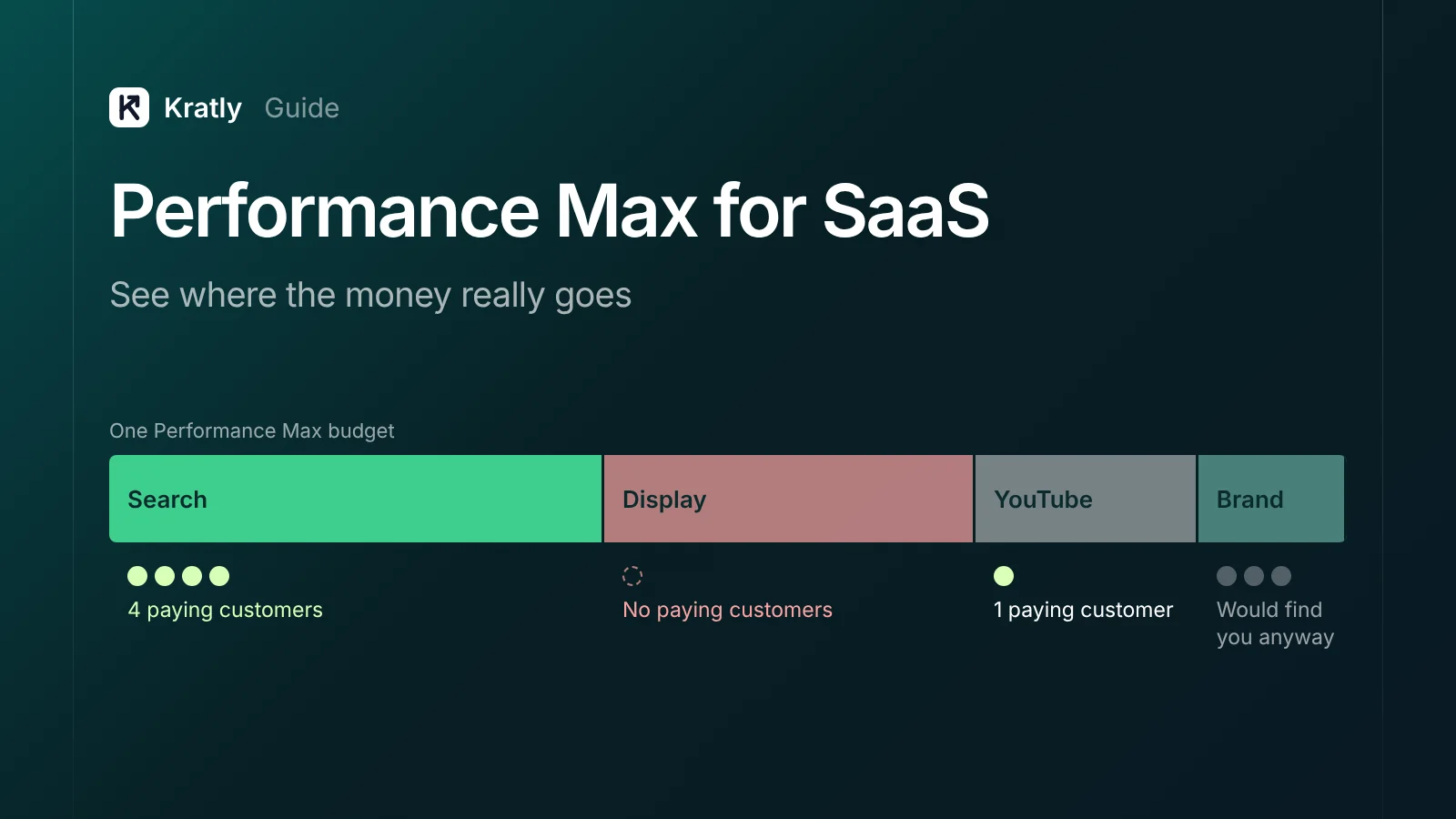
Performance Max for SaaS works only when Google can see which leads become paying customers. Without that signal, it learns to buy cheap form fills, Display clicks and your own brand searches. Run it after you import paid conversions and exclude your brand. Until then, Search campaigns are the safer place for your budget.
A lead gen advertiser on r/PPC asked how to stop spam leads from Performance Max. The strangest part: "These leads claim they saw ads that state we're offering a free trial or that we will pay them" (r/PPC, via mirror).
Performance Max (PMax) writes ads, picks pages and picks channels for you. If your goal is "form submitted," it finds people likely to submit a form. That isn't the same as people likely to pay.
It isn't only SaaS. A Shopify merchant whose campaigns included Performance Max said sales "were ridiculous compared to the amount of money we spent" (Shopify Community).
Should a SaaS run Performance Max at all?#
My default for a SaaS spending under about $20k a month on Google: don't start with PMax. Start with Search campaigns on high-intent terms, where you see every query and every dollar. Add PMax later, as a test, once two things are true.
- Google sees paying customers. You send trial-to-paid or closed-deal conversions back to Google Ads, not just sign-ups.
- You have the volume. Google's lead gen advice is to bid on a goal close to the sale. In its words: "a conversion goal closest to a sale or closed deal that has at least 15 conversions in the last 30 days" (Google Ads Help).
With 4 paying customers a month from Google, PMax has almost nothing to learn from.
| Your situation | Run PMax? | Why |
|---|---|---|
| Only sign-ups or demo forms tracked | No | It optimizes to form fills, including spam |
| Paid or qualified conversions imported, 15+ in 30 days | Yes, as a test | It has a real signal to learn from |
| Mostly selling to your own brand searchers | No, or exclude brand | It takes credit for people who'd find you anyway |
| No video or image assets | Wait | Google fills gaps with auto-made assets you didn't approve |
| Large budget, Search already capped on impression share | Yes | You've used up the clear-intent inventory |
The opposite case: a low-priced self-serve product with dozens of payers a month from Google and real revenue passed back. There PMax can beat hand-built campaigns.
Why Performance Max for SaaS goes wrong#
Four leaks show up often in SaaS accounts.
1. Spam and junk leads. When the goal is a form fill, bots and low-intent visitors look like wins. Google says that without richer data, such as lead scores or clear conversion actions, its systems work with weaker signals (Google Ads Help). A Search Engine Land piece put it bluntly. Without offline conversion data, "Google's systems are prone to bringing in a lot of spam" (Search Engine Land, 2023).
2. Display, YouTube and Gmail spend. PMax can serve on Search, Display, YouTube, Discover, Maps, Gmail and Search partners (Google Ads Help). For B2B software, cheap placements often bring clicks from people who will never buy.
3. Your own brand. PMax can bid on people already searching your name. Those conversions look cheap and make the whole campaign look good. Most of them would have come through your organic listing anyway. I cover how to test this in should you bid on your own brand name?
4. Pages you didn't choose. Final URL expansion is "turned on by default" and can replace your landing page with another page on your domain (Google Ads Help).
See where the money goes: channel and search terms reports#
Two reports show most of it.
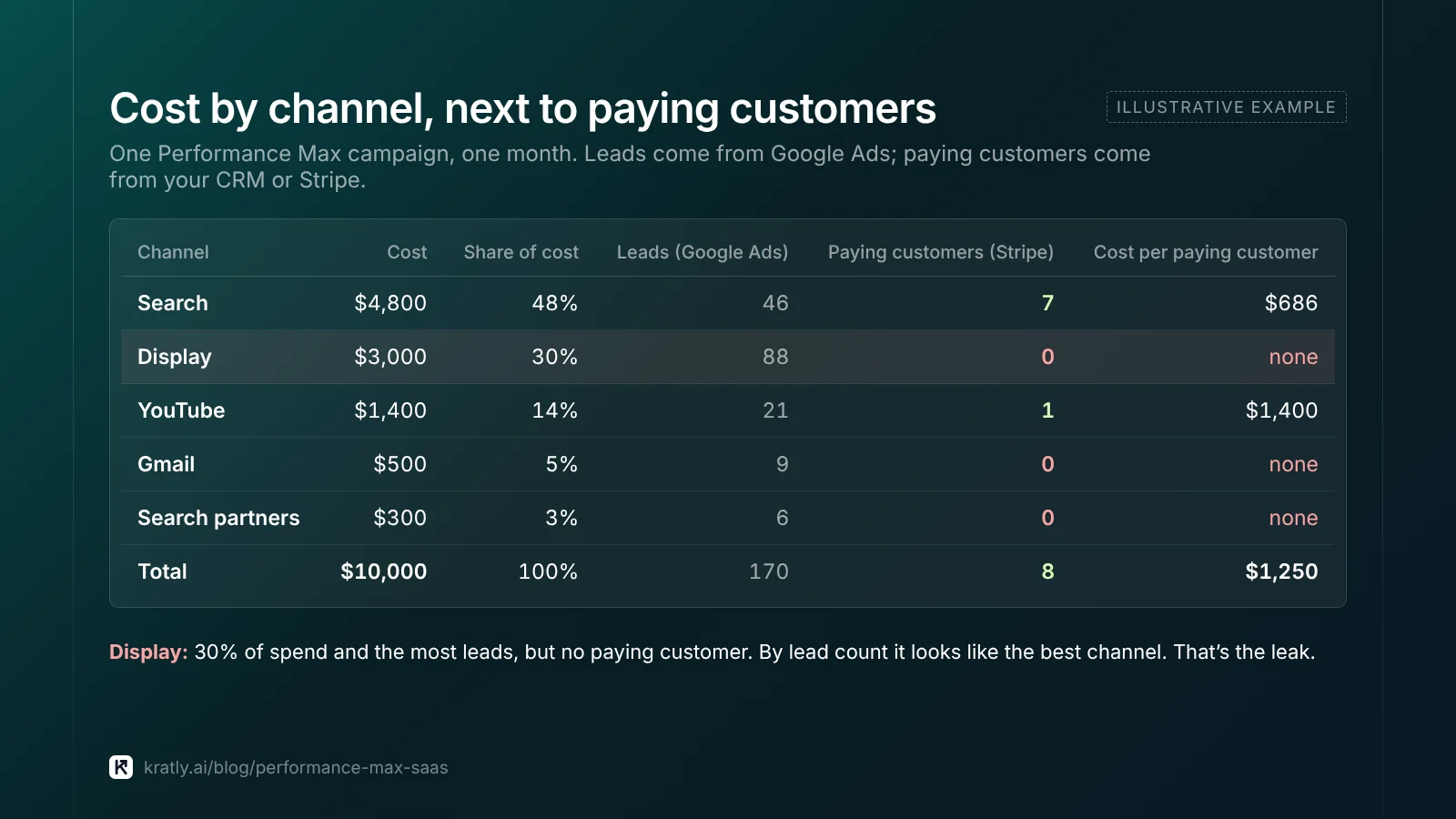
Channel performance report. Go to Campaigns › Insights and reports › Channel performance. It shows cost, conversions and value by channel: Search, Display, YouTube, Discover, Maps, Gmail and Search partners. You can view any date range after June 6, 2025 (Google Ads Help).
Check first: the share of cost on Display and YouTube versus their share of paid conversions. If Display takes 30% of spend and your CRM shows no paying customer from it, that's your leak.
PMax search terms. Go to Campaigns › Search terms and filter to your PMax campaign. It splits Shopping and text ads, with data from March 2023 (Google Ads Help). Sort by cost. Look for three things:
- Your brand name and its misspellings
- Job-seeker and free-tool searches ("jobs", "free", "login", "template")
- Competitor names, if you don't want to target them
New controls in October 2026. On October 14, 2026, Google announced channel prioritization (High or Low) and budget caps for Search partners and Display. They apply across Search, Shopping, PMax and Demand Gen. It's rolling out over months (Google blog). Until then, you steer channels only through assets, signals and goals.
PMax brand exclusion, negatives and URL controls#
Brand exclusions. Add your brand as a brand list in PMax settings. In PMax, brand exclusions cover Search, Shopping and YouTube search inventory (Google Ads Help). Google says they also help block brand misspellings and brand searches in other languages (Google Ads Help). Then run a separate Search campaign for brand, so you can see and control what it costs.
Negative keywords. PMax negatives apply to Search and Shopping inventory, and account-level negatives also apply (Google Ads Help). You can add up to 1,000 account-level negatives (Google Ads Help). Since March 2025, a PMax campaign can hold 10,000 negatives, up from 100 (Search Engine Land). PMax also supports shared negative lists (Google Ads Help). For a method, see how to find negative keywords.
Final URL expansion and URL exclusions. For lead gen, Google itself suggests that if ads show on irrelevant pages, "consider turning off 'Final URL Expansion'" (Google Ads Help). I'd turn it off for most SaaS. If you keep it on, exclude /blog, /careers, /docs, /login and /legal with URL exclusions.
| Leak | Control | Time to set up |
|---|---|---|
| Brand searches | Brand exclusion + separate brand Search campaign | 20 minutes |
| Junk queries | Campaign or shared negative list | 1 hour, then 15 minutes a week |
| Wrong landing pages | Final URL expansion off, or URL exclusions | 10 minutes |
| Display/YouTube waste | Assets, goals; channel priority once rolled out | Ongoing |
| Spam leads | reCAPTCHA, qualifying fields, paid-conversion goal | Half a day to a week |
Bid on paying customers, not form fills#
This is the fix that matters most. The others only limit damage.
Make the deep goal primary. In Google Ads, only primary conversions are used for bidding; secondary ones are reported only (Google Ads Help). Set "trial started" or "demo booked" as secondary. Set "paid" or "qualified" as primary.
Send paid conversions back. Store the GCLID when someone signs up, then upload the conversion when they pay. Google accepts clicks up to 90 days old (Google Ads Help). If you use Stripe, the setup is in track Stripe conversions in Google Ads.
Block spam at the form. Google recommends qualifying questions and "implementing reCAPTCHA on your landing page or forms," plus server-side checks (Google Ads Help).
Consider "new customers only." The customer acquisition goal has a New Customer Only mode. Google recommends it for strict acquisition budgets or non-purchase goals such as lead generation (Google Ads Help). Upload your customer list so PMax stops chasing people who already pay you.
The trade-off: fewer, slower signals. Expect a higher cost per lead in exchange for a lower cost per paying customer. If you can't wait 30–60 days for that, PMax isn't the right tool yet.
Performance Max not working? A 30-day plan#
If PMax is already running, try this before pausing it.
- Week 1: measure. Pull the channel report and search terms. Match PMax leads in your CRM against paying customers.
- Week 2: cut the obvious. Add brand exclusions, a negative list and URL controls. Turn on reCAPTCHA.
- Week 3: fix the goal. Make paid or qualified conversions primary. Expect a learning period.
- Week 4 onward: judge on revenue. Compare cost per paying customer with your Search campaigns.
If PMax still costs more per payer than Search after enough spend and your normal conversion delay, pause it. The rules are in when to pause a Google Ads campaign. The broader list of leaks is in Google Ads wasted spend: the 9 places your budget leaks.
If you have at least $5,000 to test with, a Conversion Lift study can tell you how many conversions PMax truly adds (Google Ads Help). Google opened it to Search and PMax as self-serve in October 2026 (Search Engine Land).
How to do this in Kratly#
- Connect Google Ads and Stripe. Kratly shows revenue and cost per paying customer for each campaign, PMax included.
- Compare PMax with Search. See cost per paying customer side by side, not cost per lead.
- Review the leaks. Kratly lists the search terms that spend without paying customers, including your own brand, ready to add as negatives or exclusions.
- Approve the changes. You approve each change; it's logged and you can undo it.
Questions, answered
Is Performance Max good for B2B SaaS?
Yes, once Google sees which leads pay. With only sign-ups or demo forms tracked, it tends to buy cheap leads, Display clicks and brand searches. Start with Search, import paid conversions, then test PMax with brand excluded. Judge it on cost per paying customer, not cost per lead.
How do I stop spam leads from Performance Max?
Make paid or qualified conversions your primary goal. Add reCAPTCHA and a qualifying field to forms, and validate leads on the server. Then upload which leads became customers so Google learns the difference. Google accepts uploads for clicks up to 90 days old, so store the GCLID at sign-up.
Can I see PMax search terms?
Yes. Go to Campaigns › Search terms and filter to the PMax campaign. Sort by cost and look for your brand name, job-seeker and free-tool searches, and competitor names. Add negatives or brand exclusions for terms that never lead to a paying customer.
Should I use Performance Max or Search campaigns for SaaS?
Start with Search if you spend under about $20k a month on Google. Search shows every query and every dollar. Add Performance Max as a test once you import paid or qualified conversions and have at least 15 in 30 days. Then compare cost per paying customer.
Written by
Priyansh Kumar
Priyansh Kumar has spent more than a decade in growth, scaling brands from 1 to 10 and from 10 to 100. He now builds Kratly, an autonomous growth team that ties every campaign, page and email to the revenue it brings.
Sources
- Google Ads Help: PMax best practices for lead generation · Channel performance report · PMax search terms · Brand exclusions · Brand settings · PMax negative keywords · Account-level negatives · 2025 PMax updates · Final URL expansion · URL exclusion · Customer acquisition goal · Primary and secondary conversions · Offline conversion import · Conversion Lift
- Google blog: Channel prioritization and budget allocation (Oct 2026)
- Search Engine Land: Why PMax for lead gen often fails (2023) · PMax negative keyword limit · Conversion Lift for Search and PMax
- Community: r/PPC thread on PMax spam leads (mirror) · Shopify Community
Was this article useful?