Short answer
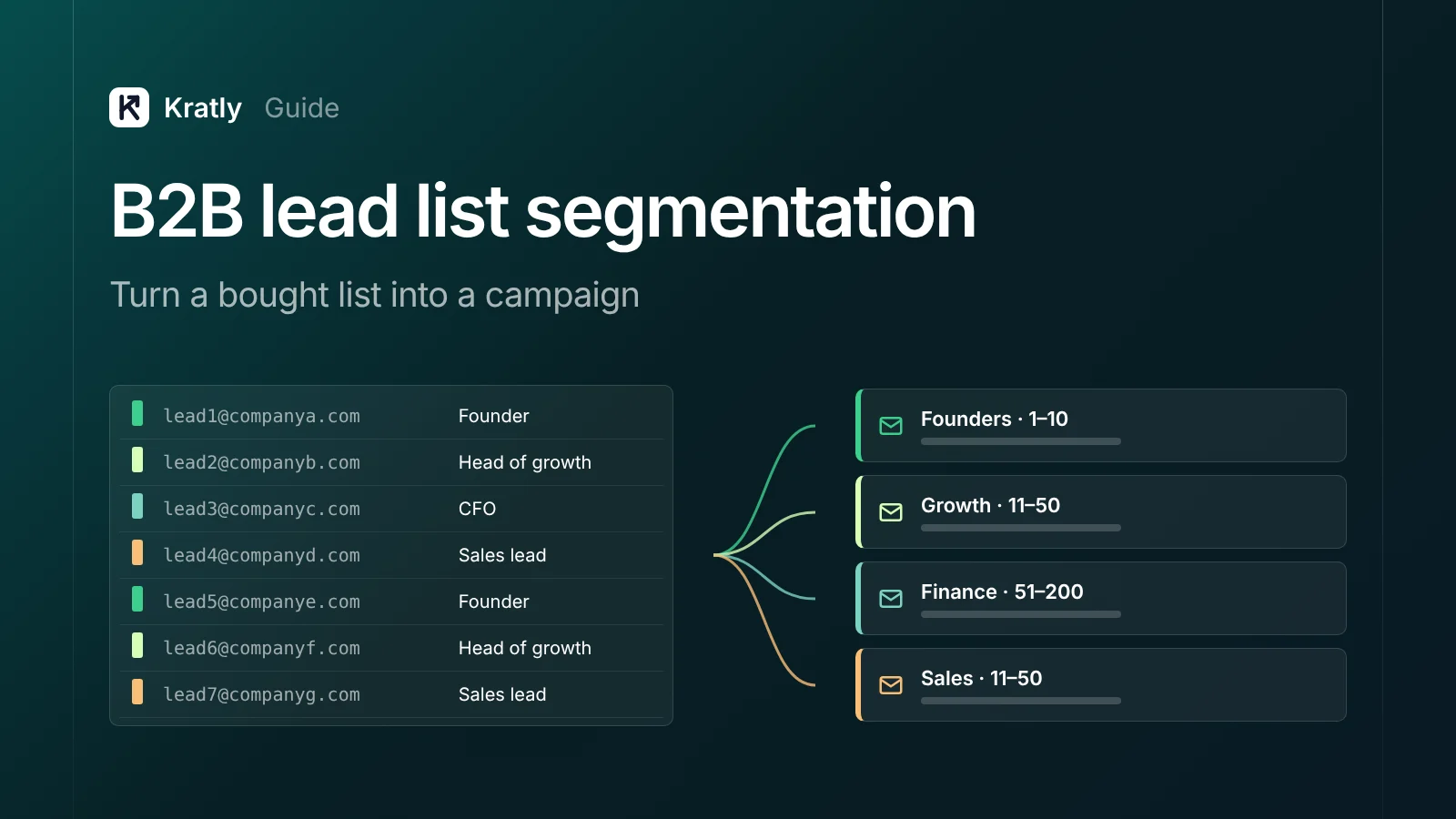
B2B lead list segmentation means cleaning a lead list, then splitting it into small groups that share one problem. Dedupe, normalize and verify first. Then group by ICP fit: industry, size, role, tech used and trigger events. Write one message per segment, size each to your sending caps, and judge every segment on meetings and revenue.
Composite example: a founder buys 5,000 "SaaS decision makers" and loads them all into one sequence. The same email goes to a CFO at a bank and a developer at a startup. Replies are rare, and the few that come in say "not relevant." This is a composite, not a real company.
The real problem was one message for everyone.
What is B2B lead list segmentation?#
B2B lead list segmentation is splitting business contacts into groups that share a reason to care about one message. Each segment is a bet: "these 200 people have this problem, and this email names it."
A good segment shares one pain, takes one true first line, and fits within your sending caps. A bought list is raw material, not a campaign.
How do you clean a lead list?#
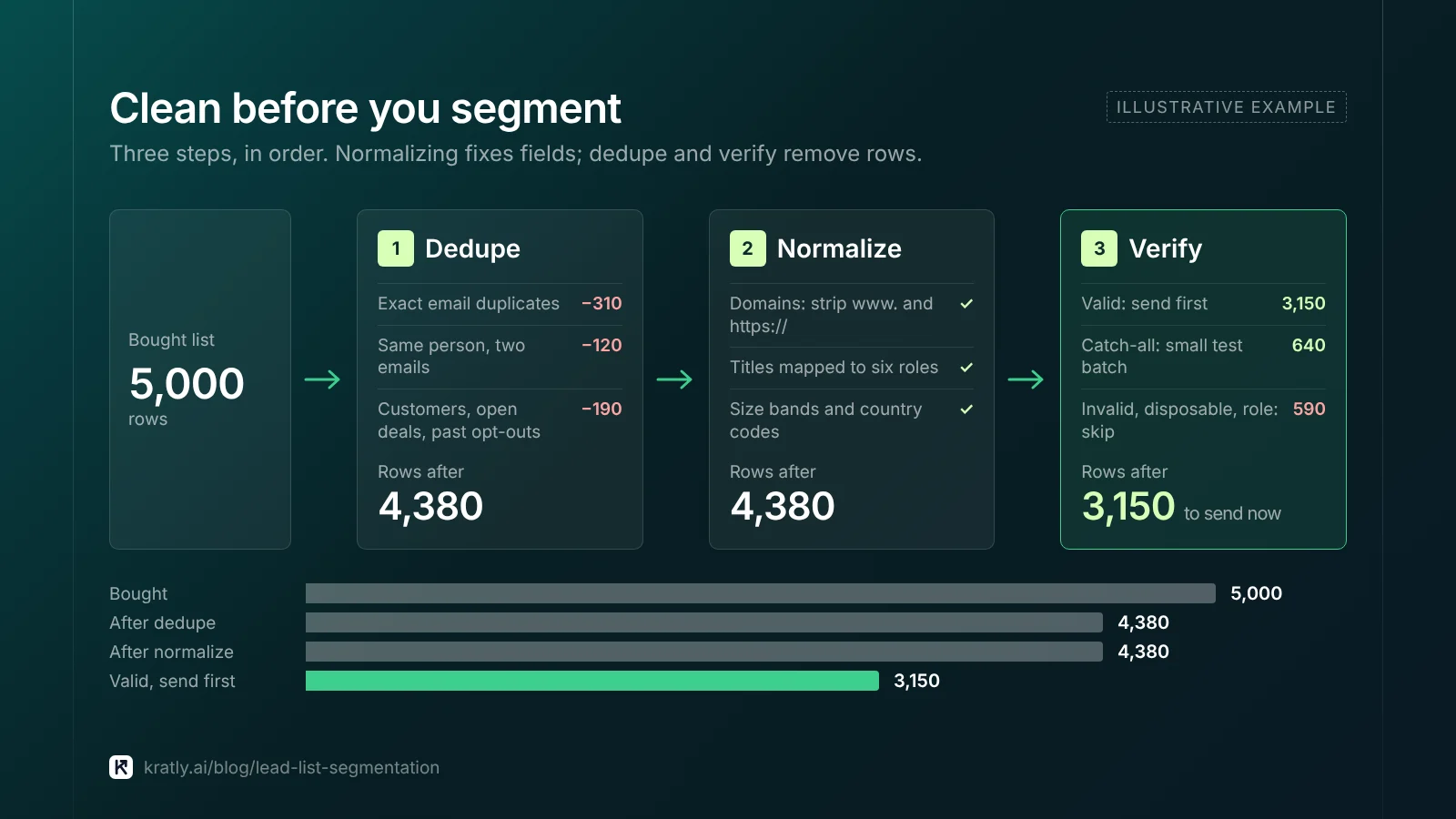
Clean before you segment, or you'll split dirty data into smaller dirty piles. To clean a lead list, run these steps in order.
1. Dedupe#
- Exact email duplicates. Remove first.
- Same person, two emails. Match on first name, last name and company domain. Keep the work address.
- Your own data. Drop current customers, open deals and anyone who opted out before. Export your suppression list and match against it.
2. Normalize#
One format per field:
- Domains. Strip
www.andhttps://. Use the domain as the company key, so "Acme Inc." and "ACME" merge. - Titles. Map raw titles to a short role list: Founder, Marketing lead, Sales lead, Engineering lead, Finance, Other.
- Company size. Turn text like "51-200 employees" into fixed bands.
- Country. One code per country, for the legal check below.
3. Verify#
Verify every address and store the result as a column. Send only to "valid" at first. Test catch-alls in a small batch. Skip disposable, invalid and admin role addresses. The full decision table is in email verification for cold email: catch-all, role and disposable.
Segment leads for cold email by ICP fit#
Your ICP (ideal customer profile) is the type of company and person who buys and stays. No written ICP? Look at what your best 20 customers share. Then segment leads for cold email on five fields:
| Field | Example values | Why it matters |
|---|---|---|
| Industry | Fintech, healthcare SaaS, agencies | Pain and vocabulary differ by industry |
| Company size | 1–10, 11–50, 51–200 | Budget, buying process and who signs |
| Role | Founder, Head of growth, CFO | Each role owns a different problem |
| Tech used | Stripe, HubSpot, Shopify | Shows fit and gives you a first line |
| Trigger event | New funding, new hire, new market | Explains "why now" |
Don't use all five at once. Three fields with three values each make 27 segments, too many to write for. My rule: one primary split (usually role), one secondary split (size or industry), and triggers as a priority tag. That gives four to six segments.
Trigger events beat static fields#
A static field says who someone is. A trigger says what just changed. Find triggers in job posts, funding news and company blogs, then tag the row with the date you saw it. I'd treat triggers over 90 days old as normal rows.
The spreadsheet column template#
One row per person. These columns cover cleaning, segmenting and testing:
| Column | What goes in it | Example |
|---|---|---|
email | Work address, lowercased | [email protected] |
first_name, last_name | Cleaned names | Jane, Doe |
company_domain | Root domain, the company key | acme.com |
country | Country code | US |
industry | Your own short list | Fintech |
size_band | Fixed bands | 11–50 |
role | Mapped role | Head of growth |
tech_used | Tools that show fit | Stripe; HubSpot |
trigger + trigger_date | What changed, and when you saw it | Hired first marketer, 2026-10-12 |
verify_result | Verifier output | valid / catch-all / unknown |
segment | One segment name | growth-smb-fintech |
source | Where the row came from | vendor-name-2026-10 |
batch | Test batch label | b1 |
status | Sent, replied, positive, meeting, opted out | positive |
legal_basis_note | For EU contacts, your basis and notice date | LI, notice in email 1 |
Use the segment value as the UTM campaign tag on every link, so visits and sign-ups trace back to the segment. A UTM naming convention your team will follow keeps those tags consistent.
One message per segment#
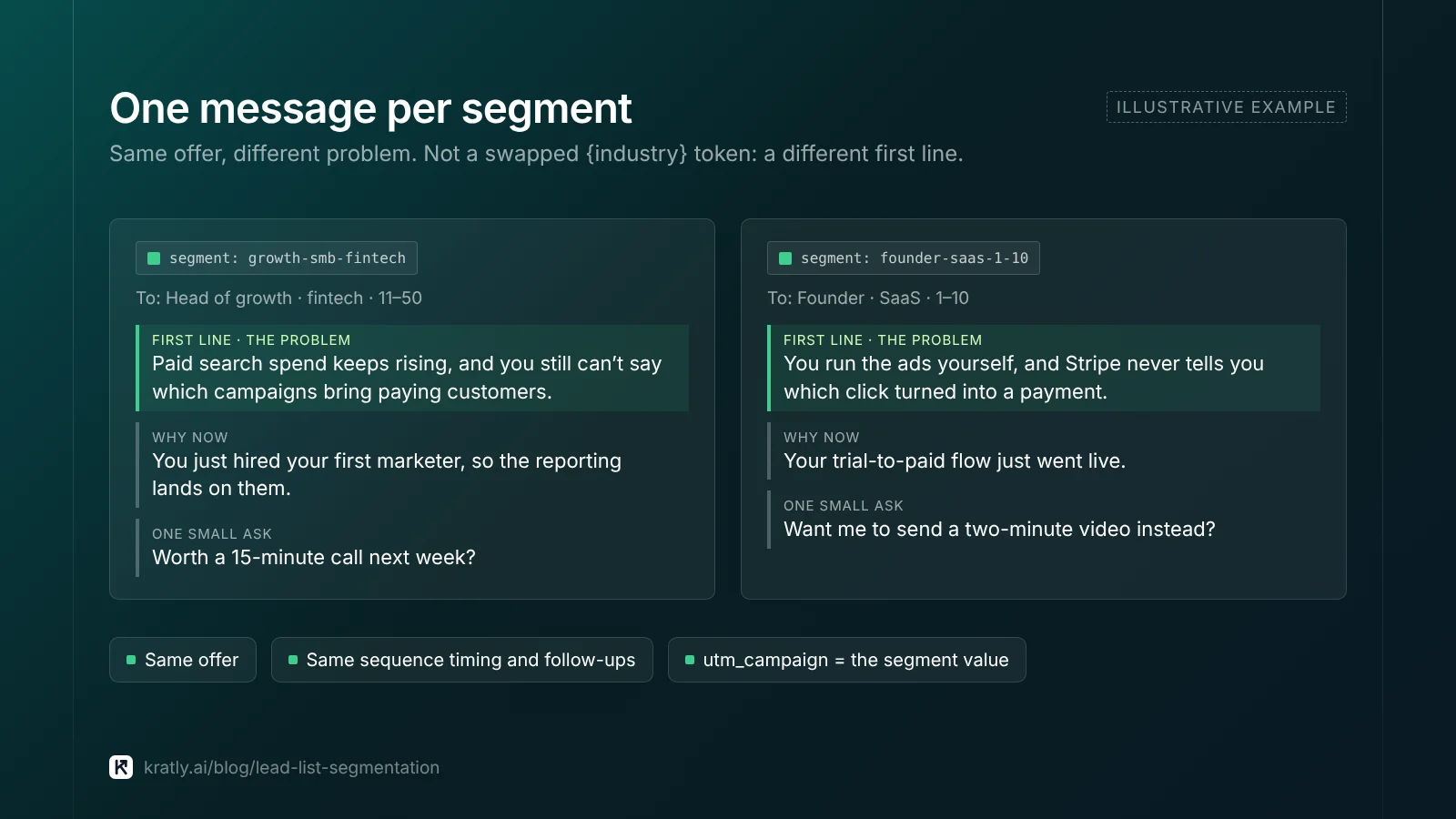
Each segment gets its own email, not a swapped {industry} token. Build it on three lines:
- The problem, in their words. What does this role at this size complain about?
- Why now. Use the trigger if the segment has one.
- One small ask. A question or a short call, not a demo request with five steps.
Keep timing and follow-ups the same across segments at first, so the message is the only thing that differs.
How big should each segment be?#
Size segments for your sending capacity, not for the list. Mailboxes, warm-up and provider rules set that capacity; see cold email deliverability in 2026: warm-up, caps and bounces.
Work it out like this:
- Daily capacity = mailboxes × your daily cap per mailbox.
- Contacts per day = daily capacity ÷ emails per contact in the sequence.
- Test batch = the contacts you can start in a few days per segment.
Worked example (assumptions, not benchmarks): you have 3 warmed mailboxes. Assume a cap of 40 emails a day each, so 120 a day. Assume a three-step sequence. That's about 40 new contacts a day. With four segments, each gets 10 new contacts a day. A 100-contact test batch per segment takes 10 sending days.
Under about 100 clean contacts? Merge the segment with its nearest neighbor. Thousands? Test first, then release more.
Test design: from reply to revenue#
A segment can reply a lot and buy nothing. Judge each one down the full chain.
- Send one small batch per segment. Same week, same mailboxes, same sequence timing.
- Wait for the sequence to finish. Add a week for late replies.
- Tag every reply. Positive, neutral, not interested, opt-out.
- Count meetings held, not booked.
- Follow meetings to pipeline and revenue. Match by company domain against your CRM and your Stripe customers.
| Metric per segment | Formula |
|---|---|
| Positive reply rate | Positive replies ÷ delivered |
| Meeting rate | Meetings held ÷ delivered |
| Pipeline per 100 contacts | Pipeline value ÷ delivered × 100 |
| Revenue per 100 contacts | Closed revenue ÷ delivered × 100 |
Small batches give rough numbers: 2 positive replies versus 4 may mean nothing. Drop clear losers, send more to clear winners, then re-test. The funnel math, and how to find your own rates from your last 200 sends, is in how many cold emails per meeting? The math for 20 a month.
Judge on meetings first, then check pipeline and revenue monthly. B2B lead generation strategy: measure pipeline, not form fills shows how to set that up. If you're still finding your first customers, B2B SaaS growth strategy: first 100 customers to $1M ARR explains where outbound fits.
Is it legal to email a bought list?#
This is general information, not legal advice. Rules depend on where your contacts are.
- Gmail's view. Google's email sender guidelines say: "Don't purchase email addresses from other companies." That's guidance, not law, but ignoring it risks your sending reputation.
- US (CAN-SPAM). The FTC says "the law makes no exception for business-to-business email." Use honest headers and subjects, a postal address and a clear opt-out. Honor opt-outs within 10 business days. As of November 2026, the FTC guide lists penalties "up to $53,088" per violating email. It also lists address harvesting as an aggravated violation, so ask any vendor how it got its addresses.
- EU (GDPR). A bought list is data you didn't collect from the person. Article 14 says you must tell them "from which source the personal data originate." If you contact them, that notice is due by your first message. Keep a
sourcecolumn for exactly this reason. National e-marketing rules can be stricter, so check them for each country.
My view: keep EU contacts in their own segments, so you can add the notice or leave them out.
Lists decay: plan for it#
People change jobs, so a list starts aging the day you buy it. The US Bureau of Labor Statistics reports that median tenure with a current employer was 4.1 years in January 2026 (BLS). That's a median across all wage and salary workers, not a decay rate for your list.
So measure your own decay instead of borrowing a vendor's figure:
- Re-verify before each batch, not once at purchase.
- Track hard bounces and "no longer here" replies per
sourceand per month. - Re-research or drop a source when its bounce rate climbs past your limit.
Where Kratly fits#
Kratly's lead lists do the cleaning steps in this article: import (CSV or JSON), duplicate removal, email checks, country rules and segments, then a campaign drafted from a segment that waits for a person's approval. They're built and being tested on our own outbound first. Live today: give each segment its own UTM campaign tag and Kratly shows which segment's clicks turned into paying customers, by campaign, page and email.
Questions, answered
How many segments should a bought lead list have?
Start with four to six. Fewer, and your message stays generic. More, and you can't write a real email for each or send enough to learn. Pick one primary split, usually role, and one secondary split, such as company size or industry. Use trigger events to decide which rows go first, not to multiply segments.
Should I clean a lead list before or after segmenting?
Before. Dedupe, normalize and verify first, so segments are built on fields that mean one thing. If you segment first, a misspelled industry or a duplicate person lands in two segments. Cleaning also shrinks the list, which changes how many segments you can afford to test with your daily sending capacity.
Is it illegal to buy an email list in the US?
Buying a list isn't banned by CAN-SPAM, but every email you send must follow it. That means honest headers and subjects, a postal address, a clear opt-out and opt-outs honored within 10 business days. Harvested addresses can make a violation worse. Gmail's guidelines also tell senders not to buy lists. This isn't legal advice.
What should I measure to compare segments?
Positive reply rate, meetings held, pipeline and closed revenue, each per contact delivered. Reply rate alone can mislead, because a chatty segment may never buy. Use small first batches to drop clear losers. Then send more to the winners and check pipeline and revenue each month as deals move.
Written by
Priyansh Kumar
Priyansh Kumar has spent more than a decade in growth, scaling brands from 1 to 10 and from 10 to 100. He now builds Kratly, an autonomous growth team that ties every campaign, page and email to the revenue it brings.
Sources
- Gmail Help: Email sender guidelines
- FTC: CAN-SPAM Act: a compliance guide for business
- GDPR text: Article 14, information where data were not obtained from the data subject
- US Bureau of Labor Statistics: Employee tenure in 2026
Was this article useful?