Short answer
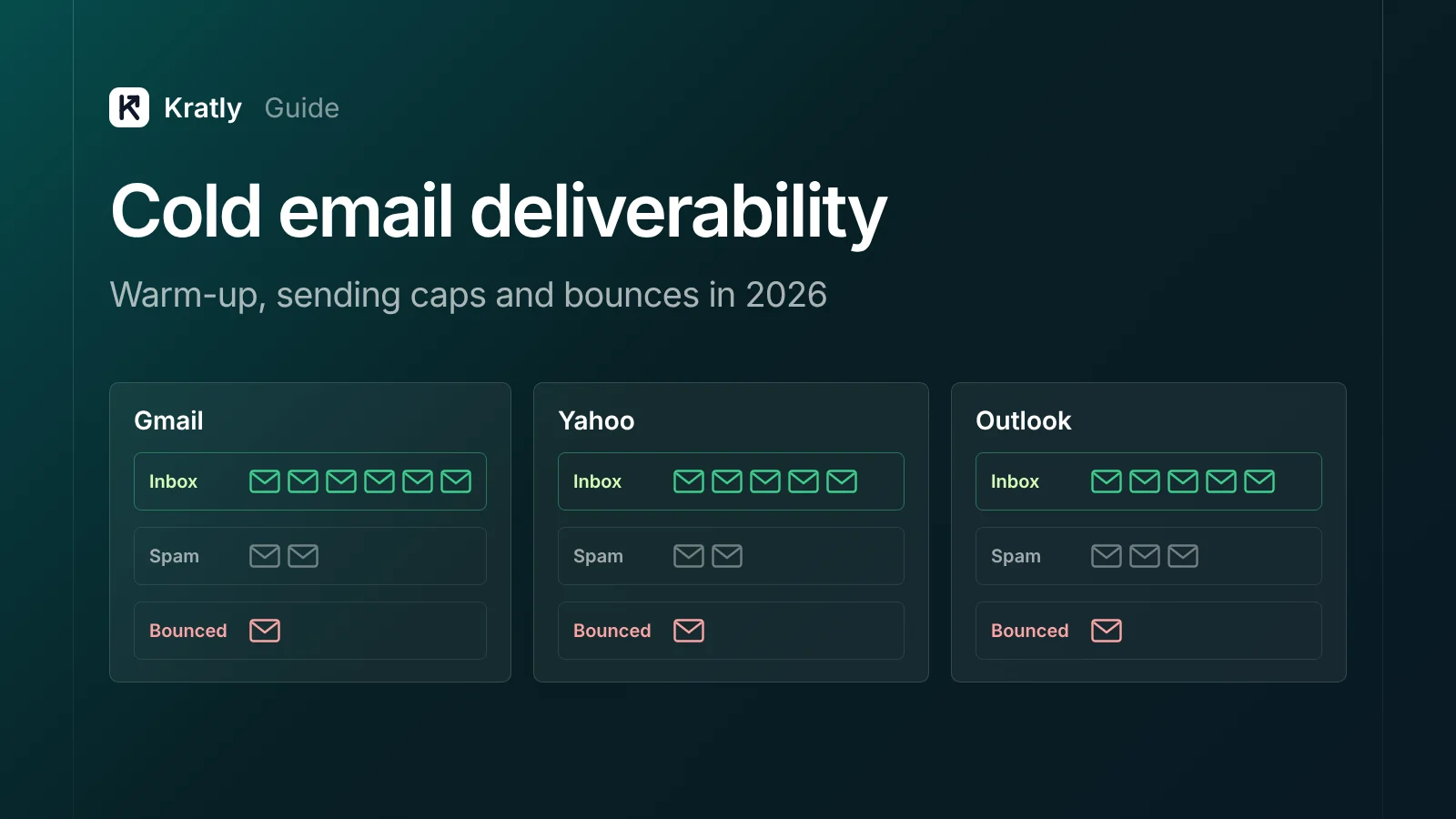
Cold email deliverability depends on four things you control. Authenticate your domain with SPF, DKIM and DMARC. Ramp volume slowly on each new mailbox. Stay far below provider sending limits. Verify lists so bounces stay low. Then watch spam complaints in Google Postmaster Tools, and keep them under 0.1%.
Composite example: a founder buys a new domain on Monday. They connect three fresh mailboxes, upload a scraped list and send a few hundred emails from each on day one. By Thursday, replies have stopped. Spam folders don't send error messages.
Below: what mailbox providers require as of November 2026, and which parts are only opinion.
What is cold email deliverability?#
Cold email deliverability is the share of your cold emails that reach the inbox, rather than bouncing or landing in spam. It differs from "delivered": mail filed in spam still counts as delivered in most tools.
If half your mail lands in spam, your reply rate halves before anyone reads your copy. So the math in how many cold emails it takes to book 20 meetings a month needs a stable inbox rate first.
What do Gmail, Yahoo and Outlook require in 2026?#
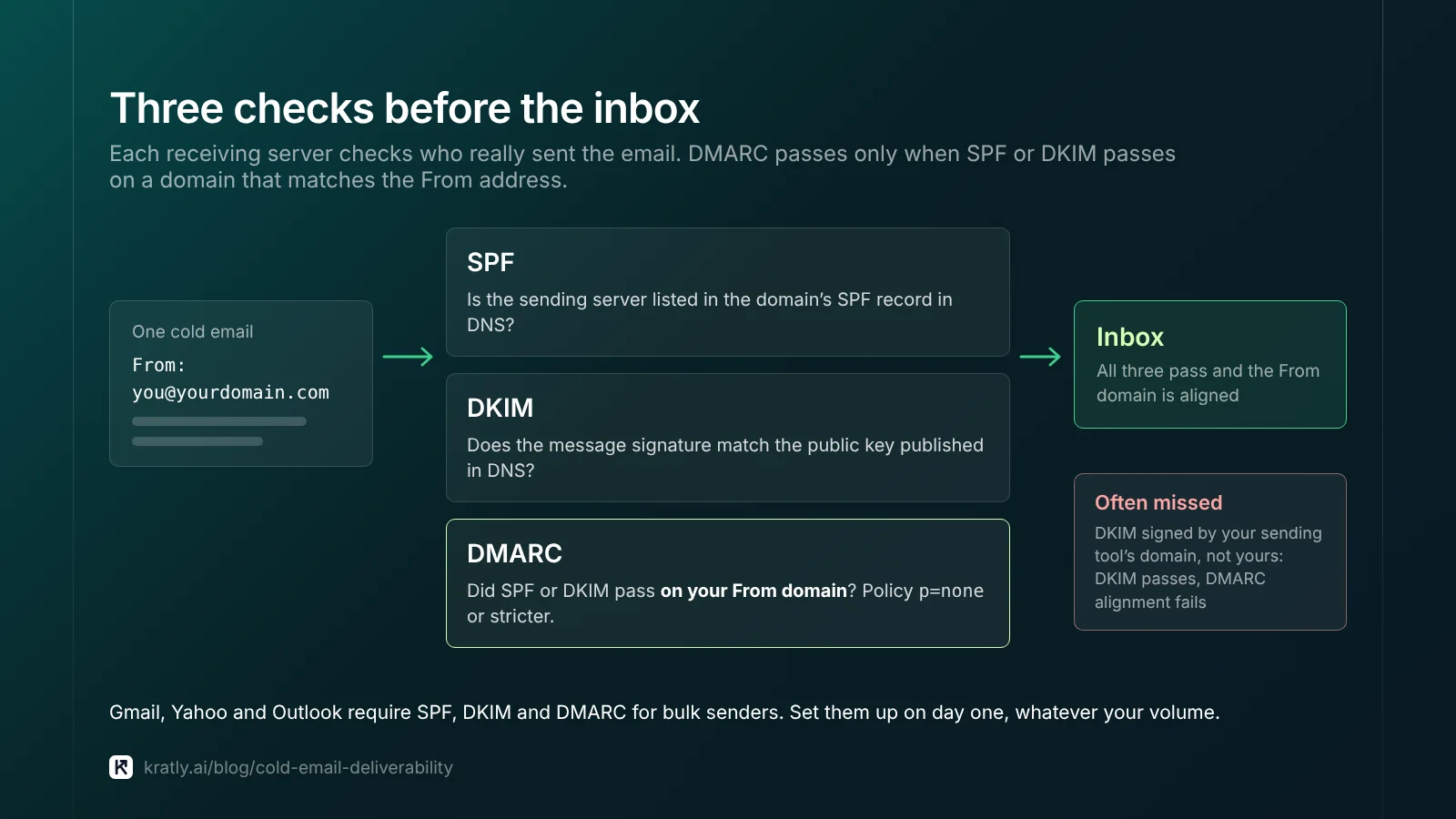
All three big providers publish sender rules. The strictest apply to bulk senders, and cold emailers often assume they're too small to count.
| Provider (as of November 2026) | All senders | Bulk senders |
|---|---|---|
| Gmail (Google) | SPF or DKIM, valid forward and reverse DNS, TLS, spam rate below 0.3% | About 5,000+ messages a day to personal Gmail: SPF and DKIM, DMARC, From domain aligned, one-click unsubscribe on marketing mail, spam rate below 0.3% |
| Yahoo (Yahoo Sender Hub) | SPF or DKIM, spam rate below 0.3% | SPF and DKIM, DMARC of at least p=none that passes, one-click unsubscribe honored within 2 days |
| Outlook.com, Hotmail, Live (Microsoft Support) | Not stated on that page | 5,000+ messages from the same From domain: SPF and DKIM pass, DMARC of at least p=none that passes |
Bulk status is permanent at Gmail. Google counts all mail from one primary domain together, and bulk status never expires once you reach about 5,000 a day (Google FAQ).
Enforcement is getting stricter. Google says that "starting November 2025, Gmail is ramping up its enforcement on non-compliant traffic," including temporary and permanent rejections (Google FAQ). Microsoft announced its own rules for high-volume senders in a 2025 Tech Community post. Mail that fails is rejected with error 550 5.7.515 (Microsoft Support).
Google's spam target is 0.1%, not 0.3%. Keep spam rates "below 0.10% and avoid ever reaching a spam rate of 0.30% or higher" (Google). Above 0.3%, bulk senders lose eligibility for Google's help until they stay below it for seven days in a row (Google FAQ).
My view: meet the bulk-sender rules on day one, whatever your volume. Our trial follow-up email guide covers the same rules for product email.
Sending limits per mailbox#
Your mailbox platform also caps each user. These are abuse ceilings, not safe targets.
| Platform (as of November 2026) | Limit | Source |
|---|---|---|
| Google Workspace | 2,000 messages a day per user; 500 for trial accounts | Google Workspace Admin Help |
| Google Workspace | 3,000 external recipients a day; 2,000 unique external recipients | Google Workspace Admin Help |
| Microsoft 365 (Exchange Online) | 10,000 recipients a day per mailbox; 30 messages a minute | Microsoft Learn |
A Workspace user who hits a limit can be blocked for up to 24 hours. Google adds that "sending limits can change without notice" (Google Workspace Admin Help).
Microsoft says senders of "legitimate bulk commercial email" should "use third-party providers" (Microsoft Learn).
My daily cap per mailbox (opinion, not a provider rule). I'd keep a warmed-up mailbox at 30 to 50 cold emails a day. Need more volume? Add mailboxes and domains instead of pushing one harder.
How does email warm-up work?#
Email warm-up means raising a new mailbox's or domain's sending volume in steps, so providers see a steady history before you send at full speed.
No major provider endorses warm-up tools or networks. Google does give plain advice on volume:
- "Start with a low sending volume to engaged users, and slowly increase the volume over time."
- "The more email that you send, the more slowly you should increase sending volume."
- "Avoid introducing sudden volume spikes if you do not have a history of sending large volumes."
All three come from Google's sender guidelines, which don't say how fast to ramp. Yahoo's page doesn't cover ramping.
Many cold email tools sell automated warm-up. Instantly, a vendor, defines it as "low-volume, engagement-simulated sends that build reputation" (Instantly, Oct 2025). Simulated replies aren't "engaged users" in Google's sense. I'd treat these tools as optional.
A ramp I'd use for a new mailbox (opinion; adjust to your own data):
| Week | Cold emails per mailbox per day | Who to send to |
|---|---|---|
| 1 | 5 to 10 | Your best-fit, verified contacts |
| 2 | 10 to 20 | Best-fit contacts |
| 3 | 20 to 30 | Wider segment |
| 4+ | 30 to 50 cap | Full sequence, if spam and bounce checks pass |
Move up only after a clean week; drop back a step if complaints or bounces rise. Instantly's own recovery advice is similar: resume at 10 to 20 emails per inbox per day and stay under 30 while recovering (Instantly, Oct 2025).
What cold email bounce rate is too high?#
Cold email bounce rate is bounced messages divided by messages sent. Hard bounces are permanent (no such mailbox); soft bounces are temporary (a full inbox).
No mailbox provider publishes a bounce threshold. Yahoo tells senders to "monitor hard and soft bounces" and to "remove invalid recipients from your list promptly" (Yahoo Sender Hub). The numbers you see online come from vendors:
- Hunter, an email-finding vendor, calls 2% "a widely adopted benchmark in the cold email industry." It cites no study (Hunter, Oct 2023).
- Instantly suggests pausing a campaign when hard bounces pass 2% after at least 200 sends in seven days (Instantly, Oct 2025).
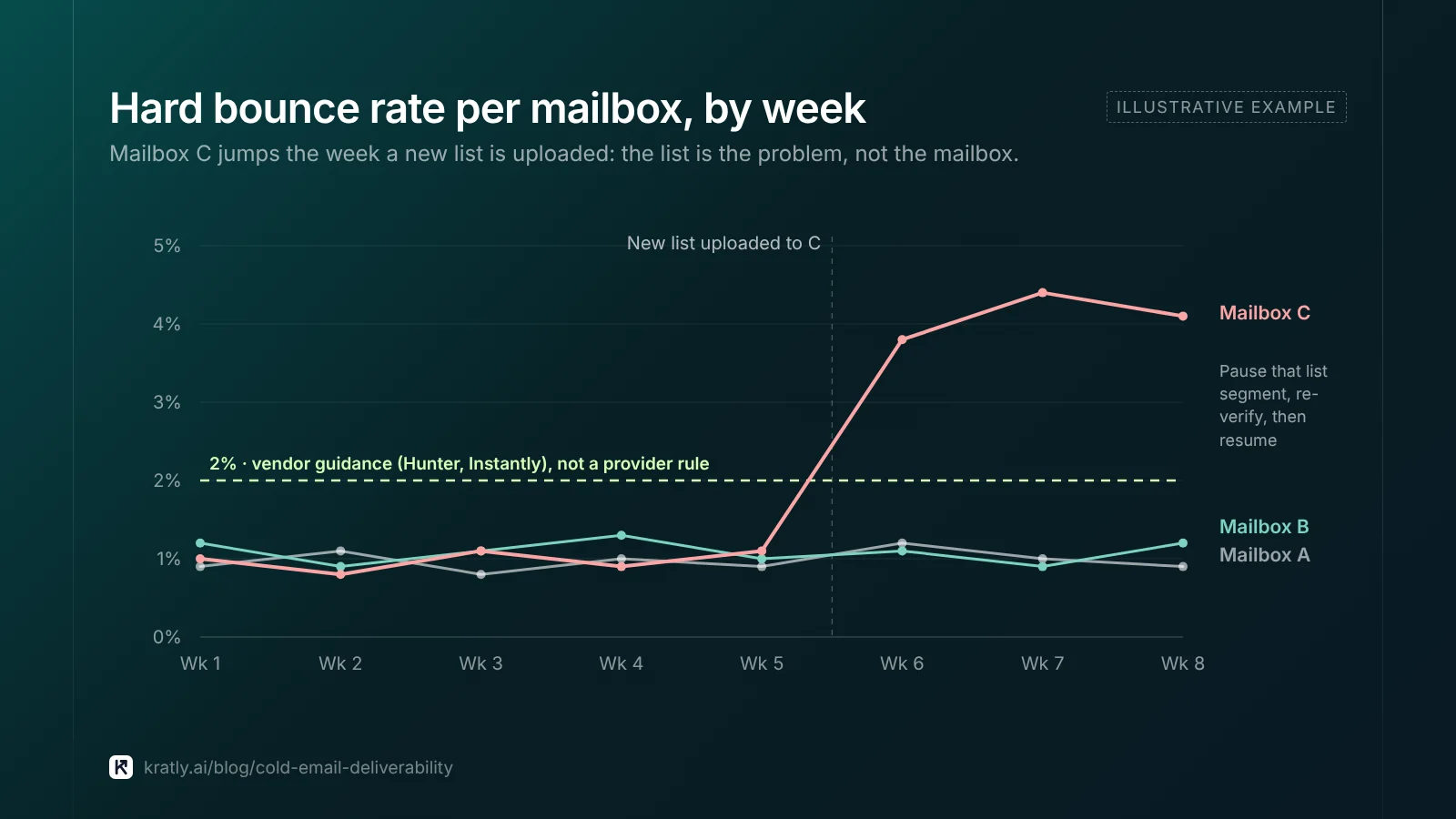
Treat 2% as vendor guidance. Your own trend is the better test:
- Work out the hard bounce rate per mailbox for your last 200 sends.
- Compare it with the same mailbox's previous 200.
- If it rose, pause that list segment, not the whole mailbox.
- Re-verify the segment before the next send.
Bounce problems usually start with the list: catch-all domains, role addresses, old data. See email verification before cold outreach for how to sort them before you send.
CAN-SPAM covers B2B cold email#
In the US, cold email to business addresses is still commercial email. The FTC says plainly: "The law makes no exception for business-to-business email" (FTC).
As of November 2026, the FTC's guide requires honest headers and subject lines, identifying the message as an ad, and a valid postal address. You must offer an opt-out and honor it within 10 business days.
Each violating email can cost up to $53,088 (FTC). Other countries' laws may be stricter.
An easy opt-out also helps deliverability: people who can say "no thanks" report spam less.
A weekly deliverability check#
1. Open Google Postmaster Tools. The newer interface (v2) has dashboards for compliance status, spam rate, authentication, encryption and delivery errors (Gmail Help). Google says the old interface is being retired, with timing still to be announced (Gmail Help).
Two caveats: spam rate counts only DKIM-authenticated mail that reached the inbox, and dashboards "might not include all data on days when outgoing email volume is low." Small senders will see gaps.
2. Check reply rate per mailbox. A sudden drop on one mailbox is your best early signal.
3. Check bounces per list, using the method above.
4. Check pipeline, not just replies. Our guide to measuring B2B lead generation by pipeline shows how to track that. For where outbound fits in an early plan, see the B2B SaaS growth strategy guide.
Where Kratly fits#
Kratly's outreach tools are built and being tested on our own outbound first. They keep each mailbox under a daily cap, pause sending when bounces climb, and apply country rules before anything goes out. Every email waits for a person's approval. Live today is the revenue side: tag outbound links with UTMs and Kratly shows which sequences brought paying customers, by campaign, page and email.
Questions, answered
Do Gmail's bulk sender rules apply to cold email?
They apply by volume, not by type of email. If your domain sends about 5,000 messages a day to personal Gmail accounts, you're a bulk sender, and the status doesn't expire. I'd meet the bulk rules from day one anyway, because the setup is cheap and the downside is rejection.
How long does email warm-up take?
Google gives no timeline. It only says to start low with engaged recipients and increase slowly, more slowly at higher volumes. In my opinion, about four weeks is a sensible ramp for a new cold email mailbox. Go faster only if spam complaints and bounces stay clean each week. Drop back a step if either one rises.
How many cold emails can I send per mailbox per day?
Google Workspace allows 2,000 messages a day per user, and Microsoft 365 allows 10,000 recipients a day. Those are abuse ceilings, not targets. My recommendation is 30 to 50 cold emails per warmed-up mailbox a day. For more volume, add mailboxes and domains.
What is a good cold email bounce rate?
No mailbox provider publishes one. Vendors such as Hunter and Instantly use 2% hard bounces as a working limit. A better test is your own trend: compare each mailbox's last 200 sends with the 200 before. If bounces jump after a new list upload, pause that segment and verify it again before sending.
Does CAN-SPAM allow B2B cold email?
Yes, if you follow its rules. CAN-SPAM doesn't require prior consent, but the FTC says it makes no exception for business-to-business email. Every message needs honest headers and subject lines, a postal address and a clear way to opt out. You must honor opt-outs within 10 business days. Other countries may have stricter laws.
Written by
Priyansh Kumar
Priyansh Kumar has spent more than a decade in growth, scaling brands from 1 to 10 and from 10 to 100. He now builds Kratly, an autonomous growth team that ties every campaign, page and email to the revenue it brings.
Sources
- Google: Email sender guidelines · Email sender guidelines FAQ · Gmail sending limits in Google Workspace · Postmaster Tools dashboards · Deprecation of the old Postmaster Tools interface
- Yahoo: Sender Hub best practices
- Microsoft: Fix NDR error 550 5.7.515 in Outlook.com · Outlook's new requirements for high-volume senders (Tech Community) · Exchange Online limits
- FTC: CAN-SPAM Act compliance guide for business
- Vendor guidance (labeled in copy): Hunter, email bounce rate (Oct 2023) · Instantly, automate campaign pauses (Oct 2025)
Was this article useful?