Short answer
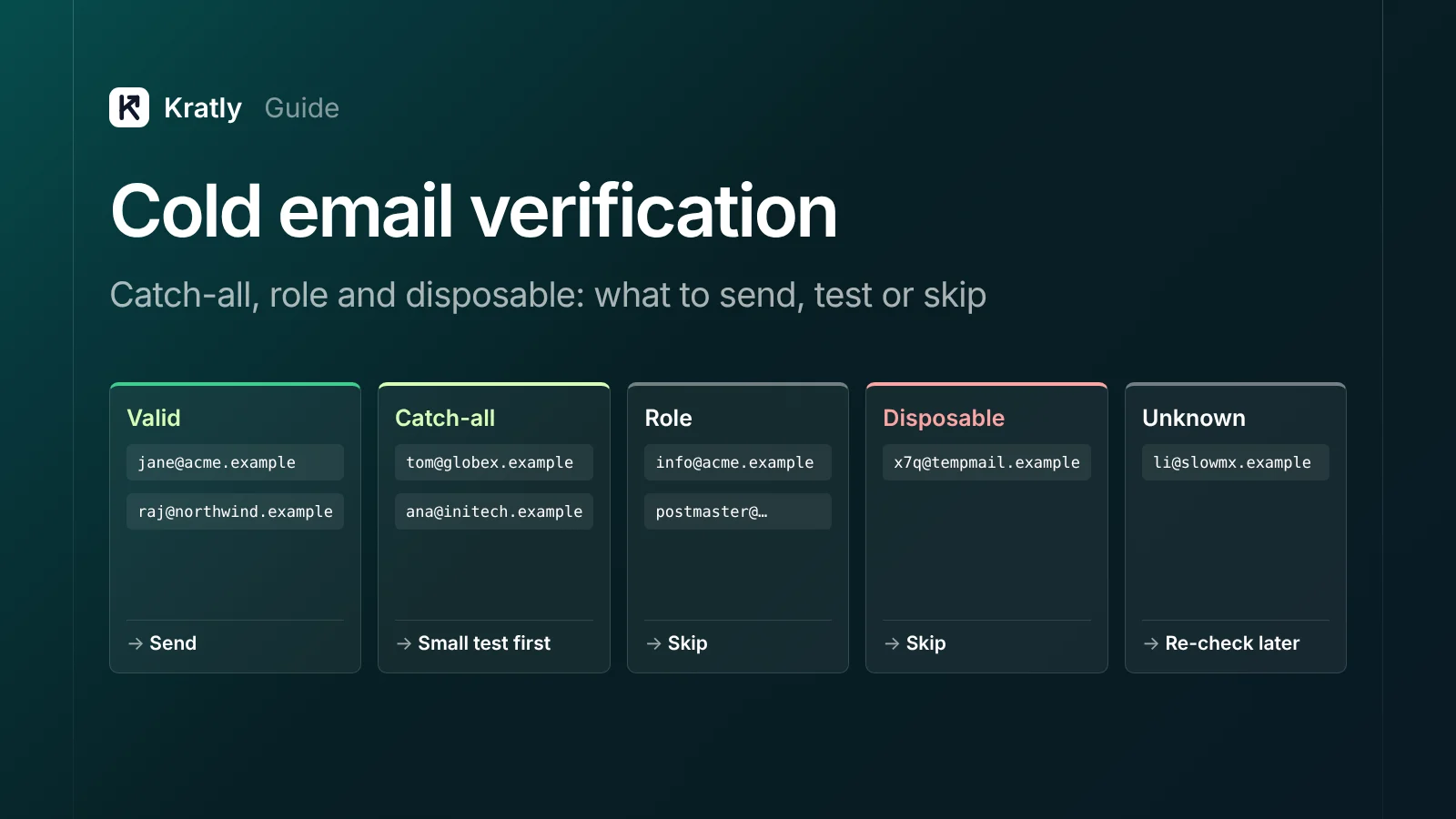
Email verification for cold email checks each address in layers: syntax, the domain's mail servers, then a live SMTP question to the receiving server. Send to "valid." Send a small test to "catch-all," because those servers accept every address. Skip disposable, invalid and admin role addresses. Re-check "unknown" before you send.
Composite example: a two-person B2B startup buys a lead list. The verifier marks most rows "valid," but a large slice says "catch-all" or "unknown." The founder sends to everything anyway. Bounces arrive within a day, and the sending domain takes the hit. This is a composite, not a real company.
Verification is cheap insurance, but only if you know what each result means.
How does email verification for cold email work?#
Email verification is the process of checking whether an address can receive mail, without sending a message to it. Good tools run three checks in order, then add risk labels.
1. Syntax#
The tool checks for one @, a local part and a plausible domain. It catches typos like gmial.com. It proves nothing about whether a person reads that inbox.
2. Domain and MX lookup#
Next, the tool asks DNS for the domain's MX (mail exchanger) records, which name the servers that take its mail. RFC 5321, the SMTP standard, sets out how senders find that host. No mail server means the address is invalid.
3. The SMTP RCPT TO check#
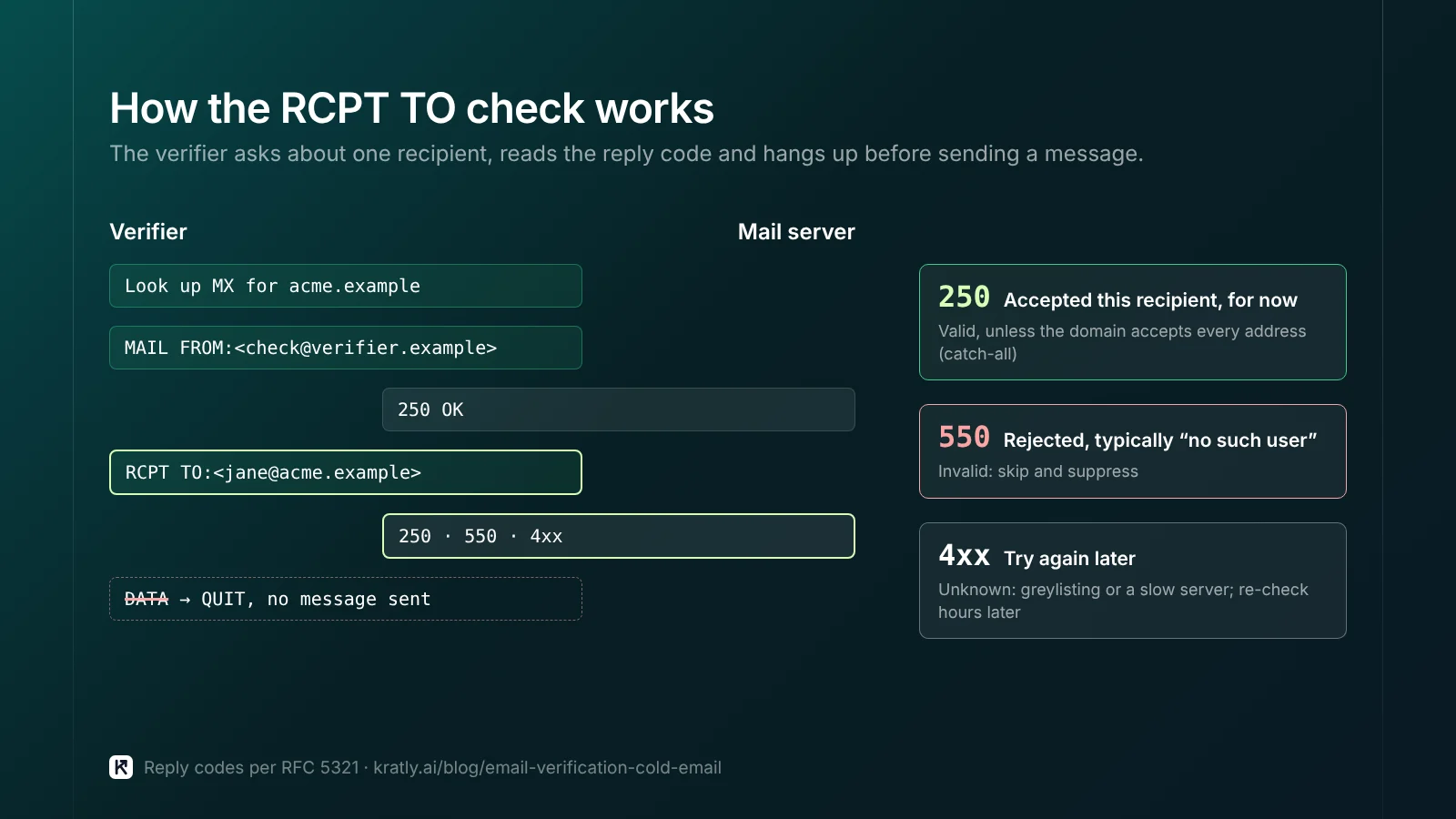
This is the core check. The tool opens an SMTP conversation, gives a sender with MAIL FROM, then names your contact with RCPT TO. It reads the reply and hangs up before sending any message.
- A 250 reply means the server accepted that recipient, for now.
- A 550 reply is the classic rejection. RFC 5321 describes "a 550 reply, typically with a string such as 'no such user'" (section 3.3).
- A 4xx reply means "try later." The tool can't decide.
The older VRFY command rarely helps. RFC 5321 lets a server answer 252 when it can't verify, and lets admins disable the command (section 3.5). So tools use RCPT TO instead. Last, they label role, disposable and accept-all addresses. Those labels are risks, not verdicts.
Why can't a catch-all email be confirmed?#
A catch-all (or accept-all) domain answers 250 to every RCPT TO, real or made up. The verifier can't tell jane@ from zzqx@. So the honest result is "catch-all," not "valid."
The standard allows this. In RFC 5321's words, "some servers do not perform recipient verification until after the message text is received" (section 3.3). They accept now and bounce later. Other companies route unknown mail to one shared inbox, so nothing bounces at all.
Verifiers spot catch-alls by testing a random address that can't exist. Some vendors sell extra checks that claim to resolve catch-alls. Treat any accuracy figure as a vendor claim until your own bounces back it up.
Greylisting looks like "unknown"#
Greylisting is a spam filter that answers unfamiliar senders with a temporary error. Real servers retry and get through. RFC 6647 defines it as "generation of an SMTP temporary failure reply code" for such traffic. A verifier that checks once reports "unknown." Re-run those addresses hours later.
Role-based email addresses#
A role based email belongs to a job or team, not a person. RFC 2142 lists standard ones. Business mailboxes include info, marketing, sales and support. Network and service mailboxes include abuse, noc, security, postmaster, hostmaster and webmaster.
Split them into two kinds:
- Admin roles (
abuse@,postmaster@,noc@). Never cold email these. Spamhaus says such addresses "should almost NEVER be on a marketing mailing list" (Spamhaus). Their readers handle spam complaints. - Business roles (
info@,sales@). Several people may read them, or nobody. My view: keep them out of sequences. At a tiny company, one hand-written note can be fine.
The disposable email check#
Disposable domains hand out short-lived inboxes, usually picked up from scraped forms or old webinar lists. A disposable email check compares the domain against a known list.
You don't need a vendor for this. The disposable-email-domains project on GitHub keeps an open CC0 list. Its maintainers warn: "We cannot guarantee all of these can still be considered disposable". So use it to flag, then eyeball any domain you know is a real business. Skip every true disposable address.
Spam traps: what verification can't see#
A spam trap is an address run by a mailbox provider or blocklist to catch senders with poor list habits. Spamhaus lists several kinds. Pristine traps were never given to anyone. Seeded traps hide on web pages to catch scrapers. Dead-address traps were once real, then switched off and revived.
Here's the uncomfortable part. A trap can accept mail like any inbox, so an SMTP check may call it "valid." Spamhaus also says owners don't reveal traps. In its view, hunting them "only treats the symptom." The fix is better sourcing, not a better verifier.
Why bounces cost more than the lost email#
A hard bounce wastes one send. The bigger cost is what it tells mailbox providers. Google's email sender guidelines say to "reduce the sending volume until the SMTP error rate decreases" when bounces start. They also say to unsubscribe recipients with multiple bounces.
The same page says "Don't purchase email addresses from other companies" and asks for opt-in. Cold outreach sits in tension with that, so keep it small, targeted and easy to leave. Caps and warm-up are in cold email deliverability in 2026: warm-up, caps and bounces.
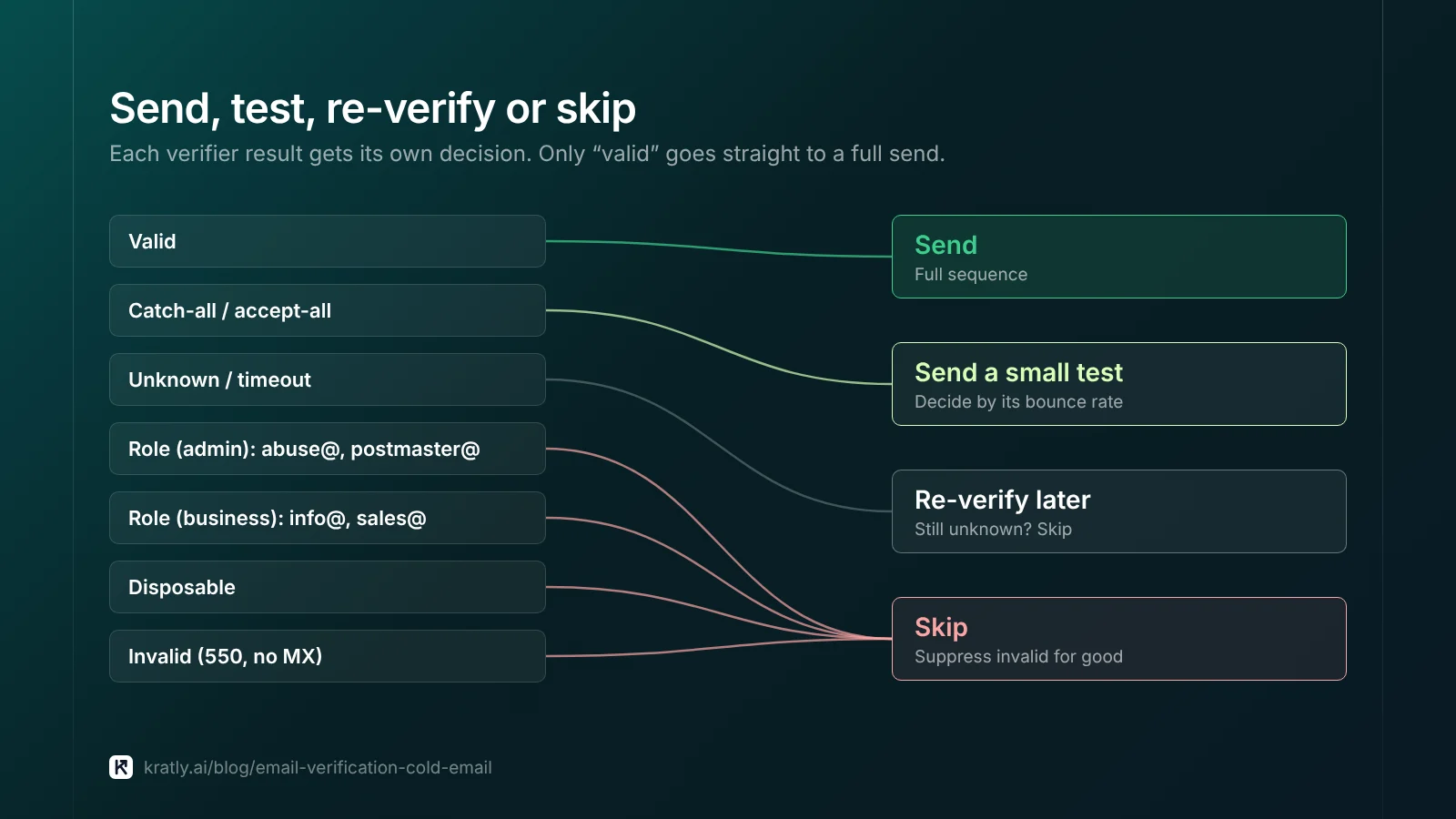
Send, test or skip: the decision table#
| Verifier result | What it means | Decision |
|---|---|---|
| Valid | Server accepted this recipient at RCPT TO | Send |
| Catch-all / accept-all | Server accepts any address; this one is unproven | Send a small test batch first, then decide by its bounce rate |
| Role (admin): abuse@, postmaster@ | Mailbox for spam and server issues | Skip always |
| Role (business): info@, sales@ | Shared inbox, often unread | Skip in sequences; one manual note at most |
| Disposable | Temporary inbox | Skip |
| Unknown / timeout | Greylisting, slow server or block | Re-verify later; skip if still unknown |
| Invalid (550, no MX) | Address or domain can't receive mail | Skip and suppress for good |
How many contacts you need to book meetings changes how many catch-alls you can afford to drop. Work that out with how many cold emails it takes to book 20 meetings a month.
Measure your own bounce rate by segment#
Vendor accuracy numbers come from vendor tests. Measure your own list:
- Tag at import. Store the verifier result on every contact as a field: valid, catch-all, role, unknown.
- Send the test. Send only the valid group plus a small catch-all batch in the first week.
- Wait for late bounces. Accept-all servers can bounce after the fact, so give it a few days.
- Count hard bounces only. These are permanent 5xx failures. Leave out "mailbox full" and other temporary errors.
- Compute per segment. Bounce rate = hard bounces ÷ emails sent, for each tag.
- Decide. If the catch-all rate sits close to the valid rate, release more catch-alls. If it's far higher, drop that segment or that list source.
Worked example (assumptions, not benchmarks): you send 400 valid and 100 catch-all contacts. Assume 4 valid and 9 catch-all addresses hard bounce. Valid bounces at 1% (4 ÷ 400). Catch-all bounces at 9% (9 ÷ 100). Catch-alls from that source stay on hold.
Splitting a bought list into clean segments before sending is covered in turn a bought lead list into a campaign. To judge outbound by pipeline rather than sends, see B2B lead generation strategy: measure pipeline, not form fills. When a reply turns into a sign-up, hand it to your trial follow-up emails that turn sign-ups into paying customers.
Privacy and the law#
This is general information, not legal advice.
- EU (GDPR). Cold B2B email usually relies on legitimate interest. Per Recital 47, direct marketing "may be regarded as carried out for a legitimate interest". It also weighs people's reasonable expectations. Document your balancing test, and check national e-marketing rules.
- Verification is processing. Uploading a list shares personal data with the vendor. Check its data processing terms.
- US (CAN-SPAM). Per the FTC, "the law makes no exception for business-to-business email". Use honest headers and subjects, a postal address and a clear opt-out. Honor opt-outs within 10 business days. As of November 2026, the FTC guide lists penalties up to $53,088 per violating email.
Where Kratly fits#
Kratly's lead lists check every address before outreach: format, mail server, and disposable and role addresses, plus a full check through an email verification service you connect. Addresses it can't confirm, such as catch-alls, are held back unless the owner turns on sending to unconfirmed addresses, which comes with a daily cap and an automatic pause when bounces climb. These outreach tools are built and being tested on our own outbound first. Live today: Kratly shows which list source turned into paying customers, by campaign, page and email.
Questions, answered
Is email verification for cold email worth paying for?
Usually, yes. A bulk check costs far less than the damage hard bounces do to a sending domain. You can run syntax, MX and disposable checks yourself for free. The SMTP step needs a tool that controls its own reputation. Whatever you use, judge it by your own bounce rate per segment, not by advertised accuracy.
Should I send to catch-all email addresses?
Send a small test batch first. A catch-all server accepts every address, so the verifier can't prove yours exists. Tag the batch, wait a few days for late bounces, and compare its hard bounce rate with your valid group. If the two are close, release more. If catch-alls bounce far more, drop them from that list source.
Does verification remove spam traps?
No, not reliably. Many traps accept mail like a normal inbox, so an SMTP check can mark them valid. Spamhaus says owners don't reveal traps and that hunting them treats only the symptom. The real fix is sourcing: build lists from research you did yourself, and avoid old, scraped or bought lists.
Are role-based emails like info@ or sales@ safe to email?
Admin roles such as abuse@ and postmaster@ are never safe; their readers report spam. Business roles like info@ and sales@ are shared inboxes that may go unread. Keep them out of automated sequences. At a very small company, one personal note to a shared inbox can work, but find a named person first if you can.
Written by
Priyansh Kumar
Priyansh Kumar has spent more than a decade in growth, scaling brands from 1 to 10 and from 10 to 100. He now builds Kratly, an autonomous growth team that ties every campaign, page and email to the revenue it brings.
Sources
- RFC Editor: RFC 5321, Simple Mail Transfer Protocol · RFC 2142, Mailbox names for common services, roles and functions · RFC 6647, Email greylisting
- Gmail Help: Email sender guidelines
- Spamhaus: Spamtraps: fix the problem, not the symptom
- GitHub: disposable-email-domains
- GDPR text: Recital 47
- FTC: CAN-SPAM Act: a compliance guide for business
Was this article useful?