Short answer
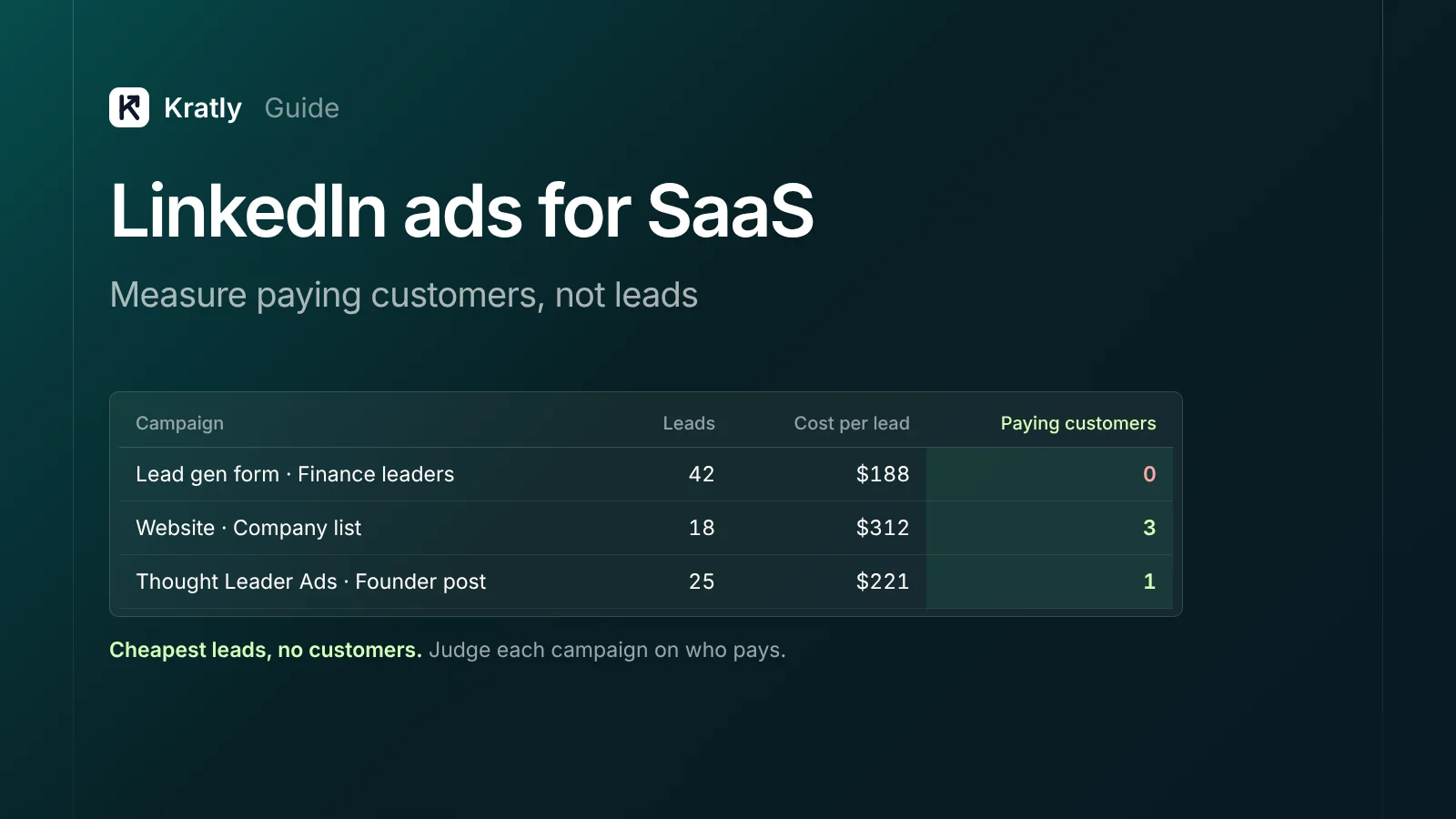
LinkedIn ads for SaaS are expensive: one 2026 benchmark puts the median cost per lead at $202. They can still pay if you judge them on paying customers. Turn on enhanced conversion tracking, store LinkedIn's click ID at sign-up, and send first payments back through the Conversions API. Then cut campaigns that bring leads but no revenue.
Two founders behind Free Blocks spent $254 on a three-day LinkedIn campaign. It brought 108 clicks and three downloads. They couldn't even tell whether those three people had seen the ad (Free Blocks).
That's the usual story with LinkedIn ads for SaaS. Clicks cost a lot, and the link from click to customer is missing. This guide fixes both.
What LinkedIn ads cost in 2026#
The best recent data I found comes from Metadata, a B2B ad software vendor. It's medians across advertisers from 2025 campaigns, with closed deals pulled from connected CRMs (Metadata).
| Channel (2025 campaigns) | Median CPC | Median CPM | Median cost per lead |
|---|---|---|---|
| $9.39 | $63.19 | $202 | |
| $1.95 | $15.50 | $145 | |
| $2.82 | $18.25 | $138 | |
| Google Ads | $9.76 | $617.91 | $524 |
Source: Metadata 2026 B2B Paid Media Benchmark (vendor data; 138 advertisers for LinkedIn figures). Google CPM isn't comparable with social CPM.
The number that matters sits further down the same page. LinkedIn cost $58,572 per customer, against $31,939 across the whole dataset. It also sourced 10.2× pipeline per lead-gen dollar, against 7.97× overall. That sample is weighted toward larger B2B deals, so don't read it as your number.
A second source gives wider ranges: CPC of $5 to $12, CPM of $30 to $90+, and cost per lead of $80 to $300+ (Factors.ai, June 2026, method not disclosed). Both agree on the shape. LinkedIn clicks cost around five times a Facebook click.
Do LinkedIn ads for SaaS pay back? Do the math#
Here's the test I'd run before the first dollar. It uses the $202 median and an assumed lead-to-paid rate. Swap in your own.
- Cost per lead: $202
- Leads that become paying customers: 1 in 20 (5%, an assumption)
- Cost per paying customer: $4,040
Now compare that with what a customer earns you in gross margin each month.
| Plan price per month | Gross margin (80%) | Months to earn back $4,040 |
|---|---|---|
| $100 | $80 | 50.5 |
| $300 | $240 | 16.8 |
| $1,000 | $800 | 5.1 |
Bessemer suggests CAC payback under 12 months for SMB customers and under 18 for mid-market (Bessemer). On these numbers, a $100-a-month product can't afford LinkedIn. A $1,000-a-month product can.
My view: if your average customer pays under about $300 a month, start with search ads first. If you need a cheaper B2B search test, Microsoft Ads lets you target by LinkedIn company, industry and job function on search clicks.
The opposite case: very few buyers, large contracts. If you sell to 500 named companies, LinkedIn may be the only place you can reach all of them by job title. Then the high CPC is the price of precision.
Lead gen forms or your website?#
LinkedIn's lead gen forms "come pre-filled with accurate LinkedIn profile data" (LinkedIn). One tap and the lead is yours. That's why they're cheaper per lead.
Metadata's data shows the gap: lead forms cost $193 a lead, against $346 for landing-page campaigns (Metadata). That page doesn't report which route brings cheaper customers.
The trade-off is intent. A form that fills itself takes almost no commitment. A trial sign-up on your site takes more.
What I'd do:
- Self-serve SaaS with a free trial: send clicks to your site. You want people who sign up and use the product, not a contact list.
- Sales-led SaaS with demos: test lead gen forms, but sync them to your CRM within minutes and follow up the same day. Judge them on meetings held and deals closed.
Targeting B2B buyers without wasting budget#
LinkedIn's targeting is the reason to pay its prices. You can target by company, job title, function, seniority and industry. A few rules keep spend tight.
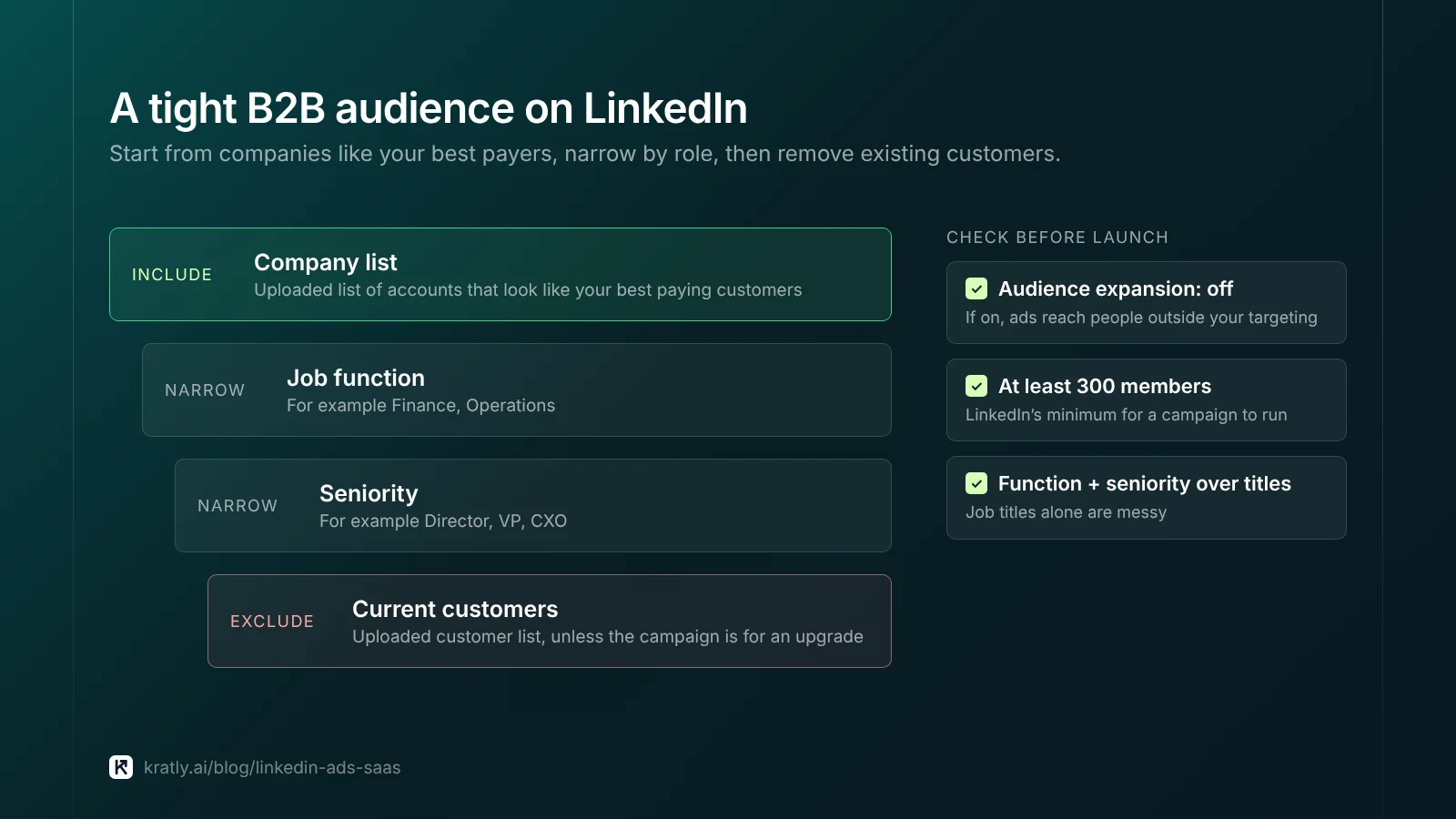
Minimum audience. "For a campaign to run, the target audience must have at least 300 members" (LinkedIn Marketing API docs). Website retargeting segments also need 300 before they serve (LinkedIn docs).
Upload a company list of accounts that look like your best paying customers. Then layer job function and seniority on top. That's tighter than job titles alone, which are messy.
Exclude your customers. Upload current customers and exclude them, unless the campaign is for an upgrade.
Try Thought Leader Ads. Since March 2024, companies can sponsor posts from any LinkedIn member, with the member's approval, not only employees (PPC Land). A founder's useful post often looks less like an ad. I've seen no public data on whether it brings cheaper customers, so test it like anything else.
What I'd check first in an existing account: the "audience expansion" setting. If it's on, LinkedIn shows ads to people outside your targeting.
Track paying customers with the LinkedIn Conversions API#
The Insight Tag sees what happens in the browser. It can't see a Stripe payment 14 days later. The LinkedIn Conversions API fixes that. It's "a direct connection between marketing data from an advertiser's server and LinkedIn" (LinkedIn docs).
Here's how to set up LinkedIn ads for SaaS so payments flow back.
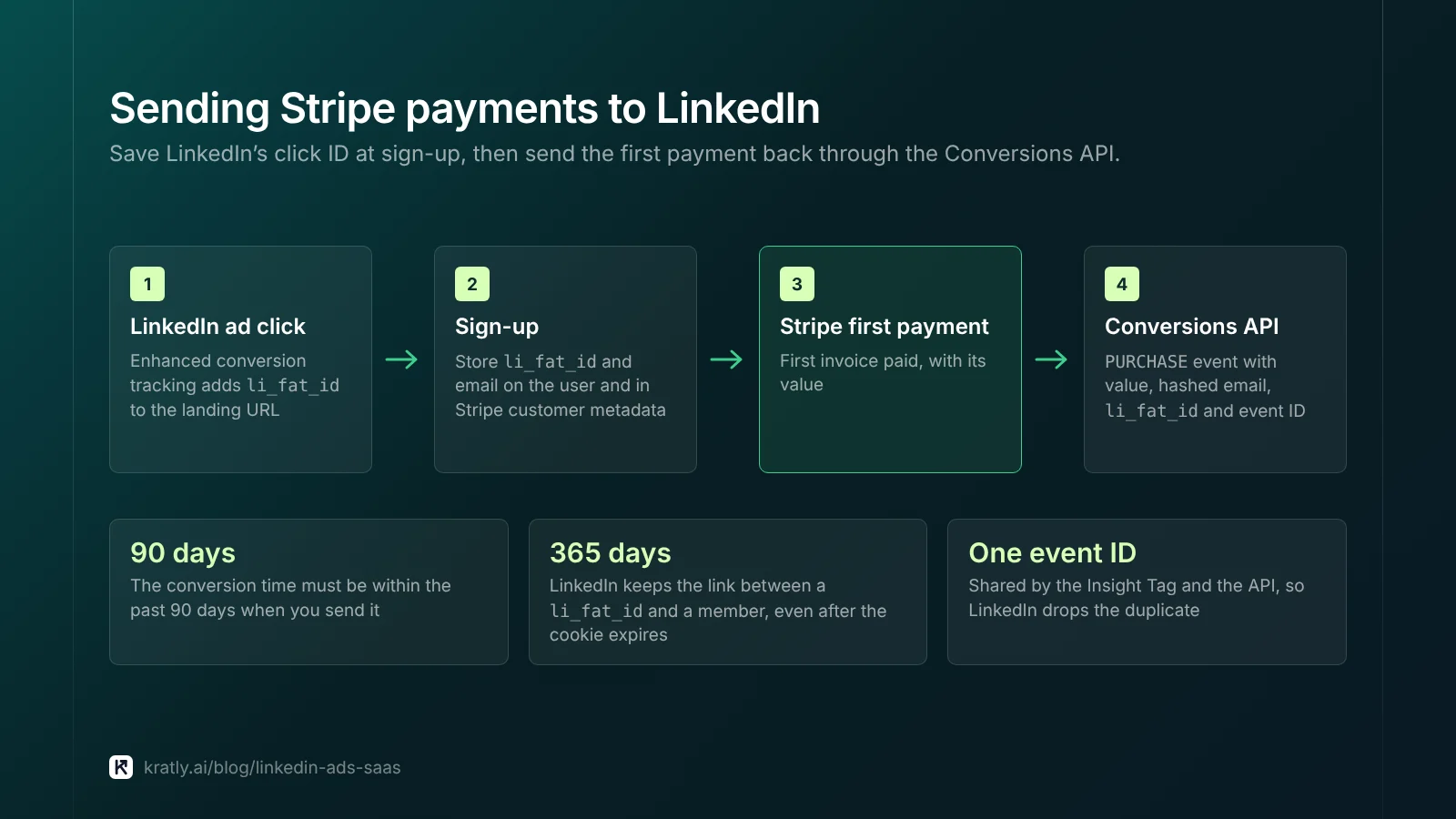
- Turn on enhanced conversion tracking. LinkedIn then "automatically adds a click ID to the end of landing page URLs." That click ID is
li_fat_id(LinkedIn Conversions FAQ). - Save the click ID at sign-up. Store
li_fat_idand the user's email on the account. Copy it to the Stripe customer's metadata too. Stripe metadata doesn't copy to related objects, so put it where you'll read it (Stripe). - Create conversion rules. One for trial sign-up, one for first payment (type
PURCHASE) with a value. - Send the payment. When the first invoice is paid, send a
PURCHASEevent with the hashed email andli_fat_id. LinkedIn says to send several identifiers "to increase match rates," because "only matched events can be used for attribution" (LinkedIn docs). - Add an event ID. If the Insight Tag and the API both report the same event, the shared ID lets LinkedIn discard the duplicate.
Three limits to know:
- The conversion timestamp must be within the past 90 days when you send it.
- LinkedIn keeps the link between a
li_fat_idand a member for 365 days, even after the cookie expires. - For lead gen form leads, the API also accepts the form's lead as an identifier. So you can report later stages, like a qualified lead or a closed deal.
No developer? Zapier offers a LinkedIn Conversions app that sends events from your CRM (Zapier). For the same pattern on Meta, see Facebook ads for SaaS.
Attribution windows: what LinkedIn counts#
Each conversion rule has a post-click window and a view-through window. The standard post-click options are 1, 7, 28, 30 or 90 days. For PURCHASE, LEAD and the qualified-lead types, you can also pick 180 or 365 days (LinkedIn Conversions FAQ).
View-through is the risk. It credits LinkedIn when someone saw an ad, didn't click, and paid later. For a buyer who also found you on Google, both platforms take credit.
My view: make budget decisions on post-click payments only. Show view-through in its own column as a hint. If you think LinkedIn drives more than clicks show, test it: pause it in some regions and compare. The method is in SaaS marketing attribution.
The opposite case: long enterprise cycles where nobody clicks an ad but the whole buying team sees it. There, a holdout test is the only fair judge.
Keep, fix or cut: a decision table#
| What you see (after 30–60 days and enough spend) | Do this |
|---|---|
| Paying customers at a payback you can afford | Keep, raise budget slowly |
| Many leads, no paying customers | Fix: switch forms to site, or tighten audience |
| Leads from the wrong companies | Fix: company list, turn off audience expansion |
| Payments only via view-through | Test with a regional holdout before scaling |
| No paying customers after spending 3× your target cost per customer | Cut the campaign |
| Plan price too low for any realistic payback | Move budget to search ads |
The same leak-hunting logic for Google is in Google Ads wasted spend.
How to do this in Kratly#
- Connect your website and Stripe. Kratly ties each sign-up with a LinkedIn source to the payments it brings.
- See cost per paying customer by campaign. Upload LinkedIn spend as a CSV (a direct LinkedIn Ads connection is coming), and compare it with Google, Meta and Microsoft on the same revenue basis.
- Review suggestions. Kratly flags campaigns with leads but no paying customers.
- Approve changes. You decide; every change is logged and can be reversed.
Go deeper: Reddit ads attribution: track Reddit, TikTok and podcast ads
Questions, answered
Are LinkedIn ads worth it for SaaS?
Yes, when a customer is worth a lot. One 2026 vendor benchmark puts the median LinkedIn cost per lead at $202. At a 5% lead-to-paid rate, that's $4,040 per customer. That suits plans of several hundred dollars a month. If your average customer pays under about $300 a month, start with search ads instead.
What is the LinkedIn Conversions API?
It's a server-to-server connection that sends conversions from your systems to LinkedIn. For SaaS, it lets you report events the browser can't see, like a Stripe payment days after a trial starts. LinkedIn then attributes them to campaigns. Send the hashed email and li_fat_id with each event, because only matched events count.
What is li_fat_id?
It's LinkedIn's first-party click ID. With enhanced conversion tracking on, LinkedIn adds it to your landing page URLs. Save it at sign-up, copy it to the Stripe customer's metadata, and send it with later conversions. LinkedIn keeps the link to the member for 365 days, even after the cookie expires.
What is a good cost per lead on LinkedIn?
There isn't one good number, but the median is about $202. That's from Metadata's 2025 campaign data, a vendor benchmark. Lead gen forms came in at $193 a lead and landing pages at $346. A good lead cost depends on how many leads pay, so judge cost per paying customer instead.
Should I use LinkedIn lead gen forms?
Use them for sales-led products with demos, and judge them on closed deals. Sync form leads to your CRM within minutes and follow up the same day. For self-serve products with a free trial, send people to your site instead. A form that fills itself takes almost no commitment, while a trial sign-up shows more intent.
Written by
Priyansh Kumar
Priyansh Kumar has spent more than a decade in growth, scaling brands from 1 to 10 and from 10 to 100. He now builds Kratly, an autonomous growth team that ties every campaign, page and email to the revenue it brings.
Sources
- LinkedIn Marketing API docs (Microsoft Learn): Conversions API overview · Conversions FAQ · Conversions API reference · Build an ad campaign (audience minimum) · Website visitor retargeting
- LinkedIn: Lead Gen Forms
- Metadata: What LinkedIn ads cost (Aug 2026)
- Factors.ai: LinkedIn ads cost (June 2026)
- PPC Land: LinkedIn expands Thought Leader Ads
- Bessemer Venture Partners: Scaling to $100M
- Stripe: Metadata · Zapier: LinkedIn Conversions
- Free Blocks: LinkedIn ads: what are we doing wrong?
Was this article useful?