Short answer
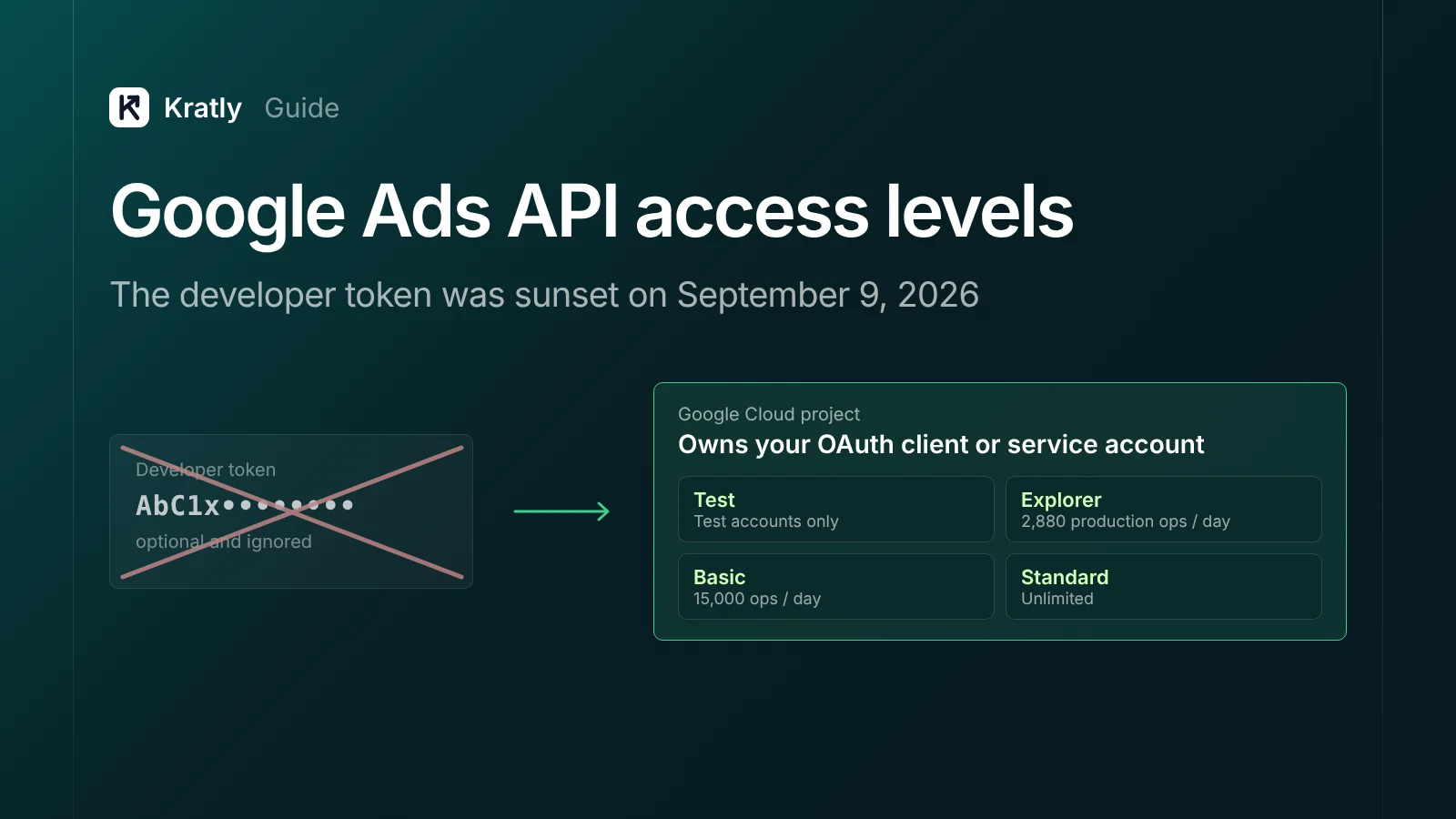
Google sunset the Google Ads API developer token on September 9, 2026. Access now belongs to the Google Cloud project that owns your OAuth client or service account. There are four levels: Test, Explorer (2,880 production operations a day), Basic (15,000, with brand verification) and Standard (unlimited). You apply in the Cloud Console.
Composite example: an agency adds a new Cloud project for a second reporting tool. Its calls to a client account fail with a production error. The old developer token sits in the config, now ignored.
All facts below are as of November 2026.
What happened to the Google Ads API developer token?#
Google's own page is short and clear: "Developer tokens were sunset on September 9, 2026" (Google Ads API docs). Access levels still exist. They just moved.
"Your API access levels are determined by the Google Cloud project you used to generate your OAuth credentials," per the same page. That means:
- User sign-in (OAuth) flow: the project that owns your OAuth client ID and secret.
- Service account flow: the project that owns the service account.
Three other changes matter, all from the developer token page:
- Old code keeps running. You can still send a token in the header. It is "optional and ignored by the API servers." Google says it will start rejecting tokens "in a future major version."
- No manager account needed to start. You need one only to "link to and manage multiple accounts using the API."
- The API Center is closing. Signup and access management moved to the Cloud Console. Applications sent through the API Center "won't be processed" (Google Ads API policy).
Google announced the new Cloud Console home on its Developer Blog on September 10, 2026.
What are the Google Ads API access levels?#
A Google Ads API access level is the permission tier on your Cloud project that sets which accounts you can reach and how many operations you can run a day.
| Level (as of November 2026) | Accounts it can reach | Daily operations | How you get it |
|---|---|---|---|
| Test | Test accounts only | 15,000 | Turn on the Google Ads API in your project |
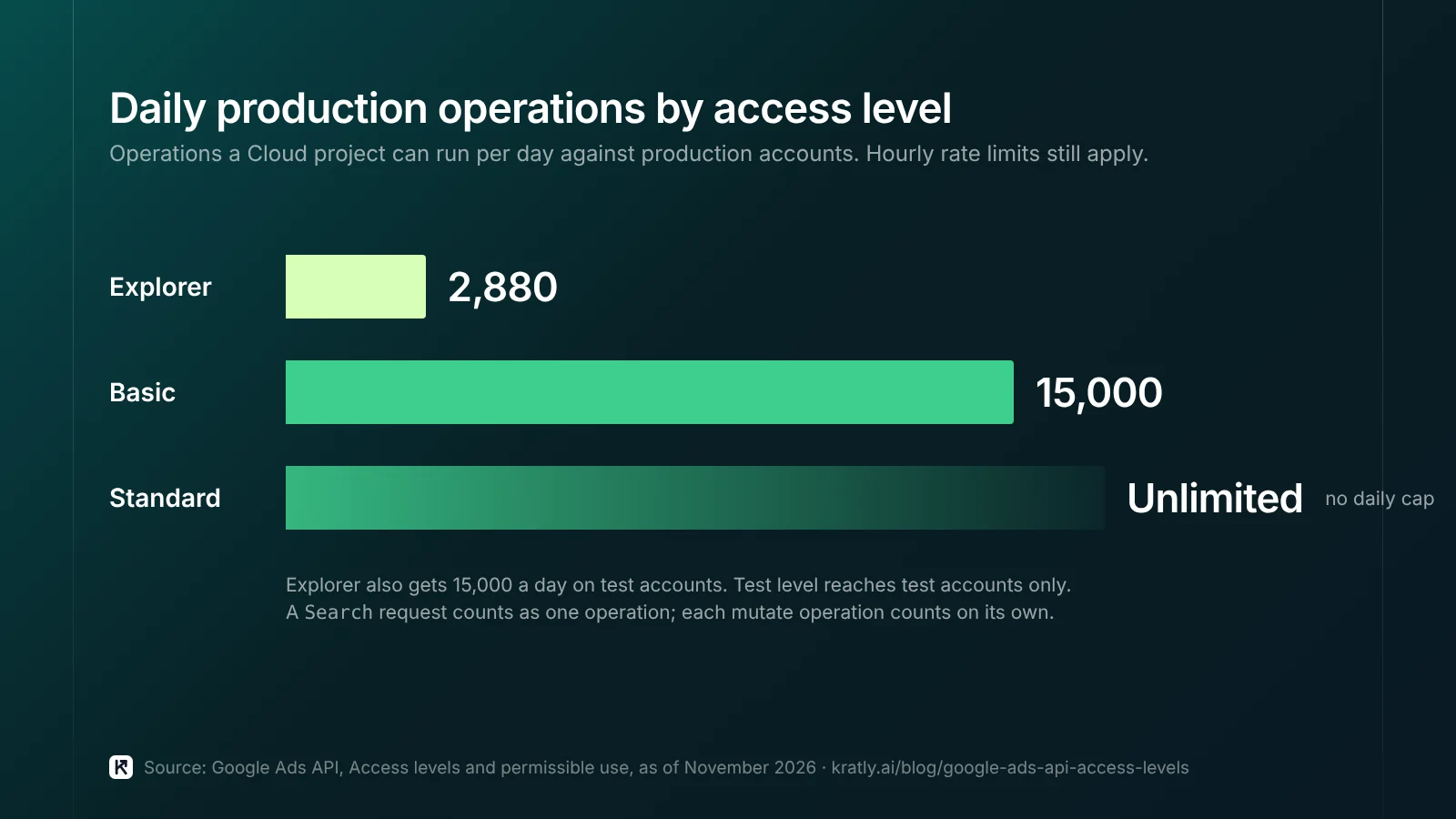
| Explorer | Test and production | 2,880 production; 15,000 test | Apply; automated review in most cases |
| Basic | Test and production | 15,000 for both | Apply after brand verification |
| Standard | Test and production | Unlimited | Manual review, about 10 business days |
Source for every row: Access levels and permissible use. Hourly rate limits still apply at every level.
What counts as an operation? A Search or SearchStream request counts as one, whatever its size. Each mutate operation counts on its own. Requests rejected with a GoogleAdsFailure still count (API limits and quotas). Go over the daily limit and you get RESOURCE_EXHAUSTED.
Explorer has gaps beyond the quota. It can't use account creation, user management, planning (such as KeywordPlanIdeaService) or billing services. Those need Basic or Standard (access levels page).
Which access level do you need?#
A rough way to size it: 2,880 operations a day is two a minute, around the clock. Here's how I'd match levels to users.
| Who you are | Typical use | Level I'd start with |
|---|---|---|
| Advertiser with one account and a script | Nightly reports, a few bid or budget edits | Explorer |
| Advertiser who pulls keyword ideas by API | Keyword Planner data in your own sheet | Basic (Explorer blocks planning services) |
| Agency reporting across client accounts | Many accounts under one manager account | Explorer, then Basic as volume grows |
| Agency that creates client accounts by API | CreateCustomerClient, user invitations | Basic |
| Tool builder serving outside users | Many advertisers, constant syncs | Basic, then Standard |
| Team using a vendor's tool only | Connect through the vendor's sign-in | Nothing; the vendor's project holds access |
A worked example (illustrative numbers)#
Assumptions: an agency manages 40 client accounts. Its script runs 6 report queries per account. Each query is one Search request, so one operation (API limits and quotas).
- Daily refresh: 40 × 6 = 240 operations. Explorer's 2,880 covers it.
- Hourly refresh: 240 × 24 = 5,760 operations. That breaks Explorer and fits Basic's 15,000.
- Add bid edits: each mutate operation counts on its own, so 1,000 keyword bid changes add 1,000.
Count your own requests per day for a normal week, then add 50% headroom. The 50% is my rule of thumb, not Google's.
What should those reports answer? See how much to spend on Google Ads and the 9 places Google Ads wasted spend leaks.
Tool builders: read the policy, not just the quota#
The Google Ads Developer Policies changed too (Developer Blog, August 31, 2026). Three lines stand out:
- They prohibit a "third-party hosted interface, secondary API, wrapper service, or MCP server, proxy endpoint" that only re-exposes Google Ads features.
- Access without "direct, per-entity Google authentication is prohibited."
- Required Minimum Functionality "applies only to projects with Standard Access." Internal-only tools are exempt.
Building an AI agent on Google Ads? Read that MCP line twice.
How to apply for Explorer, Basic or Standard#
You apply on the Google Ads API Overview page in the Cloud Console. Steps below are from the access levels page as of November 2026.
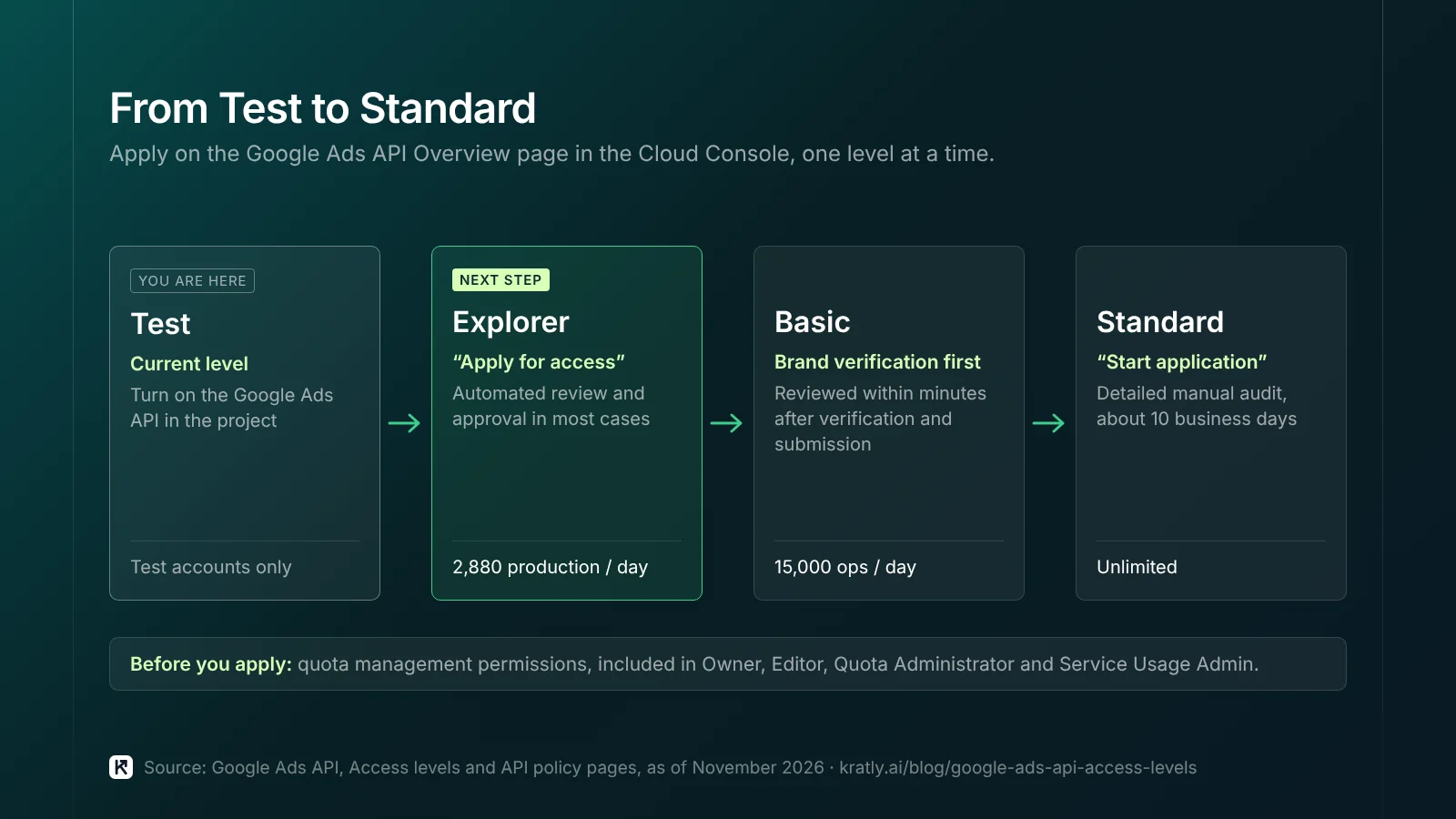
Before you start: you need quota management permissions. Owner, Editor, Quota Administrator and Service Usage Admin include them by default (developer token page).
- Explorer. Confirm the current level shows Test. Expand "Upgrade access level" and click "Apply for access." Google calls this "automated review and approval in most cases."
- Google Ads API Basic access. First finish brand verification for the Cloud project. Google calls it "a prerequisite to apply for Basic access level." Clear any brand warnings, then apply. Basic applications are "reviewed within minutes after brand verification and submission" (Google Ads API policy).
- Standard. Start from Basic and click "Start application." Expect "a detailed manual audit," possibly a demo login, and about 10 business days.
Existing Basic and Standard holders don't need brand verification, though Google encourages it (Google Ads API policy).
What breaks, and how to fix it#
These are the failures I'd look for first.
| Symptom | Likely cause | Fix |
|---|---|---|
CLOUD_PROJECT_NOT_APPROVED_FOR_PRODUCTION (v25+) or ACTION_NOT_PERMITTED (v24 and earlier) | The project only has Test access | Apply for Explorer on that project (policy) |
| You try to move a token to a new project | "No longer supported as of September 9, 2026" (developer token page) | Apply on the new project instead |
RESOURCE_EXHAUSTED mid-day | Daily quota used up | Batch with SearchStream, cut refresh rate, or apply for Basic (quotas) |
| Keyword ideas or account creation calls fail | Explorer blocks these services | Apply for Basic |
Check the mapped level. Trade publication PPC Land reports that levels moved based on recent API activity, and quiet projects may not have mapped cleanly (PPC Land, September 2026). I couldn't confirm that on Google's pages. Checking each project's level takes five minutes anyway.
Conversions and Customer Match go through the Data Manager API#
Google's quotas page lists two more 2026 restrictions for new adopters (API limits and quotas):
- From April 1, 2026: Customer Match through
UserDataServiceandOfflineUserDataJobServiceis restricted. New adopters must use the Data Manager API. - From June 15, 2026:
UploadClickConversionsis restricted. New adopters must use the Data Manager API.
Google Ads Help says offline conversion and enhanced-conversions-for-leads uploads are "blocked in the Google Ads API" for those not allowlisted. Tokens that sent no request from January through June 2026 "will not be allowlisted" (Google Ads Help).
So a new Stripe revenue sync should start there. Our guide to offline conversion import in Google Ads with real Stripe revenue covers timing, values and refunds. For audiences, see Customer Match and the Data Manager API: what to do now.
A checklist for this week#
Where Kratly fits#
Kratly reads your Google Ads data under Google's current access model, with no developer token needed, and shows it next to website tracking and Stripe or Shopify revenue as revenue by campaign. Making changes in Google Ads is built but stays switched off until it passes a live test on our own account; until then, suggested changes wait for a person, who can apply them by hand.
Questions, answered
Do I still need a Google Ads API developer token?
No. Google sunset developer tokens on September 9, 2026. You can still send one in the request header, but the API ignores it. Google says it will start rejecting tokens in a future major version, so remove it when you next upgrade. Your access level now comes from the Google Cloud project that owns your OAuth client or service account.
What is Google Ads API Basic access?
Basic access lets a Cloud project run 15,000 operations a day against test and production accounts. It also opens services that Explorer blocks, such as keyword planning, account creation and billing. New applicants must finish brand verification for the Cloud project first. After that, Google says Basic applications are reviewed within minutes of submission.
How many operations does Explorer access allow?
Explorer allows 2,880 operations a day against production accounts and 15,000 against test accounts. A Search or SearchStream request counts as one operation, and each mutate operation counts separately. That covers a nightly report across dozens of accounts. Hourly refreshes or bulk bid changes can pass it quickly, so count a normal day before you choose.
Does the developer token change affect offline conversion uploads?
Not directly, but a separate 2026 change does. From June 15, 2026, new adopters can't upload click conversions through the Google Ads API. They must use the Data Manager API. Customer Match moved the same way from April 1, 2026. If you're building a new upload today, start on the Data Manager API.
Written by
Priyansh Kumar
Priyansh Kumar has spent more than a decade in growth, scaling brands from 1 to 10 and from 10 to 100. He now builds Kratly, an autonomous growth team that ties every campaign, page and email to the revenue it brings.
Sources
- Google Ads API docs: Developer token (sunset) · Access levels and permissible use · API policy overview · API limits and quotas
- Google Cloud Console: Google Ads API Overview page
- Google Ads Developer Blog: A new onboarding experience for Google Ads API developers (Sept 10, 2026) · Making Google Ads more secure with updates to Developer Policies (Aug 31, 2026)
- Google Ads Help: Data Manager API change for offline conversions · Google Ads Developer Policies
- Trade press (labeled in copy): PPC Land, Google drops developer tokens from Ads API access decisions
Was this article useful?