Short answer
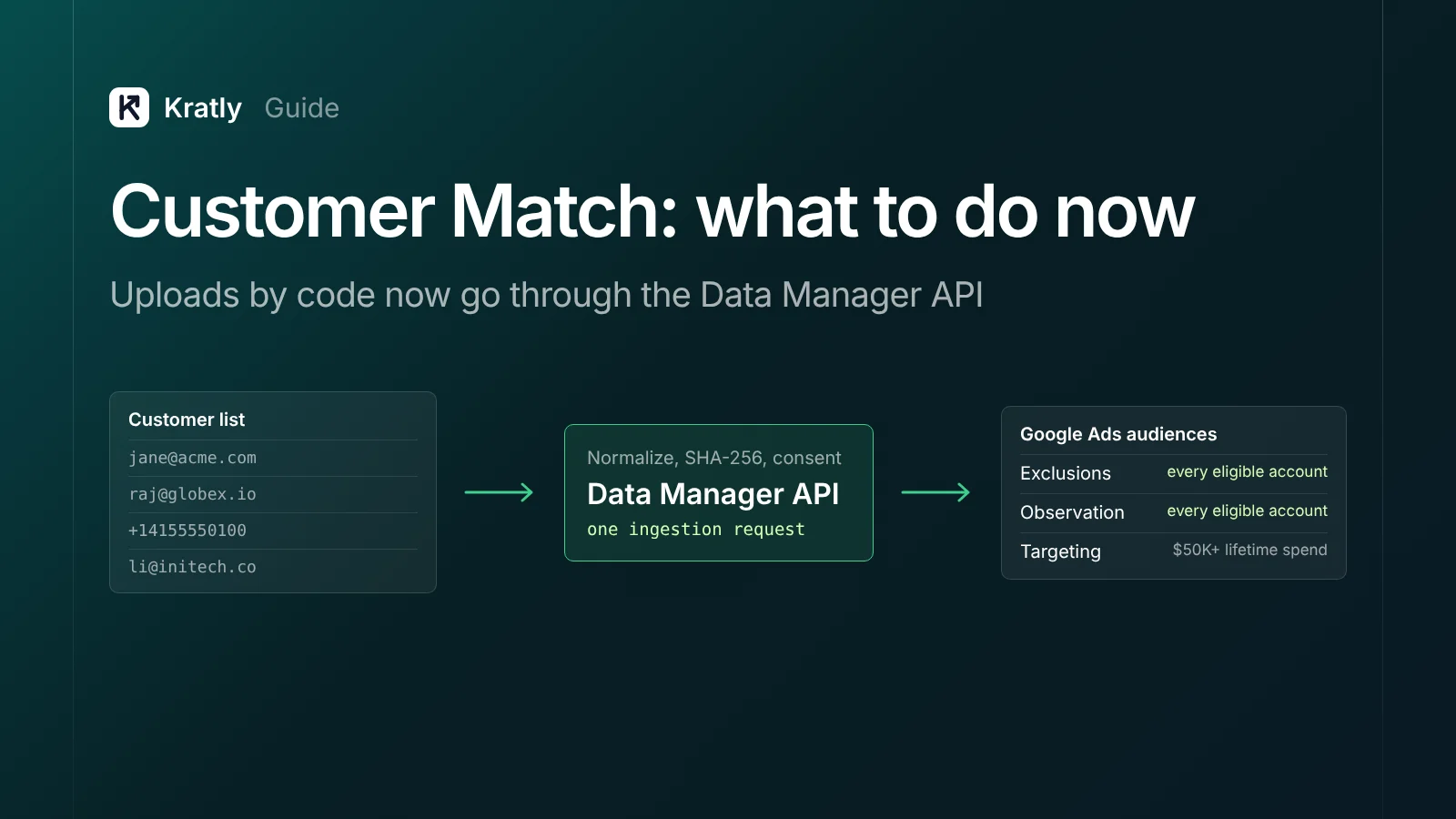
For Customer Match, the Data Manager API is now Google's route for uploads by code. Since April 1, 2026, Google Ads API Customer Match uploads fail for projects with no recent Customer Match activity. Hash emails and phones with SHA-256, pass EU consent, upload 100 or more rows, and start with exclusions.
Google's developer docs put it plainly: "Starting April 1, 2026, OfflineUserDataJobService and UserDataService requests for Customer Match will fail." That applies to projects with no Customer Match activity from October 1, 2025 to March 31, 2026 (Google Ads API docs). Google's fix: "Use the Data Manager API instead."
Here's Customer Match and the Data Manager API as of November 2026, for a small B2B team.
What changed in the Customer Match Data Manager API move?#
Failed calls return CUSTOMER_NOT_ALLOWLISTED_FOR_THIS_FEATURE. Google Ads Help calls Data Manager "the recommended path forward" (Google Ads Help).
What's different in the new API, per Google's upgrade guide (Data Manager API):
| Google Ads API (old path) | Data Manager API (new path) | |
|---|---|---|
| Workflow | Create a job, add members, run it, poll it | One ingestion request |
| Developer token | Required | Not required |
| Several audiences in one request | No, one job per audience | Yes |
| Errors | Partial failure | Fast fail |
| Confidential matching and encryption | Not supported | Supported |
| Quotas | Per developer token | Per Google Cloud project |
What is Customer Match, and who can use it?#
Customer Match is a Google Ads feature. It "lets you use your online and offline data to reach and re-engage with your customers" (Google Ads Help). You upload emails, phone numbers or addresses. Google matches them to signed-in users on Search, Shopping, YouTube, Gmail and Display.
The Customer Match policy sets two levels, as of November 2026:
| Your account | What you can do |
|---|---|
| Good policy and payment history | Use lists in "Observation" and for "Exclusions" |
| Also 90 days of history and more than USD $50,000 lifetime spend | Add "Targeting" and manual bid adjustments |
Under $50,000 lifetime spend, you can't target a list. You can still exclude it or observe it.
The policy also limits the data. Upload only data "you collected in the first-party context," such as your site, app or store. Your privacy policy must disclose sharing customer data with third parties. No data on users under 13. A bought lead list fails the first rule.
How to hash and format the list#
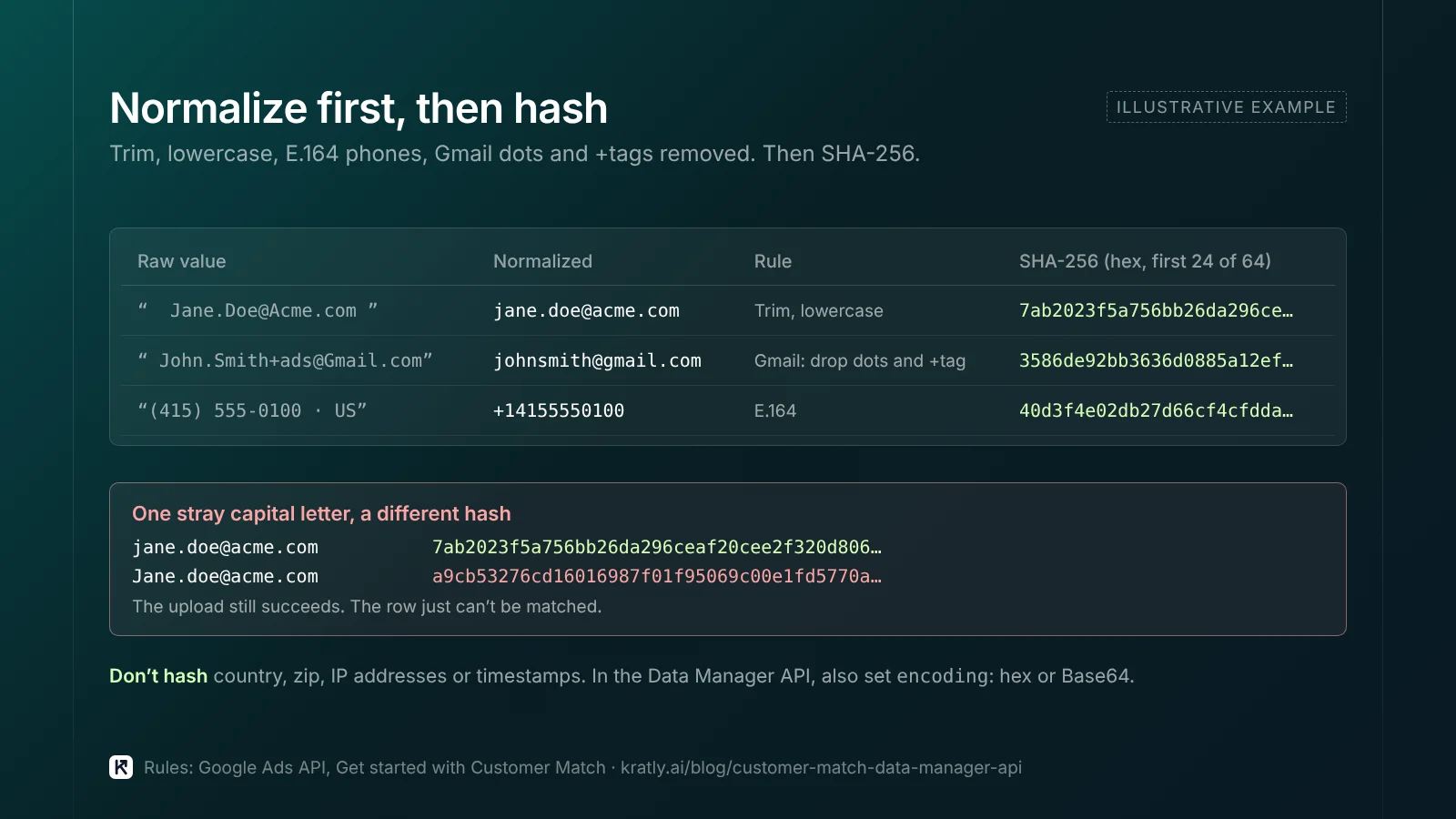
Get the format wrong and the upload still succeeds, but rows "can't be matched with a customer" (Google Ads API docs). Google's normalization rules:
- Trim leading and trailing spaces.
- Lowercase the text.
- Phones in E.164, such as +14155550100.
- Gmail addresses: remove dots and anything after a plus sign in the part before the @.
- Hash email, phone, first name and last name with SHA-256.
- Don't hash country, zip, IP addresses or timestamps.
In the Data Manager API you also set an encoding field, hex or Base64 (Data Manager API).
Manual uploads are easier. Upload a plain-text CSV and "Google Ads will hash it for you" with SHA-256 (Google Ads Help). Headers must use Google's exact names: Email, Phone, First Name, Last Name, Country, Zip.
What consent do you need?#
Google's EU user consent policy covers users in the EEA, the UK and Switzerland. You need valid consent before using their data for ad personalization, and records of it (Google).
For Customer Match, two consent signals matter: ad_user_data and ad_personalization. Since March 2024, both must be granted for a list to be used in the EEA (Google Ads Help). A missing signal counts as not consented, and that data "will not be processed."
In a manual upload, tick the compliance box and upload only consented data. In the Data Manager API, set adUserData, adPersonalization and termsOfService in the request (Data Manager API). Partners must pass the signals for you. IP matching isn't supported for the EEA, UK or Switzerland. This isn't legal advice.
Which Google Customer Match upload method fits you?#
As of November 2026, Google Ads Help names four routes.
| Route | Best for | Watch out for |
|---|---|---|
| Google Ads UI (Tools › Audience manager › Customer list) | A one-off list; small teams | Manual; easy to let it go stale |
| Data Manager (no-code connections) | A list that should refresh from your CRM, store or warehouse | Check your source is on the supported list |
| Data Manager API | Engineers building the Google Ads audience upload API flow | Your code owns hashing, consent and errors |
| Customer Match upload partner | Teams whose CRM or CDP already offers it | Confirm the partner moved off the old API |
Data Manager's supported sources table includes HubSpot, Shopify, Klaviyo, Google Sheets and BigQuery for Customer Match. My take: start with one file in the UI. Move to a connection once the list earns its keep. Write API code only if no connector fits.
How big should a list be?#
Google gives three numbers:
- 100 rows is the floor for each uploaded file. Google Ads Help also recommends lists of "at least 100 users to prevent ads from not serving" (Google Ads Help).
- 5,000 members is what the API docs suggest "to increase the chance of having enough matched, active users for targeting" (Google Ads API docs).
- 540 days is the longest membership. Lists with too few members added or updated inside that window can stop being eligible (Google Ads Help).
Serving also needs enough active users; Google doesn't publish that floor.
Match rate is the share of your uploaded list that Google can connect to its users (Google Ads Help). Google gives no target range. It says unmatched rows are common, and that match rate "isn't an indicator of list performance." Processing "may take up to 48 hours."
To lift it, Google suggests more match keys, such as email plus phone. B2B lists often hold work emails only, so expect lower rates.
Customer Match for B2B: ABM and exclusions#
Exclude current customers first#
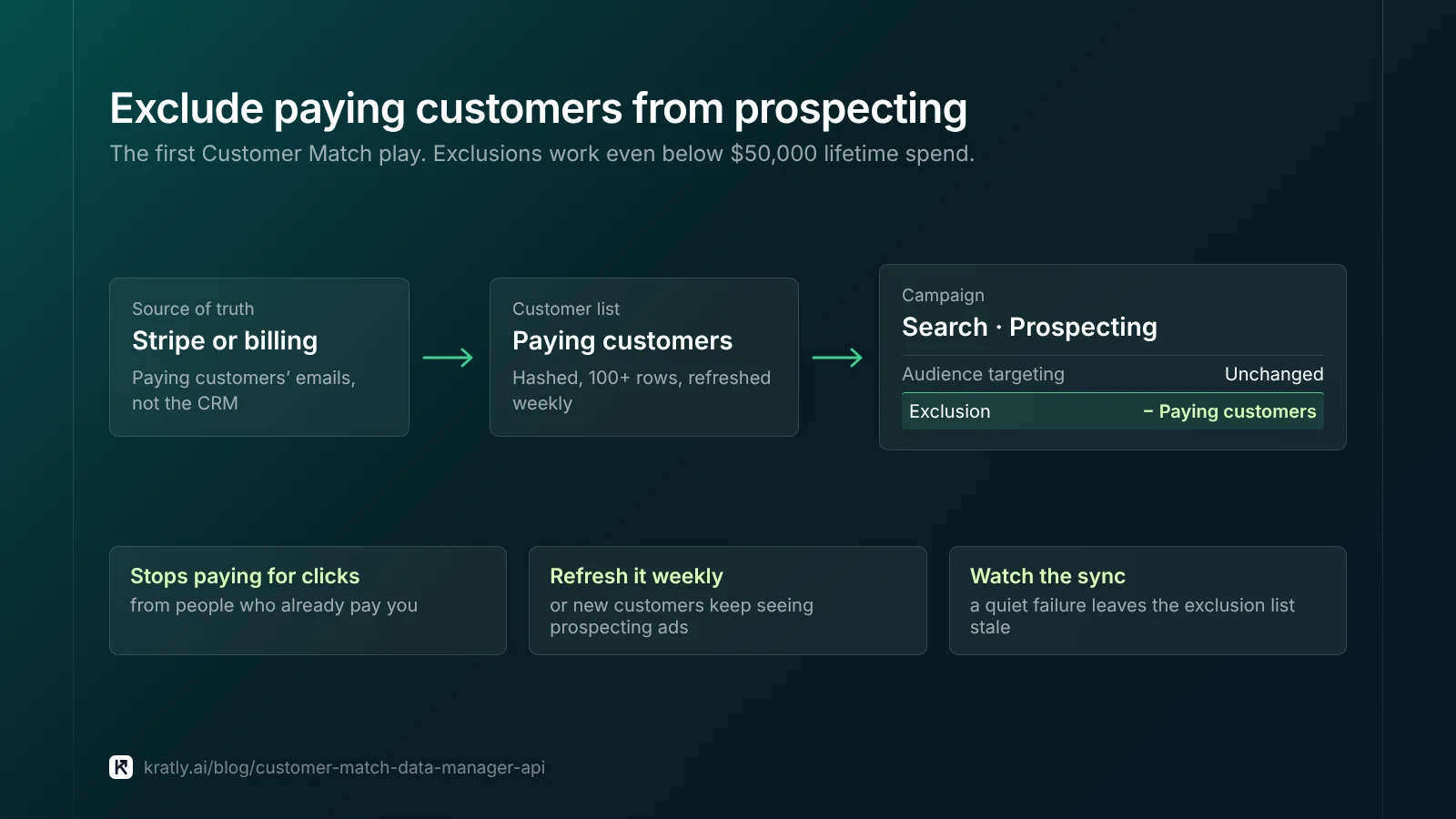
Every eligible account can run this play, even below the $50,000 line. Upload paying customers and exclude them from prospecting. Stop paying for clicks from people who already pay you.
Pull the list from Stripe or your billing tool, not your CRM. Refresh it weekly. Our guide to tracking Stripe conversions in Google Ads shows how to link those payments back to campaigns.
Account-based lists#
Upload contacts at target accounts and use the list in Observation. You'll see whether they search your terms and what they cost. With targeting access, raise bids on them. Pick the accounts with ABM for startups: one account play your team can run in a week. If only a handful match, ads to that list may not serve.
Pair audiences with revenue#
An audience tells Google who to show ads to. Conversion uploads tell it what they paid. Our guide to offline conversion import in Google Ads with real Stripe revenue covers the second half. To judge leads on pipeline, see B2B lead generation strategy: measure pipeline, not form fills.
What breaks for scripts and tools on the Google Ads API#
If you or a vendor built an uploader, check these:
- Silent failures. A nightly sync that fails quietly leaves your exclusion list stale. New customers keep seeing prospecting ads.
- Dormant code. A script untouched since last year is the riskiest.
- Partial-failure logic. The new API fails fast, so one bad row can stop the request. Validate first with
validateOnly, which checks "for fast-fail errors without ingesting any data" (Data Manager API). - Batch size. Google's sample code sets 10,000 members per request (Data Manager API). Split larger lists.
- Credentials. The new API needs no developer token; it uses Google Cloud project quotas. Google marks the legacy token "deprecated September 9, 2026" (Google Ads API docs). See Google Ads API without a developer token.
Where Kratly fits#
Kratly's ad audiences, built from a lead list or an account play and synced to the ad platforms, are built but switched off. Google uploads will move to the Data Manager API before we turn them on. Live today: Kratly reads your Google Ads data next to Stripe or Shopify revenue and website tracking, and shows revenue by campaign, page and email, so you can see which campaigns bring paying customers.
Questions, answered
Do I have to use the Data Manager API for Customer Match?
Only if you upload by code. As of November 2026, Google Ads API Customer Match calls fail for projects with no activity from October 2025 to March 2026. Google says to use the Data Manager API instead. If you upload a CSV in the Google Ads interface, or use a Data Manager connection or a partner, you don't write API code.
Can a small account use Customer Match?
Yes, with limits. Any account with good policy and payment history can use lists in Observation and for Exclusions. Targeting and manual bid adjustments need 90 days of Google Ads history and more than USD $50,000 lifetime spend, per Google's Customer Match policy. For a small B2B team, excluding paying customers is the most useful starting point.
Does Google hash the data for me?
In the Google Ads interface, yes. If you upload plain text, Google hashes emails, phones and names with SHA-256 on your computer before upload. In the Data Manager API, you hash first and set the encoding to hex or Base64. Normalize before hashing: trim spaces, lowercase and format phones in E.164.
What is a good Customer Match match rate?
Google doesn't publish a target. It says unmatched rows are common, and that match rate isn't a sign of how the list will perform. Use it to catch formatting errors. A sudden drop usually means a hashing or column problem. To raise it, add more match keys, such as phone numbers alongside emails.
Written by
Priyansh Kumar
Priyansh Kumar has spent more than a decade in growth, scaling brands from 1 to 10 and from 10 to 100. He now builds Kratly, an autonomous growth team that ties every campaign, page and email to the revenue it brings.
Sources
- Google for Developers: Get started with Customer Match (Google Ads API) · Upgrade from the Google Ads API (Data Manager API) · Send audience members (Data Manager API) · Customer Match overview (Data Manager API)
- Google Ads Help: About Customer Match · Upload Customer Match data · About Customer Match match rates · Fix list upload and small list size issues · How to provide consent for Customer Match
- Google Ads policy: Customer Match policy
- Google: EU user consent policy
- Google Ads Data Manager Help: Supported data sources
- Search Engine Land: Google to disable Customer Match uploads in Ads API
Was this article useful?