Short answer
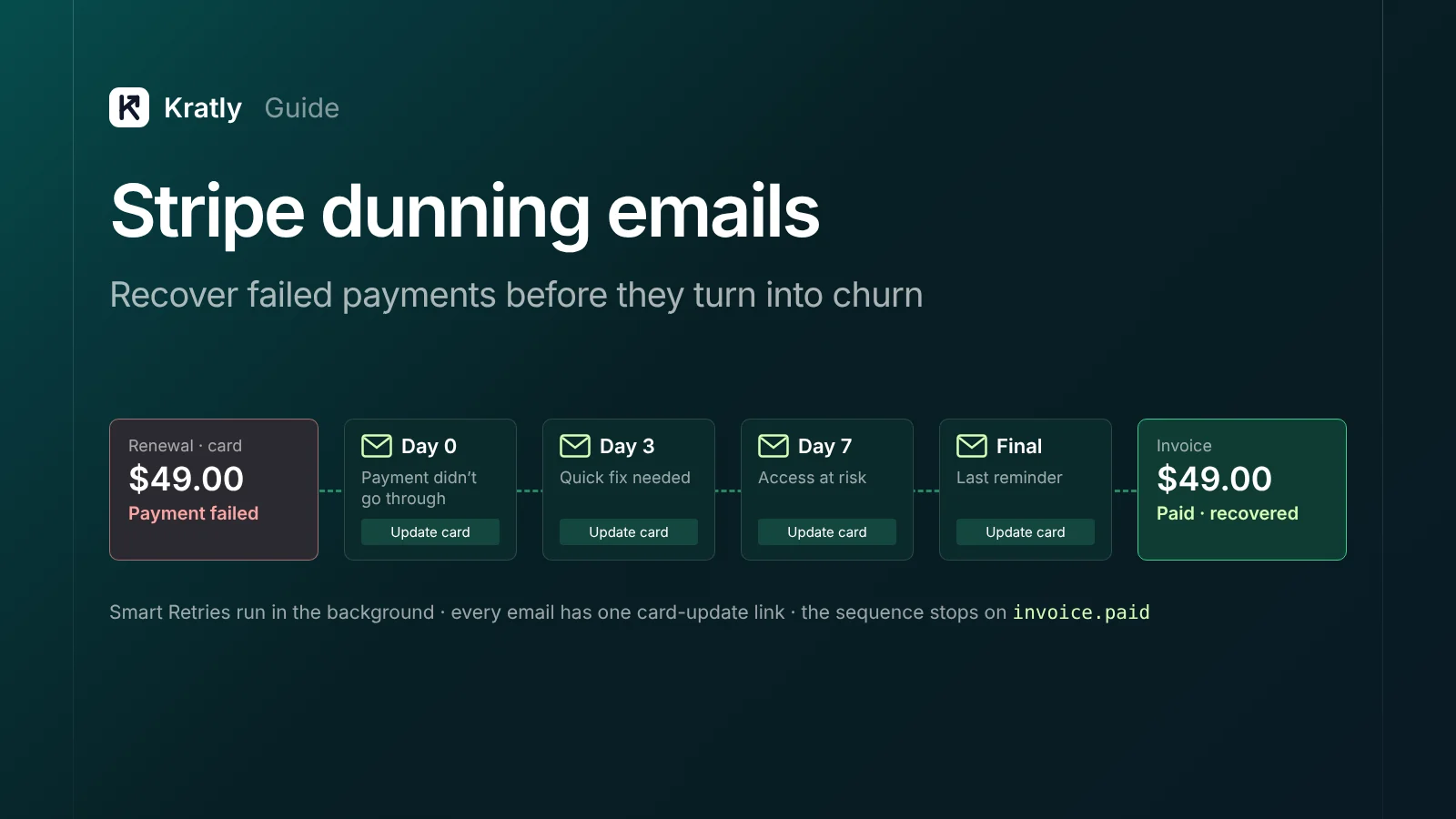
Turn on Stripe Smart Retries, failed-payment and expiring-card emails, and let automatic card updates run. Then add Stripe dunning emails on day 0, 3, 7 and before the final retry, each with a one-click card update link. Show an in-app banner while the subscription is past due, and choose what happens after the last retry.
Some customers leave without ever deciding to. One founder replied to an Indie Hackers post on failed payments. They wrote that "our involuntary churn was nearly 30 percent of total churn" (Indie Hackers, Aug 2026). They said recovery rose "from 35 percent to 65 percent" after switching to a plain-text email with a one-click update link. That's self-reported, not a benchmark.
Stripe's own figure is that businesses on Stripe "recover 55% of failed payments on average" (Stripe Billing). Stripe dunning emails, set up well, are how you go after the rest.
What is involuntary churn?#
Involuntary churn is when a customer stops paying because a payment failed, not because they chose to cancel. Common causes are expired cards, replaced cards, insufficient funds, and banks asking for authentication.
It needs a different fix from voluntary churn. A customer who cancels has a reason, and your SaaS cancellation flow is where you hear it. A customer whose card failed usually still wants the product. They need a reminder and an easy way to pay, not a discount.
What I'd check first: split last quarter's churned subscriptions into two groups. One is canceled by the customer, the other canceled after a failed payment. If the second group is large, fix it before pricing or onboarding.
What Stripe already does for failed payments#
Stripe Billing's revenue recovery tools need no code. Turn these on before you write any email.
| Tool | What it does | Where to turn it on |
|---|---|---|
| Smart Retries | Uses AI to pick the best times to retry a failed payment | Billing › Revenue recovery › Retries |
| Failed payment emails | Emails the customer "after each failed payment" with a link to update their payment method | Revenue recovery › Emails |
| Expiring card emails | Emails the customer 1 month before the card on file expires | Revenue recovery › Emails |
| Payment confirmation emails | Sends a hosted link when a payment needs 3D Secure or other confirmation | Billing settings |
| Automatic card updates | Updates saved cards when the bank issues a new card | On by default via card networks |
Sources: Smart Retries, customer emails, card updates.
Automatic card updates depend on the bank. Stripe says it's "widely supported in the United States," covering most American Express, Visa, Mastercard and Discover cards issued there. International support varies, and you can't tell in advance which cards are covered (Stripe Docs).
Hard declines don't retry. Some bank codes, such as lost_card or authentication_required, block retries. The retries stay scheduled but only run once the customer adds a new payment method (Stripe Docs). For these, your email is the only thing that can recover the payment.
The update link can expire. Stripe's hosted link stops working if the subscription becomes canceled or unpaid, or if the renewal period ends (Stripe Docs). Your last email should go out before that happens.
Retry schedule and what happens after the last try#
With Smart Retries, Stripe lets you set a number of tries within 1 week, 2 weeks, 3 weeks, 1 month or 2 months. The recommended default is "8 tries within 2 weeks" (Stripe Docs). A custom schedule allows up to three retries, each a set number of days after the last.
What I'd do: keep the default for monthly plans. For annual plans, stretch the window to a month, since one renewal is worth twelve monthly payments. Stripe automations let you set different retry policies per customer group.
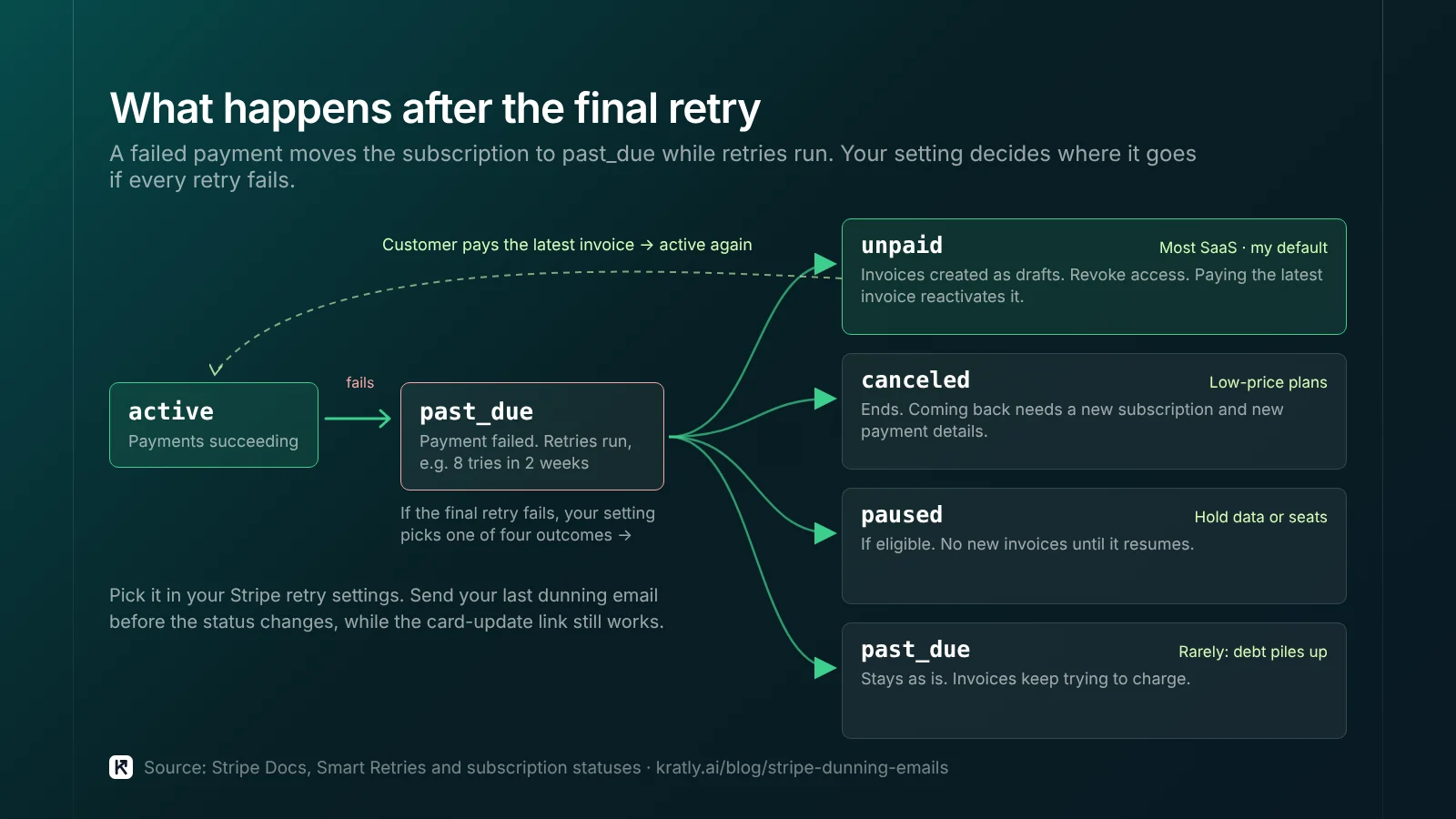
Then pick what happens if every retry fails:
| Setting | What happens | When I'd pick it |
|---|---|---|
| Cancel the subscription | Status becomes canceled. To come back, the customer needs a new subscription and new payment details. | Low-price plans where you don't gate access by status |
| Mark as unpaid | Status becomes unpaid. Invoices keep being created as drafts. Paying the latest invoice reactivates it. | Most SaaS. Revoke access, keep the path back easy. |
| Leave past due | Status stays past_due and invoices keep trying to charge | Rarely. Debt piles up quietly. |
| Pause | Status becomes paused if eligible. No new invoices until it resumes. | Products where data or seats should be held |
Source: Stripe Docs and subscription statuses.
My default is to mark the subscription as unpaid. Stripe's docs advise you to "revoke access to your product when the subscription is unpaid." The customer can still pay one invoice to come back. The case for cancel instead: if your app doesn't check subscription status, an unpaid subscription can leave people with free access. Then cancel is safer.
A Stripe dunning emails sequence: four messages#
Stripe's built-in email goes out after each failed attempt. With 8 retries, that can mean many similar emails. You have two choices:
- Use Stripe's emails as they are. Zero engineering time. Branding comes from your Stripe settings.
- Send your own sequence. Turn off Stripe's failed-payment emails, then trigger yours from the
invoice.payment_failedwebhook. Budget a day or two of engineering time.
I'd start with Stripe's emails and switch to your own once failed payments cost you more than a few hundred dollars a month. Here is the sequence I'd send. The timings are my recommendation for a 2-week retry window.
| Day | Trigger | Subject idea | What it says |
|---|---|---|---|
| 0 | First failure | "Your payment didn't go through" | What failed, the amount, one button to update the card. No blame. |
| 3 | Still unpaid | "Quick fix needed for your [Product] account" | Same link. Mention what they'll lose access to and when. |
| 7 | Still unpaid | "Your [Product] access is at risk" | Same link. Reply-to a real person for questions. |
| Final (2–3 days before last retry) | Still unpaid | "Last reminder: update your card by [date]" | Exact date access ends. Same link. |
Rules for every email:
- Plain text, one link. The update link goes to the Stripe-hosted page or your customer portal. No login wall if you can avoid it.
- Hard decline? Skip ahead. If
invoice.payment_failedshows a hard decline, retries won't run. Send the day-7 message right away. - Stop the moment they pay. Listen for
invoice.paidand cancel the rest of the sequence. - Send from a real address. Replies often contain the real reason, such as a new company card.
Follow Gmail's sender guidelines so these land in the inbox. If you already wrote trial follow-up emails, reuse the same sender and tone.
In-app banners and access rules#
Many customers never open billing emails. An in-app banner reaches people still using the product, the ones most likely to pay.
What I'd do:
- While
past_due: keep full access. Show a banner on every page: "Your last payment failed. Update your card to keep access." Link straight to the update page. - Admins only: show the banner to the account owner or billing admin. Team members can't fix it and will only file support tickets.
- When
unpaidorcanceled: block access with a single screen that says what happened and has one "Update payment" button.
The trade-off: access during past_due means up to two weeks of free use if they never pay. Cutting access on day 1 annoys customers whose card simply expired. Two weeks of server cost is usually cheaper than losing a customer who meant to stay.
The webhooks to wire up#
If you build your own emails or banner, these are the Stripe events to listen for:
| Event | Use it to |
|---|---|
invoice.payment_failed | Start or continue the sequence. attempt_count tells you which try failed. |
invoice.payment_action_required | Ask the customer to complete authentication |
invoice.paid | Stop the sequence and hide the banner |
customer.subscription.updated | Catch status changes to past_due, unpaid or canceled |
payment_method.automatically_updated | Log cards updated by the network |
One catch: if you use Stripe automations, next_payment_attempt is no longer set in invoice.payment_failed. Read it from invoice.updated instead (Stripe Docs). Use it to put the right date in your final email.
Measure failed payment recovery in revenue#
Stripe's recovery analytics show failure rates and recovery rates. Track three numbers each month:
- Failed payment amount: total value of invoices that failed on the first try.
- Recovery rate: share of that amount paid within the retry window.
- Revenue lost to involuntary churn: monthly value of subscriptions that ended unpaid or canceled after retries.
Treat Stripe's 55% average as a rough reference, not a target. Then put the lost revenue next to your other growth work. If $2,000 a month leaks through failed payments, a day of email work beats most ad tests. That's the autonomous growth idea we built Kratly around: fix the biggest revenue leak first.
How to do this in Kratly#
- Connect Stripe. Kratly reads your subscriptions, invoices and payment failures.
- See revenue lost to failed payments. Put it next to cancellations, so you know how much churn is involuntary.
- Compare it with your other leaks. Kratly shows revenue lost to failed payments next to ad spend that brings no payers. Fix the bigger one first.
- Approve fixes. Kratly suggests changes to dunning emails. You approve them, and each change is logged and can be undone.
Questions, answered
Does Stripe send dunning emails automatically?
Yes, if you turn them on. Enable "Send emails when card payments fail" in revenue recovery settings. Stripe then emails the customer after each failed payment, with a link to update the card. You can also turn on emails one month before a card expires.
How many times does Stripe retry a failed payment?
With Smart Retries, you choose a number of tries within a window from one week to two months. Stripe recommends 8 tries within 2 weeks. A custom schedule allows up to three retries. Hard declines, such as a lost or stolen card, don't retry until the customer adds a new card.
What happens to a Stripe subscription after all retries fail?
It depends on your settings. You can cancel it, mark it as unpaid, leave it past due, or pause it if eligible. Stripe advises revoking access when a subscription is unpaid. A canceled subscription can't be restarted; the customer needs a new one.
What is a good failed payment recovery rate?
Stripe says its businesses recover 55% of failed payments on average. Use it as a rough reference, not a target. Your rate depends on countries, card types and how fast customers see your emails. Track it monthly in Stripe's recovery analytics, next to the revenue you lose to involuntary churn.
Written by
Priyansh Kumar
Priyansh Kumar has spent more than a decade in growth, scaling brands from 1 to 10 and from 10 to 100. He now builds Kratly, an autonomous growth team that ties every campaign, page and email to the revenue it brings.
Sources
- Stripe Docs: Revenue recovery · Smart Retries and retry settings · Customer emails · How cards work: automatic card updates · Subscription statuses · Recovery analytics · Automations · Customer portal
- Stripe: Billing product page (55% average recovery)
- Indie Hackers: Failed cards and churn discussion (Aug 2026)
- Google: Email sender guidelines
Was this article useful?