Short answer
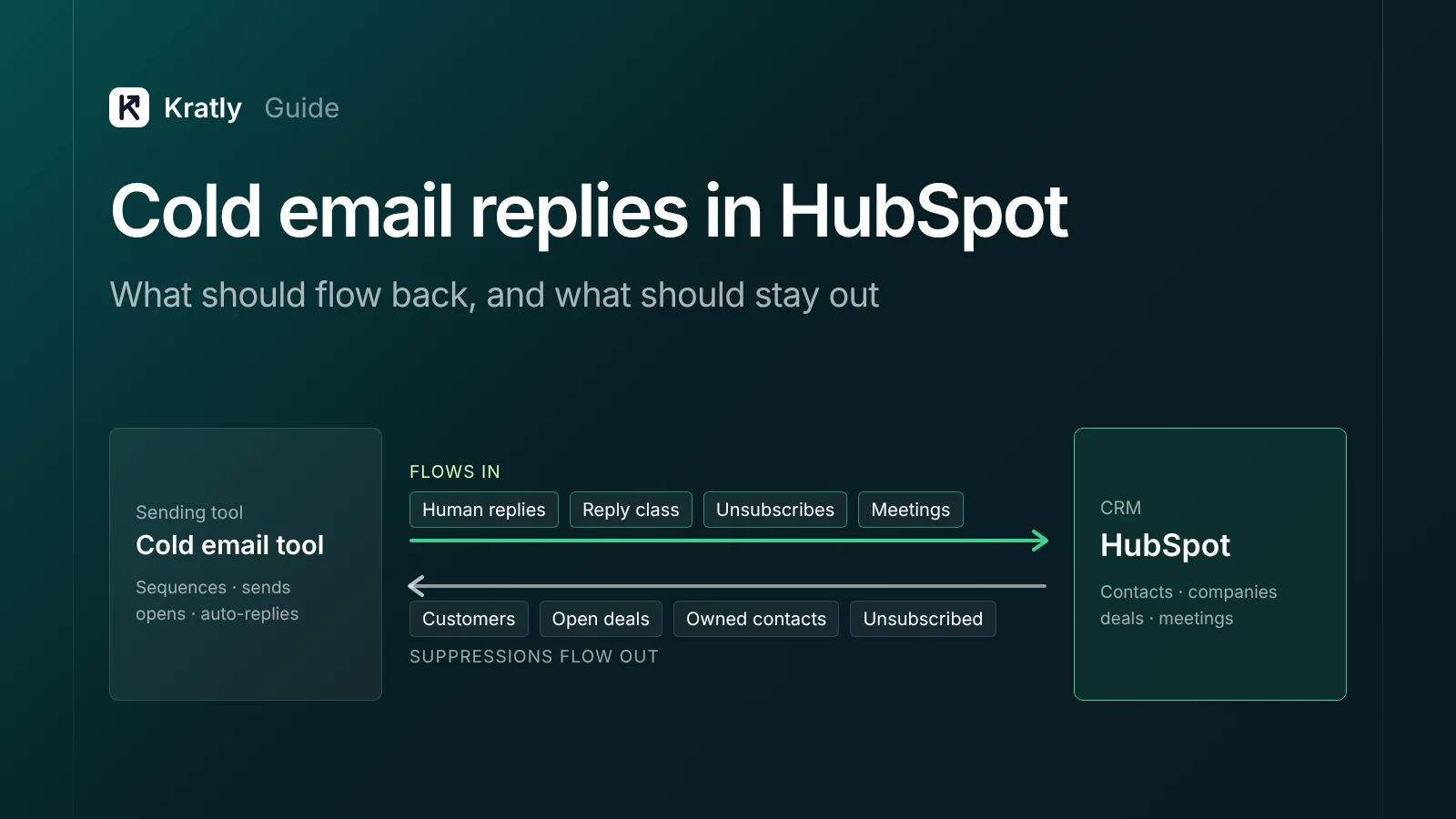
A HubSpot sync for cold email replies should write back human replies, the reply's class, unsubscribes and booked meetings. It should skip opens, auto-replies and contacts who never answered. Match contacts on email, never overwrite an owner, never move lifecycle stage backward, and link every meeting to a deal.
Composite example: a five-person SaaS team turns on a "sync everything" setting in its cold email tool. This is an illustrative case, not a real company. A month later, HubSpot is full of contacts who never replied. Some companies appear twice. One rep's best account now belongs to whoever imported the list.
None of that is a HubSpot bug. It's a sync with no rules.
What is a two-way outbound sync?#
A two-way outbound sync is a link between your cold email tool and your CRM that moves data both ways. Sales events flow into HubSpot. Do-not-contact lists flow back out.
Most teams set up only one direction:
- HubSpot → sending tool: existing customers, open deals, contacts owned by a rep, and anyone unsubscribed. These should be suppressed before a sequence starts.
- Sending tool → HubSpot: replies, reply class, unsubscribes and meetings. These are the events a person needs to act on.
Run the suppression pull before every new list upload, not once a quarter.
Still sizing the program? See how many cold emails per meeting you need for 20 a month.
What should a HubSpot sync for cold email replies write back?#
An "activity" is a logged email or meeting; a "property" is a contact field.
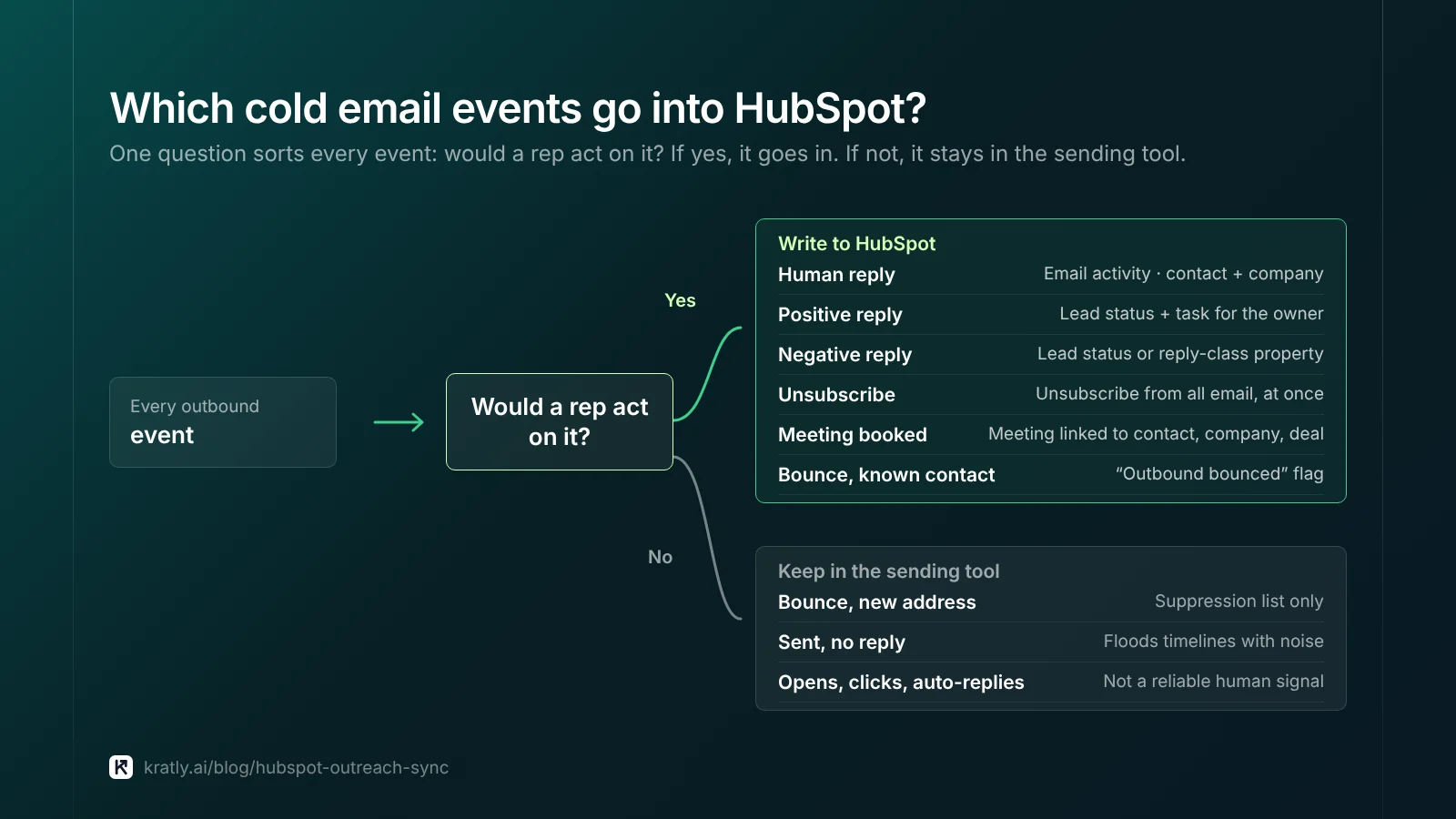
| Outbound event | Write back? | Where it goes in HubSpot | Why |
|---|---|---|---|
| Human reply | Yes | Email activity on the contact, plus the company | A rep needs the thread in one place |
| Positive reply | Yes | Lead status, plus a task for the owner | It's the trigger for a sales action |
| Negative reply ("not interested") | Yes | Lead status or a custom reply-class property | Stops the next team from emailing them |
| "Remove me" or unsubscribe | Yes, at once | Unsubscribe from all email, plus suppression in the sending tool | Legal opt-out, and it protects your domain |
| Meeting booked | Yes | Meeting activity linked to contact, company and deal | The bridge to pipeline and revenue |
| Hard bounce on a known contact | Yes, as a flag | A custom "outbound bounced" property | Tells reps the address is dead |
| Hard bounce on a new address | No | Sending tool's suppression list only | Don't create a contact for a dead address |
| Sent email with no reply | No | Keep it in the sending tool | It floods timelines with noise |
| Opens and clicks | No | Keep it in the sending tool | Opens are unreliable after Apple's privacy change |
| Auto-reply or out-of-office | No | Keep it in the sending tool | Not a human signal |
How replies should land#
As of November 2026, HubSpot's emails API logs email activity on records. It marks direction with hs_email_direction. An INCOMING_EMAIL value marks "a reply to a logged outgoing email" (HubSpot developers). The only required field is hs_timestamp.
Log the reply and the email it answered, both associated with the contact and company.
Classify every reply#
A "please stop" and a "send me times" are both replies. Tag each one before it syncs.
HubSpot's Lead status property shows "where the contact or company is within a buying cycle as a lead" (HubSpot Knowledge Base, as of November 2026). HubSpot's blog (not its Knowledge Base) lists default values including "Connected," "Unqualified" and "Bad Timing" (HubSpot blog, updated May 2025). Admins can edit them, so check your own portal.
A simple map I'd use:
- Positive (wants a call or info) → Connected, and create a task for the owner.
- Not now (asks to wait) → Bad Timing, with a follow-up date.
- Not a fit (wrong person or company) → Unqualified.
If your sales team already uses Lead status another way, add a custom property like outbound_reply_class instead.
Unsubscribes go both ways#
When someone asks to be removed, write it to HubSpot and the sending tool within minutes. As of November 2026, HubSpot's subscriptions API can "unsubscribe a contact from all email communication" (HubSpot developers). Batch unsubscribe calls need Marketing Hub Enterprise. Single-contact calls do not. If data privacy settings are on, a legal basis field is required.
Our cold email deliverability guide covers the CAN-SPAM opt-out rules.
What should stay out of the CRM#
Non-repliers. A contact who got three emails and never replied isn't a lead. Creating them fills HubSpot with people sales will never call.
Billing. As of November 2026, contacts synced by an app are non-marketing by default. HubSpot notes that "all new marketing contacts will count towards your billable contact tier limit" (HubSpot Knowledge Base). Keep that toggle off for your cold email tool, and mark contacts as marketing only once they opt in.
Opens. Apple's Mail Privacy Protection hides whether an email was opened (Apple Support).
How do you stop duplicate contacts and companies?#
Contacts. As of November 2026, HubSpot "automatically deduplicates contacts using email addresses" (HubSpot Knowledge Base). If someone replies from a new address, add it as a secondary email rather than a second contact.
Companies. The same page says companies "created through API will not be deduplicated by the Company domain name property." That includes third-party sync apps, so search for the domain first.
A stable ID. HubSpot lets you create up to ten unique value properties per object (HubSpot Knowledge Base). Store the sending tool's lead ID in one. Then a re-run updates records instead of duplicating them.
| Record | Match on | If no match |
|---|---|---|
| Contact | Reply email address | Create, only if the event is in the "Yes" rows above |
| Company | Root domain, searched before any create | Create with the domain set |
| Meeting | Calendar event ID in a custom property | Create and associate |
| Deal | Never created by the sync | A rep creates it after the first call |
Owner fields and lifecycle stage rules#
Never overwrite an owner#
HubSpot's Contact owner field is simply "the contact's owner" (HubSpot Knowledge Base).
My rules:
- If the contact has an owner, don't touch it. Assign the task to that owner instead.
- If the company has an owner, copy it to the new contact.
- Only if both are blank, set the owner to the rep who ran the sequence.
Apply "fill blanks only" to title and phone too.
Move lifecycle stage forward only#
HubSpot's lifecycle stages run from Subscriber to Lead, MQL, SQL, Opportunity, Customer and Evangelist. As of November 2026, "default automatic updates to the lifecycle stage property will only move the stage forward" (HubSpot Knowledge Base, last updated October 20, 2026). To set an earlier stage, a tool must first clear the value.
The sync may set Lead, nothing higher, and must never clear the field. Clearing it could knock a Customer back to Lead. A rep decides on SQL after a call.
Opportunity should come from HubSpot itself. Its page defines an Opportunity as a contact "associated with a deal." Our B2B lead generation guide covers how to agree stage meanings with sales.
How do you tie outbound meetings to closed revenue?#
As of November 2026, HubSpot's meetings API stores an outcome in hs_meeting_outcome. Its values are "scheduled, completed, rescheduled, no show, and canceled" (HubSpot developers).
The chain I'd build:
- Booking. The sync creates a meeting with outcome "scheduled." It links the meeting to the contact and company.
- After the call. The rep sets the outcome to completed or no show.
- Deal. If the call qualifies, the rep creates a deal and links the meeting to it.
- Source. Copy an
outbound_campaignvalue from the contact to the deal. Use the same name as your UTM campaign. - Revenue. When the deal closes, match it to the payment in Stripe or your billing tool.
Why copy a campaign field? HubSpot's traffic source fields are built for website visits. For how records were created, HubSpot suggests the Record Source property "such as import, the HubSpot mobile app, or integrations" (HubSpot Knowledge Base, as of November 2026). That tells you "integration," not which segment or email worked.
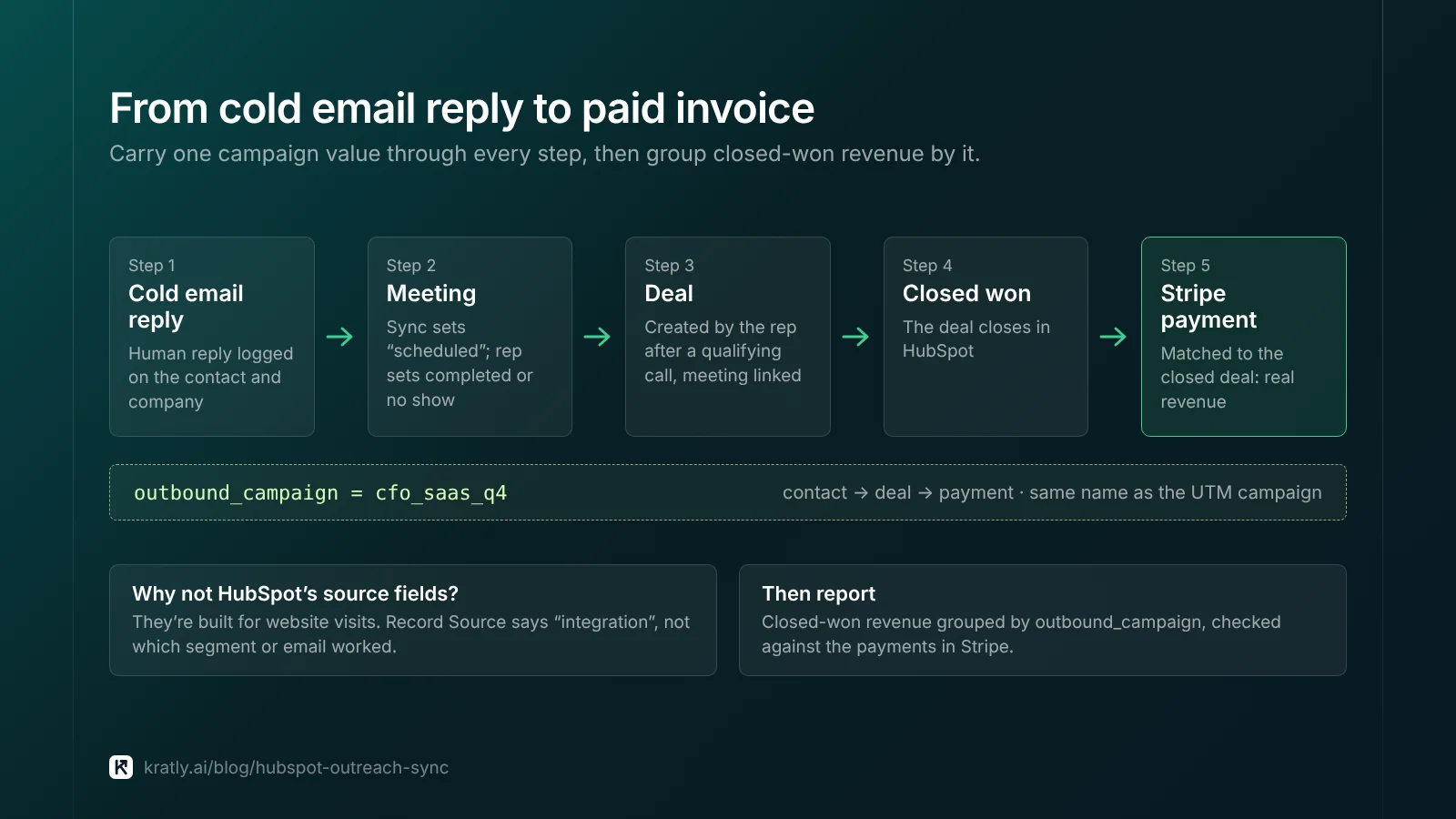
Then report closed-won revenue by outbound_campaign. HubSpot's deal revenue attribution needs a higher plan, but a simple deal report grouped by this field does most of the job.
Weighing HubSpot's reporting against a revenue tool? See our comparison with HubSpot Marketing Hub.
Where Kratly fits#
Kratly's two-way HubSpot sync is built along the rules in this article: it reads contacts, companies, deals and meetings, and writes back only people who replied or booked, with HubSpot winning on owner, stage and amount. Writes stay off until they pass a live test on our own portal. Live today: tagged links in outbound emails show up in revenue by campaign, page and email, tied to Stripe.
Questions, answered
Should every cold email be logged in HubSpot?
No. Log the emails that got a human reply, plus the email they answered. Unanswered sends, opens and auto-replies stay in your sending tool. Logging every send creates contacts sales will never call and buries real replies on the timeline.
How do I stop a sync from creating duplicate companies?
Search HubSpot for the company's domain before creating anything. As of November 2026, HubSpot says companies created through the API are not deduplicated by domain. Contacts are matched on email automatically. Store the sending tool's lead ID in a unique value property so a re-run updates records instead of adding new ones.
Can a cold email reply change the lifecycle stage?
It can set Lead on a new contact, and that's as far as I'd let it go. HubSpot's automatic updates only move stages forward. A tool must clear the field to go backward. So never let the sync clear it. A rep should decide on SQL after a call. HubSpot sets Opportunity when a deal is linked.
How do I see which outbound campaign closed revenue?
Copy one campaign value from the contact to the deal when the rep creates it. Use the same name as your UTM campaign tag. Then report closed-won deals grouped by that field. Match each closed deal to its payment in Stripe. That shows which segment brought revenue, not just which one replied.
Do cold email contacts count toward HubSpot billing?
Only if they are marketing contacts. As of November 2026, HubSpot sets contacts synced by an app as non-marketing by default. New marketing contacts count toward your billable tier. Keep your cold email integration's toggle off. Mark a contact as marketing only when they opt in to your newsletter or product updates.
Written by
Priyansh Kumar
Priyansh Kumar has spent more than a decade in growth, scaling brands from 1 to 10 and from 10 to 100. He now builds Kratly, an autonomous growth team that ties every campaign, page and email to the revenue it brings.
Sources
- HubSpot Knowledge Base: Use lifecycle stages · Deduplication of records · HubSpot's default contact properties · Marketing contacts settings for integrations · Understand traffic source properties
- HubSpot developers: Emails API guide · Meetings API guide · Subscriptions API v4 guide
- HubSpot blog: Manage your sales process with Lead status (updated May 2025)
- Apple Support: Use Mail Privacy Protection on iPhone
Was this article useful?