Short answer
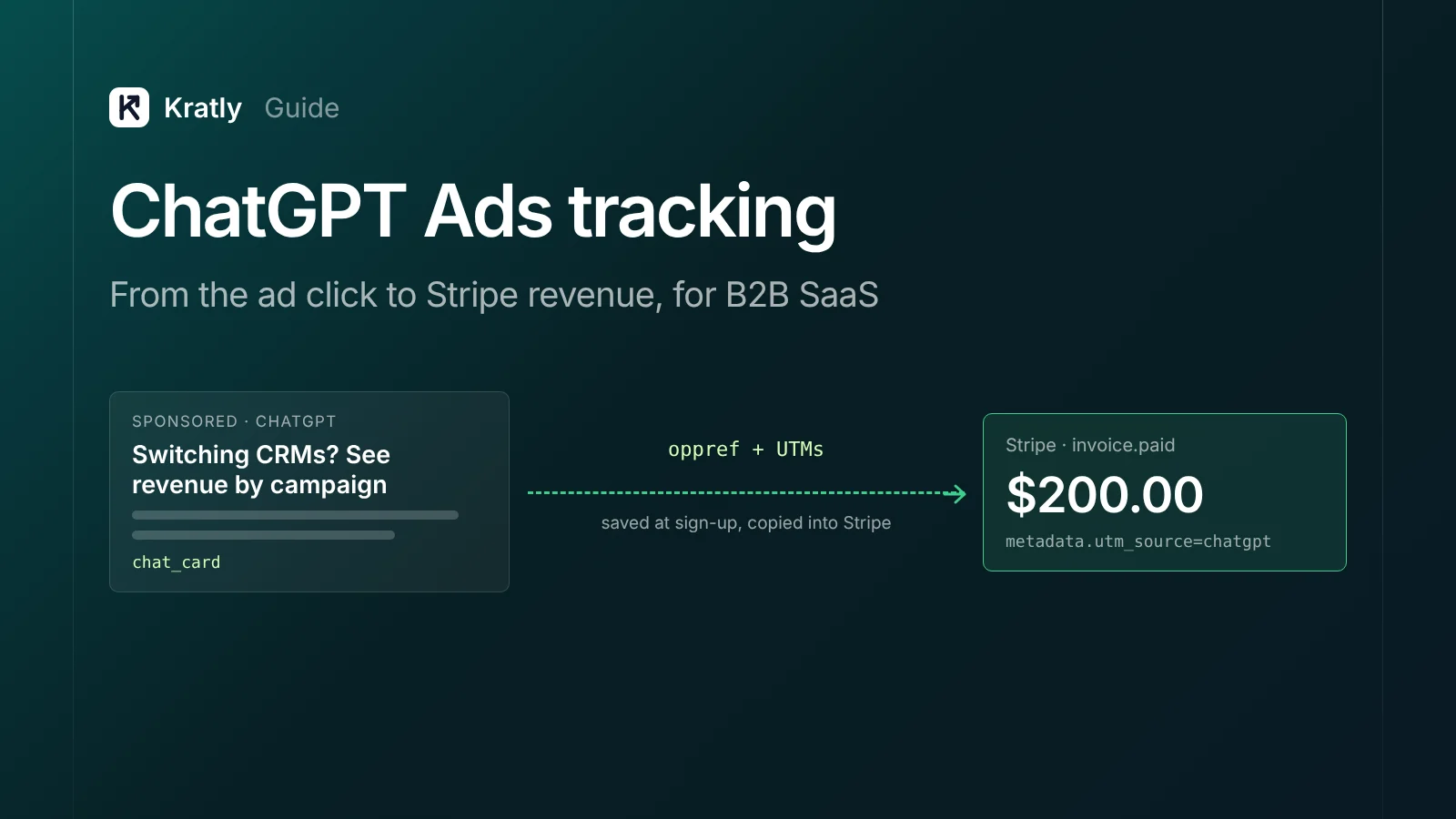
ChatGPT Ads conversion tracking has two parts. OpenAI's Pixel and Conversions API send your sign-ups and payments back to ChatGPT Ads. Your own setup captures the oppref click value and UTMs, carries them into Stripe, and reports revenue by campaign. Optimize in the ads platform, but judge spend on Stripe revenue.
OpenAI added cost-per-click buying to ChatGPT Ads on May 5, 2026. Its words: "Advertisers are only charged based on a click outcome" (OpenAI).
A click is not a customer, though. For B2B SaaS, a trial, a call and a first invoice sit in between. This guide covers ChatGPT Ads conversion tracking from click to money, as of November 2026.
How do ChatGPT Ads work?#
OpenAI's own pages say this, as of November 2026.
| Topic | What OpenAI documents | Source |
|---|---|---|
| Who sees ads | Logged-in adults on the Free and Go tiers; Plus, Pro, Business, Enterprise and Education have no ads | OpenAI |
| Where | "Over 40 countries" via OpenAI's sales team and partners (Aug 31, 2026) | OpenAI |
| Buying | Beta self-serve Ads Manager, "gradually" opening; CPM and CPC | OpenAI |
| Ad types | chat_card (title, body, image, landing URL) and product_ad_template (from a product feed) | OpenAI Ads docs |
| Targeting | Countries and locations, platform (ios_app, android_app, web), custom audiences, context hints | OpenAI Ads docs |
| Bidding | Fixed bid, maximize clicks, maximize conversions | OpenAI Ads docs |
Three details matter for B2B SaaS.
- Context hints are not keywords. OpenAI says "Hints are not exact-match keywords."
- Ads don't buy answers. OpenAI says "Ads do not influence the answers ChatGPT gives you." Earning a mention is a separate job. See how to rank in ChatGPT.
- You never see the chat. Advertisers get aggregate data only, not "your chats, chat history, memories, or personal details" (OpenAI). Your landing page and billing data have to tell the story.
What is ChatGPT Ads conversion tracking?#
ChatGPT Ads conversion tracking is the process of linking each ad click to the sign-ups and payments it led to.
OpenAI gives you two senders (OpenAI Ads docs):
- The Measurement Pixel. A script in your page
<head>sends browser events withoaiq("measure", ...). - The Conversions API. Your server sends events to OpenAI with an API key.
For SaaS, the server matters most. Renewals and invoices never touch a browser.
OpenAI's standard events include trial_started, registration_completed, lead_created, subscription_created and order_created (OpenAI Ads docs). Here is how I'd map them:
| Your moment | OpenAI event | Sent from |
|---|---|---|
| Demo request | lead_created | Pixel and server, same event ID |
| Trial or free sign-up | trial_started or registration_completed | Pixel and server, same event ID |
| First payment | order_created with amount | Server, from the Stripe webhook |
Why order_created? OpenAI says its ROAS "depends on the values sent with order_created events" (OpenAI Ads docs).
Capture oppref and UTMs on the landing page#
The oppref value#
oppref is OpenAI's click value. The docs call it "An opaque, OpenAI-provided attribution identifier. Pass the original string without modification" (OpenAI Ads docs).
The Pixel "captures oppref from the landing page URL." It stores it "in a first-party __oppref cookie" for later page views (OpenAI Ads docs).
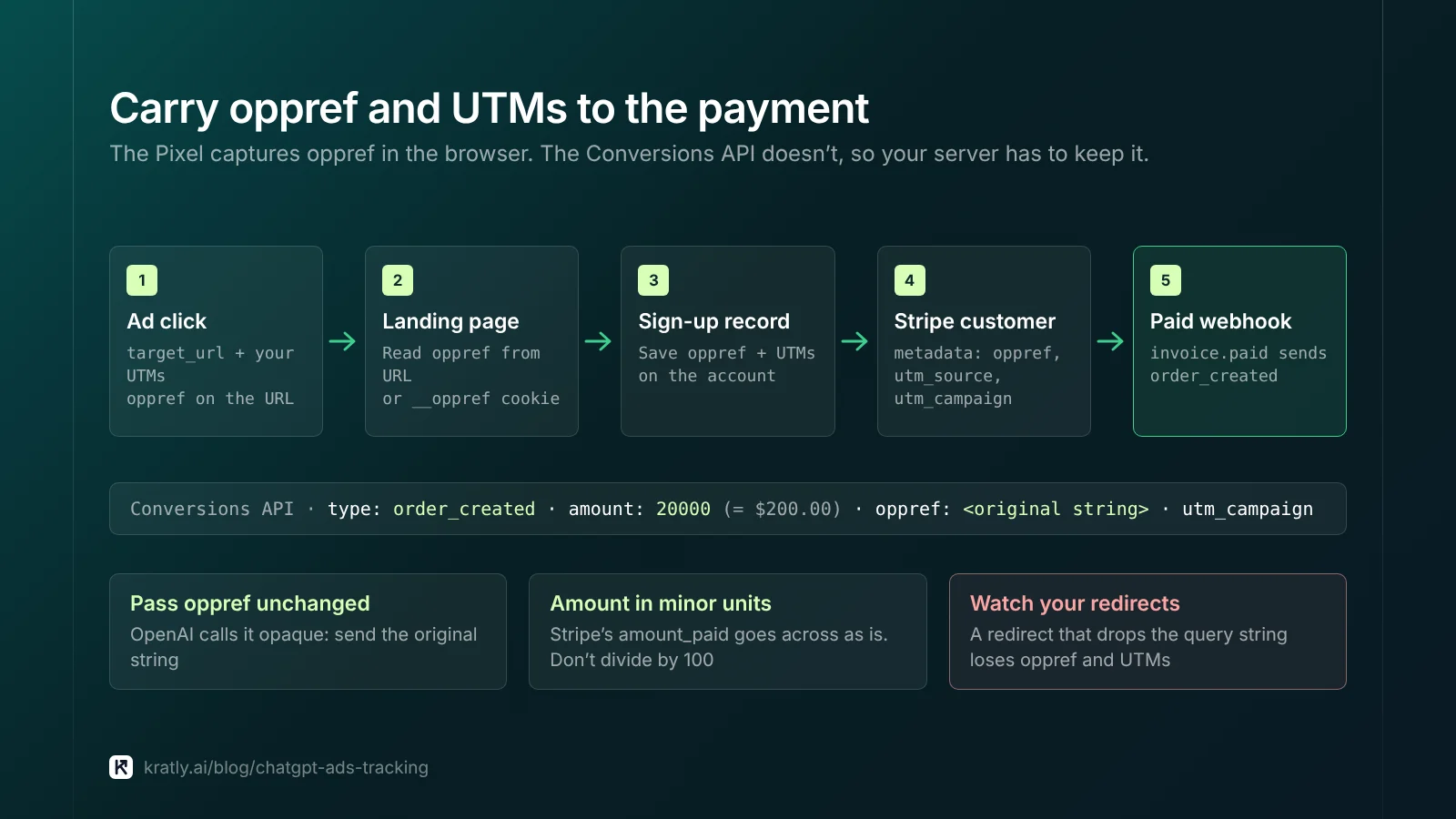
The server side is your job. The Conversions API doesn't capture oppref for you. So:
- Read
opprefon arrival. Take it from the URL or the__opprefcookie. - Save it at sign-up. Store it on the account record.
- Copy it into Stripe. Put it in the customer's
metadatawith your UTMs. - Read it in the webhook. Send it back with the paid event, unchanged.
Watch for redirects that drop query strings.
UTMs, added by you#
OpenAI's ad reference names the landing field creative.target_url. It says nothing about tracking or UTM parameters (OpenAI Ads docs). So add your own tags to the URL, for example:
?utm_source=chatgpt&utm_medium=paid&utm_campaign=crm-switchers
Use utm_medium=paid to separate ad clicks from organic ChatGPT referrals. Our Stripe UTM tracking guide shows how to carry UTMs into Stripe.
How do you send conversions with the Conversions API?#
Everything below is from OpenAI's Conversions API and conversion tracking pages, as of November 2026.
Endpoint. Events go to https://bzr.openai.com/v1/events?pid=${PIXEL_ID} with a Bearer key. You create the key through api.ads.openai.com.
Required fields. Each event needs id, type, timestamp_ms and data. Web events also need source_url. action_source is "conditionally required," with values such as web, offline and phone_call.
Amounts. Send money "as integers in the standard ISO 4217 minor unit." OpenAI's example is 12999 for $129.99 (OpenAI Ads docs). Stripe also stores amounts in minor units (Stripe Docs). So Stripe's amount_paid can go across as is. Don't divide by 100 here.
Timing. The timestamp must be "within the last 7 days." Send the paid event when the webhook fires, not in a weekly batch.
Hashing. Identifiers that point to a person must be SHA-256 hashed and sent as "a lowercase, 64-character hexadecimal string."
| Field | Normalize before hashing |
|---|---|
emails_sha256 | Trim spaces, lowercase |
phone_numbers_sha256 | Keep the country code, strip formatting, + and leading zeros |
external_ids_sha256 | Trim spaces; "Preserve case and all other characters" |
first_names_sha256, last_names_sha256 | Lowercase, remove spaces and ASCII punctuation |
Fields like countries, ip_address and user_agent go unhashed.
Deduplication. It keys on Pixel ID, event name and id. OpenAI keeps the first event and "ignores later duplicates." Use one value for the Pixel's event_id and the server's id, and reuse it on retries.
Batches. Up to 1,000 events per call, but "If one event in the batch fails, the full batch fails."
Testing. Add "validate_only": true to check a request without saving it. SaaS marketing attribution explains why paid events beat sign-ups.
Judge ChatGPT Ads ROAS on Stripe revenue#
OpenAI's ROAS is useful for bidding, not for your profit and loss. The click window is 7, 14 or 30 days, with 30 as the default. The view-through window is 0 or 1 day, defaulting to 1 (OpenAI Ads docs). Conversions update in daily processing, so allow "at least one day."
Three reasons the platform number will differ from Stripe:
- View-through credit. The 1-day view window counts people who never clicked. Set it to 0 for click-only numbers.
- The 30-day window. A deal that closes on day 45 shows in Stripe, not in the platform.
- Renewals. Send only the first payment, and platform ROAS ignores month two onward.
So build a second number from Stripe:
| Metric | Formula | Data from |
|---|---|---|
| Platform ROAS | Attributed order_created value ÷ spend | ChatGPT Ads reporting |
| First-payment ROAS | First payments from utm_source=chatgpt + utm_medium=paid ÷ spend | Stripe metadata |
| 90-day ROAS | All payments from those customers in 90 days ÷ spend | Stripe |
A worked example (made-up numbers). Assumption: $3,000 spend, five paying customers on a $200 monthly plan. First-payment ROAS is $1,000 ÷ $3,000, or 0.33. If all five stay three months, 90-day ROAS is 1.0. Compare both with your margin. What is a good ROAS? shows how to set break-even.
What's still unknown#
As of November 2026, OpenAI's pages leave some gaps. Plan around them.
- Minimum budgets. Daily minimums "depend on the account currency." No number is published (OpenAI Ads docs).
- Self-serve access. Ads Manager is in beta and opening "gradually." Your account may not have it yet.
- How long
oppreflives. The docs don't state a cookie lifetime.
A small-budget test plan#
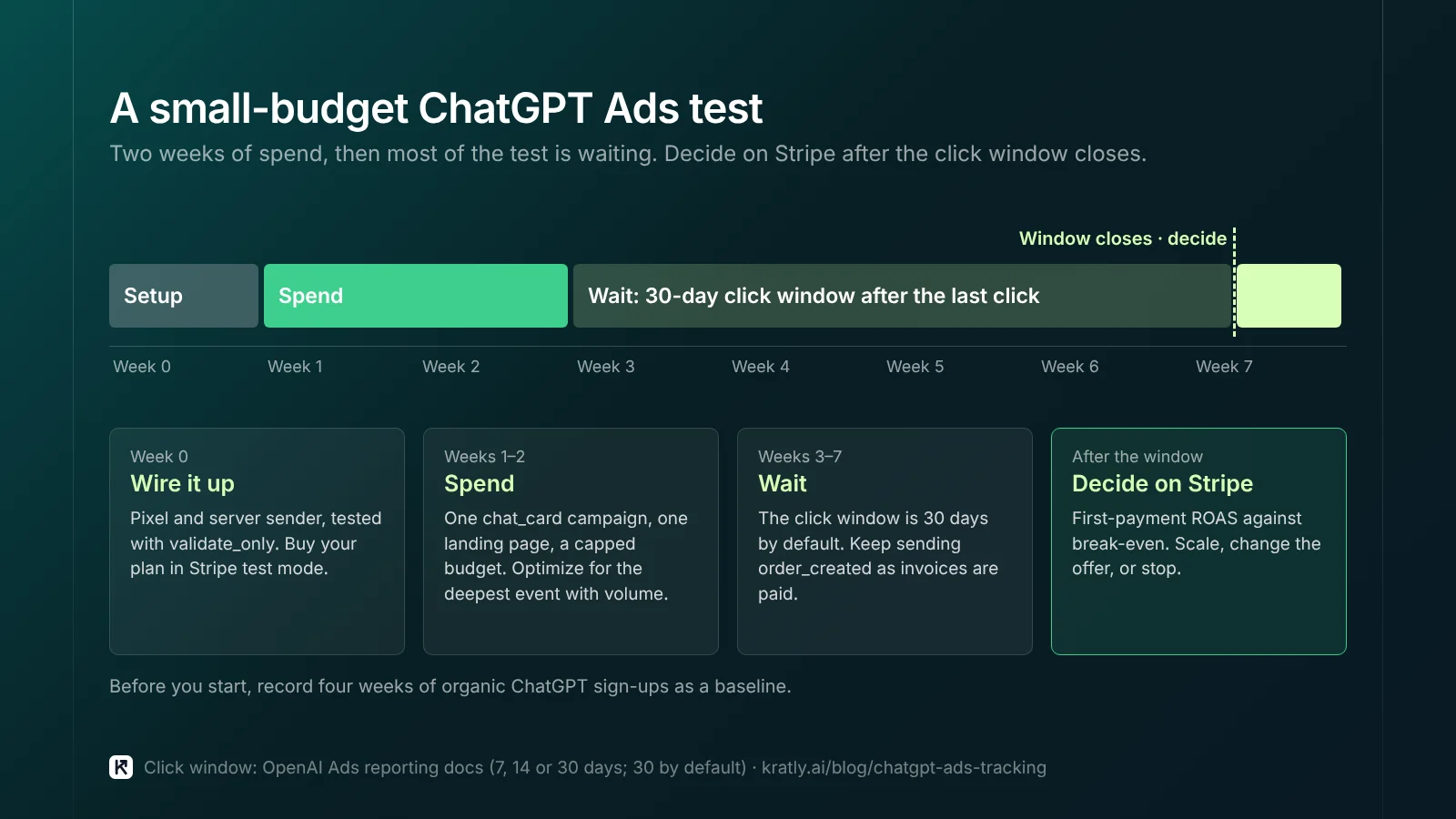
I'd treat the first month as a measurement test, not a growth bet.
- Week 0: wire it up. Install the Pixel and server sender. Test with
validate_only. Buy your plan in Stripe test mode and check thatopprefand UTMs reach the webhook. - Pick one offer. One
chat_cardcampaign, one landing page, context hints that describe the problem you solve. - Set a cap you can lose. A daily budget near your account's minimum, and a total fixed in advance.
- Optimize for the deepest event with volume. If payments are rare, start with
trial_started. Keep sendingorder_created. - Note your baseline. Record organic ChatGPT sign-ups for the four weeks before. A marketing incrementality test helps.
- Decide on Stripe. After the click window closes, compare first-payment ROAS with break-even. Scale, change the offer, or stop.
Where Kratly fits#
Kratly has a ChatGPT Ads connection built and in testing: spend and results by day next to Stripe revenue, and verified first payments sent back as conversions, with hashed email sent only if you allow it. Until it's verified on a live account, tag ChatGPT clicks with utm_source=chatgpt and Kratly shows them next to their payments, which gives you the Stripe-based ROAS view above.
Questions, answered
Does ChatGPT Ads have a conversion pixel?
Yes. OpenAI offers a Measurement Pixel that sends browser events, and a Conversions API that sends events from your server. The Pixel also captures the oppref click value into a first-party cookie. Use both with one shared event ID so OpenAI can deduplicate. Send payments from the server.
What is oppref in ChatGPT Ads?
oppref is OpenAI's attribution value for an ad click. OpenAI calls it opaque and says to pass the original string unchanged. The Pixel reads it from the landing page URL and stores it in an __oppref cookie. The Conversions API does not capture it for you, so save it at sign-up and send it with server events.
How do you calculate ChatGPT Ads ROAS?
OpenAI's reporting divides attributed order_created value by spend. That uses its click window, 30 days by default, and a 1-day view-through window. For decisions, I'd also divide first payments from ChatGPT-tagged customers in Stripe by spend. Then check a 90-day version for subscriptions, and compare both with your break-even ROAS.
Do I need to hash data for the ChatGPT Ads Conversions API?
Yes, for personal identifiers. OpenAI requires SHA-256 hashes for emails, phone numbers, external IDs, first names and last names. Normalize first: lowercase and trim emails, and strip phone formatting but keep the country code. Country, IP address and user agent go unhashed.
Written by
Priyansh Kumar
Priyansh Kumar has spent more than a decade in growth, scaling brands from 1 to 10 and from 10 to 100. He now builds Kratly, an autonomous growth team that ties every campaign, page and email to the revenue it brings.
Sources
- OpenAI: Testing ads in ChatGPT (Feb 9, 2026, updated May 7, 2026) · New ways to buy ChatGPT ads (May 5, 2026) · Expanding access to AI with ChatGPT ads (Aug 31, 2026)
- OpenAI Ads docs: Conversion tracking · Conversions API · Measurement Pixel · Supported events · Reporting · Targeting · Bidding and budgets · Ads reference
- Stripe Docs: Supported currencies (minor units)
- Axios: OpenAI launches self-serve ad platform (May 5, 2026)
Was this article useful?