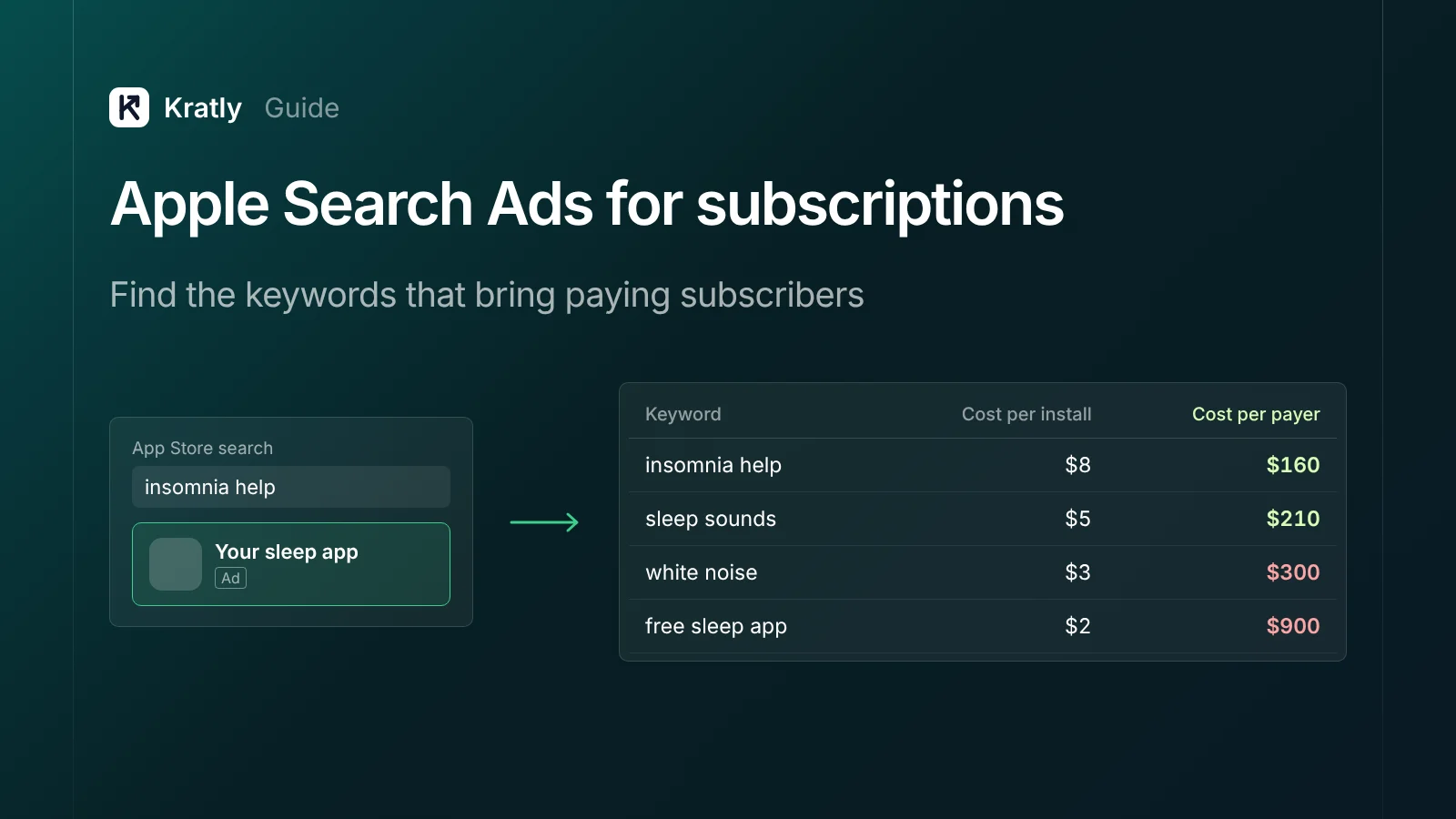
Short answer
Run an Apple Search Ads subscription app account on exact-match keywords, split by brand, category, competitor and discovery. Collect the AdServices attribution token at first launch and save the keyword on your user record. Join it to App Store subscription events. Then judge each keyword by cost per paying subscriber, not cost per install.
Apple says "almost 65% of downloads happen directly after a search" (Apple Ads). But installs aren't the goal. In RevenueCat's 2026 data, the median subscription app turns just 2.0% of downloads into payers by day 35 (RevenueCat State of Subscription Apps 2026).
Indie developer Charlie Chapman named the risk on RevenueCat's blog. Ad downloads may be "converting to paid at a lower rate than your organically acquired users" (RevenueCat blog). This guide shows how to run an Apple Search Ads subscription app account on paying subscribers instead.
Apple Search Ads is now Apple Ads: what changed#
On April 14, 2025, Apple renamed Apple Search Ads to Apple Ads (PPC Land).
Ads can run in four places, per Apple's developer docs (Apple AdServices):
- Search results: when someone searches for something specific.
- Search tab: at the top of suggested apps, before anyone types.
- Today tab: the App Store front page.
- Product pages: at the top of "You Might Also Like" on other apps' pages.
In December 2025, Apple said more ad slots would appear lower in search results during 2026. You can't pick or bid on those positions. Existing search results campaigns join them by default (PPC Land).
You also choose between two products (Apple Ads Help):
| Apple Ads Basic | Apple Ads Advanced | |
|---|---|---|
| You pay for | Installs (cost per install) | Taps (cost per tap, up to your max) |
| Monthly spend | Up to $10,000 per app | No maximum |
| Placements | Search results only | Search results, Search tab, Today tab, product pages |
| Keyword control | None | You choose keywords and match types |
| Custom product pages | Not listed | Yes |
For a subscription app, I'd go straight to Advanced. Basic hides the keywords, so you can't see which searches bring payers.
How should you judge an Apple Search Ads subscription app?#
Apple Ads reports cost per acquisition, where "acquisition" means a download. You need the subscriber. RevenueCat's 2026 report puts median download-to-paid at 10.7% for hard-paywall apps and 2.1% for freemium apps. In North America, the median trial-to-paid rate is 34.2% (RevenueCat).
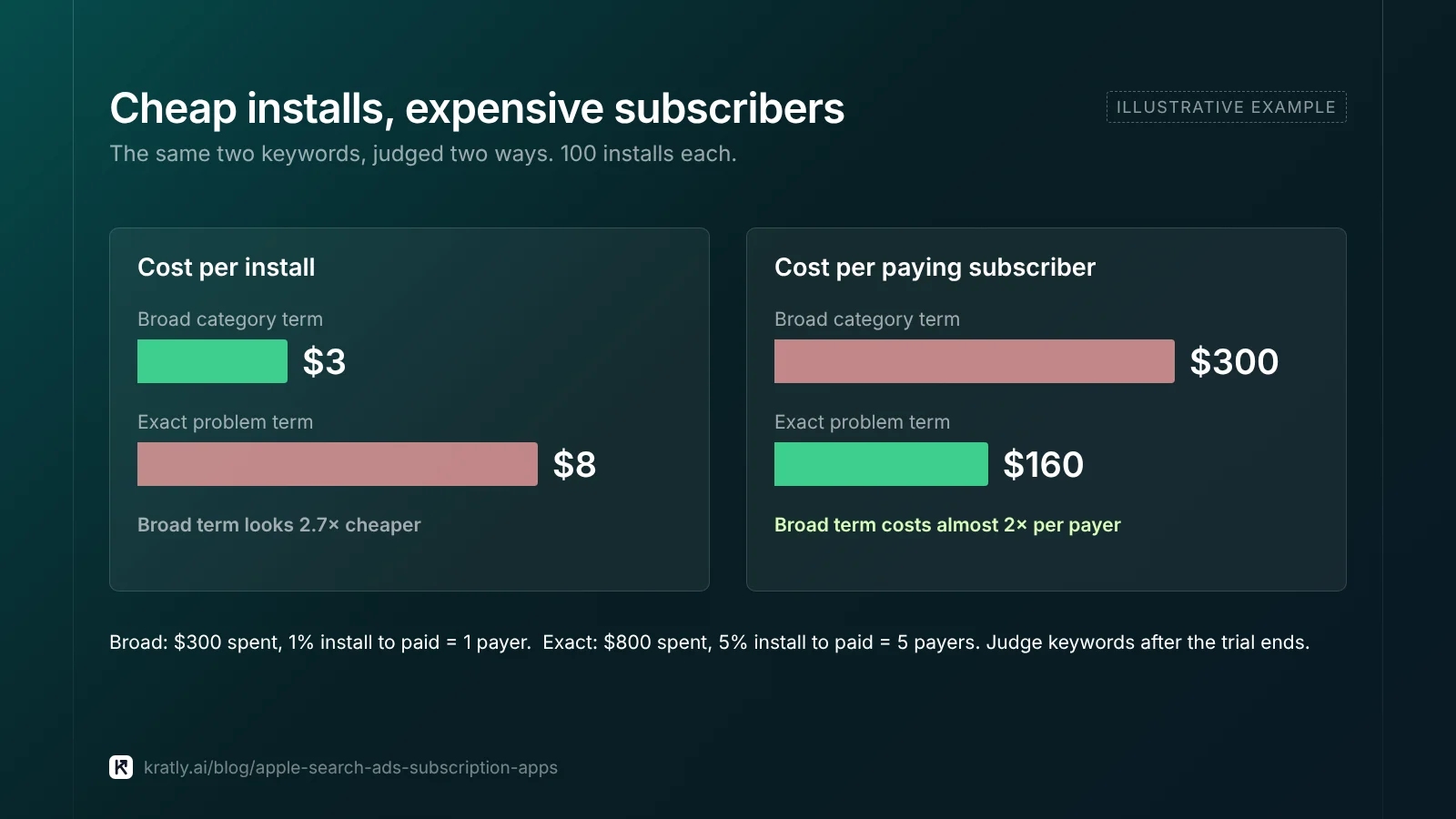
An illustration with made-up numbers:
| Keyword | Cost per install | Install to paid | Cost per paying subscriber |
|---|---|---|---|
| Broad category term | $3 | 1% | $300 |
| Exact problem term | $8 | 5% | $160 |
The cheap keyword costs almost twice as much per payer. So manage cost per paying subscriber by keyword, against what a subscriber earns you in 6 to 12 months.
Wait for the trial to end. Judge keywords only on installs older than your trial length plus a few days.
Apple Search Ads keywords: structure and match types#
Apple recommends separate campaigns or ad groups for brand, category, competitor and discovery keywords (Apple Ads best practices). The split stops brand searches making the whole account look cheap.
Match types (Apple Ads Help):
- Exact match shows your ad for the term you choose and close variants. Apple suggests it for brand and competitor campaigns.
- Broad match is the default for new keywords. It shows your ad for "relevant variants of your keyword and terms related to it."
- Search Match matches your ad to relevant searches automatically. Apple suggests using it in a discovery campaign.
My recommendation: keep every paid-for keyword on exact match in brand, category and competitor campaigns. Run broad and Search Match only in a discovery campaign with a lower bid. Move the search terms that bring payers into an exact-match campaign. Add them as exact negatives in discovery.
There's one attribution reason to keep Search Match small. When Search Match is on, Apple's attribution API "doesn't return keywordId" (Apple AdServices). You'll know the ad group, but not which search turned into a subscriber.
Finding keywords. Apple's keyword tool shows search popularity as up to five circles, based on App Store searches. After a campaign runs, the Recommendations page suggests terms people use for similar apps (Apple Ads best practices). What I'd check first: whether the term describes the problem your paid plan solves. "Budget tracker" and "free budget app" can have the same popularity and very different payer rates.
Negatives. Apple's example: "tuning app" brought taps but no installs for a music lesson app, so it became a negative. Apply the same rule to payers: installs but no subscribers after enough spend means negative candidate. Your App Store optimization checklist covers the organic side of the same keywords.
Should you use custom product pages in ads?#
A custom product page is an alternate version of your App Store page with its own screenshots and text. Since October 2025, you can create up to 70 of them and link them to keywords (Apple Developer News). In Advanced, you can use their assets for search results and Today tab ads, and send taps to them (Apple Ads Help).
Someone searching "sleep sounds" and someone searching "insomnia help" want different first screens. A matching page brings in more people who want your paid plan.
What I'd do: build pages only for your top three to five keyword groups by spend. Each costs design time and Apple review. If one doesn't beat the default page on cost per paying subscriber after a full trial cycle, drop it.
Apple Ads attribution: from token to paying subscriber#
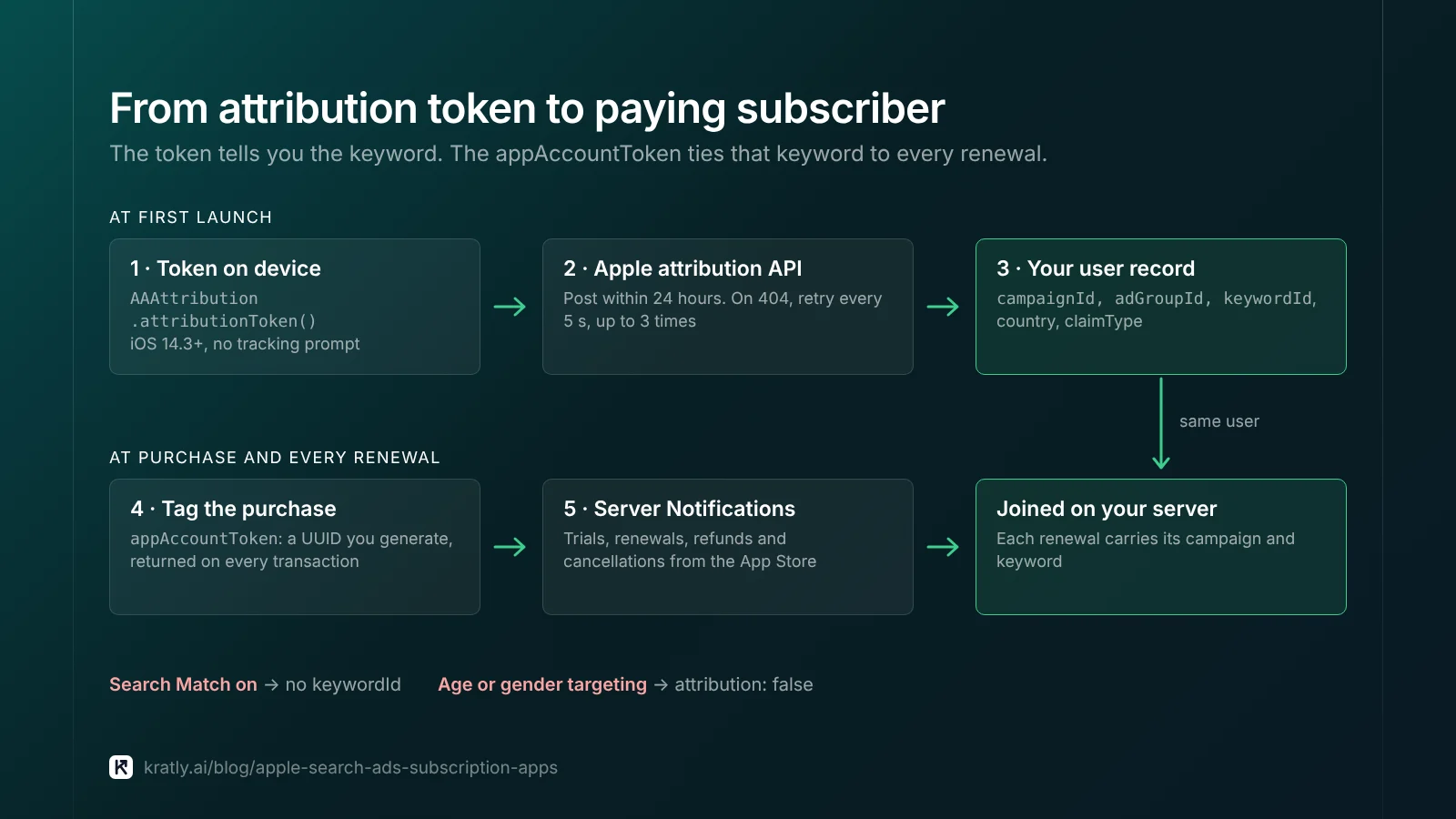
Basic Apple Ads attribution doesn't need the tracking prompt. Here's the flow.
1. Get the token on device. The AdServices framework (iOS 14.3 and later) generates an attribution token with AAAttribution.attributionToken() (Apple AdServices).
2. Send it to Apple within 24 hours. The token has a 24-hour life. Post it as plain text to https://api-adservices.apple.com/api/v1/. A 404 can happen if you call too soon; Apple suggests retrying every 5 seconds, up to three times (Apple AdServices).
3. Store the result on your user. The response includes campaignId, adGroupId, keywordId, adId, countryOrRegion, claimType and supplyPlacement. A tap counts for 30 days before the download; a view counts for 24 hours. If the ad group uses age or gender targeting, you get attribution: false.
4. Tag the purchase. When the user buys, pass an appAccountToken, a UUID you generate. The App Store returns the same UUID in transaction and renewal information (Apple App Store Server API).
5. Join on your server. Receive App Store Server Notifications for trials, renewals, refunds and cancellations. Match them to the user and their stored keyword. Now each renewal has a campaign and keyword attached.
Using RevenueCat instead. If you already use RevenueCat, call enableAdServicesAttributionTokenCollection() after configuring the SDK. RevenueCat then lets you filter its charts by campaign, ad group and keyword. Standard data doesn't need tracking consent; detailed data with timestamps does. New setups can take up to 7 days to show data (RevenueCat docs).
One timing trap, per a RevenueCat staff answer in May 2026. Keyword names reach webhooks only with the Advanced integration. They may arrive after the first purchase event (RevenueCat Community). Join later events back to the user rather than reading attribution off the first webhook.
Running web campaigns into the app too? The same user-ID join applies: see web to app attribution.
Keep, cut or move: a keyword decision table#
I'd wait until a keyword has spent two to three times your target cost per paying subscriber before cutting it. That's my judgment, not an Apple rule.
| What you see | Do this |
|---|---|
| Cost per paying subscriber below target, limited by bid | Raise the bid in small steps |
| Cheap installs, no payers after 2–3× target spend | Pause or add as negative |
| Payers, but costlier than target | Lower the max cost per tap; test a custom product page |
| Discovery search term with payers | Move to an exact-match campaign; add as exact negative in discovery |
| Brand term with high payer rate | Keep, but test pausing in one country to see if organic picks it up |
Many installs show attribution: false | Check age or gender targeting before judging |
Brand keywords always look great, partly because those people were coming anyway.
How to do this in Kratly#
- Connect your ad accounts and your app's revenue. Kratly ties campaigns to the subscriptions they bring.
- See cost per paying subscriber by campaign. Kratly flags Apple Ads keywords whose payer cost is above your target once their trials have ended.
- Run a free app store audit. Check your listing against the keywords you pay for.
- Approve changes. Kratly suggests bid cuts or pauses; you approve each one, and every change is logged and reversible.
An AI growth agent can run this bidding loop within limits you set. See autonomous growth: why 100 tools won't make customers pay.
Questions, answered
Is Apple Search Ads the same as Apple Ads?
Yes. Apple renamed Apple Search Ads to Apple Ads on April 14, 2025. Campaigns, placements and the attribution API carried over. Apple is also adding more ad slots lower in search results during 2026. Existing search results campaigns join them by default.
Does Apple Ads attribution need App Tracking Transparency consent?
No, not for standard campaign data. The AdServices token returns campaign, ad group and keyword without the tracking prompt. Detailed data with click or view timestamps requires consent, per RevenueCat's documentation. Send the token to Apple within 24 hours of first launch.
Should a subscription app use Apple Ads Basic or Advanced?
Advanced. Basic charges per install and hides keywords, so you can't see which searches bring payers. Advanced lets you pick keywords and match types, and adds the Search tab, Today tab and product page placements. Basic only makes sense for a short hands-off test with no attribution work.
How long should I wait before judging an Apple Search Ads keyword?
Wait until your trial length has passed for the installs you're judging, plus a few days. Then judge only keywords that have spent two to three times your target cost per paying subscriber. Before that, a keyword with cheap installs can look good and still bring no payers.
Written by
Priyansh Kumar
Priyansh Kumar has spent more than a decade in growth, scaling brands from 1 to 10 and from 10 to 100. He now builds Kratly, an autonomous growth team that ties every campaign, page and email to the revenue it brings.
Sources
- Apple: AdServices framework · attributionToken() · appAccountToken · App Store Server Notifications · Custom product pages update (Oct 2025)
- Apple Ads: Advanced overview · Compare Basic and Advanced · Keyword match types · Keyword best practices
- PPC Land: Apple rebrands Search Ads as Apple Ads (Apr 2025) · More search placements in 2026
- RevenueCat: State of Subscription Apps 2026 · Apple Ads integration docs · Community answer on attribution in webhooks (May 2026)
Was this article useful?