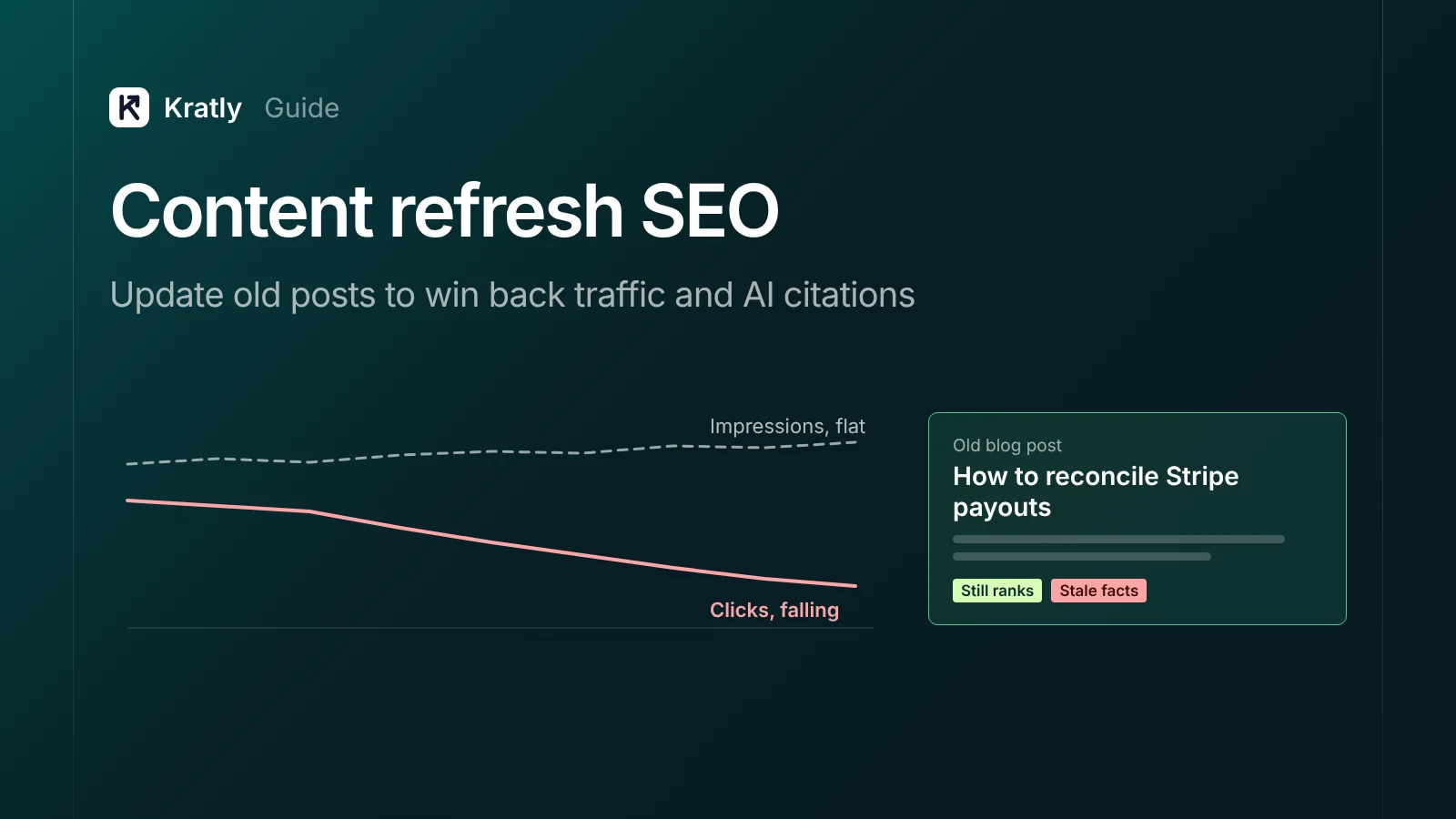
Short answer
Content refresh SEO means finding old pages that are losing clicks and fixing the cause. Compare two periods in Search Console, sort pages by lost clicks, then refresh, merge or delete each one. A real refresh adds new facts, a clear answer up top and better sources. Changing only the date does nothing.
HubSpot once looked at where its blog traffic came from. It found that 76% of monthly blog views and 92% of monthly blog leads came from old posts (HubSpot). When it updated and republished some of them, organic views on those posts rose an average of 106%.
That's HubSpot's own data, and the study is several years old. But your old posts likely do most of your work too, and they slowly lose it. AI Overviews make the loss faster: Ahrefs found they cut clicks to the #1 result by 58% in December 2025 data (Ahrefs).
Here's how to spot decay, pick a fix for each page, and update old blog posts so Google and its AI answers use them again.
Content decay: why content refresh SEO matters more now#
Content decay is a slow drop in clicks to a page that used to perform. There are four common causes:
- Better pages appeared. Newer pages answer the question better.
- The facts aged. Prices, screenshots and menu names are wrong.
- The search changed. People now want a template or a comparison, not an essay.
- The results page changed. An AI Overview or a forum box now sits above you.
The fourth cause is new, and it's the one most teams misread. Your ranking can hold while your clicks fall. Ahrefs calls this "the great decoupling": impressions up, clicks down (Ahrefs). Pew found people clicked a normal result on 8% of visits with an AI summary, against 15% without one (Pew Research).
So a refresh now has two goals: win back lost rankings, and get cited in the AI answer where the click is gone.
How to find decaying content in Search Console#
- Open Performance › Search results.
- Click the date filter, choose Compare, and pick the last 3 months against the previous 3 months. If your traffic is seasonal, compare against the same 3 months last year instead.
- Turn on all four metrics: clicks, impressions, CTR and average position (Search Console Help).
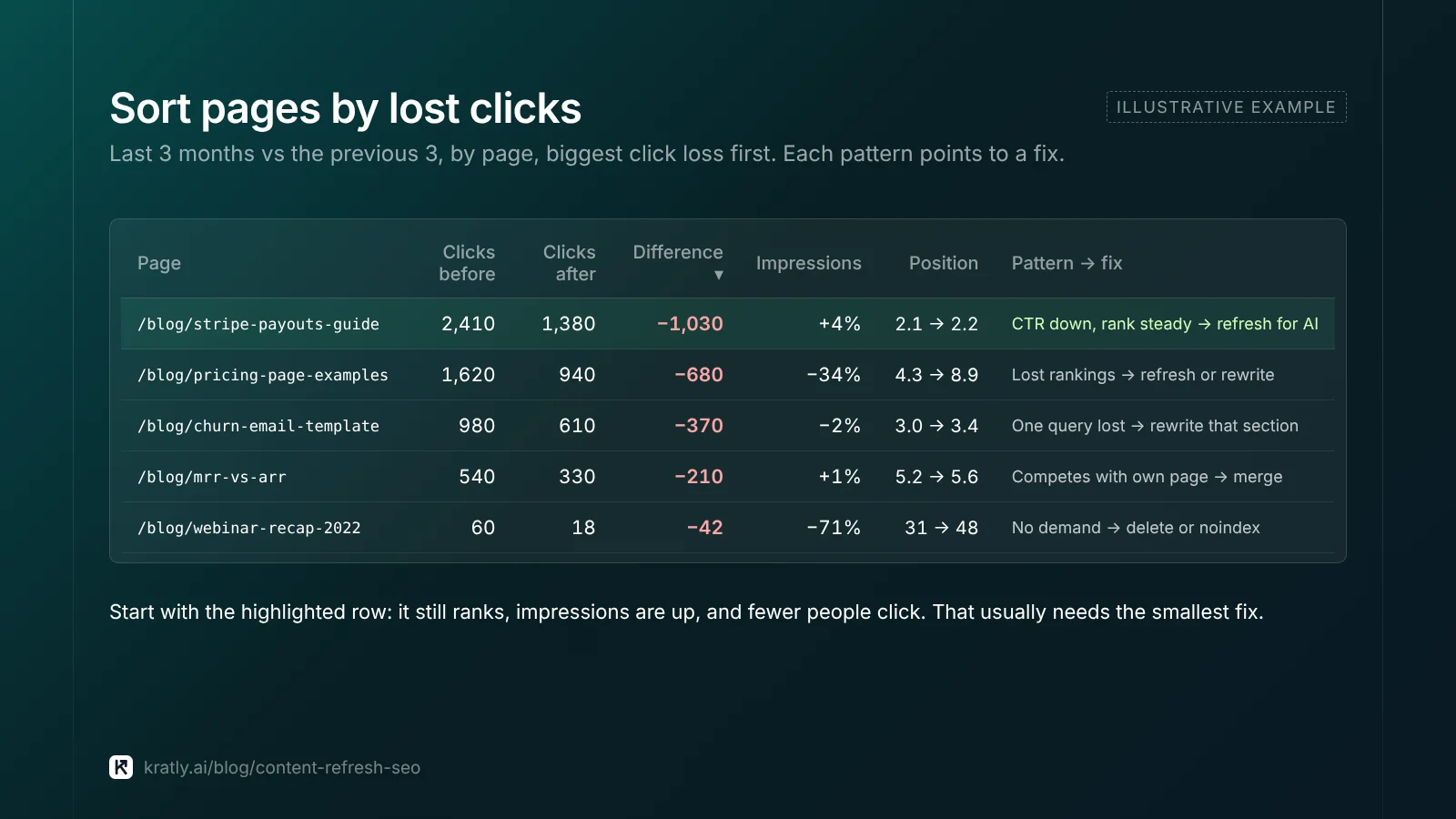
- Open the Pages tab and sort by the click difference, biggest loss first.
- For your top 10 losers, click the page, then open the Queries tab. This shows which searches you lost.
Each pattern points to a different fix.
| What you see (page, period vs period) | Likely cause | What to do |
|---|---|---|
| Impressions down, position down | You lost rankings to better pages | Refresh or rewrite |
| Impressions flat or up, CTR down, position steady | AI Overview or other SERP feature now above you | Refresh for AI citation; rewrite title and snippet |
| Clicks down on one or two queries only | Intent shifted for those searches | Rewrite the section, or make a new page |
| Two of your pages swap places for the same query | Your pages compete with each other | Merge into one |
| Few impressions for a year, no links, no sign-ups | Page has no search demand | Delete or noindex |
| Clicks down across the whole site at once | Site-wide issue or core update | Check indexing first, not single pages |
If many pages fall on the same day, check indexing before you rewrite anything. Our guide on why Google isn't indexing your pages covers each status in the Page indexing report.
What I'd check first: the "impressions up, CTR down" rows. Those pages still rank. They often need the smallest fix.
Refresh, rewrite, merge or delete: a decision table#
Not every decaying page deserves an update. Here's how I'd decide, with a rough time cost.
| Option | When to use it | Rough time per page (my estimate) |
|---|---|---|
| Refresh | Page still ranks on page one or two; facts or answer are stale | 1–3 hours |
| Rewrite | Intent changed; the page answers the wrong question | 4–8 hours |
| Merge | Two or more of your pages target the same search | 3–5 hours plus redirects |
| Delete | No search demand, no links, no conversions, no future value | 15 minutes |
Merge means moving the best parts into one page and redirecting the old URL. Google says to use permanent redirects "when you're sure that the redirect won't be reverted" (Google Search Central).
Delete means removing the page and links to it. If it has backlinks or sign-ups, merge it instead.
My default is to refresh: it's cheapest, and the page already has history. The exception is template pages with little unique text. Those usually need a merge. If you run template pages at scale, read when programmatic SEO works and when Google ignores it first.
How to update old blog posts, step by step#
Step 1: Write down what the page should rank for#
From the Queries tab, pick the main query and the five or six related ones that still bring impressions. Search each in a private window. Note what ranks now and whether an AI Overview appears.
Step 2: Put the answer at the top#
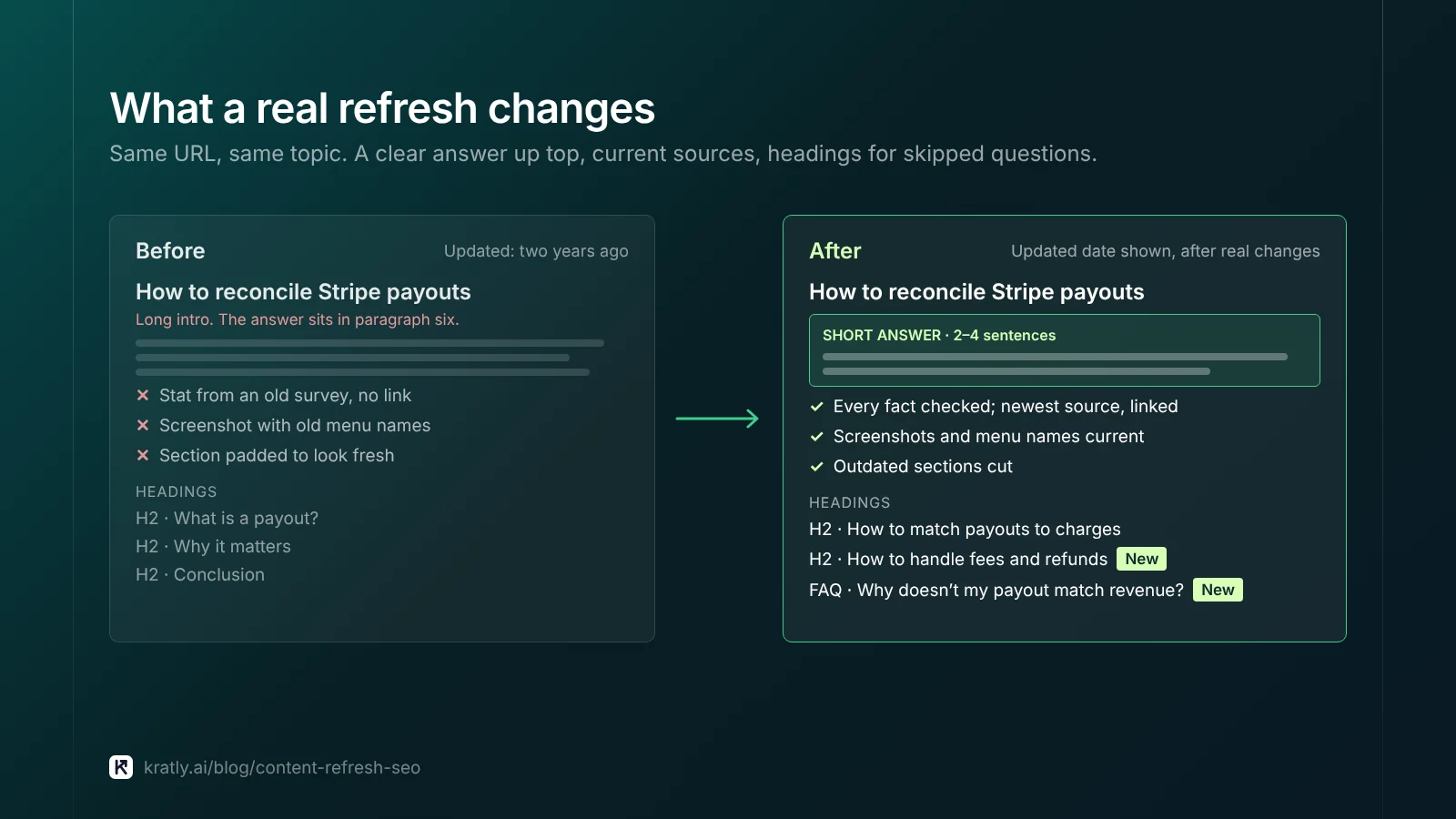
Add a two- to four-sentence answer under the H1 that works on its own. It helps readers and gives AI answers a clear passage to cite.
Step 3: Fix every stale fact#
Check each number, price, screenshot and menu name. Replace each source with the newest version, and link it. Delete claims you can't source any more.
Step 4: Add the missing questions#
Look at the queries you get impressions for but no clicks. Look at the "People also ask" box. Each real sub-question that your page skips becomes a new H2 or H3 with a short answer.
Step 5: Cut what no longer helps#
Remove outdated sections and padding. Google's guidance asks whether you add or remove content "primarily" to look fresh. Its answer: "No, it won't" help (Google Search Central).
Step 6: Fix internal links#
Link to the page from newer related posts. Remove links to deleted pages.
Step 7: Update the date, then ask Google to recrawl#
If the change was substantial, show a new "Updated" date. Then use URL Inspection to request indexing of the page (Google Search Central).
Step 8: Measure on sign-ups, not only clicks#
Compare 28 days after the refresh with the 28 days before. Did the page bring trials, demos or sales? Clicks without buyers are a weak return on 3 hours of work.
Refresh content for AI Overviews#
Google says you don't need special markup to appear in its AI features. A page has to be indexed and eligible to show a snippet, and normal SEO practices apply (Google Search Central).
So a good refresh and an AI refresh are mostly the same job. Three changes help citations most:
- A short, quotable answer. One clear passage per question, near the top of its section.
- Named sources. Link the study, the official doc or the original quote. Pages that cite their numbers are easier to trust and to quote.
- Headings that match sub-questions. AI Overviews run related searches behind the main one. Google calls this query fan-out. If your H2s answer those sub-questions, you can be cited for one of them even when you don't rank for the main search.
Our pillar guide on how to get cited in Google AI Overviews shows how to build a fan-out map for one query.
What I'd check first: which pages the AI Overview cites today for each target query, and what they answer that you skip.
Changing the date: what Google says#
Some teams change the "last updated" date and call it a refresh. Google has said more than once that this doesn't help.
- Google's helpful content guidance lists this as a warning sign. It asks: "Are you changing the date of pages to make them seem fresh when the content has not substantially changed?" (Google Search Central).
- In April 2021, John Mueller said a date change alone wouldn't change anything in search. He advised you "only update the date when you actually make significant changes on a page" (Search Engine Journal).
- Google's byline date guidance asks you to keep dates consistent and to avoid future dates (Google Search Central).
So update the date only after real changes, and show it clearly.
How to do this in Kratly#
- Run the free AI search audit. It checks whether Google's AI Overviews cite your pages for the searches you care about.
- Connect your site and Stripe. Kratly shows which blog posts and pages bring sign-ups and paying customers, not just visits.
- See which decaying pages matter. Kratly flags pages that lost traffic and ranks them by the revenue they used to bring. Refresh the ones that paid first.
- Approve the changes. Kratly suggests updates; you approve them, and every change is logged so you can undo it.
Questions, answered
How often should I refresh old blog posts?
Review your top pages every quarter. In Search Console, compare the last 3 months with the previous 3 months and sort pages by lost clicks. Refresh a page when it loses clicks two periods in a row, or when its prices, screenshots or facts go out of date. If your traffic is seasonal, compare against the same months last year instead.
Does updating old content help SEO?
Yes, when the update makes the page more useful. HubSpot reported a 106% average rise in organic views on old posts it updated and republished, though that study is several years old. A real update adds new facts, a clear answer up top and better sources. A date change alone doesn't help, and Google lists it as a warning sign.
How do I refresh content for AI Overviews?
Add a short answer near the top, cite named sources, and add headings for the sub-questions people ask. AI Overviews run related searches behind the main one, so a heading that answers one of them can earn a citation. Google says no special markup is needed, but the page must be indexed and eligible for a snippet.
Should I delete old blog posts or update them?
Update them in most cases. Refreshing is the cheapest fix, and the page already has history. Delete a post only when it has no search demand, no links, no sign-ups and no future value. If it has backlinks or brings sign-ups, merge it into a stronger page and add a permanent redirect from the old URL.
Written by
Priyansh Kumar
Priyansh Kumar has spent more than a decade in growth, scaling brands from 1 to 10 and from 10 to 100. He now builds Kratly, an autonomous growth team that ties every campaign, page and email to the revenue it brings.
Sources
- Google Search Central: Creating helpful, reliable, people-first content · Influence your byline dates · Redirects and Google Search · Ask Google to recrawl your URLs · AI features and your website
- Search Console Help: Performance report
- Search Engine Journal: Mueller: changing dates on pages won't improve rankings (April 2021)
- HubSpot: Historical blog optimization
- Ahrefs: AI Overviews reduce clicks (Feb 2026) · The great decoupling
- Pew Research Center: Google users less likely to click when an AI summary appears (July 2025)
Was this article useful?